







All Our Tips
Find Default Router Passwords at routerpasswords.com

Have you ever forgotten the password on your router? Hate when that happens! But don’t fret it, with routerpasswords.com you have no worries.
If you forget your router’s password and want to reconfigure it, you must reset it. Doing this will reset all settings to factory defaults, including the administrator password. Next, visit routerpasswords.com and enter your router’s make and model number. This site will give you your router’s factory default administrator login information. Nice!

Use Outlook to Manage Limitation Dates

This upcoming monday I will be presenting at a CLE-BC seminar on the new Limitation Act here in British Columbia.
In advance of that presentation, I am taking a snippet from my paper on how to use Microsoft Outlook to manage limitation dates.
Of all the tasks that must be done in a law office, few of them have such long reaching professional implications as missing a limitation date. Missing a limitation date involves significant personal and professional embarrassment, loss of trust with the client, possible negligence liability, having to report to your Insurance Fund and not the least of all, loss of face.
Despite all the implications of a lawyer missing a limitation date, it is still a regular occurrence in law firms.
Managing limitation dates along with reminders of other important dates is a task that can be systematized. While paper calendars and/ or index cards organized by month, date and year was the traditional way of keeping up on limitation dates, these days computer calendars offer a distinct advantage over paper-based systems. One of the biggest advantages is of course the fact that electronic calendars can “push” reminders out to lawyers and staff while paper calendars must be examined (you pull the information off a paper calendar).
Given the fact that so many electronic calendars are now synchronized with smart phones, this now means that lawyers can obtain reminders of limitation and other important dates wherever they happen to be. This is another advantage as compared to the paper-based calendar or card system that lies sitting in the lawyer’s office.
This is just one tip on how to use the capabilities of Outlook to look after limitation (and other important dates). This tip concerns using “Categories” in Outlook:
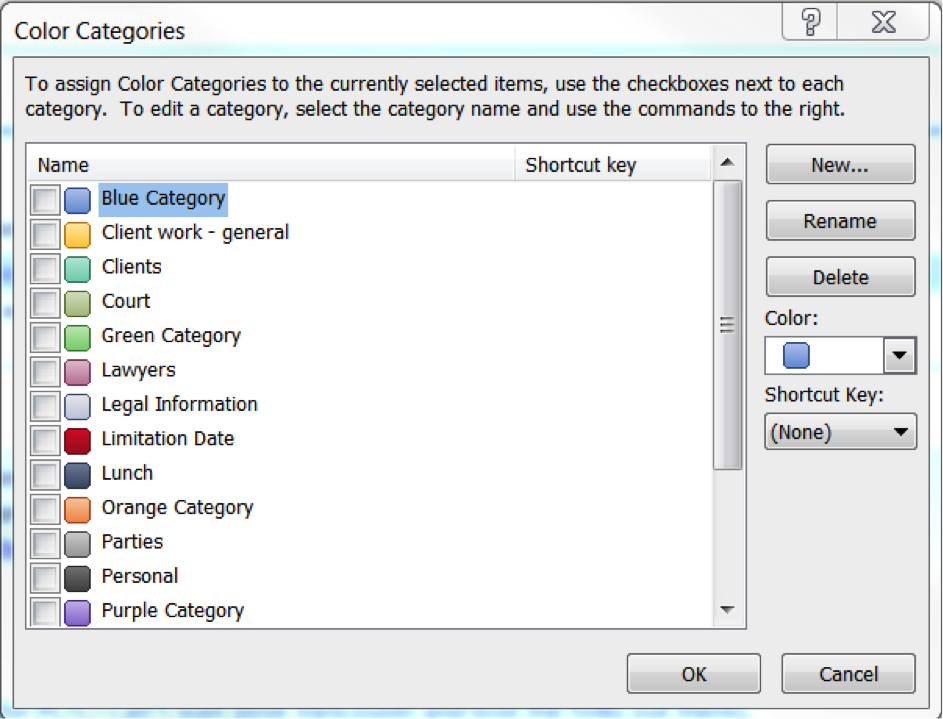
Outlook allows you to create Categories, which is a way to group similar tasks (such as limitation reminders and tasks, for example).
While categories have many uses, one could use them to draw extra attention to limitation date reminders that are ‘tasks’ or To-Dos within the To-Do Bar.
You can rename an existing category to “Limitation Date” as I have done in the above picture (colored red). From now on I can ‘tag’ a To-Do as a Limitation Date – and it would appear with this red box next to it –bringing it prominently to your attention.
You can also use Categories for appointments in the Calendar and mark them as limitation dates:
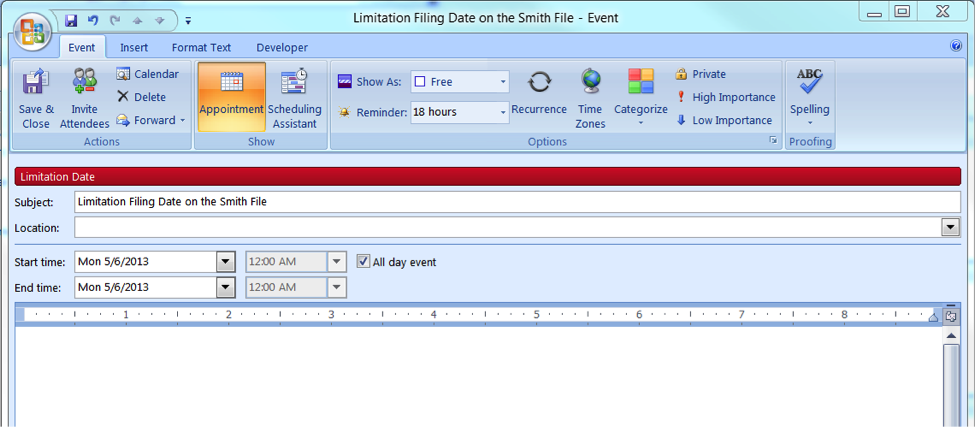
As you can see, once you have created “Limitation Date” as a category, you can click on “Categorize” in the Ribbon and specify an appointment in your calendar as a Limitation Date. The extra visual ‘kick’ that this adds to the appointment makes it stand out.
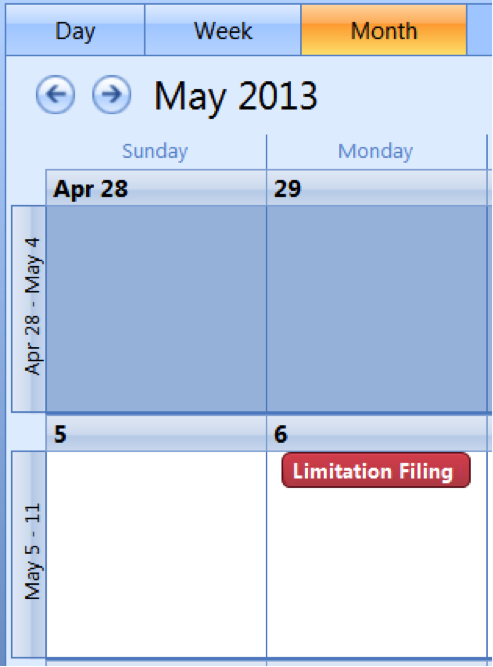
Here is how the appointment stands out in your calendar view:
—David J. Bilinsky, Vancouver.
Watch for New Sources

A Government of Canada news release reminded me to remind you to watch for new sources of information.
The Governments of Canada and of Alberta Launch New Online Portal for Accessing Oil Sands Environmental Monitoring Data and Information
OTTAWA, Ont. – April 22, 2013 – Canada’s Environment Minister, the Honourable Peter Kent, and Alberta’s Environment and Sustainable Resource Development Minister, the Honourable Diana McQueen, today announced that access to federal and provincial environmental monitoring data on air, water, land and biodiversity in the oil sands is now available through an online data portal (www.JointOilSandsMonitoring.ca). The new portal represents the next stage of progress for the Joint Canada–Alberta Implementation Plan for Oil Sands Monitoring announced in February 2012.
This new portal is a tool for legal research, well kind of new in that it is a collected jumping off point if you are looking for environmental monitoring information. The new part is the aggregated collection – quite useful if you are searching for this type of information to have a unified starting place. Check it out.
Today’s Tip: Be on the look out for new research sources and tools.
Do you have a new research tool to share? Suggest a Slaw tip about it.
Canadian Public Weather Alerts Now Available on Google Public Alerts, Search, Maps and Now
Severe weather is a fact of life for Canadians. Thanks to Public Safety Canada, Environment Canada and Google, Google has just announced that Canadians can now receive warnings of drastic weather changes directly to their mobile devices and desktops.
Severe weather notifications for Canada, in English and French, will now appear on the Google Public Alerts page, in Google Search and Google Maps on both desktop and mobile, and in Google Now.
An alert will appear on your desktop or mobile screens when you search for relevant keywords such as flood or with location-based queries like Toronto. On Android devices running Google Now, alerts will appear automatically on Cards.
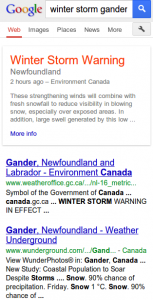
Here are example alerts in Canada surfaced on Search from a mobile device and Google Maps Mobile:
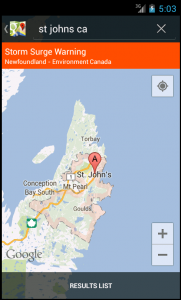
For more information, or to see all active public alerts, visit www.google.org/publicalerts.
Work-Life Balance and Jamaica
It may be a sign of our times, but one of the more complex work-life balance questions I face every year – a couple of times at least, thankfully – is the appropriate level of work-life balance to maintain while I’m on vacation.
There is no actual paradox in this seeming contradiction in terms. The reality is I have no inclination to wholly disconnect, and I’m pretty sure I am not alone on that.
True confession time – I still work a bit while I’m away. I’d rather set aside an hour or so a day while I’m on vacation to deal with emails and urgencies than face 1000 unread emails and 100 pressing tasks on my first day back.
Truth be told, there are worse places to be in the morning than an oceanview cafe on a lazy resort in the sun, wearing my blue shorts and sipping on a coffee while answering emails and watching the world go by.
I should note that I’m generally surrounded by quite a few fellow travelers during these vacation work-breaks. There are typically lots of folks pecking on their iPads and iPhones and laptops, right beside me. In fact, I’d wager that for at least a few, a tropical thunderstorm might fall a remote second as a vacation crisis, compared to the quiet panic that would ensue in the face of an internet outage on the beach.
On a recent vacation, something significant and urgent actually did come up at the office – an opposing counsel who knew I was going to be away nonetheless caused a Statement of Claim to be served on my client the day after I left – after assuring me he wouldn’t. That wasn’t fun. But it had to be dealt with, then and there, and dealing with these things is part of this job we’ve signed on to do, I believe.
Now I do understand that some might view this all as a pathology-in-motion. And while I’m not sure the world is evenly split on this question of work-life balance during vacations – yet – I do note an increasing incidence in my practice of receiving email communications from colleagues who “are supposed” to be basking in the breeze and relaxing in the sun.
I suppose that every practitioner must come to his or her own terms with what “balance” truly means. For many, remaining 15 percent “on” while away just doesn’t seem like any sacrifice, at all. For others, this is clearly anathema.
As I say, perhaps it’s just a sign of our times that so many of us have such particularly close relationships with our Blackberrys and iPhones. At home, office, and the pool.
Not that there’s anything wrong with that.
All of the above is essentially just a preamble of associations I’m having with a Jamaican vacation looming in my not-so-distant future. I confess that to me, all the islands essentially are alike, but Jamaica has become a destination of choice, in no small part because its resorts’ internet facilities are so typically superior and reliable.
What do you think? Is this discussion just a subtle indication that the world as we’ve known it has ended, or a frank acknowledgment of modern professional reality?
Or is it just that we stay connected because we can?
– Garry J. Wise, Toronto
Thank That Public Servant
The Federal Courts in Canada have a pretty good website. They also have a very nice docket search tool. Note that this search tool, although it is linked from the Federal Court website, offers a radio button for searching the Federal Court of Appeal docket as well.
Hat Tip to the Courts Administration Service for setting me to rights on that. Thank you especially to the Registry Officer who took the time to locate my email address and send some followup information after providing most of the answer to my question by phone. Above and beyond the call of duty and deserving of thanks. Given private thanks at the time, and now a public acknowledgment as well.
Today’s Tip: If someone goes out of their way to help you, especially when they are a public servant, thank them.
Visit Factory-reset.com for Factory Reset Codes
When electronic devices work properly, you have no worries. But when they don’t, it’s a real pain in the rear! One of the most common trouble-shooting options is a factory reset – that special and specific combination of button presses and steps that  restarts the device with standard factory settings.
Finding the right reset code usually requires finding the operation manual for the device. Yeah right! It might be in somewhere in the basement, or more likely went out in the garbage with the crumpled holiday wrapping paper.
So what do you do when you need to find a factory reset code for a misbehaving device? A quick visit to Factory-Reset.com will get you the code you need. It has factory reset codes and procedures for many different types of devices and products. The best way to use this site is by searching the product code. You can however browse through the site by equipment type or by manufacturer. Also listed are lamp hour/counter reset procedures and V-Chip reset guides.
ABA TECHSHOW THOUGHTS


Having had the benefit of a few days of reflection after attending ABA TECHSHOW 2013 in Chicago last week, I thought I would highlight certain aspects and themes arising from the conference and in particular, why lawyers should be attending this or similar conferences (and indeed why it may be obligatory to do so).
The Borg
Prepare to be assimilated. Only in this case The Borg = The Cloud. This was particularly brought home in the session with Wells Anderson and Catherine Sanders Reach. Microsoft is moving to a monthly subscription model. The benefits to users to going to Office 365 as compared to the traditional way of installing MS Office on your laptop or desktop (the desktop licensing plan) is apparent.
Microsoft has made it both financially and practically advantageous to move to Office 365. One advantage to Office 365 (aside from the continual updating and interconnection with other services such as ) is the ability to save to the cloud or save to the local drive (i.e. you don’t have to store data on the cloud). According to Wells Anderson, Office 365 is the better choice as compared to other web-based office productivity suites.
Security and Privacy
This was a major theme of the conference in virtually all sessions. Sites such as MyPermissions.org highlighted how lawyers want to know who – and what- are gaining access to their personal information. People are leaving FaceBook due to privacy concerns (and moving to LinkedIn at least professionally). Viivo.com is being used to encrypt Dropbox for greater security. The Honeynet project hosts a web site that allows you to see..in real time..where attacks are taking place on the web (http://map.honeynet.org)
John Simek and Sharon Nelson in their session on the capture of the Craigslist killer highlighted how video surveillance, internet records and cell phone records all combined to lead the police to the medical student who was eventually arrested for the killing. It was a very interesting overview of how commonly recorded information can lead a path to anyone..depending on the circumstances and notwithstanding the attempts by the killer to use disposable email addresses, disposable cell phones and such to hide his tracks.
Macs and iDevices
The Mac Track was packed. And the vast majority of attendees – in all tracks – were using iPads, iPad Minis and MacBooks. If anyone doubted the impact of Apple on lawyers, the proof was evident. While I am sure that many were using their iDevice as a secondary device (BYOD), their questions showed that these lawyers were interested …intent … on using Macs in their practices. And the Droid users are not far behind…
Finding Information and Things
People are finding new..and creative ..ways to lever the internet to find things…people and information ..on the Web. For example, Google has a reverse image search..if you have an image (drawing, photograph, cartoon etc) you can use this service to find out who is using it on their websites. It also has facial recognition technology built-in.
You can use TaskRabbit.com to find people who are willing to do ..for a small fee ..the tasks that you don’t wish to do.
Then there are ways to hide on the Internet. DuckDuckGo.com doesn’t match your info to your IP address..allowing you to be anonymous (“We believe in better search and no tracking”).
You Can Live On
_LivesOn is an application that will keep tweeting in your name even after you have passed away (“When your heart stops beating, you’ll keep tweeting…”).
This is the first of applications that can be described as your social afterlife.
Ahh the things you learn at ABATECHSHOW. What was apparent is the technology has completely changed the way that law is practiced. It was evident to me that the ABA was correct this summer …that competence in practice includes understanding how to use technology appropriately. With the rate of change that is occuring in technology, it is apparent that lawyers should be attending a conference such as ABA TECHSHOW on a regular basis if for no other reason but to extend their knowledge beyond their ‘unknown unknowns’; or in other words, to learn about those things that we don’t know we don’t know. Isn’t that what competence is all about?
I can hardly wait until next year…(ABA TECHSHOW 2014: March 27-29, Chicago Illinois).
Make Notes
Things get so busy in law that sometimes we get behind. For instance, Research posts are supposed to appear on Wednesdays here at Slaw Tips. We all know that notes, tasks, and to do lists help us keep on top of the things we need to do. The same is true for legal research.
Today’s Tip is to use a detailed ‘sources consulted’ list. My personal preference is to put this list in the last section of a research memo. A Sources Consulted list can take the form of a bibliography (the texts you visited) or it can be more. I suggest using the sources consulted as your working notes for your research. Use it as a map for how you are going to approach the question.
- Which texts are you going to use
- When you use the texts, note which sections you visited and if you found something
- Which legislation tool are you going to use, what are your searches
- If you find legislation on your topic, which sections did you check for judicial consideration
- Which cases were useful of those you found
- What did the noteups of those cases reveal as the standard language search terms
- Did you look in the Abridgment, Halsbury’s Laws of Canada, the CED, another digest
- What you found that helped answer your research question
Embedding all of this information in your sources consulted keeps you stay on scope with your research project (that’s right you just read some legal project management language).
These notes can also form some of the text of your research memo or opinion. You can always cut them out later and save them in a different reference document if you need to. When these detailed notes stay with your research analysis, they make it really easy to reuse. They are also fantastic if at the end of the day you do not find an answer.
How to Quickly Tell if a Site Is Down for Everyone or Just You
On many occasions, the frequent surfers among us will have struggled to view a website that  refuses to load. This raises a simple but profound question: “Is this website down for everyone or just for me?”
Now, you could call someone or send out an email asking if others are having the same experience. But, you might get a quicker response with a tweet. But even better yet, there is a humble website that will answer this important question: www.downforeveryoneorjustme.com.
What will they think of next?


