







All Our Tips
ABA TECHSHOW!


For the next 2 1/2 days, ABA TECHSHOW will be taking place in Chicago, Illinois. This year there are sessions over 8 tracks ranging from Advanced IT to Cloud & Collaboration, e-discovery, iOS, Large Firm, Litigation, Mac, Social Media, Solo and Small Firm (I and II), Tech Grab Bag, Tablets & Smartphones and others all on the theme: “Bringing Lawyers and Technology Together”.
If you can be there, you can experience the incredible range of sessions, speakers and topics that are the hallmark of ABA TECSHOW. Sessions such as 60 Sites in 60 Minutes and 60 Tips in 60 Minutes are long-standing stalwarts of the Conference and always a big hit. Then there are sessions that are totally new such as: New Geolocation Technologies AKA “Hello Location-Based Discovery.” The Mac invasion into the legal sphere continues with such sessions as”The Super -Awesome Mac Hour of Amazement.”
One great session first thing this morning was “Office 365 the Lawyer’s Preview” that showed how Microsoft will be taking all of us into the cloud, courtesy of the new collaborative tools that they have built into the web version of the Microsoft office suite (and courtesy of their new pricing scheme for the desktop vs the web versions of their venerable office suite).
The highlight of this year’s conference will be the New York Times Columnist and host of NOVA ScienceNow David Pogue’s keynote presentation.
If you have never been to ABA TECHSHOW you need to mark March 27-29, 2014 in your calendar – now – to attend this amazing conference.
If you can’t be there – then set up your TweetDeck account to follow the twitter hashtag #ABATECHSHOW and see the tweets that are coming from all the different sessions. It is – almost but not quite – like being here!
If you are here, come up and say hi (David Bilinsky speaking).

Don’t Make Things Up

Hat tip to BLG’s Neil Guthrie for his digest titled “Submitting a fake judgment: not a good litigation strategy”. The case reference is D’Souza v Linton, 2013 ONSC 70. The opening paragraph of this endorsement reads:
This matter came before me on July 31, 2012 as a motion to set aside an ex parte default judgment. The judgment, dated June 19, 2012, purports to bear my signature.
It is interesting to me that the word “purports” and its variations appears in 425 decisions – so far in 2013.
On another note, this case comment came to me via Lexology, one of several services for monitoring law firm newsletters.
Why You Should Consider Banking at Two Banks or Financial Institutions

With purses or wallets full of debit and credit cards, and all sorts of options for electronic payments and web-based banking, most of us have moved away from being reliant on cash. And most of us do all our banking at single bank or credit union.
There are some benefits to doing your banking electronically, but there are also some hazards. One of those hazards if finding yourself in a pinch if your bank or financial institution’s computer systems go down. This doesn’t happen often, but it is not unheard of. Another possible hazard is having your bank account access hacked.
In both these cases you can find yourself scrambling to access funds and/or to regain access to your account. How do you prepare for and lessen the inconvenience of these rare but possible eventualities? Consider opening a second account at a different financial institution. After doing this, account access difficulties on one of your accounts won’t totally trip up your access to banking or some of your money.
Solving the Communications Problem

Garry Wise: Last week, my co-scribe, Mr. David Bilinsky, posed a particularly simple, yet oh-so-important question:
What do you think that lawyers can do to make theirs – their client’s and their regulator’s – life a bit easier?
It all starts with communications.
And, when it comes to communications, I think I can actually answer David’s question – or begin to – in a short, but worthy SlawTip:
Once a practice has matured, no lawyer can do it alone. The solution to the communications conundrum is probably as simple as this – develop good communications systems for your firm and recruit excellent staff to implement those systems.
More specifically, with respect to written communications:
- Get an iPhone, Blackberry, Android or Windows phone and use it! Most email messages can be answered in less than 60 seconds – even while you have one eye on the hockey game. Or the news. Or your favourite reality show. Or a Supreme Court of Canada telecast.
- I suggest that it should be every firm’s policy that clients must receive copies by email of all correspondence and documents sent and received on their matters. Establish a policy that your assistant will immediately copy the client whenever a document is sent or received.
- This should occur, even when you are out of the office, so that the client is always in the loop. Copying clients on matters should be viewed as an administrative function, to be primarily handled by assistants. In this current email era, that means your assistants should have access to your inbox or be able download your email to their desktops.
- Of course, every so often a document will arrive that you will want to review before the client receives it. Train your staff members to exercise discretion in identifying those rare occasions when it is appropriate to delay copying a client with a document, pending your review.
- If you will be out of the office and unable to respond to email correspondence, set up a friendly auto-respond message to explain when and why you will be unavailable. Or ask that your assistant respond on your behalf with similar information and an offer to assist.
- Being paperless facilitates better communications. Once you have systems in place to scan all faxes, letters and documents related to every client matter, it’s not a major leap to instruct your assistants to ensure that clients receive copies by email of everything scanned as soon as it is scanned.
My thoughts on phone calls are similar:
- If you can’t immediately take a call or return a call, your assistant can do so on your behalf. At the very least, he or she can get details for you on the issue at hand, and perhaps even address it.
- I am a big believer in scheduling phone calls with clients and other counsel for specified times. Since it is often a challenge to be available at exactly the time arranged, I suggest scheduling a call to occur within a 15 minute window, where possible – for example between 3 and 3:15 p.m. Knowing a call is scheduled to occur at a specific time will focus your attention and allow for a file review or other preparation in advance.
- Brief your clients if you are unlikely to be reachable on a random-call basis. Help them to understand that you prefer to schedule calls, so that you can be sure to be available and fully informed when you do ultimately connect.
- While I suspect voice-mail is becoming an ’80’s technology of waning use and utility, don’t ignore your messages. Your assistant should be assigned the task of checking your voice-mails and returning calls – several times each day.
- If you are better at email than phone, and prefer to communicate that way, just let people know that. Many will prefer to communicate that way too.
- And finally, when you do speak by phone, do take good notes and confirm all discussions of substance by friendly email.
- Trust me on this. You are busy and you will forget important things if you don’t make good, contemporaneous notes. The person on the other end of the line, however, will never forget a single word discussed. That is just how life works. Deal with it!
Clients who are in the loop are likely to be happy with their professional advisors. Those who feel excluded from their own cases or files are much less likely to feel friendly.
So set up systems that prioritize communications, and train your staff and colleagues to implement them religiously.
Finally, a brief note on the client who insists on communicating by text message, tweet, LinkedIn post or Facebook video (yes – it’s happened to me).
Just say no.
But do it by email.
Let clients know you do not communicate using those technologies. It is difficult enough keeping track of the usual modes of communication. Make your life (and your regulator’s life) simple – make sure you have copies of all interactions. And just don’t interact professionally on media where it is difficult to keep discrete, easily accessible records.
Over to you David.
David J. Bilinsky: Garry, I think you have hit it on the head. So much starts – and ends – with communications – or the lack thereof.
So many times I have called someone only to be met with a voice mail message that says: “Hi – you have reached Joe Bloggs – I am not available right now – please leave a message.”
Just what does that tell you? Are they in the office today? This week? This month? When can I expect a return call *(if ever?)*. How often do they check calls? Joe Walsh in “Life’s Been Good” sings:
“So I got me an office, gold records on the wall.
Just leave a message, maybe I’ll call…”
Yet this seems to be the communication theme of lawyers. If you are gone…say so! If you are in the office and expected to return calls today…say so! Let your callers in on the secret – just when can they expect a response from you?
Like you Garry I am a big believer in scheduling things..if you are not available until 230 pm to return calls …say that in your voice mail. The caller will understand if you are busy until then. Better yet – invite the caller to send you an email to end the ping-pong of voice mail messages and cut to the quick. What is it that they need from you?
If you make a promise – ie to return all calls by the end of the day..then do it! Even if it is just to leave a message on their voice mail that you returned their call within your promised time. You build trust and reliance this way. After all – isn’t this all about letting people know that they can trust you to do as you say?
Communication, as it has been said, is the problem to the answer.
Communicate well – as promised and responsively – and you will have gone a long way towards not only solving one of the biggest headaches of legal regulators – you will have gone a long way towards building a solid bond with your clients. After all – if you follow through on the small promises (like returning phone calls) doesn’t that bode well for how you carry out the rest of your work?
Regulation and Act Section References
One of my colleagues asked a great question that makes for an excellent tip:
The definitions of the Minor Injury Regulation say in (g)(ii):
any insurer made a third party to the claim by the Court under section 635(14) of the Act
But there is no s.635(14) in the current Insurance Act. There was a s.635(14) before the July 1, 2012 amendments, which was Rights of Creditors. That section is now 579, 579(15) to be exact.
The question was “What am I missing”.
The answer is “Nothing” since the correct section number that should be referenced can be identified.
Regulations are not always updated when an act is revised. Last July, a major amendment to the Insurance Act for Alberta was brought into force that revamped section numbering. The context of the regulation making power in the act stayed the same, thus the regulations made under the previous act follow along, even when the section references do not line up.
For Alberta, this theory is dealt with by the Interpretation Act, see sections 36(1)(e):
(e) all regulations made under the repealed enactment remain in force and are deemed to have been made under the new enactment, insofar as they are not inconsistent with the new enactment;
At some point there will likely be a Regulations Act Regulation, or an Insurance Act Regulation that amends all of the section number referenced, but those administrative cleanup duties are likely lower on the priority list than substantive regulatatory changes.
Give Me My Old-Fashioned Windows’ Control Panel
While computer newbies may find the categorized Control Panel helpful for navigating the ever more complex configuration and appearance settings for Windows, more tech-inclined individuals may prefer the old version of Control Panel which displayed all items at once.
Getting to the old or “classic” view of 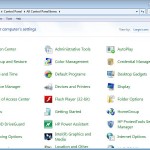 Control Panel is easy. In Windows XP or Vista, open the Control Panel and select Switch to Classic View. In Windows 7, click the View by drop-down menu in the upper-right corner and select your preferred display setting.
Am noticing there are a lot more options than there used to be…
Perspectives on Practice Management: the Regulator and the Practitioner

Garry Wise: On the weekend, I had the notion that it might be interesting if David and I devoted a post or two to answering some recurring law practice management questions we typically encounter.
My co-author, Dave Bilinsky, of course, is SlawTips’ resident guru on law practice resources. As a practice advisor and lawyer for the Law Society of British Columbia, he brings (among other elements in his broad perspective) a regulator’s vantage point to all things practice management. I come at these questions from a different place, as a practitioner and veteran of the legal trenches, having focused on litigation at a small, Toronto law firm since 1986.
I thought it might be interesting to see how our two, varied perspectives might mesh – or perhaps even, not mesh – in such a discussion.
So to start, I posed this question:
What are the three most common practice management issues each of us encounters in our respective day-to-day roles, and how do we address them?
David provided his list:
- Complaints from clients that they don’t hear from their lawyer
- Fees are too high
- Matters take too long
I provided mine:
- Staff supervision without micromanagement.
- Maintaining client communications
- Creating templates to establish best practices
And right away, I was struck by something revealing, as I compared our answers to this question.
The regulator’s window on practice management appears by necessity to be so largely defined by constant exposure to an endless refrain of complaints and public dissatisfaction with our profession that simply never seems to stop – lawyers, fairly or unfairly, perceived as charging too much to get nowhere, while keeping clients shut out and in the dark. We practitioners really do need to understand better that our Law Societies genuinely hear these very real concerns from the public – our clients – day in and day out. And we must listen – and do better.
But is that the whole truth?
By contrast, the individual practitioner’s practice management focus is on the day to day needs of our firms and the people we work with. Building the better “law practice mousetrap,” as we endeavour to innovate, improve services, get the job done, achieve results, create decent workplaces, and limit risk, as a matter of responsibility, efficiency and personal and professional pride.
Perhaps our regulators would do well to recognize – and dare I say learn from – the degree of dedication and determination so many of us have to getting it right, just as we must recognize how discouraging it must be for our Law Societies to so constantly confront situations where individuals in our profession fall short or are perceived by the public to fall short in delivering the most basic of client services.
When David so kindly invited me to join him for this Thursday SlawTips adventure, I confess I was both flattered and extremely interested in seeing where this conversation between the practitioner and the “Law Society guy” might lead.
And while we will get to the answers to the practice management questions above soon (I promise), my Practice Tip for the day is a simple one: When regulators and practitioners dialogue, only good things are bound to happen.
I will let David take it from here.
David Bilinsky: Well, to read Garry’s portion is to take me back. There was a time before I joined the Law Society ..18 years in fact..that I ran my own law practice (and part of that included studying for my MBA). So I know what it is like to try to juggle all the competing demands of life, practice, clients and more. Secondly, I would like to make it clear that I am speaking here from my personal perspective and not on behalf of the Law Society, who may or may not share my views.
I have great sympathy for all those lawyers trying to meet their client demands and make a living too (not to mention trying to maintain a life). But I am going to turn this around and ask Garry…What do you think that lawyers can do to make theirs – their client’s and their regulator’s – life a bit easier?
Here is my take on answering this question:
One: Set out yours and your client’s expectations clearly at the outset of the retainer. We all know the parameters: How long do you expect this matter to take? How much will you charge (approximately)? How can I contact you and when – and how often – will you contact me? How long does a client have to pay their bill or deposit $$ into trust to keep the matter moving?
If lawyers set this out – realistically – in writing and in a conversation with their clients at the outset – imagine how much more satisfied each party will be going forward? Stephen Covey (someone whom I admire greatly) once said “Begin with the End in Mind”. If we all start out by – accurately – describing the journey and the bumps to be expected along the way – then everyone will understand what to expect. Or to put it another way…no one likes surprises. If a road bump emerges, then tell the other party about it…immediately.
Two: Fees. No one expects a lawyer to be a crystal-ball reader in terms of predicting the final cost of a matter. But just imagine how unsettling it is if you took your car in for repairs and the repair shop said “We charge $45 an hour and we will let you know how many hours it took to repair your car at the end.” Certainly there are matters that must be billed by the hour. But there are many many more that can be changed to a fixed fee or alternative billing method. With respect, there is much that we can do here.
Three: Delay. We are all busy. But what can we all do to help keep matters moving forward? Procrastination is not unknown in the legal profession. Part of this is letting people know what is a realistic timeline for tasks to be done. But part of this is keeping ourselves accountable.
I *very* much agree with Gary about using templates..and checklists…and other ways to systematize and streamline the workflows in the office.
I like Gary’s point about maintaining client communications. I think this is key and echoed in my thoughts above. I also agree about staff micromanagement. After all, you hired this person to do your work – now – trust them to get it done! “Hovering” doesn’t assist anyone.
One of the people who had a strong and permanent impact on how I view law firm management was Milton Zwicker, who for years wrote a column for the CBA nationally. His advice was to make your firm ‘client focused’. That advice is just as important today as it was when he first penned it. From the perspective of fees, of communications, of time expectations…lay out your expectations..and those of your clients..from the client’s perspective. I think everyone stands to gain this way.
Garry Wise: Much food for thought, as always, David. The challenge here may be in moving from platitudes to practice.
I’m going to chew on your comments a while, and pick up on this dialogue next week.
To be continued….
Federal Bill Numbers
Today’s Tip is a caution about searching for federal bill numbers. Be careful that you understand what you are looking for.
I was asked to look for “Bill C-23”. I quickly used my bookmark for LEGISinfo, the Parialment of Canada’s research tool for finding information on legislation before Parliament, both current and historical (back to April 2006), to search by bill number for C-23.
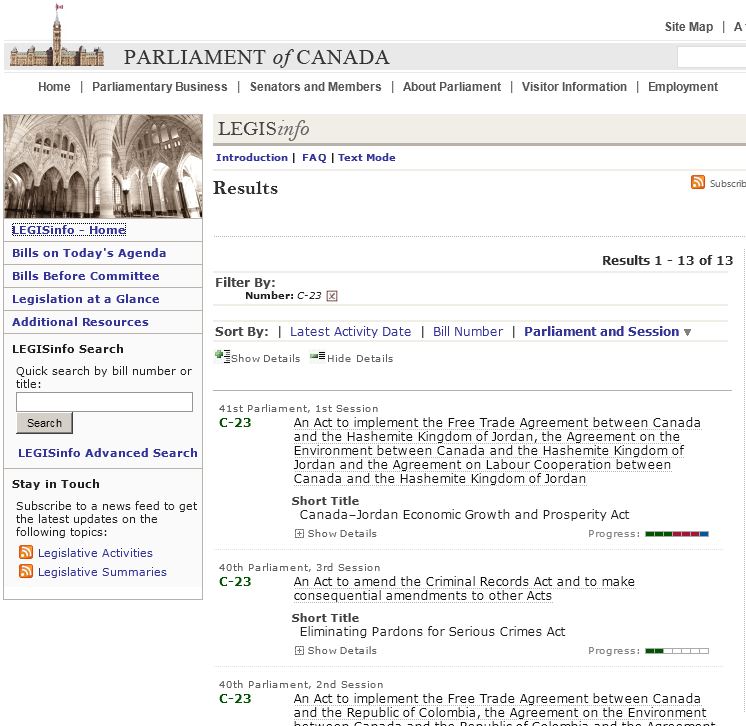
The FAQ page reviews how bills are numbered, but it does not tell you about bills like C-23A.
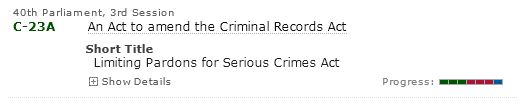
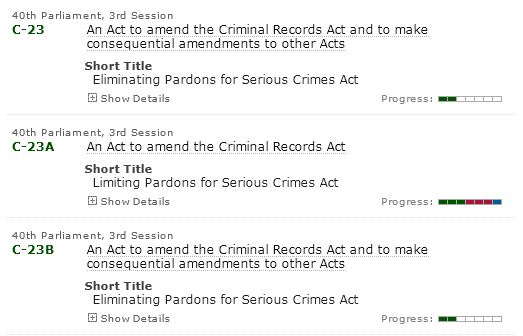
My “blink” told me that there was a 2010 Bill that dealt with Pardons, but my initial search result for Bill C-23 showed only the initial 2010 bill that was replaced by C-23A. A detailed look at the Status for Bill C-23 will tell you that:
Pursuant to Order made by the House of Commons on June 17, 2010, the Bill was divided into Bill C-23A and Bill C-23B.
This tip could be divided into A and B as well.
A. Don’t simply look at a status list without expanding it further. Had I assumed that C-23 from the 40th Parl. 3rd. Sess. only made it to 2nd reading, my requester would have only had part of the information needed.
B. If someone asks you for a bill number, make sure you know some context. There is a Bill C-23 in nearly every session. A search for “pardons” in the bill title does show all the information needed for this particular research.
One further caution: A quick title search for ‘pardons’ doesn’t show bills with ‘pardon’ in its singular form. You may want to bookmark the , which offers a Title and Content option.
Preventing Auto-Sync on One-Off Basis for an iPad, iPod or iPhone
Most of time you want automatic sync to run when you plug your iPad, iPod or iPhone into your computer. Indeed, this is the default setting in iTunes for all three devices.
However, sometimes you just don’t want  to sync your iPad, iPod or iPhone when you connect it to your computer. Here is a simple trick to prevent aauto-sync from running on a one-off basis: With iTunes open, hold down Shift+Control on a PC or Command+Option on a Mac while plugging your device in. Doing this will make iTunes skip the automatic sync just once.
And note as well, you can prevent automatic syncing from running on a default basis for any specific iPod, iPhone, or iPad; or for all iPod, iPhone, or iPad devices you connect to your computer. See this Apple Support article for instructions on doing this.
How Many of You Have an Office Manual?

Sounds basic but many solo and small firms do not have one. You need one to act as a reference for both management and employees alike. It can be your shield against discrimination, harassment and other claims. It can save time by having answers to common questions on routine employment matters and issues and employee concerns in such areas as vacation and sick-leave policies, unpaid leave, holidays, work hours and other such details. It can also contain forms (evaluation forms), descriptions (jobs, tasks and expectations) and procedures (fire, disaster, privacy etc).
Most office manuals today also address emerging issues such as: internet usage, social media use and privacy expectations.
A good (albeit American) article on how to write an office manual is available from The Lawyers Mutual Insurance Company of North Carolina.
The Law Society of BC has a number of Model Policies that can be incorporated into an office manual.


