







All Our Tips
Read a Book Review

Today’s Tip is a follow up to “”, read a book review. There are excellent book reviews available in the Canadian Law Library Review, the journal fo the Canadian Association of Law Libraries (available to members of the association as well as through subscription).
Book reviews can also be found in blog posts. For example this post on the ILTA KM Blog: Book Review–Martin White’s “Enterprise Search”. Hat tip to David Hobbie for the review.

Save Time and Clicks by Disabling the Delete Confirmation Pop-Up

By default, the delete confirmation pop-up appears whenever you delete a file on a Windows computer. The intentions are good – prevent you from accidentally deleting a file.  However, that extra click can be annoying, especially if you are deleting a lot of files.
You can easily disable the delete confirmation pop-up. Right-click on the Recycle Bin and select Properties. Uncheck the delete confirmation box, click Apply, and then OK. After doing this, deleted files will go directly to the Recycle Bin.
And another neat trick, you can bypass the Recycle Bin entirely (i.e. deleted files won’t be placed into the Recycle Bin) by holding down the Shift key while deleting files.
Dropbox and the Paperless Office on Steroids

Have you ever been at court or a critical meeting and wished you had a document with you that was still tucked away at your office?
Here’s a tip that will ensure you always have every document in your client file handy, wherever you are. Copy your entire client folder to Dropbox (or Google Drive) the day before any court appearance or other major event. Your client folder will then be available to you remotely, via the Cloud, if you need to check any documents that you left behind.
Dropbox and Google Drive are free online services that allow you to copy your files and folders to the Cloud, where they are stored securely. They can then be retrieved from any computer or mobile device anywhere, as long as you are online.
These services can function as the perfect complement to your paperless office. If you scan it, you can retrieve it – from anywhere.
When Dropbox is installed, it adds a designated folder to your desktop. You can drag and copy your files to your Dropbox folder, the same way you would transfer files between any Windows folders. The copied files are then automatically and seamlessly uploaded to the Cloud. Google Drive functions similarly.
If you’ve been looking for yet another good reason to go paperless, these services provide it. Combined with an iPad or iPhone, these services can help your practice function like a paperless office on steroids!
When choosing between services, storage capacity limits are an increasing point of difference. The basic Dropbox plan offers 2 gigabytes of free storage. Google Drive has just upped its free storage (shared with your Gmail account) to 15 gigabytes.
So today’s tip is a straightforward one – get an account at one of these services. Make it part of your office’s preparation protocol to upload your entire client folder the day before an event. At my office, our law clerk usually handles this function. One quick click (or drag) and it’s done.
And voila! You need never be without a key document at a crucial time again.
You may also conclude, as I have, that carrying a Dropbox-ready iPad is a far more pleasant experience than lugging around bankers’ boxes filled with documents you probably won’t need the next day – but you’ve brought them just in case…
So there you have today’s tip. Dropbox it.
It’s good for the trees. And it’s pretty good for the back too.
– Garry J. Wise, Toronto
Watch the Clock
Despite discussions about alternative fee arrangements and the changing times for the business of law, many clients and law firms still deal with compensation for legal work based on the billable hour. One thing that goes hand in hand with that are billable research hours, and the costs for services used that clients pay in disbursements.
Today’s tip is for the new summer law students and their articling peers: watch the clock.
Efficient gathering of information usually means less time overall spent answering a research question. Fast gathering usually starts with what an expert can tell you about an area of law (yes, a textbook whether it is online, eBook, or print). If your organization charges clients disbursements for using fee based research tools like LexisNexis Quicklaw and Westlaw Canada, make sure you know what model and method is used so that you can keep the gathering costs down.
Save Money by Printing in Draft Mode
It is costly to replace the cartridges on laser and inkjet printers. You can save money by printing in draft mode, which uses a lot less ink. In most cases, you will probably find draft mode printouts are  acceptable. Try printing in draft mode, and if the bulk of your printouts are fine, consider setting your printer to print in draft mode by default. You can then manually switch to full quality when necessary.
Wonderful Wunderlist
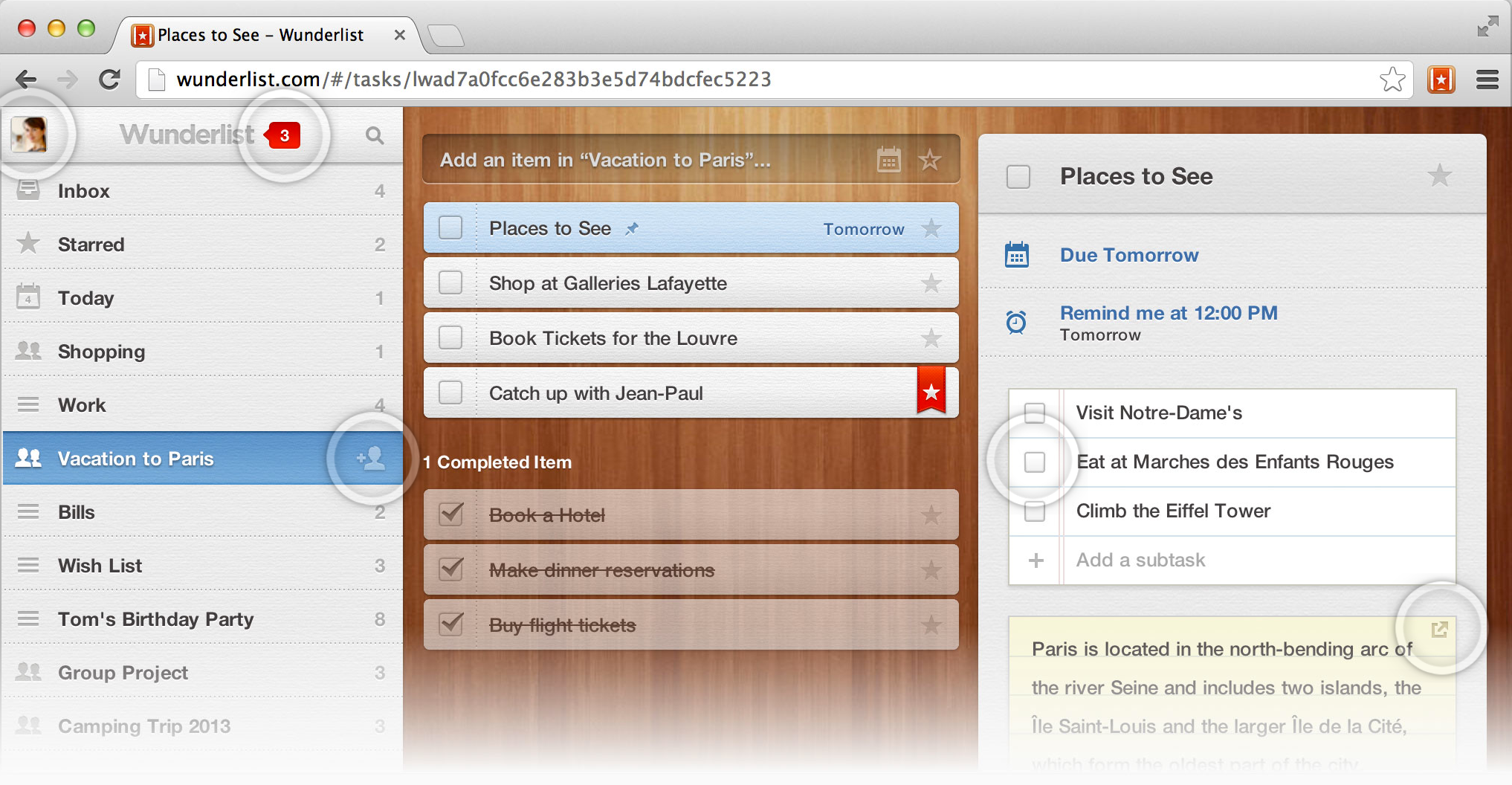
All of us have to manage our time and our deadlines. At this point in my career, I think I have tried out a fair number of the alternatives: a DayTimer paper calendar, a paper notebook, Microsoft Outlook as well as other various appointment programs etc etc etc.. I think my all-time favourite was a very good personal information program entitled EccoPro (which was unfortunately dropped by the developer but I now see it has been kept alive by a strong user group at http://www.compusol.org/ecco/).
So the search went on. That was, until I found Wunderlist.
An iTunes Hall of Fame app, this cloud-based and synched task manager was named one of the “10 Best Productivity Apps of 2010” by The Next Web. It also happens to be free. It is a multi-platform (Mac, PC, iPhone and iPad, Android, Linux and the Web) and keeps your task lists synched between all of these multiple devices. If you wish you can share your tasks (useful for legal assistants and legal secretaries). You can email reminders and email yourself tasks to Wunderlist. Deadlines and due dates are incorporated as well as Notes and Prioritization.
I like that you can have multiple to-do lists. And reoccurring items and sub-tasks.
I think I have *finally* found the one way to keep all the tasks and deadlines in my professional and personal life in one place, organized and accessible at all times. Simply Wunderful!
David J. Bilinsky.
EBook License Templates
This tip came from Christine Hiller and was shared with the Canadian Association of Law Libraries Conference in Montreal. In the Plenary today, Christine shared that there are eBook license templates and resources available! Check it it at OCUL .
Get Safe Downloads at FileHippo
To avoid viruses and spyware, you should only download software from reputable sites you know are safe. One of the best sources of safe software downloads on the web is FileHippo.com. It has the newest versions of the most widely used software (freeware and shareware), browsers and browser plug-ins.  The downloads on this site are 100% spyware and virus free. FileHippo also has old versions of some programs, allowing you to return to an old version is you don’t like the new version. There is also an Update Checker to scan your machine for old software. Visit File Hippo for a great selection of safe downloads.
New (Tax) Year’s Resolutions
With tax season either just behind us (or just ahead, depending on your filing date), it’s an ideal time of year to review all things accounting and financial at your firm.
What’s your assessment – are your bookkeeping and accounting systems working for you and your practice? Could some basic financial planning make a difference in the year ahead?
With tax-time 2014 – and the regulatory and financial well-being of our practices – in mind, here are a few questions we could benefit from pondering (and acting upon):
- Are your firm’s financial records Law Society-compliant and up-to-date? Are there any dormant trust funds or credit balances that require attention? How can any issues be expeditiously resolved?
- Are you writing off more receivables than you’d like? Does this surprise you each year? Would a more regular billing cycle or updated collections strategy make a difference?
- Do your internal systems and accounting software get you the data you need – when you need it?
- Do you review information on where your firm stands financially on at least a monthly basis? Are you getting the financial reports you require – and are you acting on them?
- Does staff need training in any area affecting your financial practices and record-keeping?
- Are your “accounting computers” showing any signs of wear and tear that could reflect early warnings of system instability? Have your backups been working and is your data secure, firewalled and virus-free?
- Are the bookkeeping and accounting professionals you work with meeting your ongoing requirements and helping you build and maintain your practice?
- Are the inefficiencies in your firm’s bookkeeping and accounting processes? Would addressing any of these save you on professional fees – and make your life easier in the process? Have you requested input from your accountants and bookkeepers on any changes or improvements they might recommend?
- Is this to be the Year of the Cloud for your firm’s accounting data, or do you still prefer to wait it out a while longer?
- Could you go “paperless” in any areas of your financial record-keeping? Could you save a few trees by paying certain bills online? How about scanning those gas-station, restaurant and charitable donation receipts so they are more organized and accessible?
- Are your paper records stored efficiently and safely? Do you know where your paper records are? Would a binder system be worth considering to help you to locate archived records more quickly if and when they may be required?
- Would you benefit from arranging an automatic R.R.S.P. savings plan through your bank?
- What are your firm’s goals and targets? How can you leverage your firm’s bookkeeping and accounting resources to assist you in achieving them in the year ahead?
And more generally, do you need to make any new (tax) year’s resolutions?
– Garry J. Wise, Toronto
Ask Questions
Sometimes the only way to answer a research question is by asking a bunch of people for their opinions.
An example: Canada Post is asking Canadians about the kind of postal service they will need in the future. An important question, especially for those of you who like getting books in the mail. This question is in response to a Conference Board of Canada report on the future of the postal service. The Conference Board is an excellent place to look to see if someone has already answered your big picture type question.
I encourage you to give feedback to Canada Post. From the News Release that askes for input:
Canada Post has stayed relevant to generations of Canadians by understanding their changing needs and evolving to serve them. The options put forward by the Conference Board are the starting point for this important conversation with Canadians about what they value, what they expect from us going forward and what needs to change to get there.
As the news release states, you can send them feedback by mail:
THE FUTURE OF CANADA POST
2701 RIVERSIDE DR SUITE N0800
OTTAWA ON K1A 0B1
The news release also offers a visit to canadapost.ca with a suggestion to follow the link to The Future of Canada Post. The feedback form was not yet available on April 30, 2013. Check the site, or, send them a letter.
Update: Comment on the Future of Canada Post at http://www.canadapost.ca/ext/en/future/?page_id=2&cpage=20&sf12333662=1
Hat Tip to @canadapostcares for tweeting me the link.


