







All Our Tips
Use High Dynamic Range or HDR for Better Pictures on Your Smartphone

Most smartphones now have an option called HDR, which is short for High Dynamic Range. When you take a picture in HDR, your smartphone camera actually shoots three pictures at three different exposures. Your phone then combines these photos to create one composite image that will be sharper and have more vivid colours. 
Try HDR when are taking pictures of landscapes or when you are shooting into the sun or another bright light source. Don’t use HDR for any pictures where there is motion as moving objects will be blurred, unless you want this effect, say for instance when you are taking pictures of a fountain or waterfall.

Internet Explorer Vulnerability

♫ You may think I’m strong
and I can do no wrong
but I’m vulnerable
so vulnerable…♫
Music and lyrics by Pet Shop Boys.
 Microsoft has reported a vulnerability in all versions of Internet Explorer. While Microsoft has posted security workarounds and US-CERT has recommended that users implement them, they only work for the two most recent versions of IE (10 and 11). Moreover, they are reported to be technically complex.
:
The IE vulnerability is a big deal, said Will Dormann, vulnerability analyst in the CERT Division of the Carnegie Mellon University Software Engineering Institute in Pittsburgh, Pa.
Continuing to use IE may result in What is a user to do? Download and install Firefox or Google Chrome or another browser and stop using IE immediately until a patch is released by Microsoft.
The vulnerabilty allows the ‘bad guys’ to hijack your computers and execute code. reports that “Microsoft is aware of limited, targeted attacks that attempt to exploit [this] vulnerability in Internet Explorer.”
There will be no patch issued for Microsoft XP which is yet another reason to move away from XP to Windows 7.
Read a Textbook

I have to confess that I am a reader. Go figure! Being a reader is trait that has been particularly helpful in my practice as a non-lawyer legal researcher, and given the high volume of use in my law libraries text collection (both print and online), I am not alone in this.
Often texts used in the legal research process are simply skimmed. The index points you to a place of interest, you skim a few pages, and valuable footnotes or embedded citations lead you out of the text to other resources.
Today’s Tip – pick up a textbook and read it. Use a legal text to discover details about an area of law that is loosely related to your practice. Use a legal text to remind yourself about fundamentals. Use a legal text like a book – discover the whole of it. Reading a legal text this way means you can gloss over the footnotes and stay tuned to the authored work.
Try it out. You may remember how much you enjoy the law.
Send Personalized Connection Invites for Better Uptake on Your LinkedIn Connection Requests
I’m just back from an ABA conference and am following up with some of the people I met. That might mean a phone call or an email with a link to an article, and in some cases, it means sending a LinkedIn connection request.
LinkedIn makes it very easy to send a connection invitation. After searching a name, a simple click on a button creates a standard message: “I’d like to add you to my professional network on LinkedIn” and a second click sends it on its way. 
While virtually effortless, these generic invites are far from ideal, and they are probably scaring some of your potential connections away. People receiving generic invites may not remember you and that will make them more likely to ignore the connection request.
To make it far more likely that the person will recognize you and accept your connection invite, take a few extra seconds to write a personalized invite note. For example:
Hi [first name]
Great to meet you at the ABA LPL Conference. I would like to add you to my LinkedIn network.
Dan
If it was someone you didn’t actually meet, try to make a connection in some other way: “I enjoyed your presentation and would like to add you to my professional network on LinkedIn” or “I see we share an interest in legal malpractice and would like to add you to my professional network on LinkedIn.”
Taking the time to send personalized connection invites will help you more grow your LinkedIn network.
OntarioCourtDates.ca Launched

It may not be a giant step for mankind, but it’s at least a baby step toward the technological modernization of Ontario’s archaic court system.
On April 16, 2014, Ontario’s Ministry of the Attorney General announced the launch of OntarioCourtDates.ca, an online service that lists daily dockets for all Ontario Court of Justice and Superior Court of Justice courtrooms throughout the province.
Searching the website by municipality and case name, you can access listings of the next day’s pending cases, court room numbers and scheduled hearing times.
The AG’s press release notes:
- The online daily court lists will be updated each day around 4:30 p.m. with case information for the next 24 hours.
- Cases subject to statutory, common law or court-ordered public access restrictions will not appear on the online court lists. This includes cases about adoptions, child protection cases and criminal cases involving youth. Cases subject to a publication ban will list only the initials of the parties involved, not their full names.
Today’s tip, then, is: Use OntarioCourtDates.ca effectively to enhance your client services and communications.
Make it a point to check online at 4:30 daily to determine your courtrooms for the next day, and reach out to advise your clients by email and/or phone as to the start times and courtrooms they are to report to the following morning.
This little gesture might provide unexpected peace of mind to clients, many of whom may be facing the daunting experience of attending at court for the first time.
What an easy way to strengthen your firm’s relationships with its clients and to provide genuinely better service, all at the same time.
– Garry J. Wise, Toronto (@wiselaw on Twitter)
Look at the Headnote
Headnotes – a brief summary, comment, or explanation, often prepared by an editor and pladed at the beginning of a court decision. In the opinion of this librarian – the value added information about a decision that quickly and succinctly gives a hint of it’s relevance to an immediate legal research question.
Today’s Tip is a pointer that the definition of headnote applies to CanLII in a new and useful way.
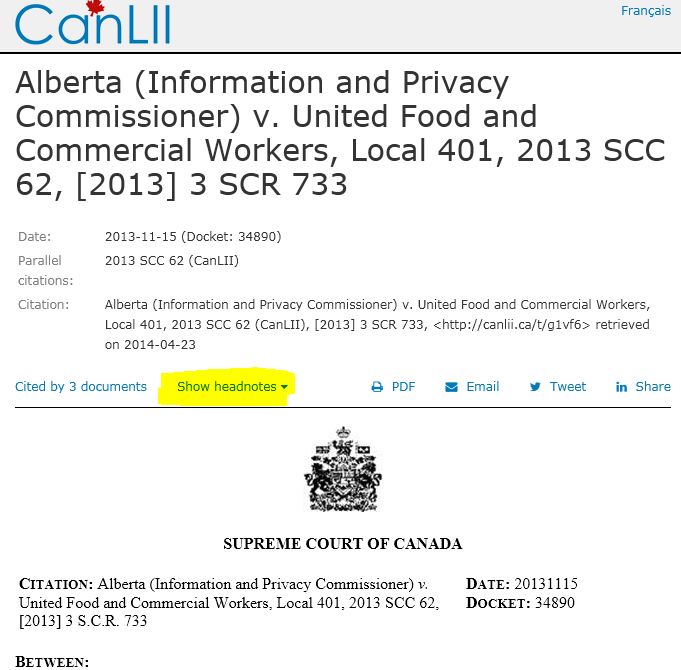
What happens when you select “show headnote” for this decision from the SCC? In addition to the court prepared summary that is embedded in a Supreme court of Canada decision, CanLII has long provided links to related decisions, legislation cited that is available on CanLII and decisions that are cited in the case. In addition to those value added features showing the headnote on CanLII now offers a link to the new CanLII Connects service. You will see:
“Visit CanLII·Connects – summaries and opinions from the legal community on selected cases”
For this decision, there are currently 3 case comments from registered CanLII Connects members – lawyers, scholars and others with professional competency in legal analysis who have offered CanLII Connects content for the information of anyone who wishes to read it – See more about CanLII Connects.
I appreciate the ability to see commentary about decisions. This innovation with add more ‘social’ to legal commentary. The legal community speaking to each other through published case commentary has been wonderful. The legal community offering select commentary to our own clients and through our own websites has also been very useful. It will be interesting to see how socializing legal commentary with this offer of case comments easily available to all impacts the legal information space.
Thanks to Colin and Sarah at CanLII for this new tool, and to all the firms and lawyers who took the time and continue to contribute to this resource.
Clean Your Smartphone Lens for Sharper Pictures and Better Selfies
For most photographers, a clean and unscratched lens is pretty much an obsession – and it is something that also is critical for getting sharp pictures.
Many smartphone users take an opposite tact and would rarely, if ever, clean their  smartphone lenses. Needless the say, the design of most smartphones isn’t exactly conducive to having a clean lens. On many smartphones you are likely to touch the lens dozens of times a day in normal use.
Take a look at the lens on your smartphone, no doubt it will show a few finger smudges and perhaps even remnants of yesterday’s lunch. Even if your lens looks clean, consider gently cleaning it with a bit of warm water. You will likely find that your selfies look a bit sharper.
How to Handle Heartbleed
♫ if you could hear my heartbleed
you’d hear me scream set me free
if you could feel my heart bleed..♫
Lyrics, music and recorded by the Peppermint Creeps.

The Heartbleed vulnerability has garnered a lot of press lately. It has (understandably) set many on edge and left wondering if they are vulnerable and if so, what should they be doing about it? Our colleague, friend (and past columnist) Laura Calloway, attorney, past ABA TECHSHOW Chair and Director of Service Programs and Practice Management Assistance Program at the Alabama State Bar wrote this piece on Heartbleed and we have reproduced it here with her permission.
I was out of the office last week when the Heartbleed bug burst into the news so, while I’m a little slow getting information posted about it, things seemed to have resolved themselves and I now feel comfortable providing our members with some information and recommendations about how to deal with it.
What is Heartbleed?
Many websites allow users to log in to complete tasks such as viewing and sending web based email, purchasing goods, viewing bank balances, transferring funds, paying bills, or doing legal research or interacting with client information such as calendar items, to-dos or client documents stored in the cloud. In order to keep your information confidential, the websites encrypt it before it’s transferred over the internet, using what’s called a private key. Many of these interactive websites use an open source program called OpenSSL to handle the encryption, and Heartbleed is a flaw in the program that allows an intruder to find the private key and use it to unencrypt the data being transmitted and read it, including usernames, passwords, the contents of email and financial data.
A real world analogy would be that you hid a key to your house in the potted plant next to the front door, but you left it so exposed that anyone coming up on the porch and looking into the plant could see it, take it, and gain access to your house if they wanted to. And like in this real world example, you’d never know that someone had used the key to come into your house unless you caught them inside.
There is no way to be sure at this point whether someone has or has not intercepted your data transmissions while you interacted with a site that uses the software with the flaw.
Does Heartbleed affect me?
If you use interactive websites that allow you to log on to engage in secure transactions, it’s likely that at least some of those websites used the software with the flaw. In addition, some other devices such as internet routers and telephones that use VoIP (voice over internet protocol) rather than the phone company’s copper wires, may also be affected.
The Alabama State Bar’s site uses an older version of OpenSSL, which did not contain the flaw. Thus, none of our users were affected when logging in to our site.
Major sites that were affected include Google and Gmail, Yahoo and Yahoo Mail, Dropbox, Box, Instagram, Pinterest, Tumblr, Etsy, Flickr, Minecraft, Netflix, SoundCloud and YouTube. It appears that Facebook and Pandora may also have been affected. Although Amazon’s sales website was not affected, Amazon Web Services was, meaning that any website operator who uses this hosting service to provide its website has vulnerable users, too. The major banking sites don’t appear to have been affected, but USAA’s site was. You can find a list of possibly affected sites here. To determine whether other websites that you log into are affected, try the Heartbleed Checkerprovided by LastPass.
What should I do now to protect myself?
Because Heartbleed is not a virus that infects your computer but a flaw in the software used to operate a website that you can interact with over the internet, you will need to change your password for every affected website, but you should first make sure that the operator of the website has fixed the flaw in their version of OpenSSL and also renewed the security keys and issued a new SSL certificate. As long as the website still relies on an unpatched version of OpenSSL for encryption or hasn’t renewed the security certificate after patching, the data you are transmitting remains vulnerable and changing your password won’t help. In fact, doing so will expose the current and new password.
The LastPass checker linked to above should give you both an assessment of whether the site was affected and the date the most recent security certificate was issued. If it doesn’t, IT World writer Melanie Pinola has a good article on when to change your passwords and has also posted a spreadsheet listing all the sites she has checked, the date she checked them and her recommendation of whether it’s time to change passwords.
If you use the Google Chrome browser, there is an extension called Chromebleed which, once installed, will alert you if you navigate to a site that is affected and has not been patched, but this can give you a false negative because it won’t tell you whether the security certificate has been reissued.
-Laura A. Calloway, Director of Service Programs and Practice Management Assistance Program, Alabama State Bar.
What is interesting is that Laura has noted that the New York Times has reported that there is a lack of evidence that the heartbleed vulnerability was exploited prior to its announcement, but that attempts are picking up given all the publicity that it has received. Accordingly it is important to take the steps that Laura has indicated to change your password on sites that may have been affected.
Consider a US Address
I really want to ty Google Glass. I am not kidding. I think there is excellent potential that this tech – or something like it – will be an innovation bump that directly impacts legal research.
On Monday, a message from Google told me:
As we mentioned this past weekend, we’re opening up a few spots in the Glass Explorer Program this week. One thing we want to clarify is that spots in the program are for US residents only.
While we’d love to bring Glass to our friends around the world (we promise we are working on this), the usual restrictions still apply. Just a reminder, all Glass Explorers must:
- Be US residents
- Be 18 years or older
- Purchase Glass for $1,500 + tax
- Provide a US shipping address
I don’t like to cheat the system – well not always – but there is a way to manage the disappointing trend of not being able to access technology as quickly if you are outside of the US. Consider acquiring some property in the States so that you have a mailing address there. My banker wishes I was kidding.
The questions I need to answer that only a personal tst of GG will do: how does it react when browsing Canadian commercial legal research sites; how does it work for CanLII searching; what about my firm’s website; is this a tech that will have an impact on how we do business.
Plus, I just want it. I am not kidding.
Filter Your Gmail Messages With Personalized Custom Email Addresses
Most people don’t realize  that you can use multiple address variations of your basic “[email protected]” Gmail address. Gmail lets you put a plus (“+”) sign and any combination of words or numbers after your name. For example, [email protected] can become [email protected] or [email protected].
All messages sent to any of these different address variations will end up on your inbox. The benefit of using address variations is that you can easily add a filter to label and/or archive messages in a particular way, depending on different address variations you have created. This can help you better manage the different types of messages coming into your inbox.


