







All Our Tips
List Conciousness

With Canada’s Anti-Spam Legislation coming into force on July 1, 2014, you may have noticed an increasing number of “confirm your email” opt in messages. Though there is a transition period where consent to receive commercial electronic messages is implied, most organizations are getting their express consent ducks in a row.
Today’s Tip is to be list conscious…or more practically, think really hard before you decide to unsubscribe.
Personally, I am making sure that legal publishers I deal with are able to send me email. Though there are plenty of ways to stay up to date on new publications and you may think of the ‘new book’ emails as being the most frequent publisher sent commercial electronic messages, publishers sent emails about all kinds of important things that you want to know.
- planned outages for electronic products
- new formats for existing works
- changes to pricing
- notices about mergers and new content
Be list conscious so that you are not out of the loop.
If the number of commercial electronic messages are getting on your last nerve, consider Slawyer Jack Newton’s Email Pro Tip #1 Create a “Robots” Folder and only look at your CEMs once a day.

Use Control+F or Command+F to Find Specific Terms on a Webpage

Slowly scrolling through a webpage to find a specific term is not the most efficient or fastest way to find the location of the information you are looking for, especially if the page is a long one.
One simple keyboard shortcut can help you instantly find the location of specific terms on a webpage. Use Control+F on a PC  or Command+F on a Mac to find specific terms on a webpage. Press this shortcut, enter your term in the search box, hit Enter and you will instantly jump to the first location of that term. Look for arrows next to the search box that will allow you to jump forwards or backwards to the next occurrence of the term you searched for.
Use an Air Gap for Security

♫ I want security, yeah
Without it I had a great loss, oh now
Security, yeah
And I want it at any cost, oh now…♫
Lyrics and music by: Margaret Wessen, Otis Redding; recorded by Otis Redding.

I have been giving a number of presentations lately that in part, deal with the (in)security of law firm systems. This is based on the findings of the Legal Technology Resource Center of the ABA (“LTRC”) in their 2013 Legal Technology Survey. They reported that 15% of reporting law firms acknowledged that they had a security leak. 43% reported being infected by a virus, spyware or malware. Only 53% of firms reporting having a disaster recovery plan in place (these last stats cause me to picture a Venn diagram showing those firms that were infected, had a security leak and those who had a disaster recovery plan and the degree of overlap…or lack thereof…but I digress…)
Bloomberg reports that China-based hackers target law firms to get secret deal data. Unfortunately the law firms being hacked were Canadian – and Bloomberg states that they rifled one secure computer system after the next – eventually hitting 7 different law firms as well as the Treasury Board and Canada’s Finance Ministry.
Bloomberg further states that in a meeting with 200 law firms in New York City with Mary Galligan, head of the cyber division in the New York City office of the U.S. Federal Bureau of Investigation and her group: “..the FBI issued a warning to the lawyers: Hackers see attorneys as a back door to the valuable data of their corporate clients.”
Obviously this column is far too short to deal with this issue in any depth except to help raise awareness and to leave our gentle readers with one technique to protect sensitive communications and data.
Bruce Schneier is one person that I listen to when he speaks on security. Bruce has been writing about security issues on his blog since 2004, and in his monthly newsletter since 1998. He writes books, articles, and academic papers. Currently, he is the Chief Technology Officer of Co3 Systems, a fellow at Harvard’s Berkman Center, and a board member of EFF.
Bruce said – if you want to evade NSA (and basically any other spying) . OK you say, how is that possible today? Well Bruce recommends having one computer with an air gap. This is a physical isolation of a computer (or network of computers) from the internet. If you want to get really really paranoid – you buy two identical computers, configure one by connecting it to the internet for a little as possible to get it running (and as anonymously as possible), upload those results to a cloud-based anti-virus checker and then transfer the results of that to the air gap computer using a one-way process. Then once you have the computer configured – never, never ever connect it to the internet again. Disable the Wi-Fi so it never gets accidentally turned on. Turn off all auto run features.
Bruce advises transferring files using a writable optical disk (CD or DVD). You can verify the data written to such a disk. Encrypt EVERYTHING moved on and off that computer (and of course have full hard-drive encryption on this air gapped computer).
. He has further suggestions in his blog. You can take things even further. Bruce should know – he is looking at Snowden documents. Bruce wants security at any cost…
-David J. Bilinsky, Vancouver BC.
Choose the Direct Link
When you are citing a web resource, provide the URL – the whole URL that links directly to the document you are referencing.
What am I talking about? As an example, when you cite a federal regulation, you identify it with the SOR number not the page number of the issue of the Canada Gazette that the regulation came from. The URL reference should be equally as direct in my opinion. A hyperlink or URL that points to the SOR – in this case the HTML version of the individual regulation from the Gazette website – not the PDF link for the more general Gazette issue the SOR is published in.
What does the NEW 8th edition of the Canadian Guide to Uniform Legal Citation say about online resources? It agrees with me!
Cite the full URL of the source, but exclude the http:// protocol. Include the protocol if it is anything else (for
example https://).
The McGill Guide, as this title is often referred to, is now available as an online publication hosted on WestlawNext Canada as well as being available in print and print plus online pricing formats. A screen shot of part of a download* from 8th edition, Online Resources section offers the general rules:
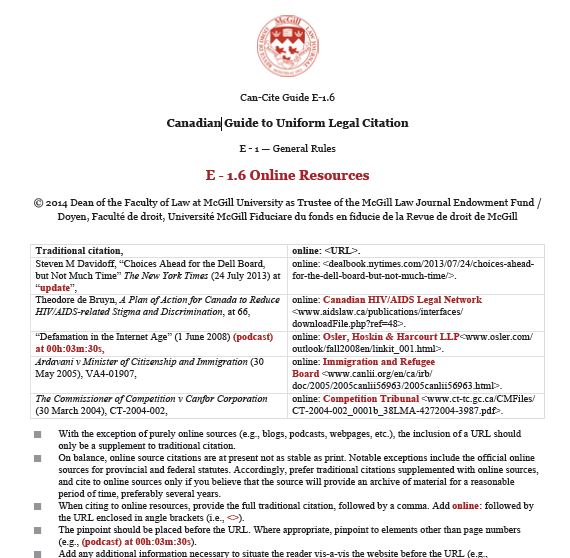
* Thanks to Carswell Reference Support for providing the McGill Guide 8th edition sample.
Make Your LinkedIn Presence Look More Professional With a Vanity URL
When you create a profile on LinkedIn, the default URL LinkedIn creates for your profile page will end with a jumble of letters and numbers. Yuck!
You can make your profile look more professional and have a profile URL that is easier to remember and share by claiming your own LinkedIn vanity URL. It will look like this: www.linkedin.com/in/yourname. 
You can customize your public profile URL when you edit your public profile. Follow these steps:
- Move your cursor over your picture icon (to the left of the Share an update… box) and click on it. This takes you to your Profile page
- At the top of your Profile page and select Edit Profile
- Click the Edit Profile button under your profile photo and details
- Click on Edit which appears next to your current public profile URL
- Scroll down a bit and in the Your public profile URL box that appears at the bottom right of the right column, click on Customize your public profile URL
- Type the last part of your new custom URL in the text box
- Click Set Custom URL
And here are few more tips about what can and can’t be in a LinkedIn vanity URL:
- Custom public profile URLs are available on a first come, first served basis.
- Your custom URL can have between 5 – 30 letters or numbers. Do not use spaces, symbols, or special characters.
- You cannot change your URL more than 3 times in 6 months. If you’ve already done this, you’ll have to wait 6 months before you can change it again.
- Some URLs may be unavailable. If you use a URL and then change it, the URL you first chose will be unavailable for use by another LinkedIn user for several months. If the URL you want isn’t available, you will need to select a different one.
A Little Night Music
♫ I close my eyes, then I drift away
Into the magic night, I softly say
A silent prayer like dreamers do
Then I fall asleep to dream my dreams of you…♫
Lyrics, music and recorded by Roy Orbison.

Well we are heading into the Canadian annual right of spring – the Victoria Day long-weekend.
With images of heading to the cottage, heading to the condo at Whistler or just kicking back and taking a few days to relax, I thought I would share my tip for the best music website that I have found to relax…or work ..to.
www.songza.com is a free website that contains playlists curated by experts. It can stream playlists based on mood, activity, artist, genre of music and time of day. You can get music to clean up, write, relax, party and much much more. You can give a ‘thumbs-up’ on a song or a ‘thumbs down’ (that immediately causes the service to skip to the next song in the playlist). Aside from the fact that it puts a virtually endless amount of music at your fingertips, it plays artists that you may not normally run across. For example, this post is being written to “The World of Roy Orbison” that not only contains many of his best works, it also has songs of those who were contemporaries and influencers of Roy. So it is a musical introduction site as well. At the moment Tom Waits is playing on the Roy Orbison playlist (and if you haven’t been previously introduced to Tom…well, there is no time like the present…)
You can also search by criteria – for example, songs of eras (50s, 60’s etc) or songs used in Apple commercials. You can try out songs from categories that you may not otherwise try – for example, searching ‘Philip Glass’ brings up this playlist (among others):
Cosmic Dreams: A look at the minimalist approach to composing music, with works ranging from modern classical to Japanese new age.
Songza is a gem. It has become one of my most visited websites EVER. I say a silent prayer that it isn’t bought out by someone and then morphed into something else.
In the meantime I can listen to the music, close my eyes and drift away….
-David J. Bilinsky, Vancouver BC
What Is in Your Collection?
The librarians in our firm library often have questions on topics that are outside our experience. This is no big deal. As well trained and experienced legal information specialists we know the steps to follow to gather information on whatever topic comes our way.
One of the things that we have to remind ourselves to do, most especially this decade, is to constantly reorient ourselves to texts and other commentary that we have access to in our constantly changing and growing web based research tools. I am not talking about how Google grows or new tools like CanLII Connects, but rather how our fee based subscriptions grow and change in content. I nearly made a rookie mistake yesterday to spend time and a wee bit of money to arrange an inter-library loan for a textbook available through a database subscription.
I can only imagine how difficult it is for non-library types to keep up with what is available to you within your organization’s materials. Given how challenging it is for me (the person who is responsible for paying for this stuff), today’s tip is to look in your own collection. You will be pleasantly surprised by what you have access to just down the hall or even at your desk.
Audio Editor Audacity Great for Recording or Converting Audio
Audacity is a free, multi-track audio recorder and editor that runs on Windows, Mac OS X, GNU/Linux and other operating systems. You can use Audacity to record live audio through your computer microphone, an external mic, mixer or other line in input. For example, you can also use it to convert your records or cassette tapes into digital recordings. Depending on your sound card, Audacity can also capture streaming audio. It will let you edit WAV, AIFF,  MP2, MP3 and various other types of audio files. You can cut, copy, splice or mix sounds together and dub over existing tracks to create multi-track recordings. It will let you remove static, hiss, hum or other constant background noises. You can even change the speed or pitch of a recording and there are numerous built-in effects (echo, paulstretch (extreme stretch), phaser, reverb, reverse, wahwah and others). And lastly, you can export your recordings in many different file formats, including multiple files at once.
For basic features, it is fairly easy-to-use, especially if you have used other audio recording software. Some of the more advance features are a bit hidden, but there are online manuals, FAQs and other resources to help.
Download Audacity from the SourceForge.net site.
The WalMartization of Law Begins in Ontario

So, WalMart shoppers can now obtain $99 wills at four in-store kiosk locations in the Greater Toronto Area, with more to come:
Behind the plastic jugs of liquid Tide stacked near the entrance of a new Walmart in Markham is an innovation in discount retailing: Axess Law.
Founded by Toronto lawyers Lena Koke and Mark Morris, Axess Law provides fast and affordable legal services to time-pressed shoppers.
Simple wills are $99. Notarized documents are $25, plus $19 for each additional document.
This should come as no surprise to those of us who have been eyeing the tea leaves for some sense of where the future of the legal profession is headed.
Clearly, there has long been much room for the entrepreneurially-inclined among us to innovate and fill the gaps in the marketplace left by our traditional practise structures – and to do so extremely efficiently.
It may be tempting for some, but ultimately moot, to languish within a false debate as to whether this is about “access to justice” or mere “access to profit.”
Traditional Law may continue to scratch its collective, heavily weighed-down head, wondering how it can be possible that software and innovation can enable the delivery of low-cost, high-quality legal documentation to the public in mere minutes.
But TradLaw will likely do so at its peril, as a new legal order slowly emerges before our eyes.
The future is now – and it has been for quite some time.
Technology has commoditized many tasks traditionally accomplished by lawyers sweating over reams of paper for long, (over)billable hours. We now have a new generation of tech-savvy, business-minded legal professionals among us whose strategic direction is firmly rooted in the future, not the past. Most engage in initiatives that are far less dramatic and press-worthy than the WalMart lawyers, but no less revolutionary.
So today’s Slaw Tip is build now, for tomorrow has already arrived:
- Pay real attention to the innovations we are now seeing, online and in the brick and mortar world. They are harbingers of the obvious future and they represent a new approach to the delivery of legal services that your firms must contend and compete with;
- Identify processes in your firm that can be automated and streamlined and take steps to do so;
- Source out experienced marketing professionals who have familiarity with the legal sector, and work with them to identify the processes and low-hanging fruit that may represent your firm’s next giant opportunity;
- Investigate existing technologies, or consider building your own to permit your firm to do its work better and more cost-effectively. These innovators challenge us to improve. We must rise to that challenge.
Developments like Walmart Law should never be seen as potentially crushing blows. They are intelligent efforts to service a specific, carefully-identified marketplace more directly, more conveniently, more cost-effectively and more efficiently. And more profitably.
Shouldn’t we all be doing that?
– Garry J. Wise, Toronto (@wiselaw on Twitter)
Share Those Conference Papers
Whenever we give legal research training to law students one of the sources of valuable up-to-date commentary that we emphasize are papers from continuing legal education seminars. This type of material provides valuable local commentary, often on changes to the law, that is specific, succinct and to the point.
In Alberta, we are lucky that the cataloguers at the Alberta Law Libraries create a comprehensive search of the table of contents for material in their catalogue. In addition to finding tools from the publishers of conference papers, a keyword search of the library catalogue will find the title or author of a paper within the seminar materials. This time consuming, but extremely useful content created by ALL library staff is not duplicated in house in my shop. Instead, we use the ALL Library Catalogue to determine the seminar title and then we search in our collection to see if we own the material.
My tip today is SHARE. Sharing the conference papers with your in house library team makes it quick for your colleagues (and also you) to find the gold nuggets in these useful sources while you are looking for other material on the topic. Even if the conference papers are on a memory stick or available through an email link, I bet that your organization’s library staff have a plan for how to make this content accessible.
Hat tip to my colleagues Jon and Michelle who, without prompting, recently sent papers from a conference they attended to my library.


