







All Our Tips
How to Take a Full or Part Screenshot on a Mac or PC

On a PC it is easy to grab an image of what is on your computer screen (aka a “screenshot”), just hit the dedicated PrintScreen key on your keyboard (sometimes abbreviated as Print Scrn, Prnt Scrn, Prt Scn, Prt Scr, Prt Sc or Pr Sc). Doing this places an image of your screen  into the Clipboard. Pressing the Alt key with PrintScreen will put an image of just the active Window into the Clipboard. You can then paste (as in cut or copy and paste) that image into a document just as you would anything that is stored in the clipboard (Press Ctrl+V or the Paste icon on your toolbar).
More recent versions of Windows include the Snipping Tool – a handy utility for grabbing an image of a portion of your desktop. I have moved the Snipping Tool to my Start menu as I use it almost daily.
There is no dedicated PrintScreen key on a Mac keyboard. However, you can grab a screenshot of the entire screen on a Mac by if you hold down the Command and Shift keys and press the number 3. To take a screenshot of part of your screen, drag a box around it, then hold down the Command and Shift keys and press the number 3. Doing this creates a PNG image file on your desktop that contains your screenshot.
While there are fancier third party programs that let you capture things in more and different ways, the built-in screen capture functionality on PCs and Macs will often meet your needs.

Use Evernote to Capture Your Tweets

♫ Just a short note
You’ll find the key inside…♫
Music, lyrics and recorded by Matt Finish.

Having just returned from ABA TECHSHOW in Chicago my mind is buzzing with everything that I has seen and heard. One of the more interesting sessions was on how to use Evernote (https://evernote.com). Now I have been using Evernote for some time but it seems that you can teach an old dog new tricks.
I became curious about how to use Evernote to not just capture web sites, recipes, legal research and such, but to try to capture the tweets that I was creating while at Techshow.
So with a little research, here is how to craft a note in Evernote that captures all your tweets going forward…without your having to do anything more.
I only wish I knew how to do this *before* Techshow ..that way my Tweets could be a record that I could easily use to write a column…the next step is to figure out how to capture all the tweets that use a certain hashtag like #ABATECHSHOW!
Here is how to create a note to log all your tweets going forward:
1. Go to IFTTT to create an account. IFTTT is a service that allows you to create chains of commands..it stands for IF This Then That.
2. Once your account is created, go to: https://ifttt.com/recipes/114761-twitter-will-automatically-archive-to-evernote and install the ‘recipe’ that will automatically send your tweets to your Evernote account.
Voila! Your tweets will now be logged into Evernote. Just a short note with a key inside!
-David J. Bilinsky, Vancouver BC.
Plan Ahead

Yesterday at Slaw, I wrote about preparedness. Today’s Tip is to be perfectly prepared before you start your legal research question. I think that there are two steps to perfect legal research preparedness. Please comment if you agree or disagree!
Preparedness Step 1 – Understand the question.
- put the question in context by review text books, loose-leaf services (or – my preference – eBooks that started out as loose-leaf services) and other secondary sources of words you should be using
- check for legislation by reviewing the footnotes of those secondary sources
- look for key cases referenced in those same footnotes
Preparedness Step 2 – Use the right search language
- Place the output of step 1 in your legal research memo so that you have everything ready for writing
- You will have to find the current law on the topic, so, write out your search in advance (keep it in the memo so you can copy and paste into the search boxes you are using on various sites
Tweak and Change Excel Tabs to Make It Easier to Navigate Your Workbooks
By default, Microsoft Excel gives your worksheets the rather bland names Sheet1, Sheet2, Sheet3 and so on. These default names do nothing to help you remember what is in each worksheet, especially if you come back to work on a workbook many days, weeks or months later.
There are a number of helpful things you can do to tweak and change worksheet tabs in ways that will help you find and remember what you have in a workbook. They include:
- Giving the tab a new name that describes the contents: To do this, double-click on a tab; or right-click on it and select rename.
- Reorder your worksheet tabs to make it easier to jump between related tabs: Just drag and drop individual tabs to change tab order. The little black triangle shows where a tab you are dragging will be dropped when you release it.
- You can also change the colour of a tab as well as insert, delete, move, copy or even hide a worksheet by right-click on tab, and selecting the option you want.
Remember these tricks next time you what to make your Excel workbooks more user friendly.
Getting Your Legal Writing Right
I remember the time that a favourite client of mine gave me a schooling in the art of legal writing – and proofreading.
A retired lawyer (and the consummate gentleman), he had retained me to draft revisions to a fairly complex Last Will and Testament.
He was a bit of a stickler. And I’m fortunate to have had the opportunity to have worked with him. Because even though my content was fine, he still had lots to say about the way my draft was set up.
Here, in a nutshell, is what I learned from him.
Precision and consistency in style, capitalization and formatting can be at least as important as content in the creation of legal documentation that meets the standards of our profession.
In other words:
- Consistent Capitals, Please: If you are capitalizing Executor in one paragraph, you need to capitalize that word everywhere in the document. This holds true in pleadings as well. If Respondent reappears in your document, be consistent in whether you capitalize it;
- Don’t mix and match your semicolons and periods: If you are working on a list, use semicolons throughout, except for the last paragraph of your list, which should end with a period;
- Don’t mess with gender: “His/her” is probably never appropriate in a legal document, and certainly is not appropriate when dealing with a single person. Take the time to verify that your gender descriptions fit your document – especially when you are working from templates and precedents;
- Paragraph numbering: To avoid errors in paragraph numbering, especially when editing, always use automatic formatting for paragraphs and lists;
- Proofread once, twice and then proofread again. The same goes for spell checking – this should be done after every revision;
- Use section titles: These will make your document easier to read. Once again, consistency matters. If you are using titles, decide whether you will be underlining them, using bold font, or both, and stick to that same selection throughout your document;
- Revisit your draft. Where possible, after you have finished your document, put it away for a few hours or a day before sending it out. Come back to it later to do a final check. You could be surprised at the number of obvious errors – in content and style – you may find when you have fresh eyes available.
Yes, it really does matter that you get it right.
As a lawyer, you are among other things, a professional writer. Your work product is your calling card, and it will go a long way, particularly when you’re starting out, toward establishing how your clients and colleagues assess you.
(As well, your supervising lawyer will probably not appreciate being called upon repeatedly to edit sloppiness, spelling mistakes, typos, formatting errors, and grammatical problems you could have found yourself in your draft).
So that’s a wrap on this week’s tip: Take the time to get your writing right. It will make a difference.
Because it will demonstrate that you care.
– Garry J. Wise, Toronto (@wiselaw on Twitter)
Legislative History in Case Law
I was reminded that sometimes you can find a decent review of the history of a piece of legisaltion within written decisions. For instance, a discussion of the Election Act for Alberta was published in Engel v Alberta (Executive Council), 2015 ABQB 226 and includes a bit of legislative history.
Ethical vs Effective Marketing?
♫ What’s left to lose?
I painted all these pictures but you couldn’t choose,
All of your company.
But is this distance, calling my name?
I think persistence is this price that we pay in the end…♫
Lyrics, music and recorded by State Champs.
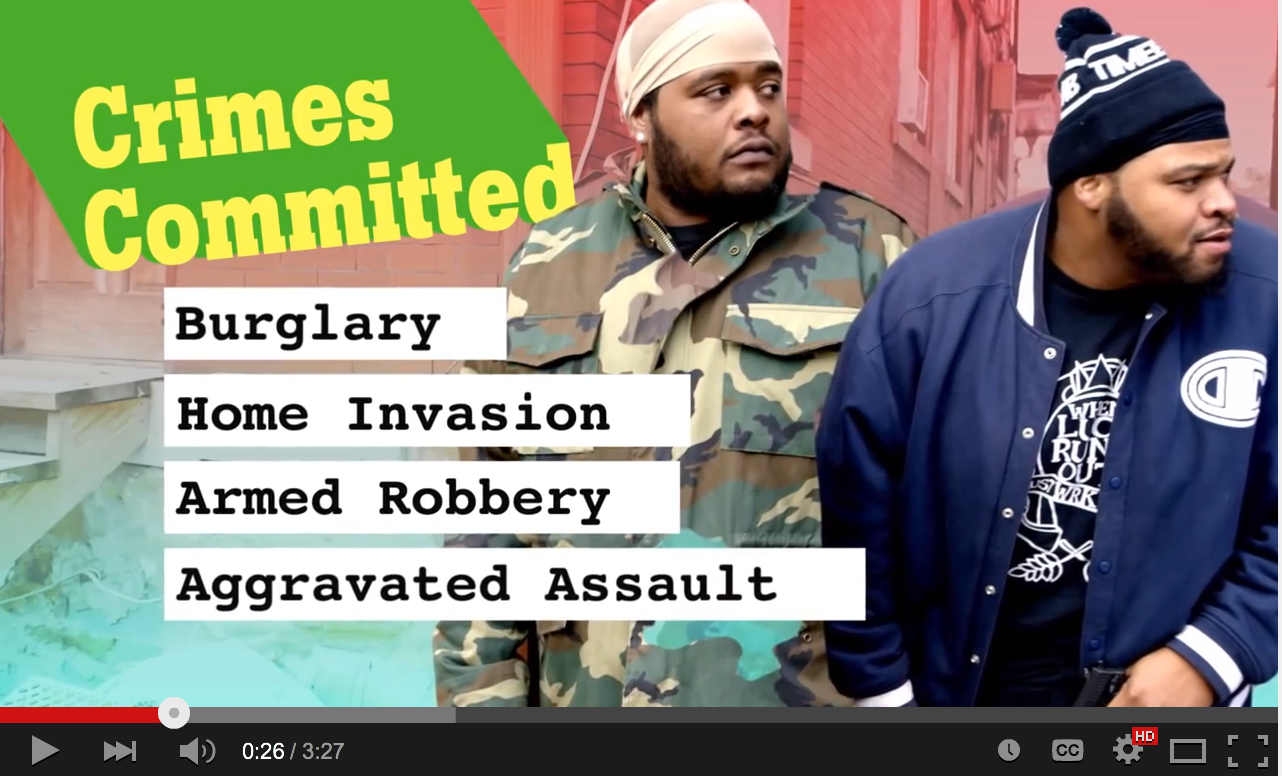

This is an image taken from a YouTube marketing video created by a Pittsburgh lawyer named Daniel Muessig. This particular video has been described as “clever, effective, legally ethical and thoroughly despicable” by ethicsalarms.com. They state:
Is this an ethical ad? According to the Pennsylvania Rules of Professional Conduct, it is within the conduct permitted by the state’s legal ethics rules. The ad isn’t misleading. It doesn’t make promises the lawyer cannot keep. It doesn’t represent dramatic recreations as fact, or use broad metaphors and exaggerations. (Lawyer ads are held to a standard of literalness that presumes the public has never see any other kinds of advertising in their entire lives.) Once upon a time the various state bar advertising regulations included prohibitions on “undignified” communications, or those that undermined public trust in the profession, but those days are long past: the standards were necessarily vague, and breached free speech principles.
So we have this: a lawyer who appeals to his future criminal clients by saying that he thinks like a criminal, believes laws are arbitrary, that other lawyers will “blow them off” and that he visits jails frequently because that’s where his friends are. He attacks his own colleagues and profession, denigrates the rule of law he is sworn to uphold, and seeks the trust of criminals not because of his duty as a professional, but because he’s just like them. Muessig is willing to undermine the law-abiding public’s belief in the justice system and the reputation of his profession and his colleagues in order to acquire clients. I’m sure his strategy will work, too.
This YouTube video has received over 282,000 hits at the time of writing this column.
Daniel Muessig has no disciplinary history according to my colleague Nancy Carruthers, of the Law Society of Alberta, who incorporated this into her paper “Ethics and the Business of Law” and displayed the full video to The Business of Law conference by the Legal Education Society of Alberta where I am honoured to be a speaker.
What do you think? Is is over the top and beyond the bounds of ethically allowed marketing by lawyers in Canada? It is certainly creative and ‘in your face’ as Nancy has noted in her paper/presentation. Is it a sign of lawyers engaging in advertising that while undoubtedly effective and distasteful to some, is too close (or perhaps even over) the ethical line? Or is it a sign of lawyers saying, when it comes to the legal battlefield, what’s left to lose?
Point, Click, Hover, Interact
Today’s Tip is about interacting with your research world.
We are involved in an increasingly complex universe of data that has increasingly complex functionality. In order to get the most out of what is in front of you I suggest that you engage with the data. Mouse over text and images; set your browser status bar to visible so that you can read the URLs that hyperlinks will send you to; watch for functionality hint pop up text; in short – interact.
The print version of this is following the footnotes, index, table of contents, table of cases or statutes, adding sticky flags, making notes, and highlighting. In short, interacting with the research world.
You may find something neat. You may learn something new. You will be engaged.
Related post: Read the Screen
The Working Stay-Cation
I shoulda been in Jamaica, this week.
For a variety of scheduling reasons, mostly my significant other’s, that didn’t work out as planned. Which is not the end of the world, particularly with temperatures hitting 15 degrees in Toronto today.
(It’s 28 in Runaway Bay, Jamaica though, as we speak).
But today’s tip is not about the thermometer. Rather it’s about the “stay-cation.”
My week was booked off for vacation and I decided to keep it that way. The order of events for the week, I prognosticated, would be:
1. Catch up with my emails
2. Relax.
Four days later, I am still working on item number 1.
Now, my tips partner, David Bilinsky, has written previously about the quest for inbox zero, and I continue to pursue that elusive goal, with most of the week now behind us.
I am not complaining. Rather, my insight is that it might not be such a bad idea to book a week off here and there, as a matter of course, just to catch up.
A week with no meetings, no telephone discussions. No administrivia. No mediations, discoveries, or court attendances.
Just a week to address all those matters that have needed attention or otherwise have fallen between the cracks.
Give it some thought.
All I can say is that at the end of this stay-cation, with Easter and Passover holidays arriving, inbox zero is looking like a distinct possibility.
And that adds up to happy clients and happy lawyers.
(And happy insurers too, I should probably add).
So today’s tip: Consider booking the working stay-cation to deal with your backlog and to catch up on all that unfinished business. It works.
A good holiday to all.
– Garry J. Wise, Toronto (@wiselaw on Twitter)
Law Reform Publications for Research
Yesterday at Slaw, I posted about the Alberta Law Reform Institute Final Report 106 Assisted Reproduction After Death: Parentage and Implications.
Today’s Tip is a reminder to look to law commission reports when researching items that touch on public policy. As Michel-Adrien Sheppard wrote in a 2013 Slaw post, these reports have hidden treasures:
There is always a chance that a law commission has looked at a legal issue you may be working on. Slaw.ca collaborator Ted Tjaden has a section on how to find law reform commission reports on his legal research writing website.


