







All Our Tips
Refine Your Writing With WordRake

♫ Good lookin’, so refined
Say wouldn’t you like to know whats going on in my mind?
So let me get right to the point
I don’t pop my cork for every guy I see
Hey Big Spender
Spend, a little time with me…♫
Music and lyrics by: Cy Coleman and Dorothy Fields, from Sweet Charity.

This column starts what I hope will be a series of columns on new and innovative technologies for lawyers.
The kickoff column in this series deals with WordRake.
WordRake is editing software for lawyers.
Most of us have to write for a living. Contracts, pleadings, documents, memorandums – even blog posts – our ideas are as clear as the words, grammar, syntax and tone that we use to communicate our thoughts.
Other than hiring an editor to go over your work, we are pretty much on our own to do our own editing and proofreading.
That is, until WordRake. As Gary Kinder, the developer states, the secret to writing well is rewriting. WordRake will take your writing and suggest edits to remove unnecessary words, improve phrasing, improve your grammar and make dull sentences sparkle.
It allows you to write clearly, be understood and make things happen with your written communications.
If nothing else, you can improve your writing by subscribing to Gary Kinder’s Wednesday Writing Tips.
WordRake works in Windows and with MS Word and Outlook. Alas, it doesn’t work on a Mac or I would be using it to help tighten this column. There is a 7 day free trial at www.wordrake.com. So let me get right to the point, spend a little time with WordRake; it may be the best $199 (Word and Outlook for 1 year) that you spend this year.
David J. Bilinsky, Vancouver BC.

Don’t Assume Too Much

A post from the daily blog from Harvard Law Schools Program on Negotiation offer this advice regarding when negotiators assume too much:
One pitfall is that decision makers often overlook others’ viewpoints. When we do take others’ thinking into account, we tend to assume that they know as much as we do. For this reason, marketing experts are generally worse than non-expert consumers at predicting the beliefs, values, and tastes of consumers.
Similarly, individuals who correctly solve a problem overestimate the percentage of their peers who will be just as successful solving the same problem .
This advice resonates for answering a legal research question as well.
- how much data is the asker looking for
- what is the depth and breadth of the answer expected
- where is the starting point that is expected
Everyone knows how the word ass+u+me breaks apart. Make sure you manage expectations by not assuming too much.
Stop Inappropriate Gmail Messages From Going Out With Undo Send

Many of us have sent angry or nasty comments in a Gmail email, only to regret it moments after hitting Send – or you remember that you didn’t attach the attachment you referenced in the email (hate with that happens!). If you have ever found yourself in either of these situations, rejoice, because Gmail’s Undo Send feature will help prevent them from happening again. 
This handy feature delays the sending of your messages by 5, 10, 20, or 30 seconds, thereby giving you a small window during which you can hit an “undo” button to prevent your message from going out.
To enable Undo Send, go into your Gmail Settings and hit the Labs tab. Scroll down and enable Undo Send, then hit the Save button (and while you are in there, you can peruse some of the other cool features that the people at Google Labs have created). Next, go to the General tab and set your “cancellation period” in the Undo Send section. Hit the Save button and exit Settings.
Better to never say anything snarky in an email message, but nice to have Undo Send if you are having a bad day.
Migrating From Windows Live Mail to MS-Outlook
Which email client does your law office use?
I raise this question, as the purchase of a new computer for my desktop has necessitated the migration of all my emails – around 20 Gigs worth – to my new machine.
Out of habit, if nothing else, we have used Windows Live Mail as my office’s email client of choice.
While I suspect MS-Outlook has long been most lawyers’ preferred email software, I was always fond of Outlook Express, the predecessor to Windows Live Mail. When OE was discontinued, we migrated to Windows Live Mail as the path of least resistance.
Windows Live Mail, however, has become increasingly clunky over the years, and key, “can’t live without them” features, such as the ability to use email stationary, have for unfathomable reasons, simply been eliminated from the software.
We worked around these limitations by continuing our use of older, legacy versions of this software. And it worked just fine.
As we discovered, however, Windows 8.1 does not appear to allow the installation of these legacy versions.
As a result, I have made a long-avoided migration to MS-Outlook.
The migration process was a rather simple, if time-consuming, three-step process.
- First, I exported all required emails from Windows Live Mail to a version of Outlook that was already installed on my old computer. Note that to use this method, it is necessary to have Outlook installed (with a profile set up) on the computer from which the export is being done;
- Using Outlook on my old computer, I then exported all emails, via the resulting PST file, to our data server, where it will also be permanently archived for backup purposes;
- Using Outlook on my new desktop, I imported the PST file from our data server, and my emails, including storage folders and subfolders, were restored.
My email life can now seamlessly carry on.
Outlook has numerous advantages over Windows Live Mail that were apparent even in this transition process.
Windows Live does not support exporting directly to our data server, for example. The software’s export function only allows saving to the desktop that hosts the program. This makes backing up and archiving a very cumbersome process.
The ability to export to a single PST file also has numerous advantages for archiving purposes.
So I am finally aboard the Outlook train.
Are there any other Windows Live Mail holdouts out there?
Ask Directions
I’ve been travelling in the Maritime this pas week. Like many places, if you are unfamiliar with the particulars of a place, sometimes signs make absolutely no sense. For instance, the subtle differences in Sydney River, North Sydney, Sydney Mines and Sydney can be just a bit confusing when viewing a map that shows New Brunswick, Nova Scotia, PEI, and Quebec.
One of the best ways to navigate is to ask directions. It helps put the scale and scope into proper perspective.
This works for legal research too.
Happy travels.
On iPad/iPhone Turn Caps Lock on With a Double-Tap on Either Shift Key
iPads and iPhones have a Shift key, which is handy when you need to type a capital letter. But what if you want to type something in all caps? Pressing Shift for each letter is a pain. No worries though, a simple double-tap on either Shift key will lock them down so you will get all caps as you type. Just tap either Shift key again to turn all caps off.
Fitbit Is Here!
♫ wheeeeeeeeeefit
whoafit
holy$#*!fit
findyourfit..♫
Lyrics and music by Seth Olinsky (Akron/Family).
Who knew that keeping track of your fitness could be addictive – and fun? Welcome to the world of wearable technology and in particular, the Fitbit.

The FitBit Flex is a wearable fitness wristband that helps you track your daily activity in terms of steps, distance, calories burned and active minutes.
It tracks how long you slept and the quality of your sleep. It buzzes when you have achieved 10,000 steps in a day (the first time mine did this I almost jumped out of my skin!).
It synchs wirelessly to your computer and smartphones. You can log additional activities such as biking, skiing, running and more.
As you achieve your fitness goals, you get email reminders and badges that reinforce your progress. You can also track drinks of water and calories eaten in the food log section.
If what gets measured gets done, the FitBit is a fun and novel way to keep on top of your fitness goals and see how you are doing.
There are different devices ranging from the Flex (above) to the Surge that incorporates a heart monitor and is classified as a ‘Fitness Super Watch’ with GPS, notifications, music, Auto Sleep monitoring and alarms.
Since keeping fit is something that all of us need to do more of, it is good to know that the Fitbit can be a great little way to get that little bit of motivation to achieve your goals with a tiny bit of wheeeeeeeeee….
-David J. Bilinsky, Vancouver, BC.
Lawyer CPD Credits
Today’s Tip, with thanks to Michel-Adrien Sheppard for the idea, is a reminder to lawyers looking for CPD opportunities to look to law librarians. We can help with identifying interesting opportunities that cross our desks via publishers blurbs, calls for conference papers, media and social media monitoring. In addition to those indirect, guide on the side types of aid, we are also offering CPD credits to lawyers at OUR educational conferences.
The final Keynote Session at the recently concluded Canadian Association of Law Libraries Conference was an address on cyberbullying by Wayne Mackay. An excellent discussion with lot’s of additional commentary provided through attendee tweets at #callacbd2015.
Remove the Background of a Picture or Clipart in PowerPoint, Word or Excel
When adding a picture or clipart to your PowerPoint or Word document, you may run into a situation where you don’t want its background to appear. This happens most frequently to me when I place a logo or symbol onto a PowerPoint slide and its background is a different colour than the background of the slide.
There is no need for a fancy photo editing tool like Photoshop. In Word, PowerPoint and Excel 2010 and later versions you can use the Background Removal tool to easily remove a background from a picture. (Older versions of Office may have the more simplified option of selecting Format – Background – No Fill.) This is how the Background Removal tool works:
First, click on the picture that you want to remove the background from. Next, under Picture Tools, on the Format tab, click Background Removal.  Drag the handles on the marquee lines so they contain just the portion of the picture that you wish to keep. The program will try to intuitively remove areas around the selected portion of your picture.
You can them manually customize what goes or stays by using Mark Areas to Keep or Mark Areas to Remove (click on one or the other and click on elements of your picture), or by drawing lines with your mouse to indicate the 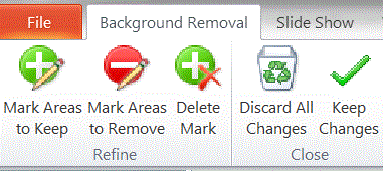 approximate area you’re interested in keeping or removing. Use Delete Mark to get rid of any drawn indicator lines you decide against or Discard All Changes to start over. When you have removed all the parts you don’t want, click Keep Changes to return to your document and see the results. If you don’t like the result, remember that Undo (Ctrl+Z) will undo your changes.
Tip: Expand your image before starting the Removal Tool to make it easier to see what you are selecting. This is especially helpful if your image has tiny details.
Mobilegeddon: Is Your Law Firm Website Ready to Pass Google’s New Mobile-Friendliness Test?
Some call it Mobilegeddon.
Google began to roll out a mobile-friendliness update last Tuesday, April 21, 2015. With this latest, major algorithmic change, Google will now be boosting search rankings of mobile-friendly web pages on its mobile search results.
A page is eligible for the “mobile-friendly” label if it meets the following criteria as detected by Googlebot:
- Avoids software that is not common on mobile devices, like Flash
- Uses text that is readable without zooming
- Sizes content to the screen so users don’t have to scroll horizontally or zoom
- Places links far enough apart so that the correct one can be easily tapped
How will this algorithmic change affect your law firm website’s search results?
Your website’s traffic from search results will begin to be impacted by whether it passes or fails Google’s mobile optimization requirements. With failure, your site’s search rankings on mobile searches may take a serious hit.
While early indications are that the sky has not yet fallen, and only modest fluctuations in search results are at this point being seen, it’s important to note this update is still in its implementation phase.
The long-term impact of this change may not yet be fully apparent.
Many commentators, including Kevin O’Keefe of LexBlog, forecast significant negative consequences for law firm websites that fail the mobile-friendliness test:
Those law firms who don’t act will suffer the consequences of their content being ranked well below mobile friendly content on smart phones – the result will be significant reductions in search traffic.
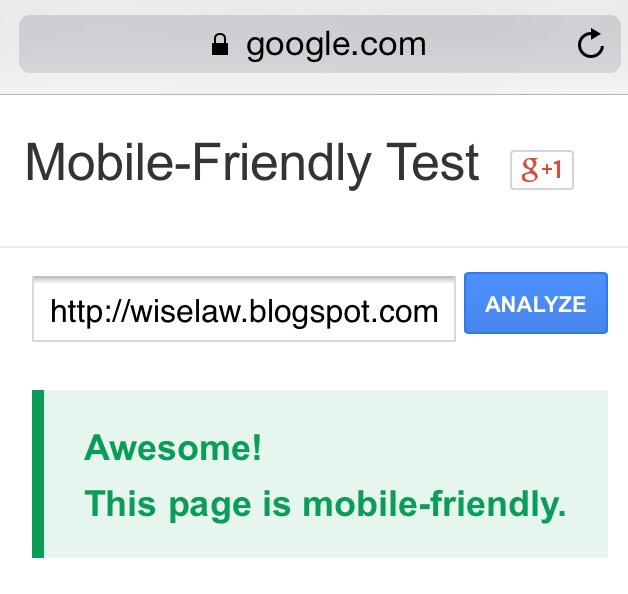
Google has published a mobile-friendliness test tool that allows you to easily check whether your website pages are mobile-compliant. Note that this test applies to each individual page, rather than entire websites.
If your key pages don’t pass the test, this might be a really good time to be in contact with a web developer about updating your site.
– Garry J. Wise, Toronto (@wiselaw on Twitter)


