







All Our Tips
Use Multiple Browsers and Compare Content

Today’s tip is a reminder that web delivered content may display or act differently depending on your browser and the size of your browser window. If it is possible in your organization, use more than one web browser.
To highlight this tip, I will show you three versions of Lexbox, a groovy new research tracking service that is available from Lexum at mylexbox.com.
Chrome – full screen:

IE – full screen:

Firefox – Full screen:

Note the very minor differences in where your see down arrows and menu options. This website is very well organized and is using responsive design. The page rescales based on the screen size and is very mobile friendly. Even with all of that care and attention the web developers brought to this work, each browser behaves differently.
Consider viewing websites in alternate browsers. You may be surprised at what is revealled when looking at something through a different lens.

Canada Day Tribute
Happy 148th birthday Canada.
There is a nice history of Canada day outlined at this federal government website that was updated in June of 2014. It reminds us of some facts. I share those blow that relate to finding the law of Canada Day:
- July 1, 1867: The British North America Act (today known as the Constitution Act, 1867) created Canada.
- 1879: A federal law makes July 1 a statutory holiday as the “anniversary of Confederation,” which is later called “Dominion Day.”
- October 27, 1982: July 1, “Dominion Day” officially becomes Canada Day. The date relates to the proclaimation of The Constitution Act, 1982, being Schedule B to the Canada Act 1982 (UK), 1982, c 11, documents both conveniently located on CanLII
I will celebrate today by playing O Canada on my ukulele.
What’s Your Bag?

♫ He ain’t no drag
He’s got a brand new bag… ♫
Lyrics, music and recorded by: James Brown.

This post continues the ‘no brainer’ posts about technology. This time it is about a bit of technology that most people don’t put much thought into, I suspect, namely their computer laptop bag.
Now some people will say that a bag is a bag is a bag. I am not one of them. In fact I can say that I am quite particular about my bag. I had a nice laptop bag given to me by our local Continuing Legal Education provider for being a volunteer that fit the bill nicely, but when it finally wore out after many years of hard use, I started looking for a replacement.
I first settled on an Eagle Creek bag – the “Strictly Business” carryall. Prior to this purchase I had had a number of bags from Eagle Creek of various sorts and liked them all. However, I discovered that the handles on the Strictly Business were too long…the bag almost dragged on the ground when carried by the handles rather than the shoulder strap- and I am a fellow who is 6’2″ tall.
But when the zipper blew after only 6 months of owning the bag, I went in search of an alternative bag.
What are the features that one looks for in a laptop bag? To me the important features are:
- Size: Look for a nice padded internal compartment for the laptop that is well-padded and once inside, won’t allow the laptop to slide around much. The compartment should be wide enough to take your laptop without a lot of extra room. The standard is to fit a 15″ laptop…if your laptop is bigger or smaller you may want to consider a larger or smaller bag.
- Durable construction. The bag that I received from CLE-BC lasted years of heavy use. That was my measure of durability. Look for good padding, stout seams and good hardware, especially the zippers. If you live in an area of significant rainfall or other harsh weather, ensure that the laptop will stay clean and dry inside. I prefer a soft-sided laptop bag but some may prefer a harder case. Personal preference. Velcro should close easily and be secure. Magnetic fastenings should stay closed. Seams should be well-sewn.
- Style: You are going to be taking this laptop bag to business meetings, on airplanes, checking into hotels and generally having it with you most days. Accordingly the bag should match your style.
- Weight: Leather may be a good choice in terms of durability and style; personally while I like the look and feel of a great leather bag, weight was also a consideration. I carry a great deal of ‘stuff’ and the extra weight of a leather bag was too much for me since I walk to and from the office. Accordingly, a fabric bag that is largely waterproof is high on my list of requirements.
- Size: As I mentioned, I carry a lot of ‘stuff’ from the laptop power cord to various other cords, papers, USB drives, my chequebook etc…so I want a bag that has lots of compartments, pockets, internal zipped pouches etc to organize things such as your cell phone, business cards, pens, a chocolate bar or two, your wallet and passport and even your toothbrush and toothpaste. Ensure that your laptop bag meets the new restricted size limits if you plan to use it on airplanes.
- Color: I am not referring to the color of the outside of the bag…that is a matter of personal preference. But the new bag that I acquired..the Solo Urban 17.3″ Ultracase, while black (with orange trim) on the outside is bright orange on the inside. If you are accustomed to ferreting around trying to find something inside a black bag you will totally appreciate the difference a bright orange lining makes. Finding something is now effortless. Plus the bag is perhaps one of the sharpest I have seen for looks. It it is a joy to carry and easily organizes and stores all my ‘stuff’.
A laptop bag can be one of the most important overlooked items in your business life. When it works well it is practically invisible since it performs its duties effortlessly and in a way that matches your lifestyle. I am quite pleased with my Solo Urban Ultracase…Daddy’s got a brand new bag!!!
–David J. Bilinsky, Vancouver, BC.
Say Thank You
When someone does or says something nice to, for, or about you, it is appropriate to express your gratitude.
This holds true for someone who goes out of their way to assist you with your legal research problem. I am not especially advocating a regular contribution to the wine fridge of your local law librarian who helps you all the time – I leave that to you.
Today’s Tip is particular to those (unexpectedly) wonderful public servants who call you back with information in a timely fashion, the colleague down the hall who saves you with a precedent, the partner who takes a bit more time to educate you about their strategy…moments of assistance that stand out. Be mindful of the assistance that others go out of their way to give you and thank them for it.
I believe that by recognizing others with thanks, we add a little bit of happiness to the world.
Readers of Slaw Tips – thank you! Have a happy day.
Mindfulness for Lawyers Goes Mainstream
The Wall Street Journal, of all places, had a feature this week on the increasing prevalence – and acceptance – of mindfulness training for lawyers.
In Lawyers Go Zen, With Few Objections, writer Jacob Gershman delivers more than just a clever headline. He focusses on the enhanced listening skills that can be developed through mindfulness techniques.
I don’t have much personal expertise in this area, but I do have the luxury of deferring on this topic to my significant other, Toronto marketing consultant Sandra Bekhor, who has completed mindfulness training.
She notes:
“Sharper listening skills will make you a better lawyer, presumably, whether you are listening to your client, opposing counsel or a judge. What you do with that information is up to you.
“Mindfulness training puts you into the present moment, so your observation skills are sharpened. You’re not distracted by preconceptions about the person you’re dealing with or the situation you are in. Being present helps you pick up on subtle messages like body language or emotional responses that you might otherwise miss.
Picking up on it can be a gold mine. It helps you see past the game face.
Of course, mindfulness is far more than just another tool to be utilized to gain tactical advantage, Bekhor notes.
Mindfulness training reduces anxiety, allows us to decompress and sharpens our ability to enjoy life, as humans and professionals.
Those interested in learning more can access the Ontario Bar Association’s Mindful Lawyer CPD series.
Archived video of the OBA’s six-module programme is available free online to OBA members.
– Garry J. Wise, Toronto
Legal Research Technology Concepts
Last week I posted about Legal Research Technology Skills. After reading Sarah Glassmeyer’s post on Slaw about The Future of Legal Practice and Technology for Law Professors. Today’s Tip is about technology concepts that I think are necessary for legal researchers. Concepts are things that a legal researcher should understand and have a rough idea of how they apply to legal research.
- Document automation (including software and word processing tools like fields and macros)
- Document management (what is kept within your organization) and content management (how are web sites, intranets and other content rich sources built)
- Open source publishing and Open Access
- Social media (Sarah included this as a skill for law professors!)
- Cloud storage
- Search engines other than Google and web browsers other than Internet Explorer
- Project Management
- Tags and hashtags, taxonomies
- The costs associated with legal research sources
- Research sources (fee based and free) that your organization does not subscribe to or have an access account for
The idea of understanding these concepts so that the legal researcher can pull them out or add them to the toolbox at the appropriate time is implied with this list.
Remember that individuals don’t necessarily need to carry their own toolbox, they can always call a carpenter (or a law librarian :-).
Use Siri Dictation Commands to Punctuate Your Life (Or at Very Least, Your Email)
I’ve previously blogged at Slaw Tips on the virtues of using Siri’s dictation functions to draft letters, emails and other documents typically created in day-to-day legal practice.
In short, dictation with Siri has increased my productivity, precision and the overall quality of my work product.
For those who are similarly inclined, I wanted to share a great list of Siri commands that can be used for punctuating as you dictate. With kudos and credit to iPhone Tricks, here is a partial excerpt:
Punctuation and Commands
Below you can find an extended list of punctuation and commands that iPhone’s voice recognition software can detect and apply.
Command Result
Period (Full stop). .
Comma. ,
Exclamation point. !
Question mark. ?
Colon. :
Semi-colon. ;
Dash (Hyphen) –
Forward slash. /
Equal sign =
Dollar sign $
Euro sign €
Percent sign %
Registered sign ®
Copyright sign ©
Trademark sign ™
Ampersand &
Smiley 🙂
Open quote “
Close quote “
Open / Close paranthesis. ( / )
Open / Close brackets [ / ]
Open / Close curly bracket. { / }
New line new line
New paragraph new pgh
Another good list of Siri Dictation Commands is here via CrushApps.
Sorry if the iPhone-centricity of this post has left anyone feeling bored or left out. Android and Blackberry users, feel free to entertain yourselves here.
– Garry J. Wise, Toronto (@wiselaw on Twitter)
Legal Research Technology Skills
Sarah Glassmeyer recently posted on Slaw about The Future of Legal Practice and Technology for Law Professors. Her opening salvo:
One of my pet peeves is when people throw around the word “technology” as a catch all to mean anything that can or will involve a computer. A common pattern is “In X number of years, this task will be replaced by TECHNOLOGY.” The speakers very rarely get into specifics as to when technology they mean. Personally, I like to amuse myself by replacing “technology” in these statements with “magic fairies.” Actually, I think fairies are more likely to exist than some technology that is universally adopted and solves myriad problems.
Sarah’s post goes on to focus on technology skills and technology concepts that she recommends for law professors. I think that there are technology concepts and skills that legal researchers should have. Today’s Tip is about technology skills that I think are necessary for legal researchers. Skills are things that a legal researcher should be able to do or use.
- Search a library catalogue database to find an appropriate set of textbooks on a topic
- Note up cases for judicial history as well as consideration of decisions by other cases and legal commentary using multiple database sources (fee and free)
- Copy and paste with keyboard shortcuts
- Sort in word processor tables and spreadsheets and be able to use methods other than eyeballs to identify duplicates in lists
- Add hyperlinks to documents
- Read a URL and understand where it is going
- Create documents answering a research question that make use of styles
- Search statute databases to locate current and historical legislation
- Use RSS feeds to keep current
- Use advanced search techniques of Google and other search engines (search within a site, by date, for words in page titles)
Next week’s tip will be about the technology related concepts a legal researcher should be able to understand.
Which tech skills should be added to this list?
SimplyFile
♫ I just want the simple things..♫
Lyrics, music and recorded by Miguel.
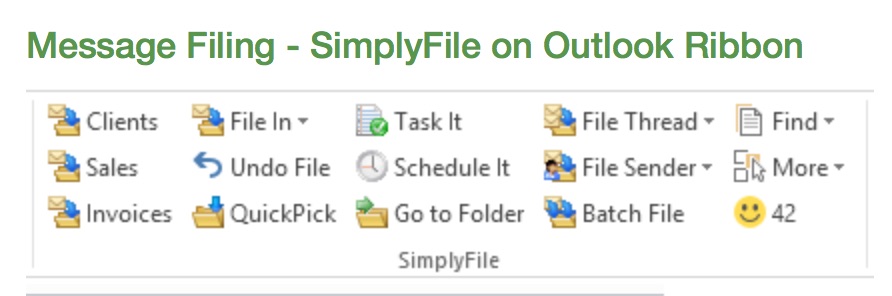
This post continues the theme of innovative technology for lawyers. John Heckman, a legal technology consultant for whom I have a great deal of respect recently wrote in his blog “Does it Compute” a piece entitled:
Technophobe and Proud Of It — the Consequences. He states that there are “attorneys whose willful refusal to become conversant with their firm’s technology will drag down its productivity and ability to respond to client needs.” John then quotes Sharon Nelson, another good friend and legal technologist who is a co-author of the annual American Bar Association’s Solo and Small Firm Technology Guide (for which the write is a contributing author) put it bluntly: “The raw choice is that lawyers must choose between adaption and extinction.”
Well, fortunately there are technologies that are simple, effective and easy to use even for technophobes. SimplyFile is one of them.
This application which is a toolbar add-on for MS Outlook on the PC (not Mac..sigh!). It does one thing very very well. It is an adaptive program that learns from you where you like to file emails in your Outlook folders.
If you set up your Outlook folders to match your client files, then SimplyFile will help you quickly and easily move both incoming and outgoing emails into their proper file in Outlook. It learns from you and correctly guesses the correct folder 80-90% of the time. Moving the email to the right folder once Simplyfile guesses the folder is just a mouse click.
No longer will you end up with all your outgoing emails in the ‘Sent’ folder in Outlook.
No longer do you ‘drag and drop’ emails to organize them.
I have been using SimplyFile for years now and love it. There are companion applications that speed up other tasks and for those I refer you to Techhit’s web page.
If you use a Document Management System (we use OpenText) Simplyfile helps you move your emails into your profiled folders in Outlook and from there they are indexed into the DMS system. I understand it is equally effective with Worldox and other DMS platforms that work with MS Outlook (but you should check with your DMS provider first).
When it comes to legal technology there is no question that for maximum adoption by lawyers on all points on the legal technology spectrum, the applications should keep it simple.
-David J. Bilinsky, Vancouver BC.
What Is Your Legal Research Project Status?
I despise long deadlines for legal research projects. Give me a complex project that has to be completed by the end of the week over a complex project that I must pick away at over a month or two any day. Why? With a longer project I must use formal project management – on myself.
Project managing a short deadline individual research question is easy to mentally manage by scripting the activity as “the research process”. To be clear, I am speaking of the type of legal research that is often assigned to junior lawyers, law students or law librarians. In reality, the legal research process that is used to answer a specific assigned question IS project management. There is a defined objective, scope, constraints, a plan, execution of the plan, monitoring of performance of the plan through the activity, and reviewing the completed product.
A longer deadline often indicates a more complex task so there is a compelling reason to lay out the project management piece of the action in a more formal way. Writing down the plan for a multi-pronged piece of legal research, checking in with delegates (and yourself) to ensure scope and timelines are in line, and all of the other bits of the project management diligence FEEL like they get in the way of doing the work which is the fun part for most of us.
Today’s Legal Research Tip: remind yourself that every legal research question is really a project; let the project management – managing the process of getting to an answer – be part of the fun.


