







All Our Tips
Expert Witnesses

Finding an expert or seeing if an expert has been qualified as such can be a challenging legal research exercise. Here are some tips and links to help you.
Tip 1
Use the Canadian Expert Witness Directory through Litigator on WestlawNext Canada. The directory links to cases the expert has been qualified in. You need a WNC password and access to the Litigator component for this of course, but it is a great place to start.
Tip 2
To find out if there are experts on your issue whose expertise has been qualified by the courts, search on CanLII for the following string:
qualif! & expert /p [insert your specific subject area with “/p” between each word]
This is a blunt force full text search so you will get results that are not relevant mixed in with those that are.
Tip 3
Check out the University of Toronto Blue Book of experts, or visit your local university website to search for academics.
Tip 4
Ask your friendly neighbourhood law librarian to search for experts – they will likely use tools like industry association websites to see who the prolific writers and presenters are on specific topics in addition to the usual paths above.
Have some advice on this topic? Please add your comments.

Health Care Practitioners: Please Don’t Keep Notes About Your Patients’ Discussions With Their Lawyers

Today’s tip is for health care practitioners whose patients are involved in litigation.
We recognize that it might be natural, and even good practice, for medical practitioners to ask their patients how their lawsuits are going.
Particularly for those practitioners who provide counselling, these discussions may be essential to your work.
Lawsuits can weigh heavily upon the psyches of those who find themselves involved in the legal system. The litigation itself can be very foreign and stressful. The future may in a very real way hinge on the outcome of their lawsuits. There may even be stressful issues between your patients and their lawyers. All of these issues can benefit from being talked through with a qualified health care practitioner.
It can be highly problematic, however, when practitioners include details of those discussions in their chart notes.
No I’m not talking about broad information about the patient’s litigation, here. I’m talking about specific nitty-gritty details of discussions with lawyers that are disclosed by your patients that shouldn’t ever find their way into a medical chart.
By that, I mean details about offers to settle, the patient’s financial expectations and the lawyer’s stated opinions about the value of a claim. Details about tactics and strategies. Information that no patient would reasonably want an adverse party to know.
Practitioners should be aware their their entire charts may at some point be producible in their patients’ litigation. If their chart notes include details of patient’ reports as to confidential discussions with their lawyers, those too may have to be disclosed. Solicitor client privilege could thereby be breached, and your patient’s legal interests could be compromised or prejudiced.
In keeping chart notes then, practitioners should exercise caution and prudence as to the details to be included. If a practitioner intends to include precise details in medical records, they should take care to ensure the patient is aware that such notes will be taken, and that informed consent is obtained.
But most importantly, practitioners should exercise caution and discretion.
Don’t unwittingly cause a harmful breach of solicitor-client privilege by charting details about litigation (and patients’ discussions with their lawyers) that have no genuine medical relevance.
Use Colour
Today’s research tip is more about research output than gathering. Do not be afraid to use colour to add visual clues to your research output. Using coloured text or tables is not appropriate for pleadings of course, but why not present your client with some visual clues in your opinions?
For instance, a table showing research results representing a quantum of damages could have background colour with the high low and mid-range results. If your organization incorporates colour into your brand, this colour wheel will help with shading.
For instance, if your colour is purple, shading a table or even an element of text that you want to draw attention to can be adjusted by considering your colour as 50% and increasing the shade to 75% or decreasing it to 25% using the monochromatic scale at a resource like the Color wheel chart from rapidtables.com

Adding colour to your research output can work to engage the reader.
How to Avoid a Dead Cell Phone When Travelling
♫ Cell phone’s dead
Lost in the desert
One by one…♫
Lyrics and music by Beck Hensen.

[Image courtesy of holohololand at FreeDigitalPhotos.net]
Having just returned from a long tenting camping vacation where my Blackberry was dead for most of the trip, I thought I would pass along some tips on how to avoid the kind of experience that I just went through.
Notwithstanding that we were travelling with both an iPhone and a Blackberry and charging them equally in the vehicle when on the road (courtesy of having USB connectors that allowed us to use the 12 volt ports and plug in the phones to charge while the vehicle was running), the iPhone would have a charge of about 90-95% the next day and the Blackberry would be dead.
Furthermore, the Blackberry kept on stating that it has exceeded its data limit plan (we were in the States for the most part and had data plans that had to be continually renewed) even when it was only ‘alive’ for 1 out of every 3 days (due to the fact that it would only be charged every 3 days due to our travel/camping schedule).
What I found out on my return was that there was a big software update from Blackberry that it kept on trying to download when on the road. If there was a notification of this, I have to say that I didn’t see it. As a result the attempted download ate up the data limit on the plan and also ate up the battery life as well.
So here is a collection of tips to hopefully avoid some of the problems encountered when travelling with a cell phone:
- Get a data roving plan before you leave. It is much better than getting hit with the pay-as-you-go rate in whatever jurisdiction you find yourself.
- Use WIFI whenever possible and turn off the data on your phone. Starbucks is my best friend on the road. For the price of a coffee you can connect to their Wifi network and check your email messages. If you are lucky you can find a table with a power connection too and top up your battery charge.
- If you can, use an unlocked phone or a small tablet that can accommodate a SIM card and purchase a SIM card in the jurisdiction of travel to cut down on your data costs.
- Consider buying a disposable phone in the jurisdiction where you are going. Often these are much cheaper than a roaming plan using a Canadian phone. Furthermore, Canadian cell phones may not work in other jurisdictions.
- Check to ensure that all software updates are installed BEFORE you leave. Or if you find out there is one released while you are travelling, find a WIFI hotspot and do the update there, if possible.
- Make sure you can charge your device wherever you may be. You may need extra plugs and adapters to accommodate the AC power in foreign jurisdictions. See a travel store before you leave.
- Get the apps, music and entertainment files you need before you leave.
- Take photos of your passport, important documents, serial numbers etc and put them in the cloud where you can get at them in the event your device and such are stolen or lost.
- Set up one HTML based email service with an easy to remember password that you can use in the event of an emergency, such as losing your device.
- GPS applications are wonderful when travelling, but remember that they also eat up data at a horrendous rate (at least in my experience).
I hope this helps ease some of the pain when travelling. You don’t want to end up in the middle of the desert with your cell phone dead!
-David J. Bilinsky, Vancouver, BC.
Linking for Law School Electronic Case Books
Thanks to Sooin Kim, Faculty Services Librarian with the Bora Laskin Law Library, University of Toronto there is another type of link creation tool to share. Thess tools are made for a specific purpose – to assist with building links to material that will be used at law schools.
Sooin shared the WestlawNext Link Creator https://lawschool.westlaw.com/admin/wllinkcreator/wllinkcreator.aspx. It is a nifty little tool that will build a link to a specific citation, a KeyCite record, a particular database or to a specific query. It also offers the link in three formats: URL, Iframe, and Hypertext link with all of the HTML code including an option to open the link in a new window.
Sooin confirmed that even though the tool points to the US Westlaw, it redirects to the Canadian source.
Duke Law (specifically the Goodson Law Library) describes the WestlawNext Link Creator on their Proxy Link Builder page. They also offer a link to a Similar tool for LexisNexis: LexisNexis Link Builder. I am sure that this tool offers similar features to those with law school LexisNexis access accounts.
I used to assist a colleague who was a sessional instructor prepare his electronic case book. Preparing links to material licensed by the University Libraries was arduous – find the cite through the proxy service links from the catalogue, copy and paste the URL, test it for link stability, build the hyperlink. These tools offer a great shortcut to that process.
Windows 10? Whatever…
Windows 10? Yawn.
If nothing else, the imminent launch of the new Windows OS gives us opportunity again to wonder why the Powers-That-Be at Microsoft continue to fail to grasp the obvious:
In terms of user interface, they got it right – with Windows XP. Its been mostly downhill from there.
XP set the gold standard for user satisfaction. That seminal OS would probably still have many millions of added, happy home and office users if the company hadn’t eliminated support for it a bit more than a year ago.
At its front-end, Windows 7 represented fairly lateral change from its predecessors, but Windows 8 and 8.1 were functional and marketing disasters. For many, the inevitable, reluctant change to Windows 8 came only with new computer purchases, and was followed by an equally inevitable scramble to find add-ons, including start menu hacks, that made Windows 8 function mostly like Windows 7 and XP.
While I am sure there have been many improvements along the way in the back end of these post-XP operating systems, from a strictly function-based analysis, I can’t think of a single thing I do on my Windows 8 computers that I couldn’t do on my Windows XP computers – or mostly, for that matter, on my Windows 95 computers that came before.
I’m hardly a casual computer user. It says a lot, then, that these fancy new operating systems mean so little in terms of the quality of my digital life.
So now, Windows 10 is about to arrive, a free download for many, and like most (I suspect), I will eventually make the change out of curiosity, if nothing else.
I fully expect that I will continue to ignore whatever this version does with its “Metro” apps, as I do on Windows 8.1. If there are additional, unpleasant quirks in 10 that fundamentally change my desktop experience, I will find workarounds to allow me continue to work in the comfort of an XP-like environment that’s as familiar as possible.
It was never broke, and now they are fixing it again, down at Microsoft.
For my part, I do not want my Windows experience to be like my iPad experience. I typically use my desktop and laptop for heavy lifting – concentrated and extensive law-related and creative tasks.
In my view, the iPhone and iPad are adequate or better for just about everything else – emails, documents, web-surfing, and social media, included.
I don’t want a dumbed-down environment for laptops and desktops that tries to emulate the simplicity of a tablet. The desktop and laptop cannot survive as products by trying to be as tablet-like as possible. Windows products are still genuinely better for certain things. Its complexity makes it so.
Microsoft would be well advised to pay closer attention to why and when people actively choose to use their Windows-based computers, rather than reaching for their readily accessible phones and tablets. If only Microsoft would just make it easier for users to do those things, and forget about the bells and whistles so few actually use…
Not gonna happen. I know.
So change and Windows 10 are now upon us.
We will adjust. Most of us will take whatever steps are necessary to make Windows 10 feel like Windows 7 or XP, and life will go on until Microsoft finally gets it – or Windows products become truly obsolete (whichever comes first).
Rant complete.
– Garry J. Wise, Toronto (@wiselaw on Twitter)
Deep Links to CanLII
To continue the theme from the last couple of weeks, Today’s Tip is about linking in to CanLII. The tips for WestlawNext Canada and LexisNexis Canada have been about linking to a specific source within the services and that makes sense for CanLII as well.
Stable, predictable, readable URLs are one of the truly wonderful things about CanLII.
What is the start page for searching Statutes and Regulations of Alberta?
http://www.canlii.org/en/ab/laws/index.html
How about Ontario legislation?
http://www.canlii.org/en/on/laws/index.html
The legislation of Manitoba?
http://www.canlii.org/en/mb/laws/index.html
The pattern for decisions is also very predictable and stable. The case R. v. Smarch which is cited 2015 YKCA 13 has this link:
http://www.canlii.org/en/yk/ykca/doc/2015/2015ykca13/2015ykca13.html
Following the logic it is CanLII website/reading language/jurisdiction/neutral cite for the court/ doc /year of decision/neutral citation/ and finally neutralcitation.html
The /doc/ part of the pattern is a static reference and except for that, everything after the language choice flexes with the decision. Citing a bunch of Court of Appeal decisions and want to make hyperlinks to CanLII from your document? You don’t have to find the decisions, and then copy and paste CanLII URLs, just locate the first one and copy and edit parts the citation to do the linking task quickly.
This works particularly well if you are linking to sections of legislation. The pattern for that is also predictable for legislation on CanLII that has the “Show Table of Contents” feature. Here is a link to section 1 of the most recent Controlled Drugs and Substances Act, SC 1996, c. 19:
http://www.canlii.org/canlii-dynamic/en/ca/laws/stat/sc-1996-c-19/latest/sc-1996-c-19.html#sec1
Guess what the link to section 2 is.
There are also CanLII related tools, like LexHub, to help with linking to bunches of cases from your work product for even speedier mashups.
Deep Linking to Westlaw Canada Sources
Last week, I gave a shout out to Ted Tjaden for sharing some info about deep linking to LexisNexis Canada sources, and I am continuing to thank Ted this week. Ted shared some information about deep linking into WestlawNext Canada.
Deep-linking to the Canadian Abridgment:
https://nextcanada.westlaw.com/Browse/Home/AbridgmentTOC/TOR.XVI.6/View.html (this should be strict liability, rule in Rylands v Fletcher)
When you are in the Abridgment, you can usually get the abridgment schema code and simply insert it in the foregoing URL. The portion of the URL above that is the schema code is TOR.XVI.
I have had good luck with jumping to a browsing page for WestlawNext Canada content by copying a URL link from anything that is hyperlinked. This method requires first going to the service and then copying the URL. For instance here is a link to the Saskatchewan Queen’s Bench Rules (2013):
The string is not quite as comprehensible as Ted’s example for the Canadian Abridgment, but it still works, even with a sign on interruption.
The point of Today’s Tip is to not be afraid of deep linking. The fact that I can only read part of my copy & paste URL to know that I am linking to the Saskatchewan Rules is acceptable. Knowing that I will have to update the link if the platform has a major change (like from eCarswell to WestlawNext Canada) doesn’t outweigh the benefit of making the links and using them while they work.
Deep Linking to LexisNexis Canada Sources
Hat tip to Ted Tjaden for Today’s Tip. Ted is a fan of deep linking to sources including fee based sources of legal research. I am a fan of Ted, including his excellent Irwin Law text Legal Research and Writing which has a companion website. Ted recently shared the pattern of how to deep link to specific material in LexisNexis Canada.
As you may know, not all databases in QL give you the “hyperlink” option.The following pattern gives you a stable URL to a single database:
ICLIP = http://www.lexisnexis.com/ca/legal/search/UrlApiShowSearch.do?sfi=CA03STCmtrySrch&csi=281866
The only variable is the CSI number. You can get the CSI number from the “Info” icon in the Source Directory.
To deep link to a combined/global database, separate the CSI numbers with a comma:
ICLL/CLSI: http://www.lexisnexis.com/ca/legal/search/UrlApiShowSearch.do?sfi=CA03STCmtrySrch&csi=281868,281863
I really appreciate being able to link to live commentary on commercial sources. In my organization links like these appear in our library catalog and on our Intranet pages. Linking to sources is the best use of licensed materials, and lets you use specific parts of a commercial database in compliance with your licence agreement – unlike downloading something and linking to a download (a no-no). Linking also means that you are seeing the current material when you follow a link.
Stephanie Parisien, Senior Customer Care Representative at LexisNexis Canada offered this additional info:
The basic pattern to give you a stable URL to a single database is:
http://www.lexisnexis.com/ca/legal/search/UrlApiShowSearch.do?sf?sfi=YYYYY&csi=XXXXXX
YYYYY = a search form code from the list below
XXXXX = the csi (constant source identifier) for the specific database. You can find the CSI by locating the source in the Quicklaw Source Directory and hovering your cursor over the source information icon. The CSI appears in a URL at the foot of the browser.
CA01STLegCmnSrch Legislation
CA01STLegBillsSrch Legislative bills
CA01STHistLegSrch Company Profile
CA01STIntLegiCmn International legislation – common law
CA01STIntLegCvl International legislation – civil law
CA04STJrnlsSrch Journals
CA04STIntJrnals International Journals
CA06STSrvSrch Services
CA06STIntServices International Services
CA01LNSimplSrch News and Companies
CA02LNCmpSrch Company Profile
CA00STGenSrch General Search
CA02STCseCmnSrch Cases
CA02STIntCseCmn International Cases – common law
CA02STIntCseCvl International Cases – civil law
CA02STPrsInjurySrch Personal injury
CA02STQuickCiteSrch QuickCite
CA02STWrngDismSrch Wrongful dismissal
CA03STCmtrySrch Commentary [used in Ted’s example above]
CA02STBrdsTribSrch Boards & Tribunals
CA03STIntCmtry International commentary
CA05STFrnPrcSrch Forms & precedents
CA05STIntFPrecdt International forms & precedents
CA01IntPrPRA Intellectual Property Practice Area
CA02ImigrPRA Immigration Practice Area
CALUSelectContent Legal Updates Page
CA04FamlyPRA Family Practice Area
CA05CrmnalPRA Criminal Practice Area
CA03EmplmPRA Employment Practice Area
Finally, to link to the table of contents it should look like this:
http://www.lexisnexis.com/ca/legal/results/renderTocBrowse.do?csi=355292&pap=srcdir
ScanSnap Is a Snap!!!!
♫ Snap, what a happy sound
Snap is the happiest sound I’ve found
You may clap, rap, tap, slap but
Snap… makes the world go round…♫
Lyrics and music by Moosebutter.
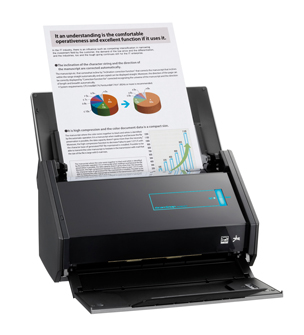
Continuing with the theme of technology that just works, I would be remiss if I didn’t mention the Fujitsu ScanSnap iX500.
This little scanner punches way above its weight. In fact in the years that I have been talking about scanners and going paperless, no one has ever said that they have regretted purchasing one of the ScanSnap line of scanners. They have been a hit with every size firm, with every practice area and every type of lawyer right across North America. Why? They do their job simply, quietly, quickly and very efficiently.
What do they do? Here are the specs:
- 50 page automatic sheet feeder
- full duplex scan
- 25 pages per minute in full colour, faster in B&W
- works with Windows and Mac computers (I use mine with my MacBook Pro)
- works with Android and iOS mobile devices and tablets
- comes bundled with Adobe Acrobat Standard (for Windows PCs only, regrettably for us Mac users) as well as other bundled software
- comes with a ‘carrier sheet’ – a dual layer clear plastic sheet that allows you to scan loose papers and receipts
- can be set to OCR (optical character recognition) files automatically
- detects colour, greyscale and black & white
- you can create a PDF, text-searchable PDF or JPEG file
- using Wi-Fi, you can scan directly to a personal computer, iPhone, iPad or Android device
- if you wish, you can scan directly to your existing Evernote, Dropbox, Google Docs, SugarSync and Salesforce accounts
The ScanSnap iX500 comes with a set of bundled software:
- ScanSnap Manager (Windows and Mac)
- ScanSnap Organizer (Windows)
- ABBYY FineReader for ScanSnap (Windows and Mac)
- Adobe Acrobat X standard (Windows)
- PFU CardMinder (Windows and Mac)
- Rack2-Filer Smart and Magic Desktop (Windows) – Available only with iX500 Deluxe
- ScanSnap Folder (Windows)
- Scan to SharePoint (Windows)
- Scan to Mobile (Windows and Mac)
Full specifications can be found here and system requirements here.
I have a ScanSnap at home and love it. It has allowed me to take my paper files and digitalize them and eliminate the need for paper files. I also upload my documents into Dropbox and this allows me to have a full cloud-copy as well as a local copy of all my documents. Have a hard drive failure? No worries…get a new PC or Windows, link it to your Dropbox account and ZIP…your documents are now dowloaded on your local computer. I know ..I experienced this. Everything in my Dropbox account was quickly and easily recovered notwithstanding the HD crash (unfortunately I found out to my regret that my photos..that I thought were backed up in iCloud ..were not. Now all my photos are backed up in Dropbox). For important documents and folders, I use third party encryption that creates encrypted volumes within Dropbox for security.
In my world, Snap makes the world go round.
–David J. Bilinsky, Vancouver, BC.


