







All Our Tips
LinkedIn Dos and Don’ts for New Lawyers

With over 467 million users in more than 200 countries (including at least a 1 million in the law practice industry) and web traffic that ranks it as the 24th most visited site on the planet, LinkedIn is the social networking tool of choice for professionals.
Regardless of whether they trying to find new lawyer, or looking for you specifically, a Google search is one of the first things prospective clients will undertake. Along with the bio on your firm website, your LinkedIn profile is likely to be at or near the top of any Google search results. Clients will be very tempted to click on your LinkedIn profile as it will instantly tell them if they know anyone that knows you –a key factor when someone is selecting a lawyer. This makes LinkedIn a very powerful marketing tool.
Perhaps less obvious, is the power of LinkedIn as a professional networking tool. Other lawyers or professionals may use to find someone to send a referral to. It is also used for hiring purposes by law firms and recruiters. Reporters use it to identify people to interview for stories and CPD providers might find speakers for their programs.
For these reasons, you should take the plunge if you aren’t already on LinkedIn, or take a bit of time to tweak you LinkedIn presence if you are already using it. It is very easy to create and maintain a presence on LinkedIn. And, when one considers ethical obligations and other practical dangers, LinkedIn is the safest social media tool for lawyers to use.
Creating a profile
Your profile is the foundation of your LI presence. Here are some tips for creating an impressive LI profile:
DON’T list every job you ever had:
Some of you were lucky enough to have really interesting, exciting or unusual summer jobs. Good for you, but will it really impress the firm where you want a job (or a potential client when you are a lawyer)? In many cases, probably not. Include a reasonable level of detail about your work experience if you think it will impress a potential employer.
DO list other relevant or interesting background:
You should include other relevant background information in your profile. The LI profile page outlines what you should include. Give details about your college or university degrees; affiliations, articles or books you have written; awards you have won; volunteer experience and so on. Note that you can change the order of the sections on the profiles page – put the sections that highlight your strengths at the top of your profile.
DON’T use formal and dry CV-speak:
Inject a little personality to let people know more about you. Ask yourself what clients really want to learn about you.
DO make your profile public:
While your LI contacts will always see your full profile, LI allows you to selectively hide details of your profile from other LI users on the Privacy & Settings page. This defeats the purpose of being on LI. Most of you should share all or most of your profile with everyone.
DO create a LI vanity URL:
By default, your LI URL will be alpha-numeric gibberish. A LI URL that includes your name is far more friendly. You can personalize your LI URL by clicking Privacy & Settings > Privacy > Edit your public profile. I suggest you use the following: linkedin.com/in/FirstNameLastName.
Collecting contacts
Collecting a network of contacts is the very essence of LI. Here are some tips for building a good collection of LI contacts.
DO consider the quality, not the quantity, of your LI contacts:
We all want to be popular but ultimately, the quality of your contacts is more important than the quantity. While a high number of LI contacts may look impressive at first, potential clients will dig deeper and judge you by the details in your profile and the quality of the people in your network.
DO make it easy for people to connect with you: LI allows you to limit invitations to connect to people in a contact list or people that already know your email address
(Settings > Email Preferences). Don’t make it hard for people to connect with you. Configure LI so that anyone can send you an invitation to connect.
DON’T accept LI connection requests from people you don’t like, respect or know (personally or by reputation): Politely say “no thanks” or just ignore the invite. This can be awkward, especially when people are pesky and keep extending invites to you. Protect your reputation by making sure you like and respect the people you connect with. Don’t accept connections from total strangers.
DO be careful about conflicts of interest:
You may need to be cautious about connecting with the judges, experts or opposing counsel that might be involved with your files. Having such people as contacts might create an impression of a conflict of interest for a firm that wants to hire you.
DO send personalized contact requests:
Generic connection requests are cold and impersonal. Few things will make a stronger positive first impression than a personalized invitation to connect. This is especially helpful if the invitee may not be sure of or recall their connection to you.
DO use the “People You May Know” feature:
Look for this box on your My Networks page. It has a list of people LI thinks you might know based on contacts of your contacts. It does a good job of finding people that you will know.
DO mine the contacts lists of people you know:
Once you connect with someone in LI, you can see their list of contacts (if they have made their contact list public). As many of us work and socialize with the same smallish group of people, looking at the friends of your friends will help you find other people you know. The “Invite accepted” email is a great reminder to do this.
DO use lists of other groups of people you know:
I have had great success adding contacts by reviewing lists of names from some of the organizations I participate in (e.g. members of the Ontario Bar Association). This works well, as many LI users list the different groups they belong to or the activities they participate in.
DO use the “Search” feature to find other contacts:
Enter the names of companies or other entities where you know people to add people to your contacts list. Do remember to invite people you are connecting with in other social media channels to LI: While you will not want to add everyone you connect with in other social media tools, this will get you a few extra contacts.
DO cross-market your LI presence:
Let people know you are on LI by adding the LI logo or your LI URL to your email signature (make it a link), your business card, and anywhere else it will be visible to people that might want to connect with you.
Posting updates
Most LI users are in a mad dash to collect contacts, and they are watching other LI users do the same thing. Unfortunately, they are missing out on one of the key benefits of LI: Being visible to your contacts by sharing information with them.
DO post regular updates, but don’t overdo it. Do what is right and works for you. At the start, that might be one update a week. Over time it might grow to a single daily update or even three daily updates. Get on a regular schedule, and stick to it. Even better, post longer updates (click on “write an article”) as they get more exposure from LI.
DO share interesting ideas, news, links or information:
Strive to post updates your contacts will feel are worthy of reading. Send information that is practical, helpful, interesting or informative. On occasion, even funny things are fine.
DON’T blast all your updates out at once:
It’s great to be efficient and work on your updates at one time (e.g. first thing in the morning over your coffee), but remember that not everyone is online all the time. To give yourself greater visibility, use tools like HootSuite or TweetDeck, which allow you to schedule your LI updates for a later point in time.
DO be professional:
What goes around comes around, and it doesn’t matter if it’s in person, in print or online. Be professional at all times, because everyone is connected to everyone on the web. When using LI you must comply with the Rules of Professional Conduct at all times.
DON’T use LI messages for lawyer/client communications:
You can’t assume messages sent through LI are private. Don’t use it for lawyer/client communications. Do inject some personal info, but not too much: Social media connections are built on personal relationships. You need to share some personal information so your contacts can learn more about you. But always remember that LI is a professional network and most things that happen in Vegas, the bedroom or the kitchen are not appropriate for posting on LI.
DON’T automatically blast all your other social media updates to your LI contacts: You can and should mention content that you post on your blog or in other social media channels, but don’t bore us all by blasting everything through LI. As a filter, note that you can configure your LI account to display only tweets with the #in or #li hashtags.
How to be more visible
As I stated above, posting regular updates or writing longer posts is key to getting value from LI. But there are other simple things that you can do to give yourself greater visibility with your contacts.
DO comment on the updates your contacts post:
If you like, agree, or even disagree with something one of your contacts has posted, share your two cents by posting a comment on the original post. For reputation building, try to post comments on the updates of respected or well-connected contacts.
DO ask questions:
Social media is all about two-way communication and interactions. Asking a question in an update is a great way to engage your contacts in a discussion. And if you ask a question, make sure you read and comment on the answers!
DO tweak your profile:
By default, LI will automatically post an update every time you change your profile. You can turn this off, but I don’t think you should. Make it a habit of tweaking your profile once or twice a month.
DO join a LI group:
LI has a groups feature. Groups help people that are interested in a particular topic, entity or event find each other. There are also groups for events, associations and other entities. I guarantee there are groups on many topics relevant to your area of practice. Click on “Interests > Groups” and enter some keywords to search for groups that are of interest to you. But be warned: Some groups have far too many consultants and vendors aggressively marketing themselves.
Power user tip
For those of you that are already using LI and want to take it to a higher level, I offer the following tip:
DO look at and tweak your LI settings: I have mentioned the LI Settings and Profile configuration pages several times. Visit these pages and look at the various settings you can change. Most of you will want to go with the default settings, but you may find there are configuration options that will make LI operate in ways that are better suited to your personal preferences.
So there you have it: Some simple rules to govern your use of LinkedIn. Not only might it help you find a job, it will be a useful professional networking tool for marketing when you become a lawyer.
This post originally appeared on the AvoidAClaim blog.
Editor: Dan Pinnington

Lawyers, Don’t Miss This Step in Your Marketing Plan

How is marketing a law firm different from marketing a packaged goods business? Instead of creating desire for a product, you are creating connection with people.
So, it stands to reason that the basic structure of a marketing plan that say sells detergent doesn’t quite cut it for lawyers. Aside from the obvious difference in the implementation of the plan, there’s a critical step missing. The piece that outlines how to market the individual professionals participating in the plan (whether they are speaking, writing, networking or other) is called the personal marketing plan.
- The firm level marketing plan includes all the aspects of the plan that represent the firm as a cohesive unit, like the logo, website, business presentations, brochures, business cards, signage, stationery, company pages on social media, firm videos, newsletters… Essentially, all the elements that require a high degree of consistency and professionalism, across the board.
- The personal level marketing plan, on the other hand, includes the specific activities of each participating individual.
While the firm and personal levels of the marketing plan are distinct steps, there are many synergies between the two. So, for example, if the individuals participating in the plan were planning to be heavy users of social media, the firm level plan could include a modern web presence, a blog, a social media strategy and a PR strategy. If, instead, participants were planning to do a lot of speaking, the firm level plan could include proposal letters, research on venues, a power point presentation and a newsletter.
The beauty of formalizing personal marketing activities (which many lawyers actually get to, but on more of an ad hoc basis), is that they create a self reinforcing loop with the firm’s marketing efforts. Individuals are set up to succeed, by way of the firm’s activities. And, in turn, when the individual lawyers succeed with their personal plans, the firm’s efforts get a boost. And so on. And so on…
—
For more reading on marketing plans, see these past articles on SlawTips:
- Main Street..or Wal*Mart? Is It Time to Rethink Your Marketing Mix?
- 5 Tips on Marketing for Law Firms (Video)
Also, see the following articles by Sandra Bekhor at Toronto Marketing Blog:
- Lawyers, are you committed to your marketing plan?
- Marketing Plan – Definition
- Maximize Return on Marketing Investment with a Marketing Plan
Bardal Factors Employment Law Tool

Researching employment law? You will be excited to learn about a new employment law resource, bardalfactors.ca. Designed to be used by lawyers and self-represented litigants, this tool enables you to quickly and easily identify reasonable notice periods for termination and dismissal.
Specifically, the tool allows you to locate cases that have applied the Bardal factors. What are these factors exactly? The factors come from the 1960 decision Bardal v. Globe & Mail Ltd. (1960), 24 DLR (2d) 140. They include age, length of employment, character of employment, and availability of similar employment. According to the website, the factors:
Represent the starting point in determining reasonable notice. And since there are over 1,000 rulings from Canadian courts expressly laying out precisely how the factors were applied, everyone – from employment lawyers to employers to employees – can look through the rulings and form a pretty good guess of how a court might rule.
However, bardalfactors.ca cautions that employment law is very complex and the factors are only a basic starting point for determining legal entitlement to notice. More research is always needed. The tool is still under development and is available in beta.
[This tip by Alan Kilpatrick originally appeared on the Law Society of Saskatchewan Library’s Legal Sourcery Blog]
All Well and Good
If I had a dollar for every time he’s heard Good, thanks – and you? in response to How are you?, I’d be writing this from a villa in Tuscany. (Or not writing it all, just sipping Negronis on a deck-chair by the pool.)
The grammatically correct response to how are you? is well, not good. Good traditionally refers to a moral, not a physical or mental, state. I’m good really ought to be confined to situations where you mean you are virtuous, good at something or well-behaved. (And not as a way of saying ‘no, thank you’ to an offer of food or drink.)
Well is both an adjective and an adverb; good is only ever an adjective (or a noun), and therefore it can’t modify a verb.
So, We did good means we effected works of charity and the like, rather than we did a good job. For that, you mean We did well, unless you want to be what Bryan Garner calls ‘unrefined’.
But this appears to be a losing battle: pass me another Negroni.
The battle is entirely lost with the verb to look. Classically, one would have said That colour looks well on you – but you would attract uncomprehending looks if you said that now.
There is still time to win the adverbial battle with constructions like Travel safe or drive clean. Safely and cleanly, please: it’s how you travel or drive, which demands an adverb to modify the verb. (Although drive clean is possibly justifiable if you mean clean as an adjective that describes a drug-free driver.)
Sometimes good is the right choice, however: with taste and smell, for example (where good isn’t so much an adverb as an adjective describing whatever is being sampled). You would use well if you were referring, though, to an expert wine-taster’s skill at sniffing and sipping.
Feel is trickier. Many insist that it’s OK to say I felt bad about having to fire her, but traditionally it’s badly. James Brown may have said I feel good! (and I wouldn’t change that song for all the Negronis in the world), but grammatically it should be well (even if that could also suggest feeling well in the groping sense). We still say I don’t feel well when we’re ill.
Robert Warren Fiske sums it up in his Dictionary of Unendurable English (2011): ‘People who use good where well should be are soulless speakers, hopeless writers.’
Next time: navigating social media
Tell Me What You Want to Do
- I know it can be done in Word (or Excel, PowerPoint, Outlook, and OneNote). I’ve done it before but I don’t remember how or where it is on the menu.
- I know it is there, but I don’t have time to look. I need to get this done now.
- The instructions say look for Picture Tools, look for format tab, and click…. Where is everything? Seriously…
If you have ever been in any of the above situations, read on. There is a great feature for you in Office 2016. “Tell me what you want to do” (also known as Tell Me Assistant) is a handy tool available in Microsoft Office 2016.
 Context-sensitive help has been around for a very long time and most people are familiar with it. Tell Me Assistant takes it one step further. Simply type what you want to do in the Tell Me Assistant box. Instead of getting instructions on how to do something, Tell Me Assistant shows you the menu required to get the job done. As you type into the Tell Me box, Tell Me Assistant will provide a list of suggestions. Click on the one you need and you get the menu immediately. If the task requires further selection of options, they will be provided on a flyout menu. No more looking for menu items on the ribbon or following lengthy instructions.
Expert users of Office who know their keyboard shortcuts by heart may find the Tell Me Assistant redundant if not downright irritating like Clippy the Office Assistant (Office 97 to 2003). Admittedly typing Alt-Ctrl-c to insert a copyright symbol is a lot faster, if you remember the shortcuts. But for the rest of us, Tell Me Assistant is a time saver. And let’s not forget those times when you are on the road with a mobile device and no external keyboard.
Below are a few examples:
Insert £, €, ©, ®, and other symbols (Word)
Put your mouse where you want the symbol to appear. Type symbol into the Tell Me Assistant box. Pick the symbol you need and voilà, it’s done. By the way, I used Tell Me Assistant to insert the à in voilà.
Text Box (Word)
Highlight the text to be put in a text box, type text box in the Tell Me Assistant box.

Click and drag the handles to resize the text box and click on the Layout Option icon on the top right corner for text wrapping options.

Page Number (Word)
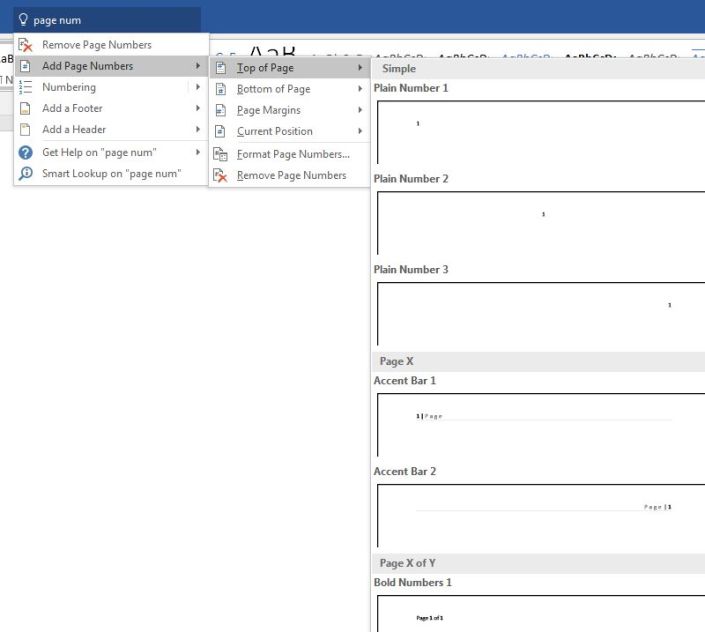
Type page number into the Tell Me Assistant box, choose the position and format of page number on the flyout menu.
Pivot Table (Excel)
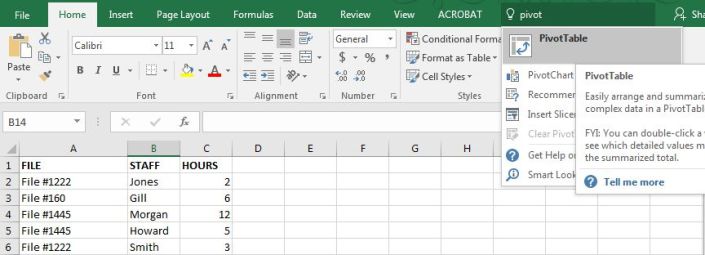
Here’s my all-time favourite. Highlight table cells, type pivot table in the Tell Me Assistant box.
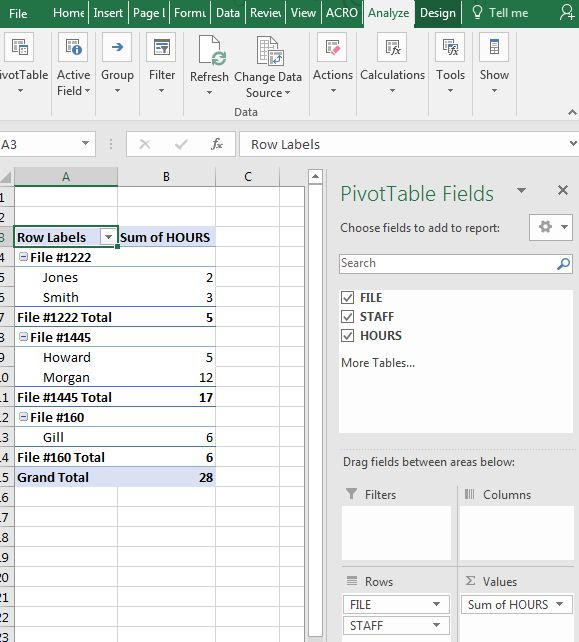
and here you are with a pivoted table:
Here are a few more of my favourites. Give it a try.
- Footnote
- Table of contents
- Change case
- Link
- Bookmark
- Cross-reference
- Margin
[This tip by originally appeared on the Law Society of Saskatchewan Library’s Legal Sourcery Blog]
Own Your Own Practice? Stay on Top of Your Expenses and Payments With Your Bookeeper
This is especially important if you run a firm where your income varies significantly from one month to the next, such as personal injury and other litigation practices.
I have seen lawyers run into trouble when they didn’t meet regularly with their Bookeeper and organize themselves to make quarterly GST payments. All of a sudden a large bill comes from CRA that was not necessarily on the budget for the month and compromises cash flow.
It’s also important to stay on top of and track personal versus business expenses monthly to ensure the business is taking advantage of all deductions available. In particular, if there is not a dedicated company credit card and the owner manager has to remember all of the expenses that were personal and business later in the year. This can be time consuming and very tricky!
—Jackie Porter (@askjackieporter)
Where Do I Find a Point in Time Version of the Transportation of Dangerous Goods Regulations?
This tip was suggested by Marnie Bailey of Fasken Martineau DuMoulin LLP.
Unlike the vast majority of Canadian regulations, you can’t find a consolidated version of the Transportation of Dangerous Goods Regulations on the federal Justice Laws website; instead the Justice Laws website refers you to Transport Canada’s website. While Transport Canada has a copy of the current consolidated version, it does not make previous versions available on its website, so what is a law librarian to do? Head to the Wayback Machine of course!
There is a lovely capture of how the Regulation read right before a major 2016 amendment; this removed a frequently referred to table from part 8.1.
The Depressed Client (Part 6 of 9)
In this sixth post of a series inspired by Justice Carole Curtis’s Dealing with the Difficult Client, we discuss the depressed client. The depressed client can come in various degrees, from being sad all the time to suicidal ideation. If the client’s life is in danger, remember that you are not the client’s therapist. Refer the client to help, such as a family physician, therapist, social services, or other community services.
When taking instructions from a depressed client, document clearly what you have communicated and what the instructions are. Confirm afterward – perhaps waiting several days if possible – that the instructions have not changed. If you have made recommendations that the client does not want to follow, which can happen if the depressed client is unwilling to take risks, however sensible, then make sure you have documented the exchange by email or letter.
A depressed client can also be slow to take action. In this case it may be worthwhile to schedule in-home visits or make phone calls at various times. The client may decline a phone call the first time, but take it at another, when the mood has lifted. In most cases, calm persistence can eventually lead to a successful lawyer-client relationship. At the same time, if you simply cannot get instructions in a timely manner, consider ending the retainer.
Who and Whom
You knew this would come up sooner or later.
The simple rule is that who is a subject (Who said that?), whom is an object (To whom is that letter addressed?). The verb to be, you will remember, takes a subjective completion (who) rather than an object (whom).
But it’s a bit more complicated than that.
First, who has largely displaced whom in common usage, to the point where the Oxford English Dictionary admits that it is ‘no longer current in natural colloquial speech’. As a result, one usually hears It’s not what you know, it’s who you know. That really should be whom you know (of course), because you need an object for you know.
On the other hand, people sometimes use whom incorrectly because they think it sounds classier: I’ve actually heard May I ask whom is calling? from someone on the other end of the telephone. And those of a certain vintage may know the line from ‘Should I Stay or Should I Go?’ (1982) by The Clash: ‘Exactly whom I’m supposed to be’. Great song, terrible grammar.
Who and whom can also be what’s called relative pronouns: the man who mistook his wife for a hat but the lawyer whom time forgot. Here again, the subject-object distinction governs.
Another complicating point is that whether it’s who or whom depends on the surrounding words. It’s correct to say I’ll talk to whomever but not I’ll talk to whomever will listen. In the second example, that whomever is wrong because you need a subject for the will listen bit – and that has to be whoever. Similarly, it’s Whomever we hire will work hard rather than Whoever … because you need an object for we hire.
Confused? Take comfort in the fact that Shakespeare got it wrong when he wrote Young Ferdinand, whom they say is drowned – as did the King James translators of the Bible with But whom say ye that I am? These examples can be readily fixed if you prune the excess words to get at the core of the sentence: in the example from The Tempest, they say is merely a parenthetical remark, the core being Ferdinand, who is drowned; and the verse from Matthew is, essentially, But who am I?
And while we’re on the subject, don’t confuse who’s and whose. Who’s is short for who is, as in Who’s who? Whose, on the other hand, is a relative pronoun: Whose book is this?
(And it’s not Who’s whom? – again because the verb to be takes a subjective completion (who, in this instance) rather than an object.)
Week after next: all well and good
The Dishonest Client (Part 5 of 9)
In this fifth post, inspired from Justice Carole Curtis’s Dealing with the Difficult Client (written when she was a lawyer), we take a look at how to handle the dishonest client. There are different degrees to which a client can be dishonest. On one end are clients who may tell half-truths or who conceal facts from you, and on the other are clients who maliciously lie to you. It isn’t often clear whether the intention is malicious or if the untold truth can come back to hurt you or your client at a later date.
Outright lies can be a good reason to terminate the relationship. It may signal a lack of trust between you and the client that cannot be repaired. If you make misrepresentations on behalf your client, the danger arises if you knew or should have known about the misrepresentation. A client that is lying may be using you for malicious reasons – avoid this client at all costs.
That said, there are sometimes excusable reasons a client can lie. A personal injury client may not recall his or her previous injuries very well. A small incident leading to pain and a visit to the family doctor can be forgotten years down the line if it resolved quickly. Similar seemingly innocuous incidents can easily be forgotten or re-interpreted as time goes on. For this reason, it is important in such files to order medical records (the third most common source of malpractice claims in civil litigation, and over all practice areas, is inadequate investigation).
Once obtained, meet with the client, go over your notes documenting what your client told you, and review with the client the medical record which contradicts the client’s account. These kinds of lies are not necessarily malicious and may simply indicate that the client needs to be sure about certain aspects of the file, and that words should be more carefully chosen (“That has never happened to me” vs. “If it happened, it’s been rare”.
Another reason a client may be unwilling to tell you everything is cultural. If the client comes from a culture where encounters with lawyers and “the system” are negative, the client may see you more as an obstacle and necessary evil than as someone who is there to help. The client may think there is something to hide, when in fact it is better to disclose to you. In this case it may take time to build trust, and patience may be rewarded.


