All Our Research Tips
Subscribe to Government & Court Press Releases
Press releases are a good source of free current awareness alerts and a legitimate resource for understanding the intent of new legislation. I’m sharing a few of my favourite sources for timely and helpful press releases today. I’m a BC law librarian so I use these three sources often. Please share your own favourite sources for press releases for your area of Canada in the comments!
Supreme Court of Canada – There are two places you can sign up for press releases from the SCC, but if you want the most timely updates, get this one*, not this one. I like these press releases because they give you a 2-4 day heads up on which applications for leave to appeal will be decided each Thursday and which appeals will come out each Friday.
BC Government – If you sign up for press releases for your area of interest and choose to get them “as soon as it’s published”, you’ll be the first to know when a relevant bill is introduced in the BC legislature. Not only is this a great real-time alert for legislative developments, but the press release often links to backgrounders and the full text of the bill. Also, the press release is the first place you’ll learn about the intent of a bill, since it will be available long before Hansard. Because the BC government press releases are so comprehensive and timely, they’re the perfect document to flip to a client when an important bill comes down.
Federal Department of Finance – The central fire hose of federal government press releases is overwhelming and often omits significant niche announcements. I recommend signing up for email delivery of individual Ministry press releases instead, such as for the Department of Finance. The option to receive press releases about new Notices of Ways and Means Motions will keep the tax lawyers among us happy, while the option to receive press releases on new public consultations is important for solicitors advising clients on lobbying opportunities.
—Bronwyn Guiton (@BronwynMaye)
* The SCC press release mailing list I prefer is often difficult to subscribe to from institutional internet connections. Make a note to subscribe at home on your personal internet connection instead
Posted on May 4th, 2016 - Editor: Bronwyn Guiton

—
Go Gender-Neutral
Strive for neutrality, or at least balance.
As Richard Wydick suggests in his excellent Plain English for Lawyers, ‘many readers, both women and men, will be distracted and perhaps offended if you use masculine terms to refer to people who are not necessarily male.’
Wydick also notes that it’s equally distracting to use ‘clumsy efforts to avoid masculine terms’, or to use only feminine terms to redress imbalance (and the latter has a sort of law-school ring to it, which may not be what you’re aiming for). And we can safely leave the androgynous new coinages xe and hir to graduate students in gender studies.
Ways to go gender-neutral:
- use both masculine and feminine: each client will have to consider his or her own circumstances
- omit the pronoun altogether: the client will need to make the decision (or a client) instead of the client will need to make his own decision
- use ‘you’ instead of ‘he’ or ‘she’: as a consumer, you’ll need to make your own choice rather than each consumer must decide for himself
- use ‘it’ instead of ‘he’ or ‘she’ (this may often work, if many of your clients are not natural persons): the banks’ customer will have to decide for itself not the bank’s customer will have to decide for himself or herself
- use the plural: bank customers will have to decide for themselves
- repeat the noun: a client will have to decide whether this is appropriate for that client’s particular circumstances rather than …for her circumstances
- alternate between masculine and feminine: this can look awkward and artificial, however, and you can mess up where a pronoun should actually be gendered, thereby giving someone an accidental sex change
- use the passive voice: not recommended, as it weakens the impact of your writing
- terminology: chair not chairman, representative not spokesman (although fisherfolk sounds silly, and fishers not much better – nor would I recommend referring to the four horsepersons of the Apocalypse)
Ways not to:
- he/she or his/her: ugly (don’t even get me started on (s)he)
- their or themselves: fine if your antecedent is plural (clients will need to assess their needs themselves) but NEVER if it’s singular (a client will need to assess their needs is wrong, wrong, wrong; say its needs or his or her needs)
Next tip: –ice, –ise, –ize
–Neil Guthrie (@guthrieneil)
Posted on April 27th, 2016 - Editor: Neil Guthrie
—
Don’t Forget Google Scholar
Google Scholar is a useful way to start a search of academic literature, particularly for subject areas for which you have limited or no access to the relevant databases. Google Scholar has indexed an impressive number of academic articles; a 2014 study estimated that it contained just under 100 million English-language academic documents.
Google Scholar uses the same search syntax as Google. Searches can also be limited by author (e.g. Author:Tredwell), name of publication, and publication date. You can also limit search results to those that have links to the full text of the paper.
Although the majority of references in Google Scholar are just to citation information, where available it includes links to the full text of papers. If you are trying to find a specific paper that someone has cited, Google Scholar is a good place to start looking.
–Susannah Tredwell (@hannasus)
Posted on April 20th, 2016 - Editor: Susannah Tredwell
—
Think About Lay-Out and Design
If you’re lucky, you’ll have marketing or communications folks who will prepare your piece for publication, but there are some design aspects you should be thinking about too.
White space
Dense blocks of text are hard on the eyes. Too many words will repel readers.
Think about breaking up long paragraphs and sentences so your piece is easier to read.
Headings and sub-headings
A useful way to impose order when you’re writing – and to guide the reader when the piece is published.
Block quotations
Avoid long quotations. As Matthew Butterick says in his illuminating book, Typography for Lawyers:
‘Lawyers sometimes put voluminous material into a block quotation intending to signal “Hey, I quoted a lot of this source because it’s really important!” The actual signal a reader often gets is “Hey, I didn’t write any of this, I just cribbed it from somewhere else!”‘
As a result, readers tend to skip big chunks of quoted text.
You’re better to quote only the essential bits, integrate the rest into your own text or, if a long quotation is absolutely necessary, explain what it says before you quote (on the assumption the reader won’t actually read the quotation).
Bulleted and numbered lists
These are really helpful:
- they’re easy to read
- they provide emphasis and
- they break up your text
Keep each item in the list short, though. Punctuation optional after each item (more modern and elegant without it).
Boldface and italics
Use sparingly.
As Butterick points out, ‘if everything is emphasized, nothing is emphasized.’
Bold and italics are also harder to read than roman (regular) text.
Next on the agenda: go gender-neutral
–Neil Guthrie (@guthrieneil)
Posted on April 13th, 2016 - Editor: Neil Guthrie
—
Don’t Forget About SITE: Search
In what is becoming a biennial tradition here on SLAW Tips, I want to remind everyone about SITE: search, one of the advanced search tools offered by Google.
Google’s SITE: search allows you to search just one website for specific terms. This can be useful when a site’s own search form is disappointing or missing altogether.
There are two ways to access this tool: via Google’s advanced search form or directly from Chrome’s address/search bar. Back in 2011 Shaunna Mireau gave us a detailed explanation on how to use the advanced search form. More recently, in 2013, Dan Pinnington showed us how to use this tool directly from Chrome’s address bar.
I prefer to use the SITE: search directly from Chrome’s address bar. To do this, follow these three steps:
- In Chrome, navigate to the website you want to search. In my example, we’ll use Transport Canada’s website (https://www.tc.gc.ca/eng/menu.htm).
- In Chrome’s address bar, delete all the characters before and after the root domain. For example, I would edit the full URL (i.e. https://www.tc.gc.ca/eng/menu.htm) to be tc.gc.ca.
- Add the phrase site: before your edited text (no spaces!) and enter your search terms after the edited URL (with a space!). Press enter and review your results. For example, my search would look like this:
site:tc.gc.ca “minor works” “navigation protection”
— Bronwyn Guiton (@BronwynMaye)
Posted on April 6th, 2016 - Editor: Bronwyn Guiton
—
Think of Your Reader
A lot of writing by lawyers is clearly intended only for other lawyers. Cases in point from a recent edition of Lexology:
Opinions: the Sixth Circuit’s most active authors
Squire Patton Boggs
This post examines which Sixth Circuit judges write the most opinions. My analysis examined opinions available on Lexis over a five-year span. On…
Delaware – Federal district court limits fee request
Morris James LLP
This is an interesting decision for the way it treats a fee request in connection with the settlement of Delaware litigation. Counsel in a case filed…
This sort of thing is fine if your target market is a lawyer at a big firm – except that probably isn’t your target market. And maybe not even if it is – those two examples aren’t exactly gripping.
Your readers may well be in-house counsel, so things of purely lawyerly interest may work for them.
But wouldn’t it be better if your in-house counsel reader could distribute your blog post (or whatever it is) to all the business people he or she supports, with no requirement for translation into plain English?
In order to expand your reach, it’s better to pitch things to a more general, non-lawyer audience. Some tips:
- plain language wherever possible
- avoid legalese – or use it once, explain it and move on
- no Latin!
- be practical in focus – why is this legal development important to someone outside the rarefied world of lawyers? what action does your reader need to take (or avoid) as a result?
- don’t go into too much detail – you want to give the highlights, without giving away all your wisdom and without miring your reader in the minutiæ (which can be a bit, well, boring)
Next tip: lay-out and design
–Neil Guthrie (@guthrieneil)
Posted on March 30th, 2016 - Editor: Neil Guthrie
—
Use a Checklist
As a great fan of checklists I highly recommend Atul Gawande’s book on the subject, The Checklist Manifesto.
In his book Gawande makes the case that a checklist is valuable even if you have done a specific task many times before and know exactly what you are doing. He illustrates this point by giving examples of how checklists are used in hospitals and airplanes.
Checklists are a very handy tool for libraries. They can be used:
- to train people to do new tasks;
- when staff are away and tasks need to be performed by someone else;
- for processes that involves multiple staff members, so that everyone knows what has been done and nothing falls through the cracks; or
- to carry out specific research tasks, e.g. researching a company or an individual. You can list all the resources that should be used on the checklist, and, once the task is done, forward a copy of this list onto the person who requested the research so they know exactly what resources were consulted.
Another value of a checklist is that designing it forces you to think about the process you are documenting. Are there parts of the process that are unnecessary or are there procedures that should be on the checklist that aren’t?
–Susannah Tredwell (@hannasus)
Posted on March 23rd, 2016 - Editor: Susannah Tredwell
—
Capitals, Defined Terms and Acronyms
Go easy with these.
Capitals
Where there are too many words with capital letters, the visual effect is jarring and over-emphatic. Don’t succumb to what Bryan Garner calls ‘the unfortunate tendency toward contagious capitalization’ in legal writing.
Above all, Resist the Temptation to Capitalise Important Words, which can look a bit Winnie the Pooh (‘I have been Foolish and Deluded … and I am a Bear of No Brain at All.’).
By all means say ‘the Government of Canada issued bonds’, but when the reference is more general, you can lose the upper case: ‘the government wants to extend tax breaks to …’ – or ‘the federal government’. Similarly, ‘The Province entered into an agreement with…’ but ‘former president Bill Clinton’. Except as a defined term in a legal document, ‘the board, ‘the company’, ‘the chair’.
Litigators take note: outside the context of a factum or other formal document, you really don’t need to stick a capital on every instance of ‘judge’, ‘justice’ and ‘court’. Do refer to ‘Justice Cromwell’, but in your legal update it’s cleaner and more modern to write ‘The judge ordered …’ and ‘The court decided…’ A capital letter in these cases is not the sign of respect it is sometimes said to be (‘the Judge is an idiot’? – or perhaps that’s ‘Idiot’); it’s a just hold-over from the days when all nouns were capitalised in English. Nouns still take the upper case in German, but the practice began to fall out of general usage in all but lawyers’ English after about 1750.
I do like the official use of a capital T for ‘Her Majesty The Queen’, however. But you’ll need to convince me why ‘internet’ needs an upper-case I.
Oh, and no capital after a colon (unless the word would have one anyway, like Canada). The Globe & Mail does this, and it irritates me. The colon doesn’t indicate the end of a sentence: it marks the pause before ‘delivering the goods that have been invoiced in the preceding words’ (Fowler, Modern English Usage).
Defined terms
A related issue.
Remember that if you’re writing a client-friendly blog post or article, a thicket of defined terms is off-putting, and often unnecessary. You aren’t drafting a contract that needs to have airtight, interlocking terminology.
If Alvin Chang is suing Jonathan Cohen, and there are no other Changs or Cohens in the picture, please don’t do this: The plaintiff, Alvin Chang (“Chang”), alleges that the defendant, Jonathan Cohen (“Cohen”), … If the dispute with Cohen is about a contract, and one contract only, there is no need to define it as (the “Agreement”). Just call it the contract or the agreement. Heck, mix things up and call it both; it will add a little variety.
Acronyms
Acronyms can be useful, but they become annoying if overdone – or even impenetrable. Examples from Lexology:
When your brand name is a claim—NAD cleans and straightens without support from advertiser
Venable LLP
There is lore that the beauty industry does not challenge itself sufficiently before NAD, and for this reason NAD brings more monitoring challenges…
CFPB proposes to delay TRID to October 3, 2015
Maurice Wutscher LLP
As referenced in our prior update, the federal Consumer Financial Protection Bureau (CFPB) issued a proposed rule to change the effective date for…
If you’re an advertising insider or know beauty industry lore, you may also know that NAD is the National Advertising Division of the US ad industry’s self-regulatory system, administered by the Council of Better Business Bureaus – but would a law firm’s client know that (or even an ad agency’s)? And while someone in financial services may recognise CFPB, I’m not so sure about TRID. It turns out it stands for the TILA-RESPA Integrated Disclosure rule – whatever that is. Wouldn’t it be better to describe it as the ‘”know before you owe” rule for consumer lending transactions’? (And don’t use reference as a verb.)
Next up: think of your reader
–Neil Guthrie (@guthrieneil)
Posted on March 16th, 2016 - Editor: Neil Guthrie
—
Use LexBox for Case Law Monitoring on CanLII
In 2011 Shaunna Mireau wrote about the usefulness of CanLII as a monitoring tool for the latest decisions in an area of law. I’m updating that tip by highlighting the value added by LexBox for this sort of CanLII monitoring.
As Shaunna wrote, the basic approach to using CanLII for decision monitoring is a quick three step process.
- Compose a search that will retrieve the type of decisions you’re looking to monitor for.
- Sort your results by “most recent” rather than “by relevance”.
- Click the RSS button and copy and paste the provided URL into your feed reader of choice. (I like Feedly, but Outlook has RSS capabilities too.)
The only issue with this approach however is that CanLII RSS feeds have a 1-year expiry date built into them. For example, below is a CanLII RSS URL for a search of all Alberta decisions about contaminated sites:
http://www.canlii.org/en/search/rssSearch.do?rssExpiryDate=2017-02-28&type=decision&jId
=ab&sort=decisionDate&text=contaminated20%2F5%20
(site%20OR%20soil%20OR%20property)&page=1
That expiry date means your new RSS feed will actually stop delivering results after one year. (This is a normal bandwidth management practice on CanLII’s part – no knock on them!) So, what is the solution for long term case law monitoring?
I’ve turned to LexBox because it uses the CanLII API itself so that saved searches never expire. Just install their Chrome extension and then use the LexBox “Set up alert feed” option to save your CanLII search for long term monitoring.
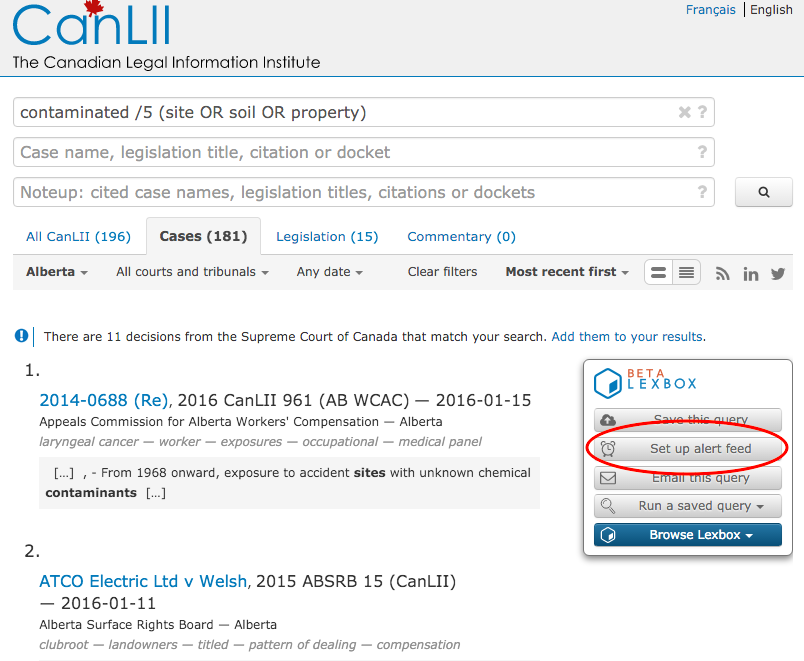
A big high five to Montreal’s Lexum for the development of LexBox! It’s a tool of many uses and this tip covers just one of the ways I leverage it on a daily basis. If you’re interested in learning more about LexBox, Nate Russell wrote a longer SLAW article about it in July 2015.
— Bronwyn Guiton (@BronwynMaye)
Posted on March 9th, 2016 - Editor: Bronwyn Guiton
—
Banish Business Jargon
This could be a long one, but I’ll restrain myself as much as possible. And I admit, not all of these are strictly writing tips.
Many aspects of the working day are, well, kind of boring. In response, people in business seem to want to jazz up the English language – but the result , more often than not, is a collection of expressions that were often bizarre to start with and hackneyed soon after.
If everyone is using them, you don’t want to. Instead, dazzle your reader (or listener) with language that is clear, precise and original.
In the world of business jargon, some patterns emerge (my commentary in italics).
Metaphors that were once vivid
‘Once’ being the operative word – they are now just clichés.
Examples:
- drill down, suit up, deep dive, high-level, circle back, run it up the flagpole, think outside the box, push the envelope [so it falls off the desk?], open the kimono [racist, sexist, more than faintly creepy], moving parts, take if offline, bring me up to speed, dial it back, drink the Kool-aid, patch me in, walk you through it, take-aways, bandwidth, next steps, optics, herding cats, on the same page, in the loop, close the loop, bring to the table, heads-up, heavy lifting, paradigm shift, special sauce, secret sauce, connect the dots, back of a napkin, grow the business, ducks in a row, boil the ocean, window of opportunity, peel the onion, reinvent the wheel, hit the ground running, pain-point, touch-point, point-person, space [as in ‘the banking space’; just say ‘banking’], take it to the next level, gain traction, move the needle, trial balloon, hill to die on, at the end of the day, the devil is in the details, game-changer, touch base [actually, all sports analogies], fall through the cracks, low-hanging fruit, buy-in, value-add, value proposition, reach out [you didn’t reach out; you just e-mailed], view from 30,000 feet
Verbs that aren’t (or shouldn’t be) verbs
Examples:
- reference [and ‘above-referenced’ is an abomination worthy of the sixth circle of hell], leverage, trial, action, incent, liaise [like ‘incent’, not even a word], impact [except in a dental sense; probably rendered a verb in more general use because people can’t figure out the difference between ‘affect’ and ‘effect’], language [ugh], plain-language [double ugh], task, repurpose, scope, whiteboard
Weird use of nouns
- learnings [never; nor should you talk about ‘a learning’], trainings [ditto], deliverable [adjective not noun, and not to be pluralised], ask [a verb that isn’t a noun], spend [ditto; you mean ‘cost’, ‘expenditure’ or ‘spending’], value-add
Noun-accumulation
- change-management, process-improvement, quality assurance, business process outsourcing, mission statement, thought-leader …
Meaningless platitudes
- going forward [are we ever likely to go back in time?]
- it is what it is [well, yes]
- solution [in the IT sense, really just a product or service; and often a ‘solution’ in search of a problem anyway]
- functionality [instead of ‘it has these functionalities’, why not just say ‘it does x, y and z’?]
- core competencies [are we interested in peripheral ones? just say ‘job requirements’ or ‘skills’ – and not ‘skill set’]
Awful adjectives
- key [let’s leverage our key learnings! no, let’s not], core, robust [fine for coffee or red wine, but not regulatory compliance], major, granular, iconic [please stop using this word, especially when describing things that aren’t images], seamless, proactive, impactful [um, how about ‘effective’?], high-level [which just means ‘superficial because I couldn’t be bothered to think about it’]
Next time: capitals, defined terms and acronyms
–Neil Guthrie (@guthrieneil)
Posted on March 2nd, 2016 - Editor: Neil Guthrie
—