







All Our Tips
Legal Infographics

A note about an infographic was delivered to me by email yesterday. Canada’s Anti-Spam Legislation website www.fightspam.gc.ca. The infographic touted in the email was titled “Worried its Spam? 5 Things to Look for”.
Sharing the infographic was encouraged in the email. Sharing is what infographics are all about.
Gyi Tsakalakis has a fantastic collection of Law Infographics on his Pinterest channel. Gyi has jsut started contributing to Attorney at Work. Gyi’s byline for his Optimize!column:
Gyi Tsakalakis helps lawyers put their best foot forward online because clients are looking for them there. He is a co-founder of AttorneySync, a digital marketing agency for law firms. You can find more of his writing at Lawyerist & Avvo’s Lawyernomics blog. You can ask him a question (or just say hi) at LinkedIn, Twitter, Google+ and Facebook.
Thanks Gyi for sharing your Law Infographics collection.

Hiring the Right Employee

One of our fellow PMAs recently shared a group photo that was taken almost 15 years ago. It prompted us to think about that meeting, and some of our former colleagues who have gone on to other employment in other industries. One such person is Diane Ellis, a brilliant lady who once worked with the Arizona State Bar and is now a successful psychologist and counselor. The following is a tip that she was the mastermind behind, and it’s probably even more useful now than it was when she first coined it. We’ve spiffed it up a little to take account of current technology.
If you’re a sole practitioner with a keyboard speed of 90 words per minute or skilled in the operation of speach recognition software, a speed typist may not be the best use of use of your hiring dollar. Before you hire, think about the tasks that require a law license. Unless you’re considering hiring an associate, you are going to have to continue to be responsible for all those tasks.
Your objective when seeking a new employee is to hire someone to do everything else that’s left. Concentrate on the tasks that don’t require a particular skill that you have, or that do require skills you don’t have and which take up your time and effort without producing revenue for the firm. Perhaps you need a new employee who can successfully handle routine correspondence and telephone inquiries about ongoing cases, or maybe your real need is someone who is a whiz with computers and can master your case management system, help you create a virtual office or help you get into the mainstream of using social media as a client development tool.
The right employee is one who can complement your skills by bringing missing abilities to the office mix.
Start at the Beginning
My browser is crowded with so many links in my favourites bar that sometimes it is faster to type a known URL than scroll for my link. Typing “parl.gc.ca” in the address bar of my browser inspired today’s tip. My shortcut to the parliamentary website skips directly to English, my sadly unilingual preferred language. As you can see below though, the beginning of the site has “important notices“…something that could be overlooked.

Click the image to enlarge.
Today’s Tip: Start at the beginning.
Tagging People Who Do Not Use Facebook in Photos Posted on Facebook


You can actually tag anyone in a photo, even if they don’t have a Facebook account. If you type in the name of someone who is not one of your Facebook friends when tagging a photo, you have the option of listing their email address. When you are done tagging the photo, they will receive an email that provides a link to the image. They will be able to see the photos in which they are tagged, but nothing else on the site, unless, of course, they get their own Facebook account.
Learned this while writing an article on Facebook tagging. The info comes from the Facebook site: http://www.facebook.com/help/463455293673370/. Hmmm…
Giving Thanks
In writing this tip, we are cognizant that today is American Thanksgiving and that Canadian Thanksgiving was not all that long ago. Of the authors, one of us is American and one is Canadian. Accordingly it seemed appropriate to focus today’s tip on the act of giving thanks.
What is giving thanks? It is also called gratitude, thankfulness, gratefulness or appreciation. It is a feeling of genuinely and positively acknowledging the acts of another. It costs nothing but means everything. In some cases it can never be felt or acknowledged by those whose acts you are appreciating – such as being grateful for the selfless acts of another (such as acknowledging those who gave all at Remembrance Day).
It resonates in all major religions. In Judaism, you are grateful for acts of human kindness and goodness. The Eucharist is the most important rite in the Orthodox, Catholic and Anglican churches: the name arises from eucharistia – the Greek word for thanksgiving. In Islam, the month of fasting of Ramadan is intended to create a state of gratitude.
Studies have shown that grateful people have positive mental health: they are happier, less depressed, less stressed and have more satisfaction with their life. They sleep better. They cope better. Grateful people are more likely to sacrifice individual gains for community well-being. They are altruistic.
Can you increase or enhance your sense of gratitude? Studies have shown that the act of writing and delivering a letter of gratitude has a big effect on improving someone’s short-term quality of life. Longer term effects are generated by writing and keeping a gratitude journal – or daily record of three things you are thankful for each day. Participants in these studies voluntarily continued their gratitude journals long after the study was over.
We can set our deeds to the music of a grateful heart, and seek to round our lives into a hymn — the melody of which will be recognized by all who come in contact with us, and the power of which shall not be evanescent, like the voice of the singer, but perennial, like the music of the spheres.
(William Mackergo Taylor, reported in Josiah Hotchkiss Gilbert, Dictionary of Burning Words of Brilliant Writers (1895), p. 290.)
A Visual Tip
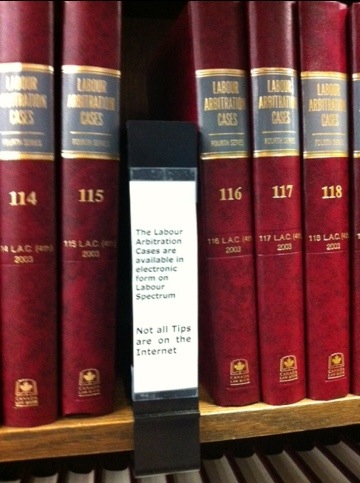
As the shelf sign says, not all tips are online. Remember to read the notes provided by your law library.
Put Your Clients First
There are many ways to orient your practice. Many lawyers set up their practices around their needs in terms of producing legal work. This is all quite natural since you need to be working in this environment at all times – it makes sense to set things up so you put your needs first so you are working as effectively and efficiently as possible – right?
Wrong.
Advisor after advisor states that to exceed client expectations – to have clients who truly sing your praises to others – you need to place your own needs second behind those of your clients. This is not easy nor is it straightforward.
Many businesses say that they place their customers first – but you quickly realize that this is not quite true when you start to deal with them.
Putting client needs first begins right at the point of first contact. Are telephone calls answered promptly (after only a couple of rings)? If you are unavailable, is the caller given the option of going to voicemail or speaking to a live person? Does someone call the client back within a set period of time – even if it is just to say that you remain unavailable (due to other matters that you are dealing with) but that their business is important and to ask if can someone else assist them (such as your trusted legal assistant?).
Are clients made to feel that their business is important and valued? That everyone at the firm cares – and cares deeply – that their needs are being met? The first and perhaps most important step in moving to this business objective is to commit to placing the client’s needs first. This means that you measure all business steps in your business by this metric: Does it place the clients needs ahead of all other considerations?
Now you need to communicate this to your team and ask them to commit as well. Everyone in the firm needs to be all working from the same frame of reference and towards the same goal. Once the team has committed to this goal…then have the good sense to get out of their way and let them reorganize how they perform tasks to best meet the client’s needs. They know their jobs – trust them to follow your lead and do what is best. Your job is to keep your eye on what ultimately needs to be done for the client – but don’t micromanage!
Part of putting the client’s needs first is to recognize that being paid results from meeting (or exceeding) your client needs; it is not something that is put ahead of client needs. There is a trust relationship being built here…the work should be its own reward. Payment is then a recognition of good work and of commitments and trust being rewarded.
And speaking of trust, part of putting the client’s needs first is to always and totally tell the client how it is. Even if the news is bad. If trust is the byword then the client has to be able to trust you to give them the truth – whether it is good or bad. They need, and deserve, to hear it from you first.
You need to learn to like people and then to take a deep breath, sit back and truly listen to what they say about how you deliver your services. Ultimately the big test of whether you have met your client’s needs comes from them. Do you survey your clients – and take their comments and suggestions to heart? If you truly put your client’s needs first – those client surveys and what they reveal are gold. And gold is something that you can take to the bank!
Buy the Book
I am often asked by folks touring through my firm’s library, or in airports, or at various events, if we still buy books. I am always a little surprised by the question. We live in the world of Chapters and Amazon – books are a major player in the retail market – of course we buy books for our law firm library.
We have a rule about books, we buy a title if we are going to use it 3 or more times a year. This seems a reasonable tipping point for pain to borrow vs. pain to buy.
If you are thinking about buying Canadian law books, check out LegalPubs.ca. The site aggregates RSS feeds from Canadian legal publishers to show the latest offerings, and provides links to the source for easy access to purchase.
For older titles, used Canadian law books are available from plenty of online retailers. I have even used eBay to add to our library collection.
Hard copy books are still a great way to share one title among many people for a reasonable, single time only, purchase price.
Use the Way Back Machine to See Older Versions of Websites
Have you ever needed or wanted to look at a previous version of a website? This is easily done on the Way Back Machine (archive.org)
It allows you to browse through 
over 150 billion web pages archived from 1996 to a few months ago. Just type in the web address of a site or page and hit enter. (Unfortunately, keyword searching is not currently supported.) You will see a listing of dates that archives for that page or site are available for. Click on a link and you are surfing in the past. And the resulting pages point to other archived pages at as close a date as possible.
Looking at really old websites puts some perspective on how far we have come. There is an early version of the website I build for my old firm from December of 1996. Hmmm… fond memories of coding HTML in NotePad. At least I had hair in my bio picture way back then. 🙂
Importance of Document Management Software
There is much interest in taking a law firm paperless today and for good reason. Moving to the digital or paperless practice of law offers many benefits and cost-savings in addition to being *green*.
We find that when starting to talk about going paperless, the discussion typically becomes mired in details such as: e-document formats (Adobe Acrobat PDF/A — the archival PDF format), the media on which the electronic documents are to be stored (locally? backed up onto a remote device? on the cloud?), scanners, remote access, security and the like. Some firms want to discuss using electronic storage only for their closed files, eliminating the expensive cost of storing paper files for years. Other firms want to have all open and closed files in electronic form accessible on iPads, smartphones as well as desktop computers. Still other firms are concerned about cultural issues around going paperless and the change management process that would entail.
This post looks at just one issue in the whole range of possible issues – one that is fundamental to taking a law firm paperless yet is often overlooked. In the paper world, there are file folders and filing cabinets, both of which help keep the documents organized. The file folder has its brads (places to attach correspondence, pleadings, etc. in date order) and the filing cabinet keeps the file folders organized.
When a law firm goes paperless, however, there typically isn’t the appreciation for the electronic equivalent of the file folder and filing cabinet. Records — which could be pleadings, correspondence, emails, etc. — are usually found in numerous different places on the network. Emails may be stored in Outlook folders, while documents, such as pleadings, research memos and correspondence, may be in saved in various Windows folders. Worse yet, Outlook stores sent emails in “Sent Items” while incoming emails are typically filed in other folders.
Unfortunately, each software application used in an office stores its data in different folders scattered across the network. As the number of electronic files grows, the ability to gather all these disparate bits of information together into a “client file” gets harder and harder. This is only compounded if the firm stores part of its data ‘in the cloud’.
With paper files, the firm would typically print out all this information and store it in the file folder. In that situation, the way in which each application and user names and stores the records on the network and hard drives is largely irrelevant since “the file” still exists in paper. But as the firm moves to a truly paperless office, the disorganized nature of electronic record-keeping starts to become a problem. It is now harder to reproduce “the file” and the collection of folders or sub-folders that would otherwise be found in the steel filing cabinet.
Some firms use indexing and desktop search engines, such as Windows Search or X1 or Copernic, to find documents on the network, but this is not a workable equivalent to a good document management application. Other firms claim that their “standardized file-naming and storage convention” is good enough. Unfortunately, this convention only works as long as everyone, at all times, complies. Once someone decides “just this time” to not follow the convention, the system starts to break down. (The second law of thermodynamics basically says that any system, over time, goes from an organized to a disorganized state without the continual addition of energy to keep it organized — otherwise known as increasing the system’s entropy.)
So what should a firm do? The solution is document management software. This software is the equivalent of the steel filing cabinet, organizing all “records” — be they documents, emails, pleadings, etc. — into the electronic equivalent of the paper folder. Document management software keeps each folder distinct from the others, offering the organizational ability of the filing cabinet.
Once you draw together all the bits of information that comprises the ‘client file’ into one place, then you can avoid entropy and keep your files well-organized and accessible. You can find information quicker and with less effort.
With document management software, a document must be “profiled” before it can be saved on the network. Profiling entails keying in some information about the document: nature, author, form (pleading, email, etc.), client, matter and more. This “metadata” allows the document management software to know how to categorize the document properly. Emails, pleadings, correspondence, memos, etc. are all organized by client, matter, lawyer and date created.
Document management software also allows searching (including Boolean searches) by keyword, type of document, client name and other criteria. It offers version control, tracking and audit (who created what version) and other activities around document creation, modification and the like. Best of all, it offers the ability to draw together in one place on the network all the disparate records that would otherwise be affixed to the brad of a paper file. Remote access is enabled, and most programs allow “briefcasing” or mirroring the documents on a laptop with synchronization once you reconnect to the network.
Entropy is avoided since the user must profile the document before it can be saved. This is how the document management software achieves its goal: it imposes order on chaos.
By making a document management system the foundation of your paperless office, you can achieve the degree of rigour, organization and systemization that will allow you to develop your business even as people change and clients come and go. Furthermore, you will have built your paperless practice on a strong and sustainable base.


