







All Our Tips
Tips for Using Flight Searches and Hotel Reviews on TripAdvisor and Kayak

I travel a lot. When I ‘m on a tight schedule and need to know all my options, getting all available flights by time and a cost across multiple airlines in one place is invaluable. For business and personal travel, Kayak and TripAdvisor are two of my favourite travel resources for doing multiple-airline flight searches. You pick your dates of travel and desired departure and/or arrival times, and these sites give you a searchable and sortable list of available flights from most of the major airlines. I find Kayak and TripAdvisor tend to give very similar results, although sometimes one will give you flights options the other doesn’t. I always confirm flight options and fares on the actual airline sites – on occasion other options are presented, and sometimes they are cheaper.
This summer I went to Europe with my family. This involved checking all sorts of flights online and through a travel agent. The travel agent was helpful for answering my many questions about travel to Europe. And while TripAdvisor and Kayak didn’t give me some of the cheaper charter options the travel agent offered me, I found that these two sites gave virtually identical flight times and cost information for scheduled commercial flights options he offered to me.
Hotel reviews are the other great source of information from TripAdvisor and Kayak. While I usually don’t have to pick a hotel when I am attending or speaking at a conference, for personal travel there are always hotel choices to be made. Online reviews from real hotel guests can be helpful, but navigating large numbers of reviews can be tricky, especially when they are inconsistent. A few really nasty reviews can leave a strong impression, but not always the most accurate one. My rule of thumb is to look at the overall consensus – what did the majority of the reviewers say? Where most people happy enough to stay there again or would they look for another place next time? Looking at the overall consensus has tended to give me hotel stays that I have been happy with. And for some more great tips on navigating hotel reviews on TripAdvisor and similar sites, see Using TripAdvisor? Some Advice, an article that appeared on the A New York Times’ Frugal Traveler Blog.

Aim for an Empty Inbox Each Afternoon

As we head for the end of the year, your mind is probably already turning to things you’d like to change in the new year. We think that aiming for an empty inbox each afternoon is one of the best resolutions you can make.
The holy grail of current email management is the empty inbox. This is often referred to as Zero Inbox, RAFT (Refer, Act, File or Toss) or OHIO (Only Handle It Once). The idea behind all these systems is that you deal with each item in your Inbox only once by doing what lawyers hate most to do: making a decision now about how to handle the message, taking the necessary action immediately, and never looking back.
When an email comes in, you must decide immediately whether it is something you must do, something you can foist off onto someone else in the office to do, something you would like to keep for future reference but need not act on, or something you will never do, no matter how much time elapses or how much the sender pleads. At this point the two minute rule comes into play. If you can handle an item in two minutes or less, whether that means doing it yourself or forwarding it with appropriate instructions to someone else, then you must handle it immediately. This will usually be the case with items which you Refer, File or Toss, whether by just deleting or sending back a quick, but polite, message denying the sender’s request. (Caveat: All of these little two minute items can add up, so be sure that you allocate an hour or so at the beginning of each day, or a half hour a couple of times throughout the day, to handle them. If you are anxious to get on to other work, there is a tendency to overlook these items for the time being, but doing so will make the system fail.)
If the item cannot be handled in two minutes or less, then it needs to be sorted into either a high priority or a low priority folder or, even better, immediately turned into a task and scheduled for an appropriate block of time so that you can get it done.
There is a split of opinion as to whether or not it’s a good idea to use a folder full of messages as a “to do” list. I think it all comes down to how you best handle scheduled tasks. If your tendency is to file them away and never get around to looking in that folder again, then it’s much better to drag them either to the calendar or otherwise add them to your To Do list, however you maintain it.
The Zero Inbox system is great for getting the Inbox cleared out, which always makes its owner feel better and also helps you to avoid the situation where your Inbox becomes so cluttered that you can’t effectively tell when you have important new messages. But it doesn’t do much to tell you where to put the stuff that you’ve RAFTed out, so it’s up to you to set up adequate systems to make sure you actually get the work done on the items which are deferred.
Aiming for an empty inbox each afternoon will make you a much happier and more efficient lawyer in 2013.
We wish you health, happiness and prosperity in the New Year!
Supreme Court of Canada Decisions

Today’s Tip: Consider how you need a decision to help determine where to get it.
An announcement from the SCC last week inspired this tip:
Major addition to the Supreme Court of Canada decision’s website
The Supreme Court of Canada and Lexum are proud to announce that the Court’s decision website now contains all decisions back to 1907. Moreover, all the PDF versions of decisions up to 2010 are identical to the official version available in the Supreme Court Reports.
This major content addition has been made possible thanks to the support of the Supreme Court of Canada. The Court has been at the forefront of free access to judicial decisions for the past 20 years. Lexum is proud to provide its technology and infrastructure to ensure continuous and efficient availability of Supreme Court of Canada decisions.
The PDF copies, even for the earliest cases, are clean and beautiful. If I were preparing for a hearing and needed a copy of an SCC decision for the authorities, I would use this source.
If I were researching, comparing and contrasting case law, or noting up I would probably use a different source. Supreme Court of Canada decisions are available in many places:
- CanLII
- Hein Online
- LexisNexis Quicklaw
- National Reporter Service from Maritime Law Book
- The Supreme Court’s decision website
- Westlaw Canada
- Your local university, law society, or law firm library collection
I may have missed some sources, but as you can see, you have plenty of options.
Happy Holidays!
Start a “Thank You” File
As we approach Christmas our thoughts, of necessity, turn to giving, receiving and gratitude. These sentiments are the inspiration for this week’s tip.
Open a file (OK, maybe an email folder) just to save all the cards and letters (or electronic communications) from satisfied clients, the replies from speaking engagements, the letter from the Little League team your firm supported, anything that demonstrates that you are making a positive difference in the lives of others.
Practicing law is not always, or even often, easy. But as we always say, “What gets measured gets done.” Start measuring the impact that you are having on the world through your profession and your career, and when you’re discouraged and you start to doubt the worth of your work as a lawyer, pull out the file and flip through it. Its a wonderful life we lawyers are privileged to live!
Seasons Greetings to you all!
Legal News for the Super Busy
Are you the most busy lawyer in Canada? Do you still need to know what is going on in the legal industry in our country?
The US Legal Market offers busy lawyers a 5 minute daily visit of the RSS feed for the legal gossip blog Above the Law to keep up to date on what is happening inside the legal industry. Associate bonuses, policies from big law firms, law firm mergers, layoffs and closures.
Here in Canada, we have 140Law – a daily offering of legal headlines offered as a roundup post on the Wise Law Blog by Garry Wise and through the Wise Law twitter stream. Today’s research tip is to follow these headlines for Canadian legal industry specific news.
Thanks for compiling 140Law for us Garry, and Merry Christmas.
Jump to Windows Explorer and OS Finder With Keyboard Shortcuts
How many times a week do you go to Windows Explorer or OS Finder to find a file? Probably more times than you care to count or remember.
Windows users, next time you want to go to Windows Explorer, save yourself a ton of time with the Windows key + e shortcut – it allows you to open Explorer with a quick press of two keys. Press the Windows key first and a split second later hit the e key.
And an aside for those that aren’t familiar with the Windows key: on many keyboards it is to the left of the space bar and it has the Windows logo on it. Some specialized keyboards may have it in other locations as well. This is what it looks like:
OS users, next time you want to go to Finder, press Command and then hit Tab multiple times until Finder is selected, then press N (while still holding the Command key down) to open Finder. Command+Tab is similar to Alt+Tab in Windows, both allow you to cycle through all the open apps on a computer.
Not quite as simple or quick on the Mac in this case, but a keyboard shortcut can often get you to where you want to more quickly as it takes longer to take your hand off the keyboard and reach for the mouse or trackpad.
Remember these keyboard shortcuts next time you need to find a file.
Pull Together a Virtual Team Plan
Do things really change? Today’s solo lawyer is not much different from yesteryear’s. A characteristic of most solo lawyers (“legal rebel”?) over the years is their strong desire to retain their fierce independence.
One thing that has changed is that today’s legal rebel does recognize that the power of the Internet means that they no longer have to be alone. Courtesy of new collaborative tools, legal rebels can bring people together into virtual teams and practice in ways never before possible as a solo.
As a solo, you can build your own virtual practice using virtual teams. Along the way you can collaborate with a new and wider office team – by bringing in assistants, bookkeepers, IT support, accountants and others on an as-needed basis to meet your support needs.
You can also collaborate with those outside the office: experts, contract staff, litigation support personnel or providers, legal research, second chair lawyer assistance and the like can all be brought in remotely to your office to assist on your cases. This allows you to contract with all kinds of different staff with different skill sets on a short-term basis rather than full-time. You now can achieve a scalable office!
This is particularly important for a solo as your physical space most probably is limited and can only accommodate a few people. However if your office walls are virtual, you have a virtually limitless capacity to expand. These days you can even outsource your office administration!
Continuing on this outsourcing theme, courtesy of having a virtual office, you can still maintain that low overhead that is characteristic of a solo. Building a virtual team means that all of you can cut your commuting times down to a minimum as your team members are accessing your office remotely – typically from their homes. All of you can work in your pajamas!
A virtual office is a largely paperless office. It is also a mobile office since all you need is an Internet connection to work.
There is no question that a virtual office must be concerned with security and privacy issues (you don’t want your virtual legal assistant to be working from the same computer that her kids use…). There are a host of legal, ethical and technical issues as well.
You can be more responsive to your clients if you can assemble a virtual team quickly to ramp up for a big case or closing. It has been shown that virtual team members (as well as yourself) can achieve a better work/life balance from adopting this way of working/commuting! As a solo with a virtual office, you can now tap into previously inaccessible talent pools (however you risk losing your solo status!)
You have to start with the creation of the virtual team. To really build the team, you need to build relationships and trust in your virtual team members. This may be people you know and have worked with before or they may be someone you’ve heard about. Either way, it’s imperative that you build these relationships as part of building the team.
After you’ve established the relationships, you’ll need to determine what platform the virtual team will use to collaborate. This may be an existing server system or a virtual system in the cloud. Whatever the platform, you’ll need to make sure everyone is comfortable with the technology, the security, and access.
As with any law-related project, you’ll also need to define the service-level goals and reporting mechanisms, such as time and reporting sheets You need to determine who signs onto the project and what is the scope of services they will provide. This may be the most difficult part of the virtual project, but once you have this established (a strong “trusting relationship” and service expectations), you can easily estimate the time and costs associated with each virtual project.
If the project is yours, you’ll need to develop the leadership and management skills necessary to govern a virtual team effectively and efficiently. This is not all that difficult from a standard law practice – the only difference is that you don’t work face-to-face and if you tend to get frustrated because someone on your virtual team doesn’t answer the phone or email immediately, you’ll need to tender that frustration. In a lot of cases, virtual team members may be working on multiple projects simultaneously and you’ll need to take that into consideration.
As the client project moves along, you’ll have to knit the various parts together: keep the disparate parts of the team informed, involved and engaged. Minimize any conflict and foster a climate of cooperation and collaboration. This is very important, especially if your virtual team members are working on other projects. The “squeaky wheel” can also be virtual.
The first time you collaborate virtually on a new platform will be an obvious learning curve, not only for you, but also for your virtual team. Everyone will need to get comfortable with the platform in order to use the tools effectively. Also keep in mind that while you may use a particular collaborative platform, other members of your team may use a different platform and it may take a little while to get used to each way of doing things.
If you run into difficulties, don’t forget non-online ways of remaining engaged! Use some old technology and pick up the phone and call your virtual team members. Sometimes a periodic quick conference call can save a lot of hassle and frustration.
Perhaps, just perhaps, as ol’Bob has said, the times they are a’changing…
Check for Coming Into Force
I was looking at the Interest Act (Canada) recently which reminded me to remind Tips readers to look carefully and closely at coming in to force information when researching legislation.
The Act at section 4 reads:
Marginal note: When per annum rate not stipulated
4. Except as to mortgages on real property or hypothecs on immovables, whenever any interest is, by the terms of any written or printed contract, whether under seal or not, made payable at a rate or percentage per day, week, month, or at any rate or percentage for any period less than a year, no interest exceeding the rate or percentage of five per cent per annum shall be chargeable, payable or recoverable on any part of the principal money unless the contract contains an express statement of the yearly rate or percentage of interest to which the other rate or percentage is equivalent.
R.S., 1985, c. I-15, s. 4; 2001, c. 4, s. 91.
The research trail at the bottom of a section will tell you amendments to that section that are in force for federal legislation. The Department of Justice Laws site gives a handy list of pending amendments when you look at the table of contents for an act:
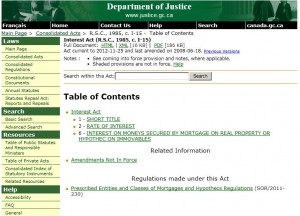
The Amendments not in force particulars for this act have a couple of references to section 4. This means that there are acts that have been assented to and are only awaiting proclamation to be brought into effect. They many never be proclaimed and eventually be repealed under the Statutes Repeal Act. Read very carefully and look at the Table of Public Statutes for the key to coming into force dates.
The Table of Public Statutes for the Interest Act shows:

The at the Privy Council Office website provides a search engine for identifying proclamations by act name.
How to Untag Yourself on Facebook (And Why You Might Want To)
Have you ever been tagged in a picture or post on Facebook? If you have a Facebook account, the answer to this question is likely yes. And don’t feel comforted if you aren’t on Facebook: Anyone can be tagged in a photo, even someone who doesn’t have a Facebook account.
Given the nature of Facebook, a tagged photo or status update can easily reach a very large number of people. Being tagged in a way that portrays you in a positive or neutral way is likely not a problem for most people. However, being tagged in an unflattering photo or post will at least be embarrassing, and at worst, it could seriously damage your reputation or relationships.
If you are on Facebook – and even if you are not – you should understand tagging and know how to untag yourself if you are tagged in an unflattering photo or post.
What is tagging and how does it work?
A tag is a special kind of Facebook link. You can tag people, photos, places and pages in anything you post on Facebook. And it’s a two-way street − anyone can tag you in photos and other information they post on Facebook. Anyone clicking on a tag has a direct link to the tagged person’s timeline.
Creating a tag is easy. When viewing a photo click on Tag photo, place the crosshairs over a person’s face, click once and type a name. Facebook will give you name suggestions from your friends list. In a status update or comment the names of friends will automatically turn into tag links. You can also create a tag by including the @ symbol in front of any names you mention. People often do this in status updates to say who they are with.
When you tag someone in a photo, people will see “Tagged by [Your Name]” when they hover over the name of the person you tagged.
Who can see tags? Lots and lots of people. When someone is tagged in a photo or post it is likely visible on the timelines of the following people:
- The audience selected for the post by the person posting the content (by using the audience selector drop-down next to the Post button) and can include their friends, friends of friends, or if they select custom, selected individuals or groups;
- The person tagged;
- Friends of the person tagged; and
- Anyone else tagged in the post and the friends of that person.
And it doesn’t end there. Anyone who can see a photo or post an update can also tag it, like it, or comment on it.
Removing a tag you don’t like
Even well-meaning friends might tag you in unflattering photos or mention you in comments you’d rather not see shared with a large audience. If you’re not happy with a post you’re tagged in, you should take steps to remove the tag or the post. To do this, place your cursor over the photo or post, click the edit button (the pencil in the top right corner), click on Options and then select Report/Remove Tag in the dropdown. From there, choose why you want to remove the tag. If you select the option I want to remove this tag you can choose to:
- Remove the tag so the post no longer links to your timeline;
- Ask the person who tagged you to remove the post; or
- Block the person who tagged you (this is mutual).
In this dialog box you can also report harassment and offensive content to Facebook. You could also directly ask the person to remove the tag or post, but would need to rely on them complying with your request.
Knowing when you are tagged
Facebook sends you a notification on your activity log (click on the globe icon) whenever your friends tag you and − by default – there will also be an update on your timeline. To review and approve posts from anyone (including your friends) before they go on your timeline, you may want to consider enabling Timeline Review. When this is turned on, posts may already be visible in other places on Facebook (and will stay that way), but they won’t appear on your timeline until you approve them. When you have a post to review, it will show up in your activity log. You can enable Timeline Review in your Privacy Settings. Note that tags from non-friends require your approval before they appear on your timeline, even when Timeline Review is off.
Make sure you understand how Facebook tagging works and actively monitor status updates that you are tagged in. This can help preserve your online reputation in the event embarrassing or damaging content about you is posted on Facebook.
What Are Firms Actually Using?
There are at least two aspects to legal technology. The first and most obvious one is “What is the latest and greatest?”
While there is a certain group that gets very excited about legal technology, there are the managers and bean counters in firms who cringe when the ‘tech heads’ start talking; they only anticipate the costs and potential disruptions in workflow that could arise from introducing something new into the well-oiled and functioning office machine. After all, change can be expensive and we are not talking about just the cost of the new stuff!
Accordingly, to satisfy both camps it is useful to have a guide – an overview of what is actually being used by law firms. Fortunately the Legal Technology Resource Center of the American Bar Association does publish such a survey annually. When contemplating a technology upgrade, it is a good idea to balance cost, utility and innovation. Too little innovation can put a firm significantly behind the competition. Too much innovation may find the partners and staff looking for life preservers.
The report is divided into 6 volumes:
- Vol. 1: Technology Basics
- Vol. 2: Law Office Technology
- Vol. 3: Litigation and Courtroom Technology
- Vol. 4: Web and Communication Technology
- Vol. 5: Online Research
- Vol. 6: Mobile Lawyers
The trend reports (containing a summary of each volume without the survey data) are $55.00 USD while the Executive summary of the whole report is $300.00.
What did the 2012 report say? Law Technology Today published 10 highlights of the Report. Here is a bit of what they found:
- iPhone moves into the lead. In terms of the “big three” smartphone platforms — BlackBerry, iPhone and Android — BlackBerry devices have consistently come out on top in our annual surveys. The iPhone has made gains in each year since its launch, though, and this year it finally broke through: Forty-nine percent of respondents overall reported using the iPhone versus 31% who used BlackBerry and 18% who used Android. The numbers looked quite different at the biggest firms (500-plus lawyers): Just 39% of those respondents reported using the iPhone versus 57% who used BlackBerry and 6% who used Android.
- 3 percent is 3 percent too many. Three percent of respondents in 2012 reported that they don’t back up firm computers, while 27% didn’t know if their firm backed up. To put the danger of failing to back up into context, 15% of respondents reported that their firm has experienced a natural or manmade disaster, and 40% reported having experienced a hard-drive failure–both cases where a reliable backup could be essential.
- Preferred tablet: iPad. Tablet use grew in 2012, with 33% of respondents overall reporting that they use a tablet for work outside of the office. Large-firm lawyers (100 to 499 lawyers) were the most likely to report using a tablet, at 40%, while solo practitioners were the least likely, at 24%. It might be more accurate, however, to replace the word “tablet” with “iPad”: 91% of respondents reported that their tablet device was powered by Apple’s iOS.
- Landing a client in the Twitter era. According to our respondents, blogging was the most effective social media tool for client development in 2012. Of those who blogged, 39% reported retaining a client directly or via referral as a result. The number dropped to 17% for online communities/social-networking sites and 11% for Twitter.
For further details, see the Law Technology Today post.
For firms contemplating future technology decisions, obtaining copies of the trend reports or executive summary is a good way to do your due diligence on the acceptance of any proposed technology – and should help mediate the discussion between the tech heads and the bean counters in the firm!


