







All Our Tips
Acts Can Be Amended by Regulations

Oh legislation. How I love the odd and interesting and esoteric nature of delving into your secrets! Today’s Tip is a reminder that legislation passed by elected members can be amended by others if they are given the authority to do so.
I have an example from Alberta, but I have seen this phenomenon in British Columbia legislation as well:
The Fatal Accidents Act at section 8 says:
Damages for bereavement
8(1) In this section,
(a) “child” means a son or daughter;
(b) “parent” means a mother or father.
(2) If an action is brought under this Act, the court, without reference to any other damages that may be awarded and without evidence of damage, shall award damages for grief and loss of the guidance, care and companionship of the deceased person of
(a) subject to subsection (3), $75 000 to the spouse or adult interdependent partner of the deceased person,
(b) $75 000 to the parent or parents of the deceased person to be divided equally if the action is brought for the benefit of both parents, and
(c) $45 000 to each child of the deceased person.
(3) The court shall not award damages under subsection (2)(a) to the spouse or adult interdependent partner if the spouse or adult interdependent partner was living separate and apart from the deceased person at the time of death.
(5) A cause of action conferred on a person by subsection (2) does not, on the death of that person, survive for the benefit of the person’s estate.
RSA 2000 cF‑8 s8;2002 cA‑4.5 s36;2002 c17 s2;2010 c6 s3
The Act also says:
Regulations
10 The Lieutenant Governor in Council may by regulation
(a) change the amounts of damages that may be awarded under section 8(2),
(b) prescribe the effective date of such change, and
(c) provide that such change applies only to deceased persons who die on or after a prescribed date.
1994 c16 s6;1996 c28 s17
There IS a Fatal Accidents Regulation, Alta. Reg. 32/2013 that adjusts the amounts of berevement damages prescribed by the act.
Because the regulation changes the act, and this is thankfully abnormal, a researcher may miss these connections. The connection will be made, but the reference is not (yet) in the Table of Public Statutes. Tables of Public Statutes always have a currency date which should be reviewed, as should the regulation making power of an act that you are using for legal research.
If this confuses you, talk to a law librarian…

Peace of Mind


What is the most meaningful point of value that lawyers and other legal professionals are able to bring to our clients?
In What do Lawyers Sell?, Law 21’s Jordan Furlong addresses this crucial question from a client’s point of view, and really hits it out of the park.
I’ll let Jordan do the talking from here:
Almost every client, when he first contacts a lawyer, is legitimately anxious about something important. He’s worried, he’s not sleeping well, his emotional well-being is compromised. ”Peace of mind” is what that client gets in that blessed moment when he can say to himself, “It’s alright. I’ve talked to a lawyer, and she’s given me options, and she’s working on the matter, and she’ll take care of it. Someone is looking after it, or will help me through it. I can start to relax now.” And he does.
…Clients buy peace of mind — that’s what they want when they hire a lawyer. Gear everything about your practice — your first consultation, your personal manner, your client communications, your dependable prices, your transparent activities — towards increasing your trustworthiness and reliability and relieving your client’s worries and burdens. You will be a happy, successful lawyer with happy, satisfied clients.
From this perspective, the client sees the lawyer’s skills, expertise, knowledge, execution, track record and bedside manner as simply the means to an end – and that important end is the client’s ability to relax a bit, in full comfort that his or her legal concerns are being handled competently, effectively and transparently.
So today’s practice tip comes via Jordan Furlong and Law21: What our clients really want is the peace of mind that comes from knowing they are in good hands.
It is simply our job to justify that confidence.
(Photo Credit: Tremblant Sunset – Garry J. Wise)
– Garry J. Wise, Toronto
Watch for See Also Notes
CanLII has added “See Also” references! No, I am not talking about references within CanLII to other things on CanLII, like the growing Commentary section on the site. In this case, I mean See Also references to case comments linked to outside sources as in the image below for Sumner v PCL Constructors Inc., 2011 ABCA 326 (CanLII),
http://canlii.ca/t/fnws8.
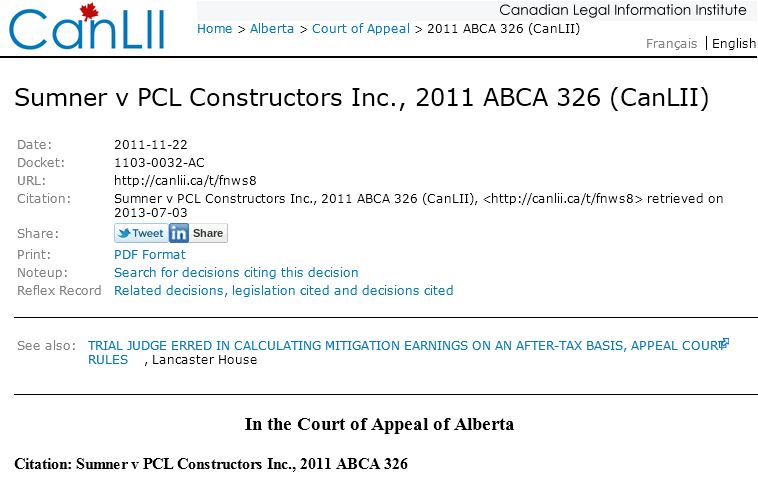
Commercial services like Westlaw Canada and LexisNexis Quicklaw offer excellent lists of case commentary in their noting up services. This is a new feature for CanLII. I like the way that it links out to the web.
Use Shift+F3 to Quickly Change Case of Text in Microsoft Word

If you do a lot of writing or editing in Word, you will often find yourself wanting to change the case of selected portions of text – perhaps to upper case or to title case. You can do this manually of course, but there is a much faster way. 
First highlight the text you want to change the case of, and then press Shift+F3. Pressing this keyboard shortcut once will convert the highlighted text to upper case. Pressing it a second time will convert the text to all lowercase. Pressing it a third time will give you title case (first letter of each word be capitalized).
Survival Tips for Google Reader’s July 1 Demise

Rest in Peace, Google Reader
When it comes to Google Reader, the world is pretty much divided into two camps.
There are the power-users, for whom this soon-to-be-expired RSS service has long been an indispensable lifeline to the news of the day. And then there is the rest of the world, known primarily (in this regard) for uttering bewildered phrases like “what’s Google Reader?”
I suspect that a disproportionately high percentage of SlawTips readers, being so unusually sophisticated, informed, curious (and unabashedly good looking), will fall into the first camp – legal-information junkies who can’t imagine the world after the Black Monday ahead when Google will pull the plug on Reader and lay it forever to rest.
So where shall we go on July 1 to find our vital law blog updates, breaking legal news, Law Society dispatches, musings in the legal press and NHL off-season developments?
Worry not, good citizens. SlawTips to the rescue!
Numerous solutions are now being rolled out by developers all over the planet, in a last-minute race to July that is reminiscent in urgency, at least, of a mad scramble to meet an unbendable court filing deadline by 4:30 pm on the Friday afternoon before a summer long weekend.
Some of the best of those solutions are still works-in-progress as at this writing, and time will tell which will emerge as the leader.
Digg Reader
We will be keeping a very close eye on Digg Reader, soft launched in beta yesterday, but not yet available to the general public. Like all the fledgling replacements, it promises to speedily migrate feeds and folders from Google Reader, will offer a clean interface and will have the ability to easily share items on Twitter, Facebook and other social media platforms.
FeeddlerRSS
The writer`s current mobile solution-of-choice is Feeddler.
Feeddler RSS is a reader app for iPhones and iPads that was originally built in reliance on the Google Reader back-end for its feed data. Earlier this week, it released an update that allows the use of alternate RSS readers at the back-end to feed your feeds to Feeddler.
Those alternate readers, currently supported by Feeddler, are:
- The Old Reader, a free, very clean emulation of earlier Google Reader incarnations;
- FeedHQ, with a $12.00 (US) annual subscription fee; and
- BazQux Reader – available in free, trial form at this point, and annual fee not stated.
All of these alternate readers will automatically import your Google Reader data, work well on your desktops, and keep your Apple mobile functionality seamlessly running without a hitch.
The writer, being old-school (as the kids like to say), has of course opted for The Old Reader as back-end, and can report that the Feeddler update and migration to this platform has been largely successful, with only occasional hiccups.The desktop iteration of The Old Reader has very limited social media share functions, however, and this platform is probably best utilized as an adjunct to Feeddler, for mobile use alone. A big drawback is that it doesn’t appear to synch across your various machines, so items you read on one computer may appear unread when logged in from another.
Since I am already using Feeddler, this migration was my path of least resistance, preserving my tried and true routine. But it may prove to be a mere stop-gap on the road to a better option in the weeks ahead.
Feedly
One such better option may well be Feedly.
Feedly is a sleek, cloud-based Google Reader alternative, available in desktop and mobile versions. It performs a speedy import of your Google Reader data with easy-to-follow prompts through the changeover process. It offers multiple view options, including list and magazine layouts, and allows efficient, direct click-through from titles to web versions of desired articles, effectively skipping a step and speeding up your reading experience.
This service could be one of the keepers.
Other Alternatives
Other high-profile alternatives include Newsibe, NewsBlur and AOL Reader. I haven`t tested them yet, so you are on your own with these ones.
Back-Up Your Google Reader Data
If you will be migrating, its a good idea to back up your Google Reader data ASAP, so that you can take your feeds and folders with you after Reader shuts down. Visit Google Takeout, where you can export your Reader and other Google data for posterity (and for risk-managing, document retention purposes, while you are at it).
This End is No End at All
So breathe a sigh of relief. RSS life will go on, after all.
What are your plans for the end of Google Reader? Let us know in the comments about the reader services you are going to test-drive.
– Garry J. Wise, Toronto
Dates
Every year on April 25th, my daughter Dominique comments that it is the “perfect date”. She is referring to the movie Miss Congeniality, and if you haven’t seen it, there is a YouTube clip. Makes me giggle every time.
Dates are often important for litigation research. Occasionally you may need a perpetual calendar source to quickly identify what day of the week a date in the past fell on.
I like the perpetual calendar in the binding ends of the Canadian Almanac and Directory print version. There are lovely tools and apps at timeanddate.com that do the trick as well. I like that the calendar shows holidays by country. It is good for litigation AND vacation planning.
Devour.com Will Help You Find the Gems on YouTube
Any way you slice it, there is a lot of junk on YouTube. And 72 hours of new junk is uploaded every minute of every day. It would take you 6,400 years to watch all the videos on YouTube. Doubt you have time for that. 
Devour.com comes to your rescue. This site sifts and sorts the junk to find best videos and a well-curated collection is posted every weekday. Fewer cute kittens, fewer nutshots, fewer laughing babies, and best of all – no crazy comments. Awesome! Visit Devour.com to watch some great videos.
Protect Your Data (From Snoops and Others)

Prism, the National Security Electronic Surveillance program operated by the United States National Security Agency (NSA) has caught a great deal of press lately. This surveillance program has raised questions as to how individuals can protect their data from being snooped upon. These revelations have led to discussions on ways that allow people to use encryption for protection.
I have been advising lawyers to use encryption technology for some time. When contacted by a lawyer who has had a laptop stolen from a car or elsewhere my first question to them is: “Did you have the laptop encrypted or just password protected?” I have yet to encounter a yes to encryption. Unfortunately it is all-too-easy to break a Windows password or otherwise gain access to the data on the laptop – for example, see: .
Edward Snowden, the whistleblower of Prism, was interviewed by The Guardian. His advice?
Encryption works. Properly implemented strong crypto systems are one of the few things that you can rely on. Unfortunately, endpoint security is so terrifically weak that NSA can frequently find ways around it.
So what is encryption and how do you use it?
Wikipedia states: “In cryptography, encryption is the process of encoding messages (or information) in such a way that eavesdroppers or hackers cannot read it, but that authorized parties can.”
Encryption can be used to encode messages as well as encrypt files or folders on a hard drive (or the entire drive itself).
From a management perspective (for this column is intended to be about management tips) it behooves a law firm to ensure that there is as much protection around their and their client’s data as possible. After all, wouldn’t you prefer to say to a client that the firm had a laptop stolen but all the data on it was encrypted with a state-of-the-art algorithm over saying that you had a laptop stolen or lost that only had a Windows password….
Let’s look at disk encryption. Windows version 7 in the Ultimate and Enterprise editions comes with . Bitlocker can encrypt the entire drive and any file that you create.
Macs come with FileVault that is built into OSX. Once you turn it on, it encrypts everything – all disk contents and actively encrypts and decrypts data on the fly. Techhive has a blog post on how to encrypt a hard drive.
Now what about email? LifeHacker.com has a blog post on how to encrypt your email. Microsoft has posted on .
What about the endpoint security that Edward Snowden was speaking about as being so terrifically weak that it poses a problem for encryption?
In network security, endpoint security refers to a methodology of protecting the corporate network when accessed via remote devices such as laptops or other wireless and mobile devices. Each device with a remote connecting to the network creates a potential entry point for security threats. Endpoint security is designed to secure each endpoint on the network created by these devices.
Usually, endpoint security is a security system that consists of security , located on a centrally managed and accessible server or gateway within the network, in addition to client software being installed on each of the endpoints (or devices). The server authenticates logins from the endpoints and also updates the device software when needed. While endpoint security software differs by vendor, you can expect most software offerings to provide antivirus, antispyware, firewall and also a host intrusion prevention system (HIPS).
Endpoint security is becoming a more common IT security function and concern as more employees bring consumer mobile devices to work and companies allow its mobile workforce to use these devices on the corporate network.
Accordingly, management must be concerned with both encryption as well as possible access to the network via wireless devices and laptops to ensure high IT security and prevent ways to get around that highly secure encryption.
David J. Bilinsky
The views expressed in this blog are those of the writer and should not be inferred as those of the Law Society of British Columbia.
Documenting Legal Research
The library team at Field Law uses the word blink all the time. We use it in the context of Blink by Malcolm Gladwell; i.e. What is your Blink on a starting point for this legal research question?
To back up our blink, we also document common questions and processes within a Library Procedures Manual. We also publish how to guides on our Intranet for common research tasks: How do we note up a case; how do we search for judicial consideration of a statute section; how do we check for coming in to force dates; what are the amounts under the cap for insurance; what is the judgment interest rate…
Today’s Tip is about documenting your legal research processes. Like David and Garry’s advice about Office Manuals, think about creating and maintaining documentation about your research process. It is easy to do for each project by adding a “Sources Consulted” heading at the end of a research memo that explains where you looked and how. It is also easy to make a spot where you consistently save information about how you do things.
Hat Tip to students of the Head Start program, who help keep legal research process top of mind for me every June.
Crop (Don’t Zoom) for Better Smartphone Pictures
With our camera-equipped smartphones, most of us are snapping more pictures than we ever did before. And while not quite the same as working with a digital single-lens reflex camera, the cameras on today’s smartphones can take amazing pictures.
Among the many features they now have, most smartphone cameras offer a zoom function.  Nice to have a zoom, but you shouldn’t use it. Why? Unfortunately, smartphones don’t have fancy lenses. This means they have a digital zoom, not an optical zoom. When you use a digital zoom, the camera is “extrapolating” what is really there. Essentially this means the firmware on the camera is guessing the details of the image because the tiny smartphone lense can’t zoom in optically.
Digital zoom is nice in theory, but practically speaking, it doesn’t work very well. If you have used zoom on a smartphone you will have been frustrated with blurry pictures. How do you avoid this problem? For better zoomed in shots, just take the picture without zooming in and crop it later with your digital editing software. Most smartphones have a resolution that is high enough to allow you to crop and enlarge portions of your smartphone pictures, especially if you are only posting things on the web.


