







All Our Tips
Fast, Convenient and Mobile

Yesterday at Slaw I posted about some legal research apps. Today I want to tell you how I use my iPad for mobile research. For me, it is about two things. Being prepared and carrying convenience.
I download things that I know I will likely need and I don’t carry paper, or a laptop. What kind of things do I mean?
- I have a current copy of the Rules of Court in PDF in iBooks sorted into a “legislation” folder [note that it is UP TO ME to make sure this is current]
- I also have a PDF copy of the topic of whatever it is that I am ‘going’ out to talk about
- for me this is survey data, reports, minutes, memos, or presentations and their notes
- if I was a lawyer if might be a searchable PDF copy of an affidavit of records with bookmarks on the key elements that I want to address in a Questioning; it might be a document with hyperlinks to web sources of material if Internet access was assured; it might be multiple drafts of an agreement
- I have my Irwin Law eBook of Ted Tjaden’s
- I have my CCH Rapid Finder
- a bunch of Ukulele music
Just in case, I have a Quicklaw App, the WiseLII app, and quick links in my iPad browser to LexisNexis Quicklaw, WestlawNext Canada, CanLII, the Alberta Queen’s Printer public website, Justice Canada Laws, LegisINFO and the Legislative Assembly of Alberta sites.
Perhaps my mobile habits relate to the fact that I also have access to my desktop from my iPad (and phone) thanks to the cleverness and capability of the fine Information Technology folks that I am lucky to work with. There is also a special security feature in the form of a mobile device management tool that would allow a remote scrub of my device if lost or stolen and an extraction of the work related material in the (unlikely) event that I part ways with my employer.
What legal research do you DO with your mobile device?

Two-Timing on My iPad With a Windows Tablet

Today’s post is not so much a “tip” as a confession.
For it’s true – I have been two-timing on my iPad with a Windows tablet. Because for all its virtues, and there are many, I’ve still had more than the occasional sinking feeling that my iPad just isn’t enough…
I could fill endless column inches discussing everything the iPad does wonderfully. And I have. But we already know all about the iPad’s many virtues, right?
Unfortunately though, there are a few things the beloved iPad simply doesn’t do very well.
“Like what?” I hear you saying.
Like:
- Dealing with Microsoft Word forms and tables and maintaining formatting on Word documents generally;
- Gaining remote access to my office computer via LogMeIn Ignition;
- Navigating the Word Press and Blogger interfaces that I use to compose my posts on SlawTips and Wise Law Blog;
- Viewing Flash videos;
- Transferring data from one computer to another, since there is no USB receptacle on Apple mobile devices.
Now, this is not a long list of fatal flaws, and there indeed are makeshift ways on the iPad to fudge and work-around almost of these obstacles.
Most, but not all of them.
I do approximately 80% of my professional work on my iPhone and my iPad. I barely touch my desktop computer at my office any more, preferring instead to compose most of my documents on my iPhone using the Siri dictation function – even when I am sitting at my desk.
When I am working from home or away, however, it gets complicated. I need access to my office computer and my files, and I greatly prefer LogMeIn via the Windows interface (as opposed to the clunky LogMeIn Ignition mobile app) to get onto my desktop.
If I have a phone call to make from home, and I need to review some files at my office to prepare, the iPad just doesn’t cut it. Perhaps this is more of an indictment of LogMeIn Ignition than the iPad itself, but if the “app is crap,” the iPad isn’t going to save it by miraculously creating functionality that just isn’t there.
Similarly, even as I draft this Tips post using Siri on my iPhone, it is clear I am going to have to get onto a Windows computer at some point to post it, add photos or media, and perfect the formatting.
Again, it may not be the iPad’s fault, but it just doesn’t work very well on WordPress. In fact, I have rarely been able to complete a full blog post on my iPad alone, without final touch-ups via a Windows computer.
So lately, I’d been using an old Windows netbook beside my iPad, in tandem, to achieve maximum efficiency. Everything that the iPad does well, I continued to do on my iPad. But I sure was glad to have a Windows machine nearby, just for those occasional moments where the Apple tablet fell short.
My five year-old netbook, however, suffers from sluggish speed and a seriously malfunctioning keyboard, the ultimate result of which is it’s missing a few of the letters I need for most of my passwords. That is also easy enough to fudge by cutting and pasting the occasional “a” and “b,” but hardly trend-setting in terms of optimal use of the latest and greatest technologies.
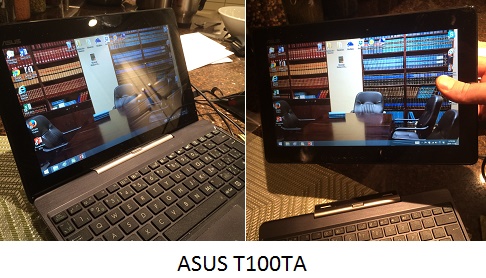
Which is where my new Windows computer, an ASUS Transformer T100TA (purchased earlier this week via Costco online) comes in.
It’s a “convertible” machine, meaning the screen snaps in and out of a keyboard that doubles as a dock, so that this computer functions equally well as a Windows tablet and as an upgraded netbook computer.
The tablet portion is a bit wider and not quite as tall as an iPad, and feels like it weighs a bit less. To this layperson’s eye, the screen brightness and resolution appear reasonably comparable to the iPad display. Like the iPad, the ASUS tablet is a bit too heavy to hold comfortably in your hand for too long. But it functions quite nicely.
The real conundrum is wrapping my brain around using the Windows desktop interface and software with a touchscreen. It just doesn’t seem natural. At least not yet, three days into my proud ownership. That may well yet change.
Nonetheless, my presumably typical knee-jerk, early resistance explains much about the split personality of the Windows 8 universe, one-half iPad wannabe, and one-half reliable and familiar, old Windows desktop.
And therein lies the challenge for Microsoft and Windows in the tablet universe.
The Metro interface, the gateway to the Windows 8 apps universe, simply isn’t as immediately enticing as the iPad interface, despite the many Windows 8 apps that work extremely well and elegantly in this strange new Microsoft world.
The sole, remaining point of superiority of the Windows OS is that so much of its legacy software – and the functionality thereof – hasn’t yet been replicated effectively for the iPad. So if you want to use the software, you have to use Windows.
And while that software remains exclusively available via Windows, most legacy software isn’t particularly touch-friendly or optimized for viewing and manipulation on the smaller Windows tablet surface.
At least not at first try.
So while I will continue experimenting, I suspect I will continue to use my iPad for just about everything, except for the few things it does poorly that I need to do on Windows.
If this proves to be the case, my Windows tablet might have a sad future of remaining firmly docked on its keyboard, to be summoned only for traditional Windows uses, except for those occasional moments when I want to wow my friends by showing them how it really is a tablet, too, after all.
So to my beloved iPad, I haven’t really left you (and perhaps I never will), but I confess that I might still be tempted to stray – occasionally – just to get my job done.
And so, I will finish dictating this post on my iPhone. I will pick it up from the cloud on my Windows tablet via iCloud.com, and cut and paste it to WordPress to create a SlawTips post.
As well, I’ve taken a couple of pictures on my iPhone of my new Windows computer, and I’ll email them to myself, pick them up on my Windows computer, merge them into one composite photo using a Windows photo editing program, Paint.net, and complete this week’s post, which was a much longer one than expected, at WordPress.
If nothing else, I hope I’ve demonstrated that while the Apple universe is almost perfect, I may still need the occasional blast from the new Windows 8 past to get the job done.
(Hopefully, you’ll agree with me that the sum of these parts at least justifies the many technologies used to create it).
– Garry J. Wise, Toronto (@wiselaw on Twitter)
Check Out Your Public Library
There are about 2300 public libraries in Canada. This doesn’t include a count of libraries with multiple branches. The bottom line is that most Canadians will have access to information that they need from a public library near them.
Today’s Tip is to make use of those wonderful resources. Books like the Handbook of Fixed Income Securities by Frank J. Fabozzi (Toronto: McGraw-Hill, 2012) or The Master Painters Institute Approved Products List 2012, which reveals the architectural painting specification manual, may never be items that you would purchase. They will absolutely be available through a public library*.
If something you need isn’t in your local public library, I can guarantee that public librarians will use their networks to help track down a source.
*Sample titles were acquired doing a search of the EdmontonPublic Library catalogues Reference shelf title additions limited by the date rage 2012 and newer.
A Lesson From a Deli?
♫ You’re a leftover
Pastrami on rye
Succulent and delicious
Yes, the sandwich of my eye…♫
Lyrics, music and recorded by Hot Soda Apparatus.
 I read an article today in Slate Magazine entitled “The UR-Deli – How Katz’s stays in business against the odds by Jordan Weissmann.” This article is about how Katz’s deli in New York City has remained in business in the lower east side of New York since 1888 while its competitors have failed.
The business model is to deliver a hefty pastrami on rye for $19.75. Believe it or not, that sandwich is not much of a moneymaker. The old-style delis are facing a conundrum: the very thing that makes them loved..those wonderful stacked pastrami and corned beef sandwiches – is the thing that makes it hardest from an economic standpoint. They don’t make much money.
Compare and contrast that with law firms: the very thing that makes us loved – delivering bespoke legal services – is the very thing that makes it hardest from an economic standpoint. We can’t seem to deliver legal services at a lower cost. We are facing a basic economic issue similar to these old delis…
How does Katz’s deli survive?
The reason Katz’s was able to live on while its competitors disappeared largely boils down to real estate. As Sax writes in Save the Deli, New York’s delicatessens can basically be divided into two groups: those that rent their buildings and those that own. Famous renters, like the Stage Deli and 2nd Avenue Deli, have closed in the face of rent hikes. Famous owners, like Carnegie and Katz’s, have lived on. (And when 2ndAvenue Deli reopened, it bought a building … on New York’s 3rd Avenue). If Katz’s had to deal with a landlord, it would likely have disappeared or moved long ago.
Is there a lesson here for law firms? Could – possibly – part of the solution to the access to justice issues be that law firms start owning their own office buildings? There are a number of advantages arising from this model. The partners of such a firm would be building equity in the property over time; that same equity could be used to retire older partners when newer partners purchase an interest in the business as well as the real estate asset. Keeping ownership of the office space may reduce the overhead costs that could help the firm render legal services to a broader base of clients.
Certainly the issue of trying to broaden the ability of existing law firms to deliver legal services economically to a wider group of society does not have any easy solutions. However, perhaps Katz’s and similar survivors have lessons for us today. Notwithstanding we are a leftover, perhaps we can still be the sandwich in a client’s eye…
-David J. Bilinsky, Vancouver, BC.
A Tip for Quickly Switching Between Relative and Absolute Cell References in Microsoft Excel

When you create a cell reference in an Excel formula that refers to another cell, that cell reference can be relative (the default) or absolute. A relative cell reference adjusts to its new location when the formula is copied or moved. An absolute cell reference does not change when the formula is moved.
Consider this example: Starting in A1 you have a 3×3 table with some figures in it. Cell D1 contains this formula: =A1+(B1*C1). If copy this formula to cell D2, the cell references will change relative to the new location and the formula will automatically change to =A2+(B2*C2).
Now consider this example where you have a constant in a formula: You have a column of costs in Canadian dollars and you want to add a second column that gives the US dollar equivalent. And in particular you want to set it up so you can adjust the US conversion rate in one location on the sheet so you don’t have to do it multiple times if the exchange rate changes.
So in the first column you have your $Cdn figures (A1, A2, A3…). Your conversion rate is in cell D1 (e.g., 1.10). In cell B1 at the top of the second column you have this formula: =A1*$D$1. The $ in front of the row and column references indicates an absolute cell reference. So if you copy the formula in B1 to B2, it will become =A2*$D$1. The first part of the formula is relative and is changed, but the second part is absolute and did not change (if it had done so, it would have referred to the cell below the cell with your conversion rate.
Absolute and relative cell references can twist your brain, but they are real handy in the right circumstances. Note that you can also have a cell reference in a formula that is a mix relative and absolute. Will save an example of that one for another day.
So recognizing that a $ sign is used to indicated an absolute row or column reference, here are some examples of relative and absolute cell references:
- A1 (relative column and relative row)
- $A$1 (absolute column and absolute row)
- A$1 (relative column and absolute row)
- $A1 (absolute column and relative row)
And now for the tip. It should be obvious that typing $ signs in one or more cell references in a formula will be tedious and error prone. The brilliant programmers at Microsoft save you a bunch of grief with some keyboard shortcuts: Click on a cell references in a formula and press F4 on a PC, or Command+T on a Mac, to cycle through the 4 possible relative and absolute combinations for that cell reference. Very helpful indeed!
OBA TECHxpo 2014
Today is the OBA TECHxpo at Toronto.
My good friend Bob Tarantino and I will be presenting “The Ultimate Guide to Being a Mobile Road Warrior:”
Track 1 — The Ultimate Guide to Being a Mobile Road Warrior
With the right tools you can work on anything, anywhere, anytime. Come to this session to learn how. • Take your office with you • Tablet versus smartphone • iPhone vs Blackberry vs Android • Essential gear and gadgets • Tips for surviving on the road
I’m expecting a lively discussion on iPhones, similar wannabe devices, and the tools lawyers can use most effectively when working away from the office.
The full programme agenda is here.
It’s not too late to register, so join in the fun.
I hope to see your there.
Garry J. Wise, Toronto
Watch Your Email
Jack Newton posted an excellent email tip on Slaw way back in February 2013. He suggested creating an email rule that moved email with the word “unsubscribe” to a Robots folder so that it skipped your inbox and let you concentrate on the most important of your email and no the automated messages (newsletters, alerts from Twitter, etc). I have been using this tip with glee since his posting to filter my inbox and only check my Robots folder once per day.
Until today.
Thanks (and I say that with a bit of snark) to CASL, I am now delaying reading messages that are not ‘automated’ since some businesses have an ‘unsubscribe’ process outlined in all of their email footers.
I am keeping my ‘Robots’ rule and adding exceptions for the email domains of email that this is happening with. Today’s Tip: attend to your email and watch your rules – adjust as necessary.
Lawyers and Pricing – Part 5
♫ I want you
Do you want me too?
I have one question
Can I help you?
Now watch me, what I do
Now thank you for coming through my drive-thru..♫
Lyrics and Music by: Julian Casablancas, Santi White, Pharrell Williams, recorded by Julian Casablancas, Santigold, and Pharrell Williams.

In the four prior posts in this series, we looked at how price is just one of seven components of the legal marketing mix. Part 2 discussed the product mix – and how changing your product mix may result in a great match between your services and the needs of the clients. Part 3 looked at who was on your team and how they deliver your services – and how this can have a big distinguishing effect on how clients view your services against the competition. In Part 4 we looked at promotion and how this can make your services stand out from the pack. In each of these posts we have looked at how each of these components helps distinguish your services from the competition; services that are distinguishable are priced differently, as they are no longer comparable with the competition.
In this post we are looking at yet another component of the marketing mix – namely the place where you deliver your services. Just consider the range of physical office configurations – from storefront offices on main street to walkup offices to Class A office space in a gleaming skyscraper. Each one of these sends an unwritten message to a potential consumer of legal services. Furthermore, you can practice as a solo, in an office sharing arrangement, an associate or a partner of a firm, large or small. Lawyers can maintain branch offices in the suburbs, in another town, province or state or even another country or continent. You can be a travelling lawyer who attends clients at their places of business, home, hospital, care facility, union hall or even a Starbucks. You can offer handicap access or after-hour access. Lastly but certainly not least, you can maintain a virtual office, using internet technologies to meet, share, collaborate and meet the needs of your clients who could be down the street, across town, in a distant city or even across the world. The range of possibilities are unbounded.
Indeed, bold lawyers have envisioned practising in ways that break the familiar constraints. Axess Law in Ontario has launched law offices that are embedded within Wal*Mart stores in Ontario and offer home, family, business services, legal contracts and notary services in an affordable and approachable context.
The range of offices and services that can be offered from different locations to meet client needs is as open and wide as your imagination. Perhaps one day a lawyer will open an office where a client can receive legal advice right in their car…and the lawyer would say…”Can I help You?” and then conclude with: “Thank you for coming thru my drive-thru…”
-David J. Bilinsky, Vancouver, BC.
Look for Webinar Opportunities
An event reminder by the Canadian Association of Law Libraries about the Substantive Law Webinar Series gets a Hat Tip for providing Today’s Research Tip. The Tip is to seek out opportunities to learn things via webinar. Plenty of associations and organizations, including some law firms, are offering webinars on useful topics that will make legal research in a new or unfamiliar area a little bit easier.
CALL is offering:
Substantive Law Webinar Series
The Webinar Committee is pleased to offer a series of substantive law webinars delivered by Ted Tjaden. Ted delivered a webinar on Civil Procedure in March, 2014, and due to the level of interest, the Committee has paired up with Ted to offer the following subjects over 2014 and 2015. Tort Law – October 30, 2014 from 1:00pm-2:30pm Contract Law – December 9, 2014 from 1:00pm-2:30pm Constitutional Law – February 12, 2015 from 1:00pm-2:30pm Real/Personal Property Law – April 21, 2015 from 1:00pm-2:30pm Criminal Law – June 18, 2015 from 1:00pm-2:30pm
SPEAKER:
Ted Tjaden, a long-time member of CALL/ACBD and the 2010 recipient of the Denis Marshall Memorial Award for Excellence in Law Librarianship, is the national litigation precedents lawyer in Gowlings’ Toronto office. Ted works closely with the firm’s national precedents team and litigation lawyers to organize and annotate the firm’s litigation research and precedents for use by the firm’s advocacy professionals. Ted has extensive experience as a litigator and knowledge management lawyer and is called to the bar in both British Columbia and Ontario. In addition to being the author of Legal Research and Writing, 3rd ed (Toronto: Irwin Law, 2010) and The Law of Independent Legal Advice, 2nd ed (Toronto: Carswell, 2013), he is a regular speaker at conferences on issues of knowledge management, technology and the effective organization of litigation documents.
REGISTRATION FEES:
CALL/ACBD Member: $40 + $5.20 HST = $45.20/webinar Non-member: $60 + $7.80 HST = $67.80/webinar*A 20% discount will be applied to registrations for the entire series (5 webinars). Please contact [email protected] to register for all 5 webinars.
A Beginners Guide to Law Firm Video – Pt 2: Choosing Topics for Your Firm’s Videos
In today’s second instalment of our Video for Lawyers series, SlawTips brings you a Tips vlog on choosing topics for your law firm videos:
Transcript:
Hello, I’m Garry Wise from Wise Law Office in Toronto and Wise Law Blog. Today, I’m using my iPhone to talk to you about choosing topics for your law firm’s videos.
Tip #1: Identify Your Target Audience
Before choosing a topic, decide who your target audience is.
Are you looking to do:
- information pieces for existing clients?
- educational videos for the general public?
- marketing-oriented videos to build your practice and attract prospective new clients?
- perhaps you want to speak to the legal profession as a whole to comment on a controversial issue or even to introduce yourself as a candidate for election as a bencher?
Tip #2: Pick Topics that Speak to the Audience You Are Targeting
Once you’ve decided who your videos are targeting, pick topics that will be interesting to the audience you have in mind.
Tip #3: Demonstrate Expertise
As an example, if you are looking to do marketing videos to attract new prospective clients, demonstrate expertise – use your videos to answer the types of questions that you are typically asked on introductory consultations:
- What are my rights?
- Am I entitled going to be entitled to compensation?
- How much compensation?
- How long will it take?
- How much will it cost to hire a lawyer?
- What happens if I lose?
- Will your firm stay in touch with me?
- How will I be kept in the loop?
These are the kinds of questions that people who are looking for a lawyer have in mind.
Tip #3: Go Deep
A different approach is “go deep.” Take a single topic and do a series of videos, each addressing one aspect of that topic.
For example, if you want to speak about spousal support, you might talk about:
- Who qualifies for support?
- What are the Spousal Support Advisory Guidelines?
- How is the amount of support calculated?
- What happens if your circumstances change and you need to change your support order?
- When does support end?
And so on. By doing a series of videos, each focusing on one aspect of a topic, you really demonstrate your expertise, and you let your prospective clients know that you have the ability to handle the kinds of issues that they need to have dealt with when they retain counsel.
A couple of other small points:
Tip #4: Keep it Short and Sweet
Sound bites work better that long soliloquies. Get to the point and get there quickly.
Tip #5: Your Videos Should Be 3-5 Minutes at Most
Try to limit your videos to three to five minutes maximum.
Tip #6: Include a Transcript of your Video in Your Post
Always include a typed transcript in then post in which your video appears.
Tip #7: Make Your Video Title Interesting and Descriptive
As well, make your titles interesting and Google-friendly. Remember, Google is going to index your videos. You want your prospective audience to recognize immediately that your video contains the content that they are looking to see.
Tip #8: Have Fun
Lastly, have fun. The more video you do, the easier it becomes, and the better you will get at it.
So give it a try, and we will look forward to seeing you at the movies!
– Garry J. Wise, Toronto (@wiselaw on Twitter)


