








Administrator’s note: thanks to Karen Sawatzky for this guest tip!
All Our Tips
The Research Log
Today’s tip is courtesy of Melanie Bueckert, legal researcher extraordinaire at the Manitoba Court of Appeal via Brian Roach, articling student at Tapper Cuddy LLP.
The Research Log (well deserving of its capitalization) is a deceptively simple template that forces the legal researcher to document all sources consulted and note what about that source was of importance. You can also include anything that wasn’t important so you know not to review it again. If used properly, your research memo practically writes itself. I can vouch for its usefulness – the first time I used it, my memo flew off its pages. It’s a simple, three column document:

I now open one for every memo I write. If I need to return to the topic, I have a draft of what my process was, so I can get up to speed quickly. It always amazes me that sometimes the simplest idea is pure genius. Thanks Melanie and Brian, for showing this to me.
—Karen Sawatzky, Tapper Cuddy LLP
Library Technican Dialog

Problematic Pasts
Not things you did as a teenager that you’d rather forget about, but past tenses of verbs that continue to cause people trouble.
Dive
The past tense of this verb is not dove. That’s a bird, mispronounced. The past tense is dived (or should be – the Yanks differ on this one).
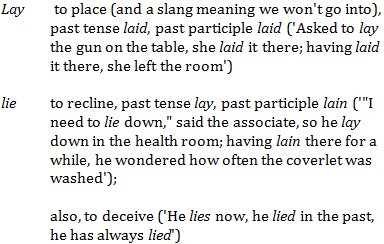
Lay and lie
A confusing pair. From last time:
Lead
As in lead me astray. The past tense (and past participle) is led. Similarly, mislead and misled.
Confusion may arise because these two don’t follow the same pattern as read, which is the same in the past and present tenses: I read the last chapter of the book last night; I always read in bed before I go to sleep.
Plead
American usage to the contrary, the past tense is not pled or plead: it’s pleaded. Always.
Shrink
Honey, you shrank the kids! Now that they have shrunk they will need new clothes in smaller sizes for their shrunken bodies.
And it’s drink, drank, drunk(en); sink, sank, sunk(en); spring, sprang, sprung; stink, stank, stunk (although in colloquial speech one hears stunk as the past tense as well as the past participle; there’s that song about the Grinch).
It isn’t think, thank, thunk, though – except in the jocular Who’d have thunk?
Sneak
The past tense is not snuck but sneaked.
Spit
The past isn’t spit – it’s spat. Same deal if you replace the p with an h.
Up next: comma conundrums
Sway by Microsoft: The Easy Breezy Way to Create an Interactive Presentation

Have you ever had to create a simple interactive presentation in a hurry and PowerPoint seems too daunting when you are in crunch mode? Give Microsoft Sway a try. In a few easy steps, you can create an online interactive presentation that you can make public, keep private, or share with people who are given a link. Best of all, Sway is free, and you can’t argue with free.
Sway and PowerPoint are both Microsoft products. While PowerPoint gives you full control of animation, sound, layout, design and branding, Sway is for you to whip up a presentation (even if you only have your cellphone or tablet available) when the ominous deadline is staring at you and you are willing to give up some design control.
Once you log in to Sway, creating a presentation takes just a few steps. First you select a theme, then a navigation style (horizontal or vertical, for now). After this, you just add heading, text, and insert photos or videos directly from OneDrive, Facebook, Flickr, YouTube, Twitter, Internet, or upload from your computer. Here is a quick presentation I made in under 15 minutes. It doesn’t give you a lot of creative freedom, but it gets the work done.
Start using Sway here, or check out this official video by Microsoft on YouTube.
[This tip originally appeared on the Law Society of Saskatchewan Library’s Legal Sourcery Blog]
And the Numbers Show… (Part 3)

(Missed Part 2 of this series? Read it here: So Why Are Lawyers Spending So Much Time On Administrative Tasks?)
And Finally: Volume
I think the last reason attorneys are spending so much time doing administrative tasks is the increase in information we have all been subjected to as the world has gone digital.
According to Surprising Statistics About Lawyer Information Overload:
By the end 2015, attorneys on average were creating or receiving more than 70 documents every day (and for some, many more). That includes emails, email attachments, Word documents, Excel spreadsheets, PDFs, client records, opposing
counsel records, etc. That’s more than 26,000 documents a year!
But, that’s not all. Just two years ago, an average lawyer managed fewer than 18,000 documents annually. That’s a 50% growth rate just between 2013 and 2015. Not surprisingly, email communication and email habits are partly responsible for this growth.
Left without administrative staff for the filing and handling of much of the incoming, attorneys are physically handling more–more files, more papers, more data and more emails. Each piece of paper, electronic file and email requires time and focus to process–most of it not billable.
On a side note, when dictation was removed as a standard operating procedure, so too went the option for higher value staff to easily and efficiently delegate tasks, follow ups, reminders, calendar entries, instructions…pretty much anything a “boss” could tell an “assistant” to do was delegated via voice through dictation.
Removing dictation as the start of a firm’s workflow meant attorneys had no other option but to spend far more time entering new matter information or creating properly formatted documents than simply asking someone familiar with the tech and tools do to it, while at the same time getting it OFF of their to-do list entirely–which is about as efficient as one can get!
Now I certainly agree that attorneys should be competent in the completion of common office tasks and that it is good that an attorney have the ability to do any and all job which needs to be done in an office. But that does not mean they should be charged with doing it all, all of the time.
Certainly the data illustrates what I have long said – attorneys spend FAR TOO MUCH TIME doing the administrative work needed to run their practices.
And it’s not because they can’t type.
And it’s not because they can’t manipulate or are not proficient with technology.
It’s because there is far too much administrative work to do in ANY business, and the more successful you become, the more administrative work there is.
For attorneys who want to learn more about the trap of working in their business instead of on it, read The E-myth Revisited (no need to get the “attorney” version)…and to learn how best to delegate, I recommend a very oldie: The One Minute Manager.
When you include delegation into your workday, you will finally find a way to balance all that has to be done at work.
Just because you can type, doesn’t mean you should.
Andrea Cannavina (@AndreaCan) helps law firms organize, automate and implement business process improvements to create efficient workflows and happier staff.
Try a Different Browser
I was asked what the library equivalent was of our help desk’s standard “try turning it off and back on” advice. I’m not sure there’s an equivalent, but “try a different browser” comes close.
A not infrequent problem is that certain sites and databases don’t display properly (or sometimes at all) on a given browser. If you find that a web page or online document isn’t displaying properly and you can’t figure why, try looking at it with a different browser. Some vendors design their databases to work with a specific browser. (In one case, I was assured by a vendor that “all lawyers use Internet Explorer” so there wasn’t a problem.)
And with regards to the “try turning it off and back on” advice, a bonus tip: always make sure you’ve saved everything first.
And the Numbers Show… (Part 2)
(Missed Part 1 of this series? Read it here: Being Efficient Doing the Wrong Tasks = Not Being Efficient)
So Why Are Lawyers Spending So Much Time On Administrative Tasks?
To start, in Time to Work Workflow Technology into the Law Firm Arsenal, Eric Wangler states:
Initially when the market shifted, firms turned to cutting administrative staff to decrease their costs. However, it was soon clear that this type of short-term solution had significant drawbacks. The remaining support staff were expected to do the same amount of work with fewer people, leading to increased stress and compromised work quality and customer service.
While I agree with Eric’s assessments that firms first turned to cutting staff to save costs, a short term solution with significant drawbacks, I disagree that it was the remaining support staff who compromised work quality.
The shift in less support staff correlated with a shift in how work was produced: from attorneys delegating to doing their own typing. So the compromised work quality touched upon by Eric was far more likely due to that shift.
Fast forward a decade, and not only are attorneys responsible for typing all manner of properly formatted documents, but for the data entry work required to run the office. Along with not being billable, administrative tasks also happen to be extremely boring work – generally the data entry of numbers, names, addresses… tab…tab…tab… and yet at the same time it is also extremely exacting work thereby requiring great focus.
Great focus by anyone means slowing down and taking greater care. Slowing down and taking greater care being focused on non-billable work is exactly the wrong things attorneys should be doing. Reminds me of one of my favorites: “Drink Coffee – do stupid faster with more energy”
Another reason attorneys are spending so much time on administrative tasks is due to the actual tech being served up as what is needed to create efficiency in the modern law firm. Many of the technologies used by lawyers today are resident in the cloud and that can mean a very long time from the time one hits submit (or tab) and the time the program registers the command.
In fact, one law firm I spoke with stated: “when California wakes up”, their law firm management solution grinds to a crawl. According to attorney Avi Frisch in his review of nine technologies aimed at the solo/small firm market:
The downside is that [the tech] is not at all optimized to getting work done quickly. Most tasks take multiple clicks, new matter intake requires entry of data in numerous places to get everything down and getting bills out to clients simply takes forever.
http://www.tinyurl.com/LPMReport
So besides not having the proper tools to delegate administrative tasks to those best suited to get them done, attorneys are spending far too much time “working” in agonizingly slow and cumbersome cloud based technology.
Coming next week in Part 3: And Finally, Volume.
Andrea Cannavina (@AndreaCan) helps law firms organize, automate and implement business process improvements to create efficient workflows and happier staff.
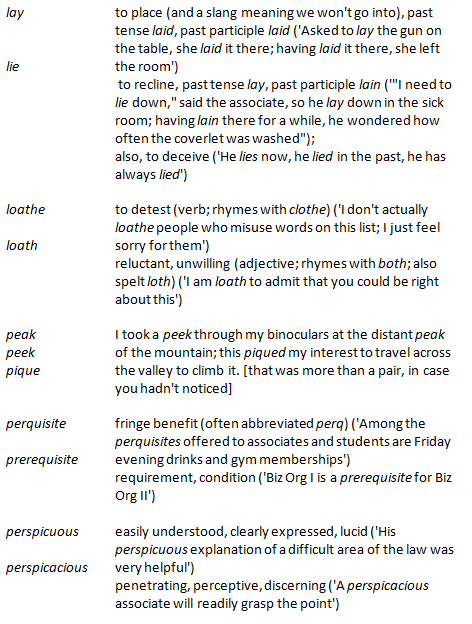
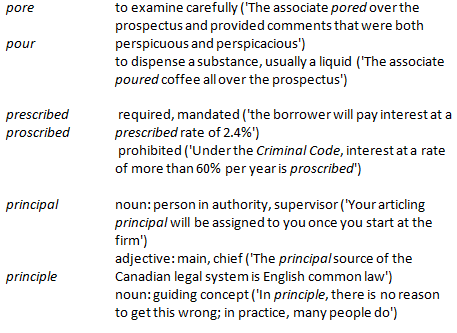
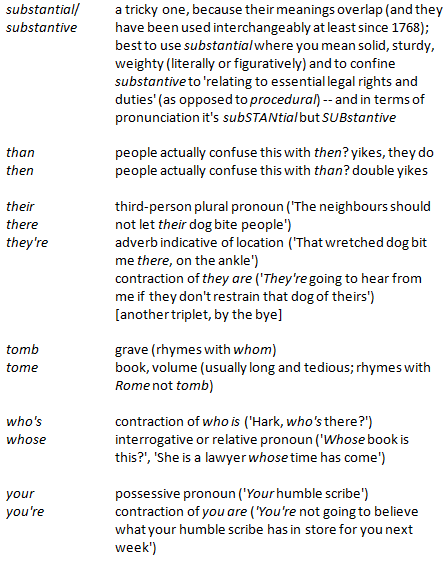
Confusing Pairs, Part 2
More words you may be mixing up.
Next time: problematic pasts.
De-Clutter Your Gmail Inbox With This Trick
If you have signed up for online accounts, newsletters, or even just to download a white paper that you want to read, you will know that a valid email address is usually required. As you are filling in the online sign-up form, a little voice inside your head may be telling you that you will be getting a whole new pile of daily notifications and junk mail cluttering up your inbox. Is there a way to deal with this? You bet.
If you have a Gmail account, Google allows you to create an infinite number of variations with your Gmail address that is still linked to your original address. You can add anything preceded by a + sign between your name and the @ sign and Gmail will consider this the same address. For example, if your Gmail address is [email protected], you can use:
How can you take advantage of this? You can sign up for an account at Pinterest, for example, using [email protected] and set up filtering rules within your Gmail account to route all emails to this address to a low-priority mailbox and mark them as read, or even to the trash folder or spam mail folder. Then your inbox will not be cluttered with notification emails.
The other variation of your Gmail address is to add periods to the address. For example:
[email protected] is the same as [email protected]
If nothing else, it certainly makes your email address easier to read.
If you have another email address, send a test email to your Gmail account using these variations to see how it works!
[This tip originally appeared on the Law Society of Saskatchewan Library’s Legal Sourcery Blog]
And the Numbers Show… (Part 1)
We all love data. Crave it. We don’t put down our digital devices for a second of missing some interesting digital tidbit. Here’s some interesting data I’ve recently come across with regard to the administration of law firms:
Being Efficient Doing the Wrong Tasks = Not Being Efficient
According to Bob Ambrogi in: Exclusive Survey Results: Small Firms’ Greatest Challenges and What They’re Doing to Address Them, the numbers clearly show how the administrative functions of running a practice have taken over the average attorney work day:
Top five overall challenges (factoring in the issues ranked as both moderate and significant):
- Acquiring new client business (78 percent).
- Spending too much time on administrative tasks (69 percent).
- Increasing complexity of technology (63 percent).
- Cost control and expense growth (62 percent).
- (Tie with 4) Clients demanding more for less or rate pressure from clients (62 percent).
Top five overall challenges facing solos:
- Acquiring new client business (25 percent).
- Spending too much time on administrative tasks (22 percent).
- Clients demanding more for less or rate pressure from clients (20 percent).
- Increasing complexity of technology (16 percent).
Oddly, administrative tasks did not appear in the:
Top five challenges of firms of 11-29 attorneys:
- Acquiring new client business (37 percent).
- Clients demanding more for less or rate pressure from clients (22 percent).
- (Tie with 2) Succession planning (22 percent).
- Cost control and expense growth (14 percent).
- (Tie with 4) Information overload from growth in legal documents (14 percent).
Which leads me to believe the other 47% for spending too much time on administrative tasks is attributable to firms with 2-10 attorneys. Even without surmising, the above solidly shows that attorneys rank spending too much time on administrative tasks a major challenge.
Coming next week in Part 2: So Why Are Lawyers Spending So Much Time On Administrative Tasks?
-Andrea Cannavina
866-848-2195 x101 [email protected]
A Little History of “Noting Up”, or Why Noting Up Is Called “Noting Up” Anyways
Administrator’s note: thanks to Natalie Wing, Law Librarian at Yukon Public Law Library, for this guest tip!
WARNING: this post may contain disturbing content for those with deep anti-marking-up-of-library-book sensitivities.
Back in ye olden days, law clerks and law librarians used to write in the margins of case reporters, literally “noting up” the pages with citations for subsequent appellate decisions. Indeed, it would seem that librarians both sanctioned and participated in the marking up of library books, but of course only for very specific purposes, and conceivably only with the tidiest of (and most tidily placed) writing. Here is an example of an old noted up reporter from the Sir James Dunn Law Library (Halifax, NS), found and shared by reference librarian Nikki Tanner:
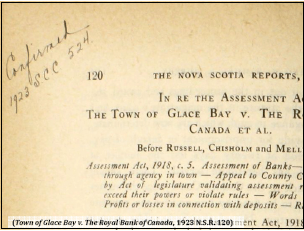
References to the practice of “noting up” can be traced back to at least the 19th century, when The Law Times provided practitioners with “Notes for Noting Up”, and when proposals for legal textbook volumes included plans to bind in blank leaves specifically for noting up so that the textbooks could contain the latest law:
A MEMBER has suggested that the first text-book of the Society should be one which shall comprise the entire Practice of Law [….]
It is further proposed that the volumes should be bound with blank leaves for noting up, and that in any digest of the Society a figure should refer to the page in the text-book in which the case or statute digested ought to be noted, so that the volumes should always keep pace with the existing law until a new edition is rendered necessary by the number of references (Verulam Society, (1844) 3 The Law Times 275).
This post was the result of a question asked of the broader Canadian Association of Law Libraries community. Many thanks in particular to Lynne McNeill, Nikki Tanner, and Katie Albright for knowing such things in the first place, and for sharing their knowledge.


