







All Our Tips
What’s on Your Browser’s HomePage?

This tip comes from Ted Tjaden, , Slaw contributor, and National Director, Knowledge Management at McMillan.
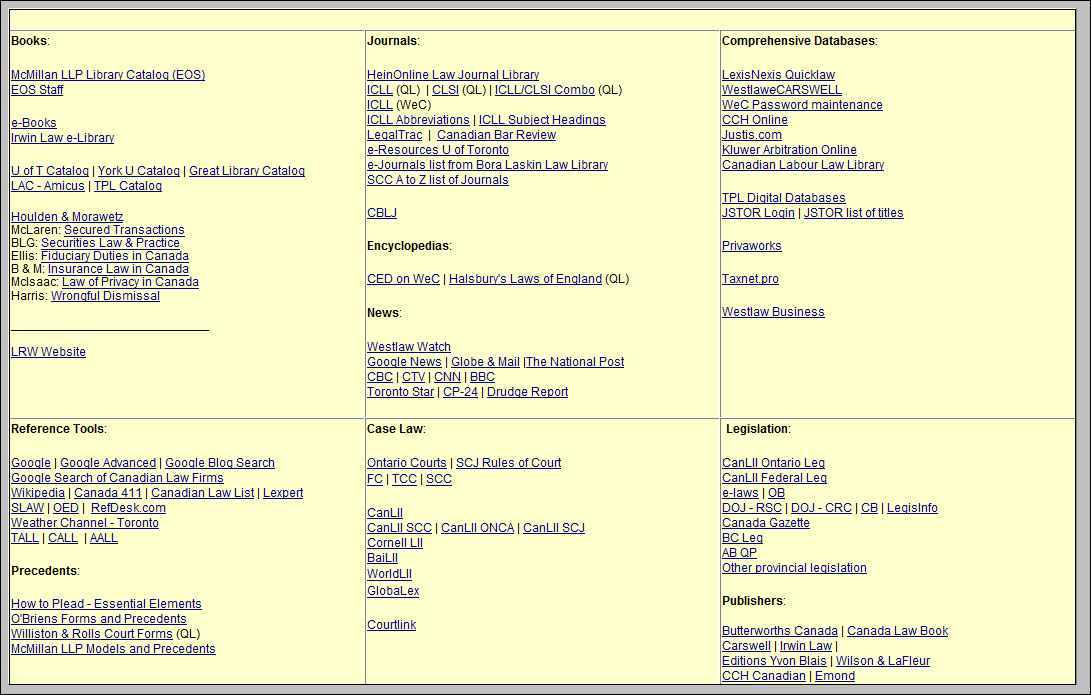
For the last 15 years or so I have customized an HTML page sitting on my local C drive containing a 2 x 2 or 3 x 3 table of Internet links I most frequently use on a daily basis for conducting research.
This is quicker than trying to organize and subsequently use Browser bookmarks or favorites. Depending on which computer I am on, this page is either my home page (on my personal laptop) or the top “Favourite” in my browser’s toolbar (on my work computer which otherwise defaults to the firm’s Intranet homepage).
It is also very easy to create the page using Microsoft FrontPage or any other number of HTML editors (it is even possible to do this in Microsoft Word).
In some situations, I will build in password reminders next to the links for proprietary databases.
I also upload the page into my DropBox account so I can access it when on the go.
Below is a screenshot of my customized homepage (slightly edited, to remove password reminders; it also needs to be updated):
Thanks for the great tip Ted!

Never Forget to Add Attachments With Attachment Alarm for Microsoft Outlook

Do you forget to include attachments when you are sending an Outlook email? I hate when that happens!
If so, try Attachment Alarm for Microsoft Outlook. This add-in is very easy to use. You just specify the words or phrases that occur in an email message and imply an attachment (“see attachments”, “see attachment”, “in attachment”, “the file attached” etc.). Attachment Alarm scans all outgoing e-mail messages and if it finds words or phrases from the Key words list, it raises the alarm and suggests inserting an attachment in a Microsoft Outlook message.
Attachments Alarm for Outlook works with Microsoft Office Outlook 2010 32-bit, Outlook 2007, Outlook 2003, Outlook XP (2002), Outlook 2000 and is compatible with Windows 7 (x86, x64), Windows Server 2008, Windows Vista (x86, x64), Windows 2003 and Windows XP.
It is very reasonably priced: US$19.95 for one licence that can be used on up to three computers. Bulk discounts are available.
Plan Your Future!

This tip comes from Erin Roberts, the founding partner of Zzeem, Inc, a consulting and technology firm in Toronto, Ontario, Canada. Erin works with businesses to build strong business processes within industry, professional and government organizations.
Erin runs workshops that help organizations focus on excelling at the services that they provide. Her advice is how to start moving your business from where it is now to where you want it to be:
Step One: Assessing Your Current Situation
- What legal services do you provide now?
- How do you deliver them?
- What works well for you?
- What needs improvement?
Step Two: Envisioning Your Ideal Future
- In a world with no obstacles, what would your organization look like?
- What legal services would you deliver to your members?
Step Three: Identifying the Obstacles
- What stands between you and your ideal future?
Step Four: Brainstorming the Solutions
- Write the prescription that will make your client value proposition irresistible.
Thanks Erin for the great coaching advice!
Watch for Trends
You can have too much information. Not surprisingly though, you can often not have enough. It is important to know what is going on in the world, even if the knowing is a simple scrath of the surface. There is a reason children are encouraged to monitor current events in social studies.
A quick way to monitor current events is to quickly browse a current events source. One of my favourites is the Google News page. Though this is a search engine starting point, you can monitor trends and see broadly what is happening in the world just by viewing the first page.
Todays tips: Watch the trends
Use Invert Selection for Easier File Selection in Windows Explorer
The next time you need to select most of the files in an open Explorer window don’t waste your time holding down Ctrl and clicking each file manually. It’s much easier to select the ones you DON’T need, and then let Windows reverse your selection.
Inside an open window, hold down Ctrl as you select the file(s) you DON’T want to select (sounds backward, but wait…). Select Edit, then Invert Selection, and Windows will turn your selection inside out leaving you with the files you wanted to select. You can then delete or copy them as needed.
Get Google’s Secret Sauce!
Google is one of the run-away success stories of the Internet. They rethought the business model for search, they drove all sorts of innovations and they have changed the way that all of us think about information.
Because they know that they can’t stay on top of the search heap without the best people and practices, they recently decided to use their data gathering and analysis capabilities to determine what makes a good boss. Now, using the information they came up with, they’ve rethought the rule book for managing people and teams. It’s no surprise that their ideas on management are innovative, too.
Managing people in a law firm is no different from managing them at Google, or anywhere else. Lawyers and firms that want to reach the top of their game would do well to consider Google’s ideas on management. In an article published on March 12, 2011 in the New York Times, Adam Bryant discusses at length what he calls the often “forehead-slapping[ly] obvious” directives that Google’s Project Oxygen developed, and also created a stripped down, put-it-to-work-right-now version of Google’s Eight Good Behaviors and Three Pitfalls of Managers.
Shouldn’t an innovative firm like yours be putting Google’s Rules to work, today? They’re too good and easy- to-implement to pass up!
Use What You Have
Today’s tip: Use what you have.
Knowledge is always useful, especially when it can be used more than once. This tip is a simple reminder to look first to what you (or your colleagues) have already done when you have a research question: you organization’s document management system, your binder of research memos, your personal precedents.
Yesterday I saved a client a few dollars by updating a past memo that we had written for them. Even though the context of their question was different, the information was something we already knew.
Double-Click Windows Titlebar to Quickly Maximize or Resize a Window
A very short but useful tip this week. If you need to quickly resize a Window, remember that double-clicking the Titlebar of any Window (the horizontal part of a window across the top where the name of the document and applications usually appears) will toggle it between full screen size (the same as Maximize) and its former size (the same as Restore). If you want to resize a window the Titlebar is a bigger target than the caption buttons. Unfortunately this trick doesn’t work on a Mac.
Plan to Succeed
Or maybe, to convey the meaning we’re really trying to express, it should be phrased as: “To succeed… plan.”
Regardless of how you say it, in order to make every day a successful one and keep your energy and enthusiasm levels high, you should spend the first few minutes of it (or – even better – a few minutes at the end of the day before) determining what your most important tasks are. Jot them down. Keep the list close at hand, cross tasks off as you go and, each time the inevitable interruptions and unexpected events that make up the practice of law pull you away from your priorities, use the list like a compass to quickly help guide you back on track.
Make daily priority lists for your personal life, too. We only go around once and this day will never come again. Decide what you want to get out of it, and don’t be dissuaded by the unexpected from reaching your goals.
Thanks to Nancy Byerly Jones for this practice management tip. As an additional tip, you can follow Nancy on Twitter.
Recent Decisions Sources
Today’s Tip: Check with the media.
If you’re trying to find the text of a judgment that has just been released and it is not on the relevant court’s website, check the websites of the Globe and Mail and National Post. They will quite often scan in the court judgment (assuming the case is important enough) and link to it from the relevant news story.
This tip is from Susannah Tredwell, Library Manager, Lawson Lundell LLP in Vancouver, BC. Follow her on twitter or come and see her speak at the Canadian Association of Law Libraries Conference in May. Susannah also writes a column for Slaw.


