







All Our Tips
News to Documents

Often a news item will mention a document, sometimes a decision, agreement or other type of document that you need to access. Today’s tip is a reminder to go to the source.
For example, a recent radio broadcast mentioned a memorandum of agreement between the City of Edmonton and Harbin, China to help design a waste managment system. This document does not appear on the City’s website. To get a copy, I need to find a source. Some choices follow that you can apply to your research scenario:
- Find the contact information for the radio newsroom and phone to ask for the background document, or their contact
- Find print news sources and call the author for a copy of the document, or their contact for it
- Call the originators office, or communications branch (there is usually a contact phone number on a news release
- Use a public body’s website to try and identify the most likely branch that will have the information you are seeking and call a general phone number
All of these tips sound a little like my previous Phone a Friend tip, but in this case you have to start by finding and making a friend.

Is Facebook Secretly Sharing What You Are Reading and Watching?

During a recent phone call, my colleague Catherine Reach and I had a bit of a chuckle over a rather risqué and NSFW (not suitable for work) article that one of our mutual friends had apparently just read online. Think clothing-optional antics by a celebrity in a bedroom in Vegas. As it happened, a few minutes before our call, we had both seen a Facebook update telling us that our friend has just read this particular article.

The critical fact here is not what happened in Vegas, but rather that our friend likely had no idea that the articles he was reading were being shared with the world via Facebook. And our friend is certainly not the only person unknowingly embarrassing themselves in front of all their Facebook friends and acquaintances. Catherine and I have both noticed recently that more and more people seem to be sharing embarrassing information about what they are reading and watching on Facebook.
Please remember, some sites will automatically share what you are doing with your Facebook friends. Some of these sites may warn you the first time you visit them (usually when you look at an article that someone you know has shared). There will be vague warning or checkbox to click on before the article you want to read loads. In most cases, this will be the one and only warning you get. From that point forward they will automatically share a description and link to every item you watch or read. Yikes!!
This is called “frictionless” sharing. Read more about it in this CNET article (How Facebook is ruining sharing).
The number of sites using frictionless” sharing is growing very quickly. At first it was the mainstream media and sites like Netflix and Spotify, but now there are many more, and the list is growing longer on a daily basis. See this Mashable post for a list of 60 apps that will share information on Facebook.
Do any of the apps on this list look familiar? Are you using any of them?
Go to your Facebook Privacy settings page and review the list of apps you have installed and what they are sharing. Do it now. Right now. I am guessing you are sharing information that you don’t realize you are sharing.
And while you’re at it, check the privacy and sharing settings on the other social media tools you use. MyPermissions.org is a great tool to help you do this.
A HT to Catherine who tweeted about our conversation earlier today and inspired me to write this.
The 10 Steps to Going Paperless – Part 2

This is the second of two posts dealing with the management side of taking your office paperless. The first post from last week dealt with the first 5 things to consider from a management perspective. This post looks at the remaining 5 things to be part of your paperless plan.
Here are the next 5 things to consider:
- Research: Do a thorough investigation of the available tools to help you (document management systems, electronic faxing, scanners, data backup systems, security systems, document conversion companies, process consultants, storage formats, storage devices, remote access devices etc…). Knowledgeable consultants can help you out here.
- Budget: This is required!!! Select your needs in advance (hardware, software, training and installation, consultants) and arrange to incorporate these into your budget and into your business plans. You may have to spread things out a bit to accommodate everything in the budget. For software, consider what will fit with your needs, including ease of use and implementation, cost, and integration with your existing systems. Don’t neglect backup needs to keep electronic data from being lost!
- Do a small test project: make any needed changes; and then move to the transition into the rest of the practice, using your early adopters as change agents.
- Develop a plan: for ongoing practice-wide use. Include a document storage plan for employees with specific guidelines.
- Do a celebration followed by a post-mortem. Learn from the experience!
There are many benefits of taking your firm paperless. Much of the literature in the area speaks to the technological side of the process. However, paying attention to the management side will oftentimes make the difference between a successful and straightforward conversion to the digital world and one that was fraught with anxiety, stress and wasted energy.
Having a plan means that you are prepared to handle the potential roadblocks as you have given them due consideration and have your responses thereto already thought out and are ready to handle them in a smooth and businesslike manner.
An Alternative Source to Find UK Lawyers
Do you find yourself in need of a Barrister in the UK? Do you have access to JustCite from Justis Publishing? Even if you do not have access at your desk to JustCite – which is an excellent index that that allows you to search multiple jurisdictions to find leading cases, articles and legislation and see how legal documents cite and relate to each other – you can use their Barristers search.
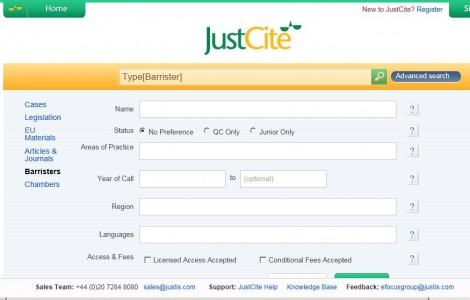
The search result includes contact information, practice areas, case history generated by Justis and representative cases and a biography if the barrister chooses to add to their profile.
Rather than show you a sample search result, I will leave ou to follow the links to the Advanced search at JustCite.com and check it out.
How to Access Gmail When It’s Down
Many people experienced some degree of frustration today with the Gmail outage. The Internet is more reliable than it has ever been and most major service providers like Google very rarely suffer service outages. But when they do, it can be a great inconvenience, in both your personal and/or professional lives.
For that reason there are some lessons to be learned. If you store your data on the cloud, be prepared to operate when you can’t access the cloud or the particular service. What cloud services do you use and how long could you function with access to them? Consider the ones you can’t live without and what you can do to access them in alternative ways. There are many options, depending on what service you are using and how you access it. The alternatives could involve different hardware, software or an offline backup of your data.
If you use Gmail, this excellent post on Lifehacker gives you various alternatives for accessing Gmail, even when Gmail.com is down. It is a must read for anyone that uses and relies on Gmail.
The 10 Steps to Going Paperless – Part 1
At ABA TECHSHOW 2012, Dave Bilinsky presented with Russell Alexander, an Ontario family law lawyer who has a multiple-office, paperless practice, on: “Managing the Transition to Paperless”. Accordingly this post is the first of two based on that presentation dealing with the management side of taking your office paperless.
How do you build your plan to take yourself paperless? Here are the first 5 things to consider:
- Commit to going paperless. Call your staff to a meeting and explain the advantages for each of them individually, and as a group. Fully involve them in the process and invite them to raise their concerns now while you are at a planning stage. Ask for their support and commitment to a successful transition.
- Check your existing computer hardware including your server and back up and RAID systems to make sure it can handle all paperless applications (hardware and software requirements). Make sure you have a reliable backup back-up system (including storage off-site).
- Analyze your needs – now and in the future. Think about what you’re likely to need in the future as your business grows as well as your current needs. Think about which documents need to be accessed often or quickly, which need extra security, and which could be weeded out after a certain time. After all you don’t want to be storing all documents forever but you do have requirements for document storage and retention from your ethics regulator or insurer (or both).
- Develop a transition plan and a timetable. The timetable should be tight enough to keep everyone on line but not so much so that it doesn’t allow for reasonable adjustments and setbacks. Plan to be flexible!
- Start small. Use a single lawyer and legal assistant to start. Learn from the pilot project so you can address any problems before broadening your scope. It is easy to correct small things at the pilot stage before they become much bigger things in a firm-wide rollout.
Searching Court Dockets
In Canada, legal researchers do not have many opportunities to search dockets of courts. That is not the case in the US. Manay of us will search US Court dockets infrequently. Today’s Tip: learn from the experts.
The American Bar Association Law Practice Magazine had an article last year titled Finding Info Like a Pro: Investigating Court Docket Databases. The article offers some tips, and it references a book that offers more.
Happy Searching.
Note: The Supreme Court of Canada Case Information database is available to searchers at http://www.scc-csc.gc.ca/case-dossier/cms-sgd/search-recherche-eng.aspx
Change the Style of Your Gmail Inbox to Make Finding Messages Easier
We all need help on keeping up with our email. The Gmail styles feature could help you more quickly see the messages that are most important to you.
Gmail has several built-in configurations or “styles” that change how your Inbox sorts messages. In the Classic style – the default Inbox style – messages are ordered chronologically by the date they arrived (newest first). The other styles present messages in slightly different ways. These are the other styles and what they do:
- Unread First – Unread mail stays at the top; everything else is at the bottom.
- Starred First – Starred mail stays at the top; everything else is at the bottom.
- Important First – This style brings mail from the contacts you email most often and other important mail to the top of the page. Everything else is in its own section at the bottom of your inbox. See this Google Support page for more information how Google flags “important” messages.
- Priority Inbox – Messages classified as important and unread are in the top section, then starred messages, then everything else. Each section can be customized further, so if you want more control over your inbox, Priority Inbox is for you. See this Google Support page for more info on Priority Inbox.
You can change the inbox style by clicking the arrow that appears when you hover over “Inbox” on the left side of your Gmail page. You can easily and instantly switch between inbox styles any time. Try the different styles out to see if something other than Classic helps you better manage and find the messages that are important to you.
Save on Rent. Ditch Your Files.
Real estate costs can be one of a law firm’s highest expenses. There’s no reason to pay rent to house hundreds of case files, especially closed files, that could be much more inexpensively stored off site or converted to electronic format. As soon as possible, set aside some time to determine which files can be destroyed, which can be moved off-site for less expensive storage or digitized, and then, if you haven’t already done so, implement a system to begin creating a paperless file for each new case as you open it. You might even be able to rent out the freed-up space at a profit.
Educate Yourself
Today’s Tip: Life is improved by learning, so educate yourself.
I made some foolish choices in my youth about formal education that I have come to regret.
The good news, for me and others, is that there are plenty of opportunities to educate yourself. Whether it is continuing education about a specific topic or general life-long learning, basic legal research processes, a more esoteric topic like how tribunals can provide excellence in administrative justice, or updates in an area of law you have an interest or practice in, there are opportunities available to learn things.
Take in a lunch meeting, a seminar or a conference, meet people, learn things. Give yourself an academic moment.


