







All Our Tips
Updated Version of Great Social Media Guide for Lawyers Released

Last spring, Meritas’ Leadership Institute released a Social Media Guide for Lawyers. This helpful resource provided lawyers with an overview of the three main social media tools — LinkedIn, Facebook, and Twitter— and some tips on how to use them for networking and marketing purposes. The guide also include two sample law firm social media use policies – one strict and one permissive.
As you all know, technology changes almost as fast as the weather does, and to keep up, Meritas has just released an updated version of the guide: Social Media Guide for Lawyers v. 2.0. This great guide is full of practical information for lawyers that want to learn more about using the three main social media tools. It will be helpful to lawyers that are just starting out in social media as well as those that have mastered the basics and want to do more.

Cash Flow Reports – Part 1

Following on our earlier Top 10 Financial Errors posts, this is the first in a series of 10 posts dealing with Cash Flow Reports and in particular, cash flow management.
Mark Ruffalo once said: Certainly, it’s very easy to fall in love with cash. If you’re going to make all your decisions based on cash, you’re going to have a pretty naffy career.
In my MBA days, I took a series of accounting courses. One of the courses was entitled ‘managerial accounting’ but it really was about how to manage cash. I still recall the professor walking in and saying: “Forget everything you learned in those other accounting courses. Here you learn to manage cash – and that is what you will need to know to keep your businesses alive.”
So how do you learn to manage the cash in your practice? How do you assess how you are really doing? How do you get a solid grip on your financial future?
One key is cash flow management – you must understand over time what funds are coming into your practice, and where the money is flowing out. In this series of posts, we are going to look at the top 10 monthly cash flow managerial reports you should be getting from your accounting system, what they mean, and why you should be producing (and reading!) them at least monthly.
The first cash flow report that you should be generating from your accounting system is:
#1 – Overall and projected monthly billings:
What are your overall monthly billings, measured against your projected (i.e. budgeted) billing target? This report will tell you if your gross income is meeting projections. Needless to say, if you are not billing according to budget, you are not going to be receiving cash according to budget.
A related question is what percentage of collected monthly billings should a lawyer’s income be? According to James D. Cotterman, a consultant with Altman Weil, the figure should be 55-60%. (Cotterman, James D., Fiscal Management of a Law Firm, Altman Weil, Report to Legal Management, September 2001.)
Why do we mention these two ideas together? If your gross income is falling below projections, then there will be a direct and negative impact on cash which you can withdraw as personal income, since you will still be required to pay the bills in order to stay in practice.
We have long advocated that you take the mental approach of ‘paying yourself first’ rather than paying yourself last. Why? Because if you envision paying your projected draw first and then meeting all other expenses, you will work towards that goal. If, however, you take the position that you will pay yourself whatever is left after the bills are paid, then you will only get what is left… whatever that amount might be.
In our view, it is much better to know your financial budgeted goal, work towards it and measure your progress – particularly when that goal is having sufficient cash to meet all your needs, including your draw!
Just the Facts

Today’s research tip is about facts.
When research is assigned to juniors (and librarians for that matter) it is important to share facts that are critical to the research. It can also be difficult to remember to share everything that might be pertinent.
This tip is a reminder to researchers to ask for facts. The ask might be looking in the file – whether electronic or paper, or it might be talking to the assistant who works on the file. It might be going back to the responsible lawyer to ask for more information. It may prove necessary to get more information from the client.
Regardless of how you get the facts, it is better to have the right information than to base your answer to the research problem on only part of the story.
Minimize That Darn Office Ribbon for More Room on Your Desktop
If you are using Office 2007 or 2010, The Ribbon is now a part of your life. Some of you will be happy about this – some of you won’t.
The Ribbon was introduced with Office 2007. It replaced the standard Office toolbars and menus with a very large toolbar filled with graphical representations of control elements or commands. Commands are organized in logical groups by functionality and are collected together under tabs. Each tab relates to a type of activity, such as writing or laying out a page.
There are good intentions behind the Ribbon – honest! It was designed to help you more quickly find the commands you want to use when you are creating and formatting your documents.
If you are learning Office, you may like the Ribbon as it can be helpful to find commands you don’t use that often. However, if you are a power user, you probably don’t like it – likely because it takes up a huge amount of space on your desktop, especially if you are working on a smaller laptop screen.
If you want to go Ribbon-less for more desktop real estate, you can minimize the ribbon by pressing Ctrl+F1. This will make the Ribbon disappear or be “minimized.” When the Ribbon is minimized, the Tabs will still be visible. When it is minimized, pressing on a Tab will make the Ribbon appear, and it will disappear again after you press a command.
If the Ribbon is minimized, pressing Ctrl+F1 again will bring it back.
So there you go, if you want more space on your Office 2007 or 2010 desktop, remember to press Ctrl+F1 to minimize the Ribbon.
Manage Chaos! Create a Shared Family Calendar
Our lives as lawyers are hectic enough even before we factor in busy family events. Accordingly our tip is to create a ‘family’ calendar where every family member can enter (and see) the entire spectrum of upcoming family events. Schedule movie nights! Put in Grandmother’s birthday party! The school play (where your daughter is on stage!). Also enter the evenings where you have business events to let everyone know Mom (or Dad) won’t be available until later (no need to put in confidential client info – just a notation that you have a business meeting is just fine).
If the calendar is on the web then everyone in the family can see it. Mobile family? Ensure that it can be viewed (and manipulated via smartphones and other mobile devices).
Platforms? You can use Google Calendar (where you can create individual calendars and link them) or a dedicated family calendar site such as Cozi (http://www.cozi.com/). Cozi also incorporates shopping lists, to do lists and is configured for mobile devices. Never forget a birthday or family event again!
Will That Research Site Work on a Mobile Device
Today’s top: Be prepared for mobile.
Sarah Glassmeyer of CALI shared a tip from her session at the Canadian Association of Law Libraries Conference yesterday. You can test a website to see how it will act on a mobile device. visit http://www.howtogomo.com to check your research websites before you try and use them with your phone.
Amazing MS Outlook Tip: Sort Your Inbox by Multiple Columns
Most MS Outlook users know that you can sort your Inbox by a single column. A single left-click on any column head will sort all the messages in the Inbox by the contents of that column. For example, alphabetically by subject or chronologically by sent or received date.
Note as well that a second click on the same column will sort the messages again in reverse order to the initial sort.
Sorting your Inbox by a column can be helpful for locating a message or deleting old messages.
But you can do more – you can actually sort your Inbox by two or more columns. It’s actually very easy to do.
First, sort by the first column by clicking on a column head. Then, hold the Shift key down and click on a second column heading. If you do this with From and the Received date, your messages will be sorted primarily by sender, and all the messages from each sender will be ordered chronologically.
You can add a third column to your sort by following the same steps. Wow!
Go tackle your Inbox – use the multi-column sort to find and delete all the old messages that are clogging your Inbox – I’m seeing the elusive “Inbox Zero” in your future.
A hat tip to Paul Unger for including this great tip in his presentation at the ABA LPM Section meeting in Napa last week.
Take Back Your Privacy!
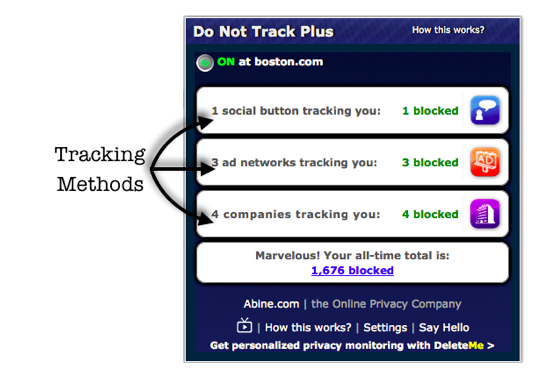
If you spend any time on the web, you should be aware of the fact that you can be tracked by websites that you do not visit. This can include analytic services, advertising networks and social platforms. Few of these offer any reliable way of opting-out. Accordingly, we are left with working with a voluntary op-out procedure that is honoured by third-party web tracking sites.
One of the ways to prevent this tracking *at least by third parties who agree to honour a user’s Do Not Track preference* is by installing a plug-in for Firefox, Internet Explorer, Chrome, and Safari. One such plug-in is available from www.DoNotTrackPlus.com.
DNT+ is a browser tool that blocks the tracking capabilities of advertisers, social-networks and data-collection companies. In addition to helping restore your on-line privacy, regain control over who sees your activities on-line, stopping pop-up ads and other advertising, it also allows you to load some websites up to 4x faster (since you are not dealing with all that tracking overhead!).
DNT+ prevents your browser from communicating with these third-party data-collectors.
Can you depend on DNT+? In their words:
We’re also completely dedicated to your privacy, so don’t collect or track anything when you get DNT+ (unlike *cough cough* those other companies with shady ties to marketing people). The only thing we can see is that a download took place by a certain IP address so we can figure out how many users we have. There are no forms to fill out and no tracking of any kind. In fact, the only connection we ever have to the software is when it asks our servers for updates on new trackers to block. That’s it!
Who are these people you may ask?
The DoNotTrack.Us website is maintained by Stanford researchers Jonathan Mayer and Arvind Narayanan. We are affiliated with the Security Lab at the Computer Science Department and the Center for Internet and Society at the Law School.The broader Do Not Track project is a collaboration of numerous researchers, advocacy groups, and technology companies. We have worked closely with Alex Fowler, Sid Stamm, and other Mozillans; Peter Eckersley, Lee Tien, Rainey Reitman, and otherEFFers; Alissa Cooper; Chris Soghoian; Ashkan Soltani; Harlan Yu; and many more.
All text on donottrack.us is licensed under a Creative Commons Attribution 3.0 Unported License.
DNT+ is not the only way to block third-party tracking of your activities. Ghostery is another.
To give you an idea of the controversy that this is brewing, here is The Atlantic (Alexis Madrigal on March 30, 2012) on “The Advertising Industry’s Definition of ‘Do Not Track’ Doesn’t Make Sense:
There is a battle brewing between the Federal Trade Commission and digital advertisers over a system designed to help people control their data called “Do Not Track.” On the one hand, you have the FTC saying this:
An effective Do Not Track system should go beyond simply opting consumers out of receiving targeted advertisements; it should opt them out of collection of behavioral data for all purposes other than those that would be consistent with the context of the interaction.
That seems like a pretty airtight definition. Do Not Track means, “Do not collect information about me unless it’s needed to show me content that I want to see.” That makes sense, no?
Well, it doesn’t make sense to the online ad industry as represented by the members of the Digital Advertising Alliance. They define ‘Do Not Track’ as something closer to “Do Not Target.” That is to say, the industry’s companies want to continue to collect data even after you’ve said, “Do not track me.” Their only concession is that they won’t show you ads that have been constructed with your data in mind. Here’s the summary of their position in the New York Times:
The advertising group, however, defines it as forbidding the serving of targeted ads to individuals but not prohibiting the collection of data.
I have installed DoNotTrack and I am (uncomfortably) aware of the number of sites that DNT+ has stopped. What worries me is the number of social buttons, advertising networks and tracking companies that have not agreed to honour the voluntary opting-out of users from being tracked. Ultimately I believe that legislation (both in the USA and in Canada) would be welcome (and necessary) to stop such third-party tracking. Until then, those of us that wish to take back our privacy need to download such services as DoNotTrack plug-in offered by Stanford’s Center for Internet and Society or Ghostery to take back our privacy.
Talk to Your Librarian
Today’s tip: “talk to your law librarian” is in honour of all the new legal summer students that are starting at law firms. For those of you who don’t have access to a person or team in house, law society and bar organizations have your back.
The Nova Scotia Barristers’ Society Library offers:
- through the provision of reference and research assistance;
- current awareness to the membership;
- document delivery and interlibrary loan services;
- research and resource guides;
- online services;
- training to the membership;
The Great Library website offers an Ask a Law Librarian page which states:
Experienced staff are available to answer reference questions, advise on research strategy and assist in locating and using resources in the Great Library.
The Toronto Lawyers Association Library and Research folks offer organization of training session with LexisNexis Quicklaw and Westlaw Canada trainers and offer a Criminal Sentencing Research session. If you have ideas for other training topices, they take requests.
The Courthouse Libraries BC offers in person, and online training and How To videos.
The above list merely scratches the surface. Every jurisdiction has a law librarian who is willing to help.
Preventing Embezzlement
It is an unfortunate fact of life that the most trusted of employees could be stealing money from their employer. Ian Doddington, CA, an accountant who advises law firms, states that the main areas of risk are:
1. Theft due to lack of internal controls and supervision of accounting transactions:
This is demonstrated by the IBM Selectric typewriter ‘lift-off’ fraud. Ian suspects this was quite common. He states he is aware of one bookkeeper who carried this fraud on for six years in a firm of five lawyers. Her thefts averaged $60,000 per annum.
In her case, cheques were prepared payable to an innocuous payees such as “Minister of Finance” or similar government registry. These cheques were then presented to a lawyer signatory by the employee. After signing, the employee would lift-off the payee and insert her own name and negotiate the check. At month end, the employee picked up the bank statements and put the cheque back into the IBM Selectric to ‘lift off’ her name as payee and re-insert the original payee name. This slight-of-hand enabled the fraud to fool the annual audit.
Special circumstances:
a. The employee would ‘signature shop’ ie pick the signatories who rarely asked questions – usually one of the two litigators when they returned after a hard day in court (she rarely used the paper lawyers)
b. the employee gave her bank a cover story – she was going through a matrimonial separation, her employers were acting for her and she would be cashing regular pay out cheques from her employer.
2.Unsupported payments:
Another fraud occurred where the employee would draw cheques payable to a credit card company in payment of each of the partners’ monthly credit card statements. After signature, he would prepare a covering letter and include his own credit card statement and instructions to spread the payment over the partners accounts and pay off all of his own credit card balance.
Over time this became quite diverse and included payments of his hydro, telephone, cell, and department store accounts.
To add insult to injury, in the season of giving, he would make donations of the firm funds to various charities and obtain charitable receipts in his own name for tax deduction.
3.Inappropriate client disbursements
Client disbursements are quite vulnerable to fraud. Lawyer signatories don’t question validity as strongly when the cheque is charged to disbursements. Ian states he has seen examples of office supplies, entertainment and similar expenses of employees charged as disbursements. If they could not be buried in the bill to the client, the employee would authorize write-offs. There were other situations where junior lawyers have charged personal travel and vacation trips in a similar manner.
Personal injury practices can foster an environment for manipulation. Often the lawyer is involved in structured settlements or paying re-habilitation expenses for the client-medical and home renovation expenses etc. Again, Ian has seen examples where employees personal expenses were run through as disbursements.
4. Air miles
An employee, secretary, would occasionally travel on business with the lawyer (don’t ask me why). Tickets would be obtained using travel miles and the lawyer would get another ‘friend’ who had a travel agency, to provide an invoice for the trip which would then be re-imbursed by the firm.
5. Computer upgrades
Few firms keep an inventory record of their hardware and software acquisitions. One employee had a personal deluxe system and software set up at their home and paid for by the firm- $10,000. This only came to light when the firm was going through an upgrade and the supplier raised a question about the employees system.
So as we can see, fraud can come in many forms – the common denominator being the reliance on trust by the employer. While trust is generally a good thing, it is important that the firm also put into place internal controls and checks that ensure that this trust is well-placed.


