All Our Research Tips
Spam or Not
Wondering if that email in your inbox is a legitimate request for business? Here are some steps that I use to research if an email from a company is legitimate.
- Look at the original email – check the properties (usually a right click) of the From address to make sure that it matches what appears as a link – make sure the domain matches the company URL.
- Hover over any links in the email to see if the URL behind the link matches what is highlighted.
- If there is a phone number in the email, paste it in to Google or Bing or Yahoo as a search.
- Search for the company website using Google or another search engine. Look at the URL attached to the search results and check for inconsistencies with the email.
- Check LinkedIn for principles named in the email.
- For international companies, look for North American distribution of the product. If there is no Canadian distribution, it is less likely that there would be a claim in our jurisdiction.
- Check the Canadian Importers Database http://www.ic.gc.ca/eic/site/cid-dic.nsf/eng/home to see if a product is listed in the email and there is no apparent distributor in Canada. This database can be searched by product.
- Check the FBI eScams page http://www.fbi.gov/cyberinvest/escams.htm or the RCMP reporting Economic Crime On-Line website https://www.recol.ca/partnerspage.aspx for more information about email phishing.
- Check Dan Pinnington’s Avoid a Claim Blog for news of recent scams directed specifically at lawyers and law firms.
- Follow your law society Client Identification and Verification guidelines.
Posted on November 9th, 2011 - Editor: Shaunna Mireau

—
Budget Your Research
Today’s tip is about budgets. For many law firms, fall is budget season. Why not think about budgeting for individual research projects?
Things you can consider:
– what format do you need downloaded cases and materials in? Free and fee sources offer different outputs so do your gathering once.
– how much research time so you have to het an answer? If you only have an hour, spend it (on commentary) wisely.
– have you (or someone you work with) answered this question? Updating work product you have makes for a fast and inexpensive research budget
Happy planning!
Posted on November 2nd, 2011 - Editor: Shaunna Mireau
—
Pay Attention to the Privy Council Office
The Privy Council Office, among many other responsibilities, prepares Orders-in-Council and other statutory instruments to give effect to Government decisions.
The PCO website is the first place to look for proclamation dates of federal legislation – proclamations are published in Canada Gazette Part II, but the Gazette publication is sometimes far later than the Order in Council that brings a federal Act in to force. The PCO maintains the .
For example, on October 6, the PCO published Privy Council Order Number: 2011-1164. this is the instrument that says:
Therefore, His Excellency the Governor General in Council, on the recommendation of the Minister of Industry, pursuant to section 372 of the Canada Not-for-profit Corporations Act, chapter 23 of the Statutes of Canada, 2009, hereby fixes October 17, 2011, as the day on which sections 1 to 296, subsections 297(1) and (5), sections 298, 299, 303, 305 to 307 and 309, subsections 311(2) and (5), section 312, paragraphs 313(z.4) and (z.6), sections 314 to 316, subsection 317(1) and sections 318 to 340 of that Act come into force.
That proclamation was published in the October 26, 2011 Canada Gazette
Order Fixing October 17, 2011 as the Day on which Certain Provisions of that Act Come into Force
Canada Not-for-profit Corporations Act
SI/2011-87
26/10/11
If you were only watching the Gazette for federal in force dates, you would be weeks behind the news.
This week’s research tip: Pay attention to the Privy Council Office
Posted on October 26th, 2011 - Editor: Shaunna Mireau
—
Mobile Offline Law
I am the kind of law librarian who likes to read legislation. I know, it is weird. It is particularly nice to have frequently needed legislation sources in my pocket. I have posted before about the keeping your rules of court handy on your eReader. Today’s Tip includes steps for putting statutes on your mobile device.
John Papadoupoulos wrote about the Canadian Law app that is available through Apple’s App Store. This app sounds neat, and it might work very well for you. I prefer law from the source and thought it would be good to outline the alternative for getting offline law for this Tip.
Using your mobile device online, navigate to the Justice Laws website. The site has a new PDF page layout that makes downloading PDFs very simple.
Navigate to the pdf of act you want access to offline. If you are viewing this on your iPhone or iPad, touch the screen at the top until you see the black download bar. Choose your pdf viewer, and voila, PDF downloaded to your device. I like iAnnotate ($9.99) for marking up PDFs, but iBooks is free and works great too.
On a Blackberry, BeamReader gets decent reviews as a PDF viewer. eReaders like the Kindle, Kobo, and Sony Reader will store PDFs as well, though you may need to do the original download on your desktop and connect from there.
My favourite download from the DOJ Laws website is the Table of Public Statutes.
Posted on October 19th, 2011 - Editor: Shaunna Mireau
—
Real Time Research
Today’s Tip: seeing is believing.
If you have an interest in a particular area of law, for example human rights, you should be aware of what is happening at the Supreme Court of Canada in regards to your topic.
Today, the SCC is hearing a case from the Saskatchewan Court of Appeal called Saskatchewan Human Rights Commission v. William Whatcott. The SCC Case information page (link location) leads to a summary, the docket, the Factums and the live (or archived) webcast.
Webcasts for SCC hearings can be viewed directly in your Internet Explorer browser using the plugin. If you visit the webcast site without the plugin, you will be prompted for an install. Silverlight works with Intel base Mac operating systems
Posted on October 12th, 2011 - Editor: Shaunna Mireau
—
Follow the Class
One of the great things about Twitter is that you can follow along with what is happening at a continuing education seminar that you are not attending.
Ted Tjaden and I are presenting, along with other great speakers, for the Legal Education Society of Alberta on .
For today’s tip, I have been tweeting tips, as have others, at #LESAonline
Posted on October 5th, 2011 - Editor: Shaunna Mireau
—
Leveraging Google Advanced Search
Editor’s note: This tip was provided by Ted Tjaden, National Director, Knowledge Management at McMillan, Slaw contributor, and . Thanks Ted!
Although many law librarians “complain” of the tendency for law students to go straight online before thinking about the issues and consulting print and online secondary resources, I remain surprised by the number of smart law students who when they go online have never used
Google Advanced Search has a number of advantages over a simple Google search:
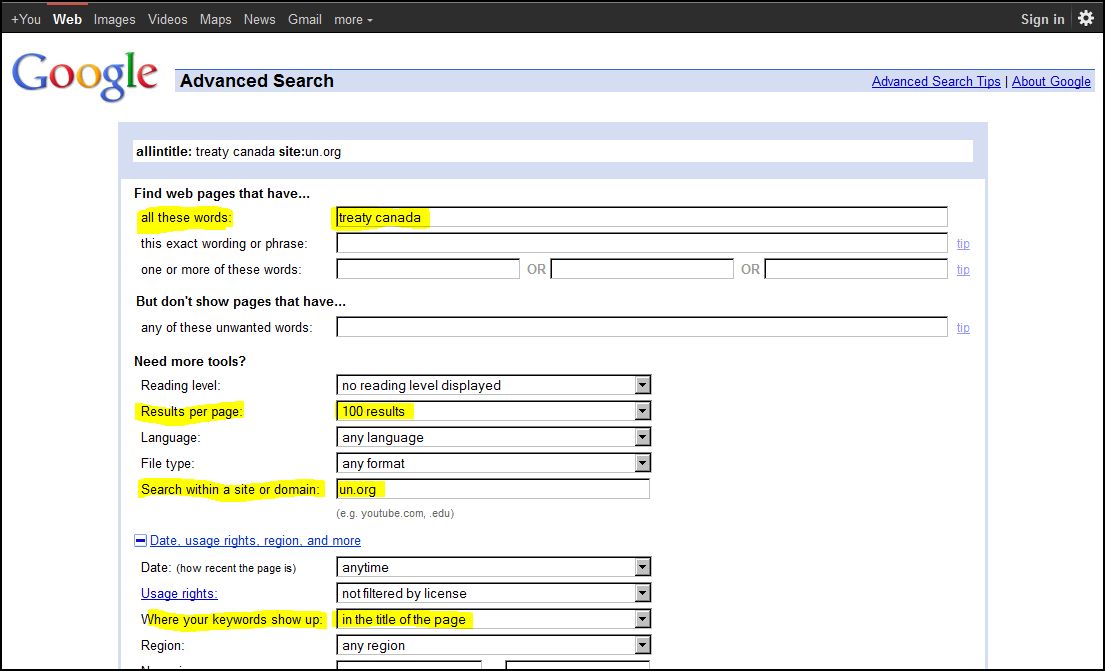
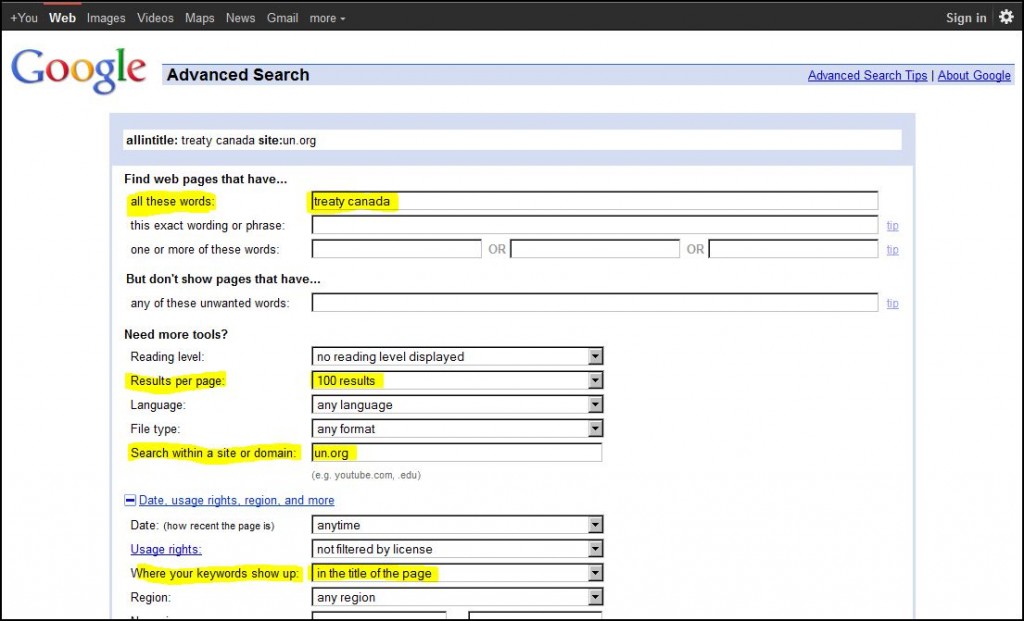
- Search within a a site or domain: limit your search to a particular domain or URL (e.g., “un.org”)
- Show 100 results per page
- Where your keywords show up: easily limit your keywords to the “title” of a document (providing a much more focused search)
- File type: limit your results to a particular document format (e.g., PDF or Word)
- Date or region restrictions
The screenshot below shows a Google Advanced search limited to the United Nations website where the words “canada” and “treaty” appear in the title of the document showing 100 results per page.
Click on image to enlarge
Running a search on the United Nations website on “canada” and “treaty” gets results, but different results. In many situations, I find it easier to review and navigate the Google Advanced Search results compared to the actual site’s internal search engine results.
Realize, however, that some websites make block Google from crawling their entire website.
Posted on September 28th, 2011 - Editor: Shaunna Mireau
—
Search in Google Plus
Google+ is now open to anyone so I thought it would be appropriate to share a tip for legal research on this social media tool.
First – a caution: the only thing that Google+ will tell you about a topic is who cares about it. Sometimes that is important to identify when looking at a legal research issue.
How do you search Google+? This is one of the new features announced yesterday
Search in Google+
You’ve been asking for it, and we’ve been busy building it, so today we’re bringing Google’s search expertise to Google+. Just type what you’re looking for into the Google+ search box, and we’ll return relevant people and posts, as well as popular content from around the web.
Join Google+ to get access to the search box. There is always a catch 🙂
Posted on September 21st, 2011 - Editor: Shaunna Mireau
—
Be Creative
I believe that creativity is a skill that can be developed. I have to believe it because I am still working on colouring inside the lines. To enhance your legal research work product, sometimes you need to think outside the lines.
For example, think about unconventional places where information can be found. I am not talking about a Google search.
A good example of creative thinking is set out in a case called Sparks v. Dubé, 2011 NBQB 40. Even though precedent suggested that an ex parte order for preservation of information on a Facebook account would be difficult, defense counsel in this case took a creative and slightly different angle in their argument and were grated the order. There is a very nice precedent for what such an order might contain at the end of this decision too.
Hat tip to Karen Sawatzky of Tapper Cuddy in Winnipeg, and columnist at Slaw.ca for sharing the case.
Posted on September 14th, 2011 - Editor: Shaunna Mireau
—
Keep Your Skills Sharp
Today’s Tip: Take advantage of training opportunities.
Since we are in back to school mode, I thought a training tip would be appropriate. Legal research, like many other skills, is enhanced by practice. We don’t always have a chance to practice everything we need.
When was the last time you did research for a point in time historical regulation? When did you last need to find a United Nations document? Are you confident that if you needed ALL the commentary about a point of law you would be able to find it?
There are plenty of offerings to help you keep your research skills sharp. Check out your local continuing legal education group, the Canadian Bar Association, your local law library. You might find a legal research offering that will help keep your skills sharp.
September is also a great time to revisit training from the vendor of your commercial legal research provider.
Posted on September 7th, 2011 - Editor: Shaunna Mireau
—