All Our Research Tips
Comma Conundrums
The humble comma seems to baffle many. Space doesn’t permit full discussion of the subject (you may be relieved to hear), but here are some pointers.
Pauses
If you’ve ever read a contract or a will drafted by an English solicitor, you’ll have noticed the complete lack of commas (omitted because they can be the source of ambiguity or error, as the cases attest*). Read that English document aloud, and you’ll be left breathless: no pauses.
The basic rule is that a comma should be inserted wherever there is a natural pause for the reader. Don’t overdo it, though: too many commas make things choppy. Lawyerly writing definitely suffers from excessive use of commas.
Clauses
Use a comma to separate independent clauses joined by a conjunction (and, but, for, or, nor, so, yet): The plaintiff was severely injured in the accident, but the limitation period has now expired.
Bracketing
Use a comma to set off information that is useful but non-essential or in some way extra (it could be removed and the sentence would still make sense): The comma is, of course, a useful thing or The plaintiff, who has suffered multiple injuries, is unable to perform basic tasks.
Lists
Separate items in a list with a comma (or a semi-colon, if individual items within the list contain internal commas).
But, you ask, is there a comma (sometimes called a ‘serial’ or ‘Oxford’ comma) before the ‘and’ (or ‘or’) preceding the final item in the list? In the USA, generally; in the UK, generally not. Take your pick, but I tend (as in most things) to go with the Brits. That final comma looks fussy and a bit cluttered.
Sometimes it’s useful, though. This sentence could use a second comma, methinks: This book is dedicated to my parents, Margaret Thatcher and God. Ambiguities could also arise where a list is longer and more complicated.
Descriptions
The comma defines and limits. I asked my brother Ed for help and I asked my brother, Ed, for help mean different things. The first means I have brothers other than Ed; the second, only one brother, and he’s called Ed.
Commas are also used to separate multiple adjectives describing a noun: She drove a little, red Corvette. The comma drops out, however, if the final adjective is an integral part of the noun that follows: The birdwatcher spotted a beautiful bald eagle (unless it was lovely and had no feathers on its head).
Inseparables
Don’t separate what should not be separated – like subject and verb, or verb and object/complement. This is wrong: The thing is, that … [worse: adding another is before that]. And so is this: Many Somalis have termed the 2015 election, historic (from qz.com, 25 October 2015; the comma must go).
Connector
The comma does connect, but beware the run-on sentence, which (incorrectly) splices two independent sentences with a comma. Don’t do this: I am sending you this article, I thought you would find it interesting. Instead of that comma, you need a semi-colon, a period or a word like ‘because’.
Quotations
This is correct: He said, “I disagree”, and then went on to add, “but I won’t argue the point with you.” Use a comma before quoted speech (or a colon, although that wouldn’t work in the example just given because of the structure of the remaining part of the sentence). Put punctuation outside the quotation marks unless it’s actually part of the quotation (the final period is, the comma after ‘disagree’ may or may not be). In the USA, it’s usual to put all punctuation inside the quotation marks, but this is not desirable.
Next: colons and semi-colons
*Some expensive comma cases:
Osmium Shipping Corp v Cargill International SA, [2012] EWHC 571 (Comm)
Telecom Decision CRTC 2006-45
AMJ Campbell Inc v Kord Products Inc (2003) 63 OR (3d) 375
Coyote Portable Storage LLC v PODS Enterprises Inc (2011) 85 Fed R Ev Serv 459, 2011 WL 1870593
–Neil Guthrie (@guthrieneil)
Posted on November 23rd, 2016 - Editor: Neil Guthrie

—
The Research Log
Administrator’s note: thanks to Karen Sawatzky for this guest tip!
Today’s tip is courtesy of Melanie Bueckert, legal researcher extraordinaire at the Manitoba Court of Appeal via Brian Roach, articling student at Tapper Cuddy LLP.
The Research Log (well deserving of its capitalization) is a deceptively simple template that forces the legal researcher to document all sources consulted and note what about that source was of importance. You can also include anything that wasn’t important so you know not to review it again. If used properly, your research memo practically writes itself. I can vouch for its usefulness – the first time I used it, my memo flew off its pages. It’s a simple, three column document:

I now open one for every memo I write. If I need to return to the topic, I have a draft of what my process was, so I can get up to speed quickly. It always amazes me that sometimes the simplest idea is pure genius. Thanks Melanie and Brian, for showing this to me.
—Karen Sawatzky, Tapper Cuddy LLP
Library Technican Dialog
Posted on November 16th, 2016 - Editor: Guest Contributor
—
Problematic Pasts
Not things you did as a teenager that you’d rather forget about, but past tenses of verbs that continue to cause people trouble.
Dive
The past tense of this verb is not dove. That’s a bird, mispronounced. The past tense is dived (or should be – the Yanks differ on this one).
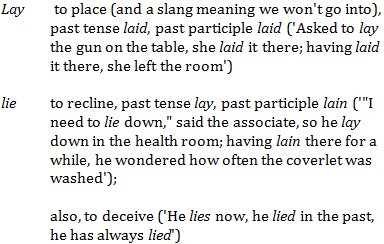
Lay and lie
A confusing pair. From last time:
Lead
As in lead me astray. The past tense (and past participle) is led. Similarly, mislead and misled.
Confusion may arise because these two don’t follow the same pattern as read, which is the same in the past and present tenses: I read the last chapter of the book last night; I always read in bed before I go to sleep.
Plead
American usage to the contrary, the past tense is not pled or plead: it’s pleaded. Always.
Shrink
Honey, you shrank the kids! Now that they have shrunk they will need new clothes in smaller sizes for their shrunken bodies.
And it’s drink, drank, drunk(en); sink, sank, sunk(en); spring, sprang, sprung; stink, stank, stunk (although in colloquial speech one hears stunk as the past tense as well as the past participle; there’s that song about the Grinch).
It isn’t think, thank, thunk, though – except in the jocular Who’d have thunk?
Sneak
The past tense is not snuck but sneaked.
Spit
The past isn’t spit – it’s spat. Same deal if you replace the p with an h.
Up next: comma conundrums
–Neil Guthrie (@guthrieneil)
Posted on November 9th, 2016 - Editor: Neil Guthrie
—
Try a Different Browser
I was asked what the library equivalent was of our help desk’s standard “try turning it off and back on” advice. I’m not sure there’s an equivalent, but “try a different browser” comes close.
A not infrequent problem is that certain sites and databases don’t display properly (or sometimes at all) on a given browser. If you find that a web page or online document isn’t displaying properly and you can’t figure why, try looking at it with a different browser. Some vendors design their databases to work with a specific browser. (In one case, I was assured by a vendor that “all lawyers use Internet Explorer” so there wasn’t a problem.)
And with regards to the “try turning it off and back on” advice, a bonus tip: always make sure you’ve saved everything first.
— Susannah Tredwell
Posted on November 2nd, 2016 - Editor: Susannah Tredwell
—
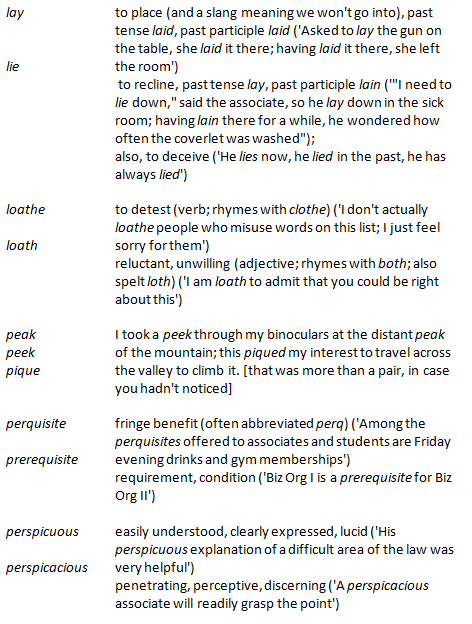
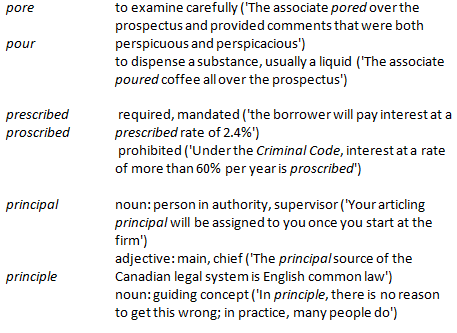
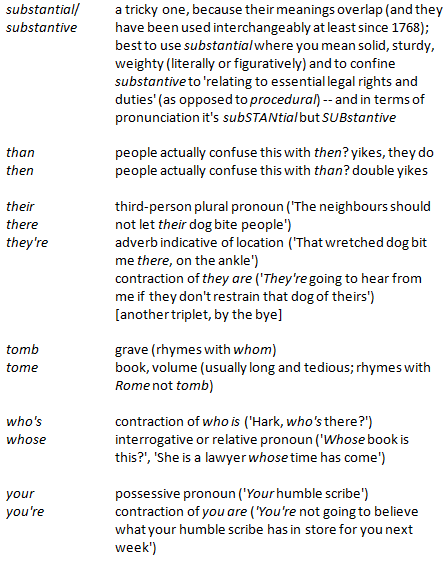
Confusing Pairs, Part 2
More words you may be mixing up.
Next time: problematic pasts.
-Neil Guthrie (@guthrieneil)
Posted on October 26th, 2016 - Editor: Neil Guthrie
—
A Little History of “Noting Up”, or Why Noting Up Is Called “Noting Up” Anyways
Administrator’s note: thanks to Natalie Wing, Law Librarian at Yukon Public Law Library, for this guest tip!
WARNING: this post may contain disturbing content for those with deep anti-marking-up-of-library-book sensitivities.
Back in ye olden days, law clerks and law librarians used to write in the margins of case reporters, literally “noting up” the pages with citations for subsequent appellate decisions. Indeed, it would seem that librarians both sanctioned and participated in the marking up of library books, but of course only for very specific purposes, and conceivably only with the tidiest of (and most tidily placed) writing. Here is an example of an old noted up reporter from the Sir James Dunn Law Library (Halifax, NS), found and shared by reference librarian Nikki Tanner:
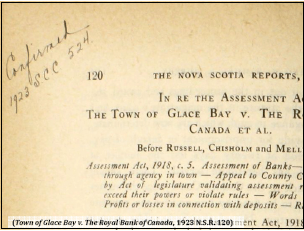
References to the practice of “noting up” can be traced back to at least the 19th century, when The Law Times provided practitioners with “Notes for Noting Up”, and when proposals for legal textbook volumes included plans to bind in blank leaves specifically for noting up so that the textbooks could contain the latest law:
A MEMBER has suggested that the first text-book of the Society should be one which shall comprise the entire Practice of Law [….]
It is further proposed that the volumes should be bound with blank leaves for noting up, and that in any digest of the Society a figure should refer to the page in the text-book in which the case or statute digested ought to be noted, so that the volumes should always keep pace with the existing law until a new edition is rendered necessary by the number of references (Verulam Society, (1844) 3 The Law Times 275).
This post was the result of a question asked of the broader Canadian Association of Law Libraries community. Many thanks in particular to Lynne McNeill, Nikki Tanner, and Katie Albright for knowing such things in the first place, and for sharing their knowledge.
Posted on October 19th, 2016 - Editor: Guest Contributor
—
Confusing Pairs, Part 1
Words you mix up at your peril.
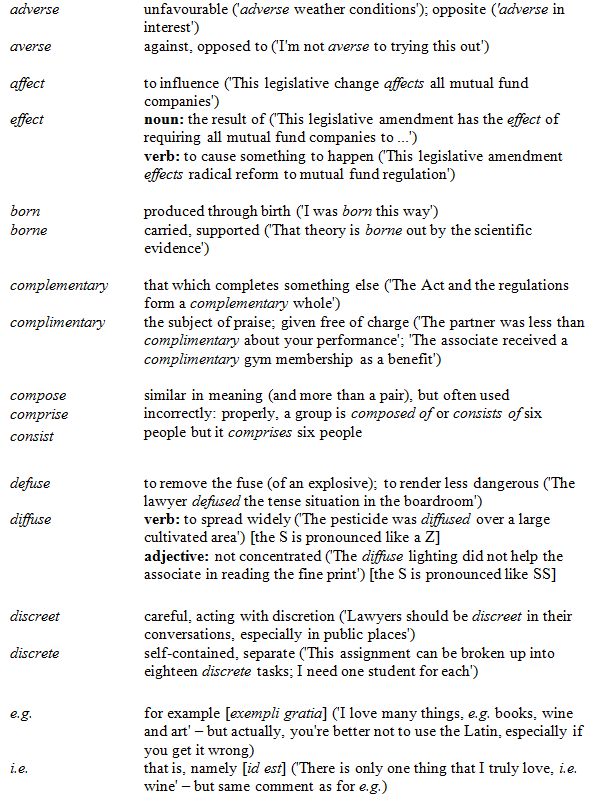
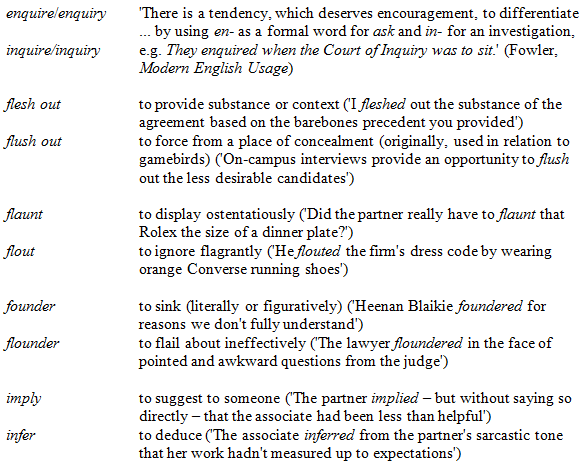
Next week: confusing pairs, part 2
–Neil Guthrie (@guthrieneil)
Posted on October 12th, 2016 - Editor: Neil Guthrie
—
Search Strategy – Cast Your Net Wide
Good keyword searching practice varies from database to database, depending on how the data is structured and how the search engine works. But there are some principles that apply to most situations.
For legal research, whenever you have at least a basic understanding of the legal concepts involved, it is usually best to start out casting your net wide, and refine or expand as you go. The goal, for this strategy, is to create a search that will include ALL relevant documents and as few irrelevant ones as possible.
The following process involves an imagined scenario in which I am searching for case law on drug trafficking and entrapment. But hopefully the process is generic enough that it can apply to a variety of situations.
Step 1: Brainstorm for keywords
Think of (1) all the key facts associated with your legal problem, and (2) any legal concept that may apply. So if I am dealing with a drug trafficking case, the list of keywords might include: undercover, police, bar, drugs, suspicious, ask, request, solicit, cocaine, powder, trafficking, guilty, entrapment, dealing, selling, narcotics, controlled substances.
Step 2: Identify key concepts, group keywords
Group your list of terms into two or more key concepts. There will usually be one or more legal concepts, and one or more concepts that describe a particular factual scenario. Try to think of every possible variant (synonym) for each concept.
For example, if I want to use the entrapment defence on a drug trafficking charge, I might employ one factual concept and two legal ones:
Concept 1: drugs, controlled substances, narcotics, cocaine
Concept 2: trafficking, dealing, selling, pushing
Concept 3: entrapment
Step 3: Create search query
This is the stage where you can look at your keywords more critically, and perhaps eliminate some of them. For example, if the search engine is likely to use terminology drawn from the relevant federal statutes, then you can eliminate synonyms for “trafficking” – as this is the official name of the charge, and is certain to be used in any case on point. By eliminating synonyms, you decrease the likelihood of netting bad hits (e.g. that use a word like “dealing” in an unrelated context).
Separate synonyms using the OR operator and separate concepts (groups of synonymous terms) with the AND operator. Remember to review the search syntax (sometimes under the heading “searching tips”) for whatever database you are using. For example, is the AND operator the word “AND” or an ampersand (&) or the default (no operator). Bearing that in mind, our first search may look something like this:
(drugs OR “controlled substances” OR narcotics) AND trafficking AND entrap!
Step 4: Execute search and analyze results
Regardless of how many or how few hits you get on the first try, it is critical to analyze the results. How many hits are there? If too few, may need to drop a concept, or add some synonyms to existing concepts. If there are too many hits, you may need to add a concept, or drop some synonyms.
How are the results arranged? Relevancy? By date? Or by court level or number of cites? Can you change the order? If you cannot rank by relevancy, then take extra care to keep the number of results manageable, because the best ones might be at the bottom of the list. If you sort rank by date, consider applying a date filter to the initial search (if that is an option).
Look at a few hits – are they relevant? In the best, most relevant, results, check for key terms in the document that you may not have included in the search query. If you see a lot of poor results, check to see how and where your search terms appear in the document. Any terms that are producing poor results should be removed or modified. In some cases, consider adding a “proximity” operator, to search for two terms in the same sentence, or separated by less than a certain number of characters.
Step 5: Reformulate search
No search will net perfect results, no matter how well you refine it. On the other hand, you will rarely get optimal results on the first try. Generally, you can expect somewhere between 3 and 10 iterations to achieve a manageable set of relevant documents. But your research on this database, whatever database it may be, is still not done.
Step 6: Work Laterally
As I said, it is rare that any single keyword search will net 100% of relevant results. So now you need to read your results (the cases), and make note of references to other cases that did not come up in your search results. Then read those, and make note of further authorities. Also, for highly relevant cases, make sure to note them up, track down any citing references, and then look for citing references backward and forward in those (if they are on point), and so on.
I think of mediated searching, using a search engine or classification system, as “vertical” (think drilling down), and searching using cross-references from other relevant documents as horizontal or “lateral.” Some research tasks call for predominantly one strategy or the other, so a good researcher will know when and how to employ either strategies, or the two in combination.
Step 7: Stop
Know when to stop. You are finished your research when you either (1) stop seeing citations to unknown cases commenting on your topic (in other words you’ve seen them all, or very close to it), or (2) see repeated references to a small number of higher court authorities on which you can rely.
[This tip by Ken Fox originally appeared on the Law Society of Saskatchewan Library’s Legal Sourcery Blog]
Posted on October 11th, 2016 - Editor: Law Society of Saskatchewan Library
—
Using a Canned Search to Find Definitions
A frequently asked question is “what does this word mean in a legal context?” In my last SLAW tip, I talked about using legislation to find definitions, in particular interpretation acts. However, legislation cannot define every term used, so if you can’t find your term in the legislation, you may want to check if it has been judicially defined. There are a number of books of words and phrases listing judicial definitions (and truly it is a wonder what has been defined), but, as with legislation, these books cannot be exhaustive.
If you can’t find your term in either legislation or books of words and phrases, you will have to search the case law. I use the following canned search to find definitions:
TERM /3 (define OR mean OR interpret)
For example, if you want to find out if the word “martini” has ever been defined by the courts, use this search on CanLII with the word “martini” substituted for TERM.
Since CANLII automatically expands search terms, you don’t have to use wildcards to find all the variants of your search terms (e.g. mean, means, meaning). However, if you are using this search in one of the paid databases, you will have to add the database’s truncation symbol (e.g. defin! OR mean! OR interpret!).
Thank you to Bronwyn Guiton for suggesting this as a SLAW tip.
Posted on October 5th, 2016 - Editor: Susannah Tredwell
—
Words That Don’t Mean What You Think They Do
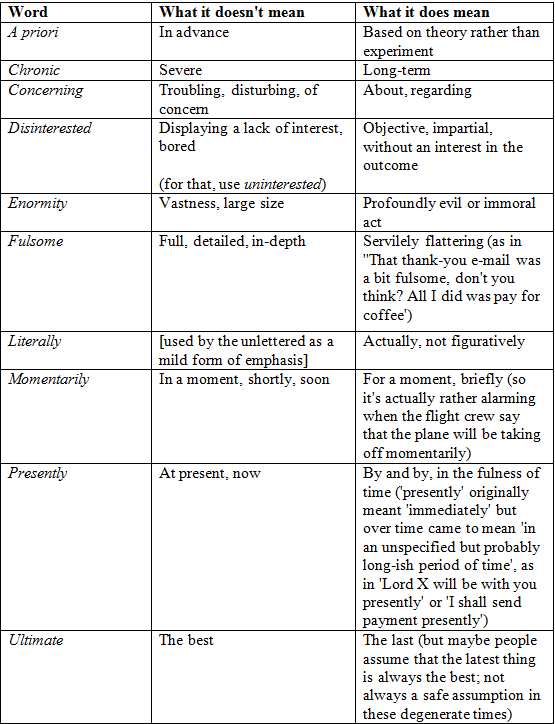
Next: confusing pairs, part 1
–Neil Guthrie (@guthrieneil)
Posted on September 28th, 2016 - Editor: Neil Guthrie
—