All Our Practice Tips
The Law Office Backyard Retreat
 We’re going to try something different next month – the First Annual Wise Law Office Backyard Retreat.
It will be a day-long, out-of-office session to explore planning and teamwork and to ask to ourselves some fundamental questions about what it is that we do as a law office.
There will, of course be food and festivity too, but ultimately, it will be an opportunity for our lawyers and staff to put our collective heads together to do some creative, directed brainstorming.
In the planning stages for this event, I’m having lots of thoughts as to the issues we should be addressing. But the one topic for discussion that keeps coming to my mind is this:
What are our firm’s “service promises” to our clients – and what can we do – collectively and individually – to ensure that we always keep those promises?
A corollary question also comes to mind:
What are our own professional promises to ourselves, and how do we as a firm support and enable our people to actualize those career goals and aspirations?
We are a small firm, and it might seem a bit high-fallutin’ (to some) that we would attempt to address such lofty topics. In an era of change and rapid evolution in our legal marketplace, however, my conclusion is that those who fail to take a hard look at the big questions and the big picture are probably missing out on major opportunities.
There are many excellent resources and consultants on law practice management, strategic planning for lawyers and law firm branding. I very much endorse the involvement of those resources and professionals, and I’ve invited Sandra Bekhor of Bekhor Management (full disclosure – my significant other) to participate and facilitate the opening session of our day. I expect that her added insight and expertise will be helpful in guiding us.
It will be very interesting to see the ideas that emerge from within our group.
Will we conceive of new systems for doing what we do better? Or develop ideas for better implementing technologies into our day-to-day work? Is it time for a new blogging strategy? Will a mission statement be articulated that we can all buy into? Maybe we will figure out how to get better at saving trees and being paperless. Or perhaps we will establish a more rapid method of responding to new client enquiries. Perhaps we can look at the nuts and bolts of the business of law, while also focusing on the quality of our professional lives.
Or perhaps we will just enjoy a (hopefully) sunny day together, sample exotic delicacies, vegetarian and otherwise, and walk away with a better sense of who we are as a firm and who we aspire to be as professionals.
If so, I expect it will be a very good day.
– Garry J. Wise, Toronto (@wiselaw on Twitter)
Posted on May 29th, 2014 - Editor: Garry J. Wise

—
Use an Air Gap for Security
♫ I want security, yeah
Without it I had a great loss, oh now
Security, yeah
And I want it at any cost, oh now…♫
Lyrics and music by: Margaret Wessen, Otis Redding; recorded by Otis Redding.

I have been giving a number of presentations lately that in part, deal with the (in)security of law firm systems. This is based on the findings of the Legal Technology Resource Center of the ABA (“LTRC”) in their 2013 Legal Technology Survey. They reported that 15% of reporting law firms acknowledged that they had a security leak. 43% reported being infected by a virus, spyware or malware. Only 53% of firms reporting having a disaster recovery plan in place (these last stats cause me to picture a Venn diagram showing those firms that were infected, had a security leak and those who had a disaster recovery plan and the degree of overlap…or lack thereof…but I digress…)
Bloomberg reports that China-based hackers target law firms to get secret deal data. Unfortunately the law firms being hacked were Canadian – and Bloomberg states that they rifled one secure computer system after the next – eventually hitting 7 different law firms as well as the Treasury Board and Canada’s Finance Ministry.
Bloomberg further states that in a meeting with 200 law firms in New York City with Mary Galligan, head of the cyber division in the New York City office of the U.S. Federal Bureau of Investigation and her group: “..the FBI issued a warning to the lawyers: Hackers see attorneys as a back door to the valuable data of their corporate clients.”
Obviously this column is far too short to deal with this issue in any depth except to help raise awareness and to leave our gentle readers with one technique to protect sensitive communications and data.
Bruce Schneier is one person that I listen to when he speaks on security. Bruce has been writing about security issues on his blog since 2004, and in his monthly newsletter since 1998. He writes books, articles, and academic papers. Currently, he is the Chief Technology Officer of Co3 Systems, a fellow at Harvard’s Berkman Center, and a board member of EFF.
Bruce said – if you want to evade NSA (and basically any other spying) . OK you say, how is that possible today? Well Bruce recommends having one computer with an air gap. This is a physical isolation of a computer (or network of computers) from the internet. If you want to get really really paranoid – you buy two identical computers, configure one by connecting it to the internet for a little as possible to get it running (and as anonymously as possible), upload those results to a cloud-based anti-virus checker and then transfer the results of that to the air gap computer using a one-way process. Then once you have the computer configured – never, never ever connect it to the internet again. Disable the Wi-Fi so it never gets accidentally turned on. Turn off all auto run features.
Bruce advises transferring files using a writable optical disk (CD or DVD). You can verify the data written to such a disk. Encrypt EVERYTHING moved on and off that computer (and of course have full hard-drive encryption on this air gapped computer).
. He has further suggestions in his blog. You can take things even further. Bruce should know – he is looking at Snowden documents. Bruce wants security at any cost…
-David J. Bilinsky, Vancouver BC.
Posted on May 22nd, 2014 - Editor: David Bilinsky
—
A Little Night Music
♫ I close my eyes, then I drift away
Into the magic night, I softly say
A silent prayer like dreamers do
Then I fall asleep to dream my dreams of you…♫
Lyrics, music and recorded by Roy Orbison.

Well we are heading into the Canadian annual right of spring – the Victoria Day long-weekend.
With images of heading to the cottage, heading to the condo at Whistler or just kicking back and taking a few days to relax, I thought I would share my tip for the best music website that I have found to relax…or work ..to.
www.songza.com is a free website that contains playlists curated by experts. It can stream playlists based on mood, activity, artist, genre of music and time of day. You can get music to clean up, write, relax, party and much much more. You can give a ‘thumbs-up’ on a song or a ‘thumbs down’ (that immediately causes the service to skip to the next song in the playlist). Aside from the fact that it puts a virtually endless amount of music at your fingertips, it plays artists that you may not normally run across. For example, this post is being written to “The World of Roy Orbison” that not only contains many of his best works, it also has songs of those who were contemporaries and influencers of Roy. So it is a musical introduction site as well. At the moment Tom Waits is playing on the Roy Orbison playlist (and if you haven’t been previously introduced to Tom…well, there is no time like the present…)
You can also search by criteria – for example, songs of eras (50s, 60’s etc) or songs used in Apple commercials. You can try out songs from categories that you may not otherwise try – for example, searching ‘Philip Glass’ brings up this playlist (among others):
Cosmic Dreams: A look at the minimalist approach to composing music, with works ranging from modern classical to Japanese new age.
Songza is a gem. It has become one of my most visited websites EVER. I say a silent prayer that it isn’t bought out by someone and then morphed into something else.
In the meantime I can listen to the music, close my eyes and drift away….
-David J. Bilinsky, Vancouver BC
Posted on May 15th, 2014 - Editor: David Bilinsky
—
The WalMartization of Law Begins in Ontario

So, WalMart shoppers can now obtain $99 wills at four in-store kiosk locations in the Greater Toronto Area, with more to come:
Behind the plastic jugs of liquid Tide stacked near the entrance of a new Walmart in Markham is an innovation in discount retailing: Axess Law.
Founded by Toronto lawyers Lena Koke and Mark Morris, Axess Law provides fast and affordable legal services to time-pressed shoppers.
Simple wills are $99. Notarized documents are $25, plus $19 for each additional document.
This should come as no surprise to those of us who have been eyeing the tea leaves for some sense of where the future of the legal profession is headed.
Clearly, there has long been much room for the entrepreneurially-inclined among us to innovate and fill the gaps in the marketplace left by our traditional practise structures – and to do so extremely efficiently.
It may be tempting for some, but ultimately moot, to languish within a false debate as to whether this is about “access to justice” or mere “access to profit.”
Traditional Law may continue to scratch its collective, heavily weighed-down head, wondering how it can be possible that software and innovation can enable the delivery of low-cost, high-quality legal documentation to the public in mere minutes.
But TradLaw will likely do so at its peril, as a new legal order slowly emerges before our eyes.
The future is now – and it has been for quite some time.
Technology has commoditized many tasks traditionally accomplished by lawyers sweating over reams of paper for long, (over)billable hours. We now have a new generation of tech-savvy, business-minded legal professionals among us whose strategic direction is firmly rooted in the future, not the past. Most engage in initiatives that are far less dramatic and press-worthy than the WalMart lawyers, but no less revolutionary.
So today’s Slaw Tip is build now, for tomorrow has already arrived:
- Pay real attention to the innovations we are now seeing, online and in the brick and mortar world. They are harbingers of the obvious future and they represent a new approach to the delivery of legal services that your firms must contend and compete with;
- Identify processes in your firm that can be automated and streamlined and take steps to do so;
- Source out experienced marketing professionals who have familiarity with the legal sector, and work with them to identify the processes and low-hanging fruit that may represent your firm’s next giant opportunity;
- Investigate existing technologies, or consider building your own to permit your firm to do its work better and more cost-effectively. These innovators challenge us to improve. We must rise to that challenge.
Developments like Walmart Law should never be seen as potentially crushing blows. They are intelligent efforts to service a specific, carefully-identified marketplace more directly, more conveniently, more cost-effectively and more efficiently. And more profitably.
Shouldn’t we all be doing that?
– Garry J. Wise, Toronto (@wiselaw on Twitter)
Posted on May 8th, 2014 - Editor: Garry J. Wise
—
Internet Explorer Vulnerability
♫ You may think I’m strong
and I can do no wrong
but I’m vulnerable
so vulnerable…♫
Music and lyrics by Pet Shop Boys.
 Microsoft has reported a vulnerability in all versions of Internet Explorer. While Microsoft has posted security workarounds and US-CERT has recommended that users implement them, they only work for the two most recent versions of IE (10 and 11). Moreover, they are reported to be technically complex.
:
The IE vulnerability is a big deal, said Will Dormann, vulnerability analyst in the CERT Division of the Carnegie Mellon University Software Engineering Institute in Pittsburgh, Pa.
Continuing to use IE may result in What is a user to do? Download and install Firefox or Google Chrome or another browser and stop using IE immediately until a patch is released by Microsoft.
The vulnerabilty allows the ‘bad guys’ to hijack your computers and execute code. reports that “Microsoft is aware of limited, targeted attacks that attempt to exploit [this] vulnerability in Internet Explorer.”
There will be no patch issued for Microsoft XP which is yet another reason to move away from XP to Windows 7.
Posted on May 1st, 2014 - Editor: David Bilinsky
—
OntarioCourtDates.ca Launched

It may not be a giant step for mankind, but it’s at least a baby step toward the technological modernization of Ontario’s archaic court system.
On April 16, 2014, Ontario’s Ministry of the Attorney General announced the launch of OntarioCourtDates.ca, an online service that lists daily dockets for all Ontario Court of Justice and Superior Court of Justice courtrooms throughout the province.
Searching the website by municipality and case name, you can access listings of the next day’s pending cases, court room numbers and scheduled hearing times.
The AG’s press release notes:
- The online daily court lists will be updated each day around 4:30 p.m. with case information for the next 24 hours.
- Cases subject to statutory, common law or court-ordered public access restrictions will not appear on the online court lists. This includes cases about adoptions, child protection cases and criminal cases involving youth. Cases subject to a publication ban will list only the initials of the parties involved, not their full names.
Today’s tip, then, is: Use OntarioCourtDates.ca effectively to enhance your client services and communications.
Make it a point to check online at 4:30 daily to determine your courtrooms for the next day, and reach out to advise your clients by email and/or phone as to the start times and courtrooms they are to report to the following morning.
This little gesture might provide unexpected peace of mind to clients, many of whom may be facing the daunting experience of attending at court for the first time.
What an easy way to strengthen your firm’s relationships with its clients and to provide genuinely better service, all at the same time.
– Garry J. Wise, Toronto (@wiselaw on Twitter)
Posted on April 24th, 2014 - Editor: Garry J. Wise
—
How to Handle Heartbleed
♫ if you could hear my heartbleed
you’d hear me scream set me free
if you could feel my heart bleed..♫
Lyrics, music and recorded by the Peppermint Creeps.

The Heartbleed vulnerability has garnered a lot of press lately. It has (understandably) set many on edge and left wondering if they are vulnerable and if so, what should they be doing about it? Our colleague, friend (and past columnist) Laura Calloway, attorney, past ABA TECHSHOW Chair and Director of Service Programs and Practice Management Assistance Program at the Alabama State Bar wrote this piece on Heartbleed and we have reproduced it here with her permission.
I was out of the office last week when the Heartbleed bug burst into the news so, while I’m a little slow getting information posted about it, things seemed to have resolved themselves and I now feel comfortable providing our members with some information and recommendations about how to deal with it.
What is Heartbleed?
Many websites allow users to log in to complete tasks such as viewing and sending web based email, purchasing goods, viewing bank balances, transferring funds, paying bills, or doing legal research or interacting with client information such as calendar items, to-dos or client documents stored in the cloud. In order to keep your information confidential, the websites encrypt it before it’s transferred over the internet, using what’s called a private key. Many of these interactive websites use an open source program called OpenSSL to handle the encryption, and Heartbleed is a flaw in the program that allows an intruder to find the private key and use it to unencrypt the data being transmitted and read it, including usernames, passwords, the contents of email and financial data.
A real world analogy would be that you hid a key to your house in the potted plant next to the front door, but you left it so exposed that anyone coming up on the porch and looking into the plant could see it, take it, and gain access to your house if they wanted to. And like in this real world example, you’d never know that someone had used the key to come into your house unless you caught them inside.
There is no way to be sure at this point whether someone has or has not intercepted your data transmissions while you interacted with a site that uses the software with the flaw.
Does Heartbleed affect me?
If you use interactive websites that allow you to log on to engage in secure transactions, it’s likely that at least some of those websites used the software with the flaw. In addition, some other devices such as internet routers and telephones that use VoIP (voice over internet protocol) rather than the phone company’s copper wires, may also be affected.
The Alabama State Bar’s site uses an older version of OpenSSL, which did not contain the flaw. Thus, none of our users were affected when logging in to our site.
Major sites that were affected include Google and Gmail, Yahoo and Yahoo Mail, Dropbox, Box, Instagram, Pinterest, Tumblr, Etsy, Flickr, Minecraft, Netflix, SoundCloud and YouTube. It appears that Facebook and Pandora may also have been affected. Although Amazon’s sales website was not affected, Amazon Web Services was, meaning that any website operator who uses this hosting service to provide its website has vulnerable users, too. The major banking sites don’t appear to have been affected, but USAA’s site was. You can find a list of possibly affected sites here. To determine whether other websites that you log into are affected, try the Heartbleed Checkerprovided by LastPass.
What should I do now to protect myself?
Because Heartbleed is not a virus that infects your computer but a flaw in the software used to operate a website that you can interact with over the internet, you will need to change your password for every affected website, but you should first make sure that the operator of the website has fixed the flaw in their version of OpenSSL and also renewed the security keys and issued a new SSL certificate. As long as the website still relies on an unpatched version of OpenSSL for encryption or hasn’t renewed the security certificate after patching, the data you are transmitting remains vulnerable and changing your password won’t help. In fact, doing so will expose the current and new password.
The LastPass checker linked to above should give you both an assessment of whether the site was affected and the date the most recent security certificate was issued. If it doesn’t, IT World writer Melanie Pinola has a good article on when to change your passwords and has also posted a spreadsheet listing all the sites she has checked, the date she checked them and her recommendation of whether it’s time to change passwords.
If you use the Google Chrome browser, there is an extension called Chromebleed which, once installed, will alert you if you navigate to a site that is affected and has not been patched, but this can give you a false negative because it won’t tell you whether the security certificate has been reissued.
-Laura A. Calloway, Director of Service Programs and Practice Management Assistance Program, Alabama State Bar.
What is interesting is that Laura has noted that the New York Times has reported that there is a lack of evidence that the heartbleed vulnerability was exploited prior to its announcement, but that attempts are picking up given all the publicity that it has received. Accordingly it is important to take the steps that Laura has indicated to change your password on sites that may have been affected.
Posted on April 17th, 2014 - Editor: David Bilinsky
—
Migrating From XP to Windows 8.1

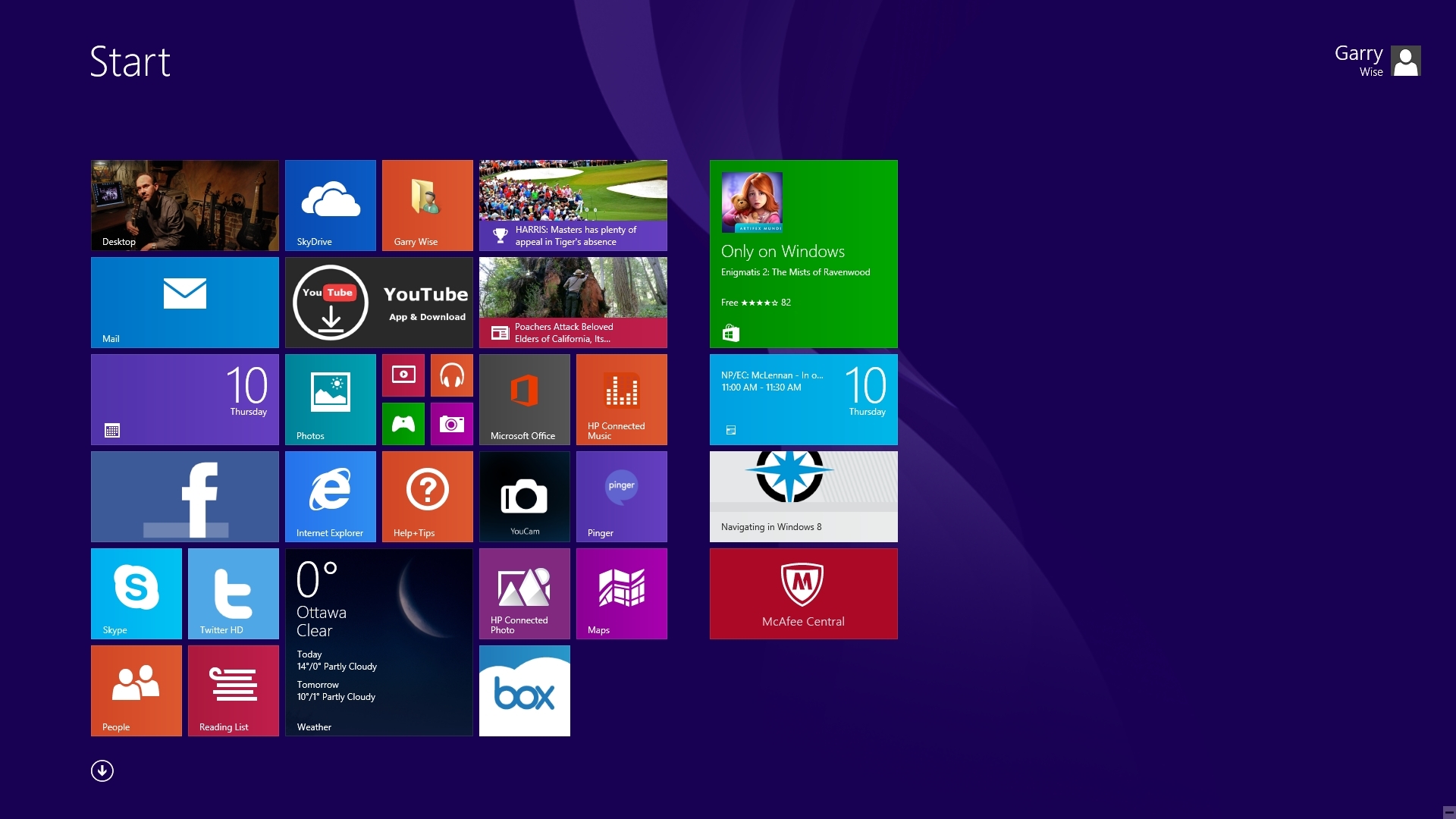
Windows 8.1 Start Screen
Amidst all the hype about this week’s t, I made the jump on the weekend to Windows 8.1 from the first of our remaining, four XP computers.
Overall, it was a pretty seamless and surprisingly anti-climatic event, particularly given my long avoidance of this change, buttressed as it has been by the many mixed reviews of the Windows 8 interface I’ve encountered online.
We have a number of Windows 7 computers in our office, all of which have performed admirably. It certainly would have been my initial preference to replace my remaining home and office XP computers with Windows 7, being the “devil I know.”
However, Windows 7 PC’s are no longer readily available at retail, and thus Windows 8, now upgraded to 8.1, was the obvious, easy alternative.
Windows 8.1 is really two, easily interchangeable interfaces in one.
The desktop interface borrows extensively from all predecessor Windows releases, and will provide familiar and mostly seamless continuity with all you have known before. With a few key exceptions, you won’t likely notice too much difference in the 8.1 desktop environment, whether you’re upgrading from XP, Vista or Windows 7.
The alternative, Start Screen interface attempts to replicate a tablet-like experience on your PC, particularly if you are using a touch screen. Rather than featuring shortcut icons that launch the familiar executable programs, it features clickable squares that open apps and features. Windows 8.1 apps, shortcuts and other destinations on the computer are easily pinned to the Start Screen, allowing you to fully customize your experience.
You will find a number of apps pre-installed, many of which you will eliminate immediately as unnecessary. The Windows store allows you to download from a vast array of existing apps to more fully personalize your selection.
Whether you will prefer to use the Facebook, Twitter, Mail and Calendar apps on 8.1, as opposed to accessing these services via your web browser, may be a matter of personal taste.
The bottom line is that the web browser versions of all these services remain full-featured, while their parallel apps contain streamlined and downsized versions. While it may make sense to use such apps on your smart phone or tablet screens, I have not yet been struck by any advantage to using them on the full-size screen of the Windows 8.1 desktop.
While the Windows 8.1 app ecosphere will undoubtedly grow and become more tempting over time, for now it’s a safe bet that most of my Windows 8.1 experience will be on the familiar desktop, with only infrequent visits to the Start Screen to use the occasional app.
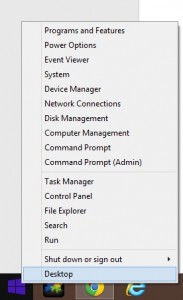
Start Menu
The most common complaints about the original Windows 8 release related to its elimination of the familiar Start button and Start Menu. As a result, simple tasks like restarting your computer and finding your installed software became a chore.
With the new Windows 8.1 update, this problem has been eliminated.
The start button has returned to its familiar, bottom-left corner of the screen. It can be toggled to switch between the desktop and Start Screens. Right-clicking brings up a menu with numerous familiar options allowing you to access your programs, task manager, Control Panel, and shut down functions.
As a result, Windows 8.1 will allow you to do everything you have always done in Windows, with the added bonus of the Start Screen, to be accessed as you may desire.
In all other regards, the updated Windows 8.1 interface is intuitive, sleek, user-friendly, fast and elegant.
As with any new computer initiation, installing software and importing files can be a bit time consuming. This problem was minimized for me by copying everything I needed from my XP to an external hard-drive, including my Downloads Folder (and all the software saved to it), which allowed for surprisingly quick transition and program re-installations.
I was up and running within an hour or two.
With more than 30% of the world’s computers still running XP and support now ended for this venerable old OS, there is likely to be a mass migration over the next few months to Windows 8.1 computers, as we retire our remaining, trusted XP workhorses.
I’m pleased to say that for me, this first transition has been a fairly simple and easy one.
So today’s tip: Windows 8.1 – try it, you’ll like it!
(And I’m still deciding whether I may attempt to salvage my still solid, but now obsolete XP computers by trying Linux – but that’s a whole other post for another day…)
– Garry J. Wise, Toronto (@wiselaw on Twitter)
Posted on April 10th, 2014 - Editor: Garry J. Wise
—
Going Paperless – Techshow Style
♫ There’s a bridge
I don’t know how to cross yet
I need your hand
To hold along the way..♫
Music and lyrics by: Tozer, Faye/lauper, Cyndi/pilsford, Jan/irn, Jasper, recorded by Steps.
 Since I am just recently back from ABA Techshow in Chicago which was held last week, I thought this blog post could be an amalgam of the sessions that touched on going paperless that I saw as well as the management issues that were raised in these sessions.
To start, there are “Three Key Steps to Paperless Success.” These are:
- Everything gets scanned
- You need protocols in place to make sure it gets done
- You (and everyone else) has to make time to do it
If you don’t scan everything, nothing else matters as the systems then start to break down.
There are three Scanning Methods that you can adopt:
- Centralized Scanning: This is suitable for large firms. Here you have one person or a team dedicated to the task, using large capacity scanners
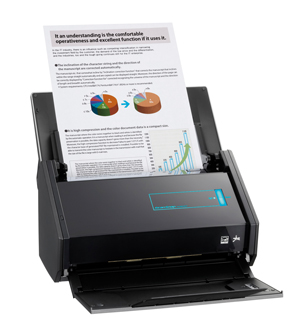
- Distributed Scanning: This is suitable for smaller firms, where everyone scans their own documents. Here you have staff that have multiple roles, including scanning. The King of Scanners for this method of scanning: The Fujitsu ScanSnap.
- Hybrid Scanning: This method is suitable for medium to larger firms. Here work groups scan their own documents, using a variety of scanners. Staff have greater familiarity with the types of documents being scanned as compared to Centralized Scanning.
Regarding the management process behind the decision to go paperless, the suggestions were:
• Create a paperless policy/plan (Hint: it doesn’t have to be on paper)
• Get a Commander in Chief: This person is empowered to make final decisions on the paperless process. This way you don’t end up with inconsistent policies and methods in the office.
• Have a detailed process for converting documents to paperless. Decide if you are going to do it in a centralized way (one big scanner, dedicated staff), a distributed way (paper is distributed to secretaries/staff for individual scanning) or a hybrid method as noted above.
• Develop guidelines for destroying documents. Do you do so immediately after scanning? After 7 days? 30 days? How much of a window do you give yourself just in case the scan didn’t work…
• Evaluate your hardware and software – is it adequate? Going paperless puts an additional strain on networks and resources. Chances are you will need to upgrade equipment and software.
• How much data will you need to store? Do you have sufficient server/storage/backup capacity? What happens when you start adding additional documents to the collection as time goes on?
• When will the paperless records be destroyed? Here the question is, how long do you retain the electronic records?
• Avoid haphazard document naming conventions. You will need a detailed and consistent protocol for naming files and folders if you are not adopting a DMS (document management system) such as NetDocs or Worldox or one of the DMS systems built into practice management systems such as Clio, Amicus Cloud, PCLaw, MyCase etc. Some people adopt document naming conventions even when they use a DMS so that the names of the files are consistent and tell a great deal about the document without opening it.
• You need to nail down the details. Paperless is not undertaken lightly or haphazardly.
• Watch out for unsecured data access due to devices with remote access capabilities such as cell phones being lost or stolen. Can you remotely revoke their ability to access the network?
• You need to ensure that your backups work properly and most importantly, that you can restore from a backup. Accordingly, test backups and restores frequently. Have a remote backup (cloud) as well as a local backup just in case your office is destroyed in a disaster.
• Have a monitoring system in place just in case. Check it frequently.
• Have a record retention plan as part of your backup system.
Once you have the management policies and procedures in place, here is a list of the hardware and software to think about to support your move to paperless:
• Scanners (the Fujitsu ScanSnap received rave reviews from every speaker. I can vouch for that – I have the iX1500 and it is a dream workhorse).
• Servers
• Back up devices/cloud/hardened hard drives (such as the ioSafe line of fireproof, waterproof, immersion proof USB hard drives and network storage devices).
• Multiple Monitors. The last couple of years at Techshow the recommendation was to go to two monitors. Now there are many who have gone to three or more monitors.
• Computers
• Shredders
• Copiers
• Fax machines (or increasingly, electronic fax)
• Printers
• PDF software (Adobe standard or professional, not just the reader) is a cornerstone to the move to a paperless practice. Adobe Standard comes bundled with the iX1500 and you can pay for the upgrade to Professional if you wish. Very cost-effective way of getting a scanner and the Adobe software. Nuance has just announced as an alternative to Adobe PDF software.
• OCR (optically character recognition) is a necessity for all documents coming into the paperless system. Without an OCR version of a document, you can’t search the text behind the scan. OCRing produces a ‘dual layer’ PDF – one layer is the image of the document (like a photograph) and the other layer is the text that is shown in the image. You can read the image layer but a computer can not – it can only search the OCR’d text. and Omnipage are two applications that can OCR a document. The ScanSnap has the ability to scan (both sides at once) and OCR a document all at once.
• Get a DMS (document management system) to go paperless. A DMS will handle email + attachments rather than trying to do so by rolling your own system. Just using a file/folder naming convention tends to break down quickly. A DMS will keep everyone in line!
• Make sure your scanner works with your DMS.
• ScannerPro will turn your iPad into a scanner for $2.99 (for use in a pinch).
Hopefully these management and hardware/software tips will help you cross the bridge to a paperless office…
-David J. Bilinsky, Vancouver, BC.
Posted on April 3rd, 2014 - Editor: David Bilinsky
—
10 Tips for Protecting Your Firm Against Cybercriminals That Target Lawyers
Thanks largely the excellent work being done at Avoid a Claim blog by LawPro, Ontario lawyers’ professional liability insurer, we now receive ongoing updates about cybercrime, and in particular, criminal efforts to target law firms and steal from lawyers’ bank accounts.
A post last week by Tim Lemieux provided a splendid, nuts and bolts roadmap on the steps fraudsters took to steal several hundred thousands of dollars from a law firm trust account. It all began with a phishing email that duped a firm’s unwitting bookkeeper into providing its bank account numbers by telephone directly to the bad guys.
So the cybercrime problem is here and well documented. The question is how do we react and protect ourselves?
Let me offer these tips:
1. Ensure that only one staff member within your firm is authorized to communicate with your firm’s bank. If bank
enquiries are received via anybody else, these enquiries should be directed to the firm’s sole, authorized bank liaison person.
2. The person authorized as your bank liaison person should be instructed to immediately seek guidance from the supervising lawyer prior to responding to any unusual bank-related enquiry.
3. Educate your staff about phishing emails and why they should never be responded to. Inform your staff and associates that enquiries from banks rarely will come from unknown persons or unsigned emails. Bank enquiries are almost never general or generic. They tend to be about specific transactions, and due to privacy legislation and regulation, will virtually never be sent to anyone other than the firm’s authorized bank liaison person.
4. Use your phone’s call display to verify the identity of any unfamiliar caller purporting to be from your bank. Unless the incoming phone number coincides with your bank branch’s phone numbers, take a message, obtain a return number, contact your branch to report the call and verify the caller’s bona fides. Only then, if safe and appropriate, should you call back to address the unfamiliar caller’s enquiry.
5. Do a training session in your firm about the kinds of frauds that law firms now need to worry about and protect themselves against. Talk about examples in the press and on Avoid a Claim . Give your staff and lawyers the information they need to know to protect the firm’s bank accounts.
6. Ask your staff if they have ever received any suspicious calls or emails related to the firm ‘s banking. Be proactive about informing yourself on whether your firm has already possibly been targeted.
7. Instruct your bank to contact your liaison person for confirmation prior to releasing any funds via wire transfer from your account. Put it in writing. Ensure that your instructions are specifically noted on your Bank’s customer and account records.
8. Discuss this concern with your bank. Ask your bank for its advice on best practices to avoid victimization.
9. Ensure that all firm computers have up to date, working anti-virus and anti-malware software, and that such software is set to conduct daily scans to detect keyloggers and other malicious software that could be scooping confidential information from your network.
10. Stay informed. Fraudsters’ tactics will continue to evolve, and yesterday’s scam is unlikely to be tomorrow’s. Regularly read Avoid a Claim for updates on current risks and dangers.
– Garry J. Wise, Toronto (@wiselaw on Twitter)
Posted on March 27th, 2014 - Editor: Garry J. Wise
—







 We’re going to try something different next month – the First Annual Wise Law Office Backyard Retreat.