







All Our Tips
Game – Set – Match Your Tech With Your Evidence

If you have to go to court, you want to make sure that you are being the most effective advocate possible. There are many ways to persuade the trier of fact – but you can shine by bringing a picture (or graphics) which, as they say, are worth a thousand words. So think about how you can make your next case sparkle (and hopefully win the battle) by bringing persuasive technology with you to court, to a mediation or to your next arbitration.
What can you use? Here is a selection of alternatives:
- Use (PC or Mac), Keynote (Mac) or TrialPad (iPad) to display photographs, diagrams or maps.
- Use an Elmo (document camera) to display small objects or to be able to rotate a physical object for all to see.
- Have a DVD or Blu-ray player for video evidence (or laptop with the appropriate optical drive installed).
- Consider having a color printer in court to print out copies if necessary, for note taking or marking up by a witness.
- For dynamic evidence, consider having a touch-sensitive Smartboard….that combines a whiteboard with a computer screen, thereby allowing a witness to draw, note, highlight, rotate and otherwise manipulate images with their finger:
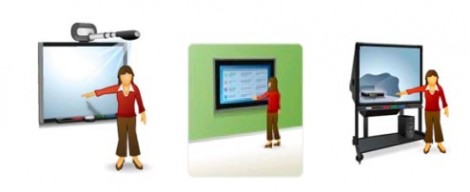 The Smartboard is used in grade school classes to great effect for good reason. Smartboards allow people to manipulate and highlight graphical evidence with their hands by using appropriate ‘pens’. After all, it is one thing to describe an exhibit; better to see it; best yet, allow the witness to manipulate it, highlight it, draw on it, indicate the placement of objects, people or directions on it – in other words, to make the exhibit real to everyone in the court.
As advocates, at the end of the day, we want to say – game, set, match!

Public Consultations as a Key to Legislative Change

I was reminded to look at public consultations by Gilbert Van Nes, General Counsel and Settlement Officer for the Environmental Appeals Board in Alberta some time ago when we both had an opportunity to present at a Legal Education Society of Alberta seminar. Alberta has a public consultations portal on the government website, which is a handy, and probably under used, research space. The portal includes completed consultations as well – highly useful.
The Government of Canada also offers a Consulting with Canadians portal.
Is there a public consultations portal on your provincial government website?
Remember to Use the Powerful Microsoft Office 2012 Clipboard

As we all know too well, the basic Windows clipboard holds only one item. This can be a pain when you have multiple items to copy and paste. Some people resort to installing third-party apps for greater clipboard functionality. However, if you have Office 2010 installed on your computer, remember to use the Office Clipboard. It can hold up to 24 items at a time – amazing!
Unfortunately, you need to dig a bit for the Office clipboard. Click on the Home tab. On the lower left edge of the Ribbon you will see a “Clipboard” in a light grey colour. There is a very small diagonal arrow on the right – click on it to launch the Clipboard Task pane.
Everything you copy to the clipboard will be displayed in this pane – up to 24 items. You can select any item on the list and select Paste or Delete. The “Paste All” button will paste every item in the clipboard.
Remember to use the Office Clipboard – you can use it to be more effective when you are editing documents.
How Much Did That Cost?
In manufacturing, there is a metric known as “Cost of Goods Sold”. When it comes to legal services, the equivalent metric would be the “Cost of Services Rendered” (CoSR).
Do you know what it costs you to render an hour’s worth of legal services?
This metric looks at what you expect an hour’s worth of each lawyer’s legal time to cost your firm, on average. For a solo lawyer, it is straightforward – the total forecast expenses for the firm (including the lawyer’s draws) divided by his or her billable time expectation.
For example, if a lawyer expects that his practice will cost $200,000/year and he expects to bill 1,000 hours that, then their CoSR = 200,000/1,000 = $200/hr.
This provides you with a very important yardstick. If you expect to work two hours on a matter and you do not expect to be able to charge one or two times your cost, $400 for the work, for example, then you should be asking yourself why you are taking on this matter, which doesn’t include profit, and not referring it out to someone else?
This gives rise to a very important threshold question when looking at any new matter: will the expected fees in this file exceed my forecast CoSR?
If your expected fees are less than your CoSR for the file – then you have a decision to make. Either accept the case – knowing it is a loss-leader for you – or refer it out to someone who, hopefully, can handle it in a financially-rewarding way.
Check Your References
Today’s Tip is not about noting up cases and legislation found in the footnotes of a text, encyclopedia or journal article, though from the title, it could be. It is about using social tools to find and use the best sources and products that will help with legal work.
The Attorney At Work blog offers an excellent article today on the top iPhone and iPad Apps for Lawyers. This list is a great example of using references to assist in decision making. The post offers 10 apps and there is a longer downloadable list available with an email registration. I find the daily dispatch from Attorney At Work a welcome item in my morning email inbox.
Just in case you think I am stretching by posting this to the Research Tips, the download includes a full page of apps that are useful for legal research and reference. With prices. For example:
Manual of Patent Examining Procedure (Free) – The U.S. Manual of Patent Examining Procedure for your pocket. This app is packaged for lightning-fast browsing and search queries. Leave the heavy book at home.
The list does weigh toward American sources. If you have some great Canadian sources, I invite you to share with a comment.
Take Your Firm Paperless
We have spoken and consulted with a number of lawyers lately who have called about taking a law firm paperless. Certainly many lawyers become anxious at the thought of giving up on paper and practising in a paper-less world (there will probably never be a situation where we fully abandon paper). Often, that concern is rooted in a fear that somewhere the rules of professional responsibility or other regulations governing the firm require that paper files be kept. There are, of course, specific requirements in every jurisdiction regarding retention, maintenance and destruction of client files (check your specific practice and ethics rules) – but – information is information and the medium that it is stored on is largely irrelevant so long as you can meet the requirements to produce various items from the file. The typical concerns that we hear can be summed up as follows:
- There is no paper trail.
- Computers can go down.
- No backup exists.
- You can be hacked.
- File formats become obsolete.
- Media becomes degraded.
- You can lose an e-document.
- There is no structure to the documents on the system.
- Documents can be sent outside the office easily.
- Changes are required to policies, procedures and work routines.
- There will be increased time costs, including costs of running dual systems.
- There is the possibility of job elimination or reassignment.
- A lack of training could lead to a loss of face in not knowing how to work the new system.
- The firm would face increased costs of transferring a file.
- What about all the transition issues?
- How do we go from here to there?
- What about increased hardware and software costs?
- What do we do with the original documents?
Of course, there are also many benefits of going paperless:
- You can search the entire network –and file – easily and quickly, particularly compared to paper files.
- You can reuse documents easily – and thereby craft a precedent library.
- Document management software imposes greater organization than in a paper-based office where documents can be left in piles on desks, cabinets and floors.
- The cost of electronic storage is MUCH less as compared to paper.
- Paperless offices enable remote access and telecommuting for full and part-time lawyers and staff.
- Paperless offices are greener.
- Paperless systems can integrate and share data – thereby saving time and money.
- The cost of handling files can be faster, cheaper and easier.
- Offices are neater.
- There is an increased ability to meet new client needs (Sharepoint extranet portals for example). Indeed at a recent Corporate Counsel meeting, counsel stated that they preferred electronic war and closing rooms to emailing documents back and forth. You can better control access, distribution and versioning.
- There is usually a decrease in photocopy/printing costs.
- Courts, land title offices and other organizations and tribunals are increasingly accepting paperless filings in many jurisdictions.
- It is harder to forge or alter a properly secured electronic document. Moreover, metadata associated with an e-document records a great deal of information about who created it, when it was modified and by whom etc… which is not typically available with paper documents.
- Your clients’ systems are electronic and they expect you to be able to accept e-discovery electronically.
- Having a paperless office requires the firm to at least consider a file retention and destruction policy that is consistently applied in accordance with The Sedona (Canada or USA) Principles to avoid any suggestion that files were destroyed in order to eliminate evidence.
- The Courts are calling on lawyers to be paperless in court (see Justices Turnball’s and Granger’s posts to this effect at www.slaw.ca).
While there are many valid reasons to go paperless (as well as arguments against it), there is no denying that the world is moving in a paperless direction. Barker, Cobb and Karcher in a 2008 publication entitled “The legal implications of electronic document retention: Changing the rules” stated that 99 per cent of business documents are currently being produced electronically. At this juncture, it is pointless going against the tide; lawyers need to adjust to the new reality and embrace the possibilities, examine the risks and benefits in moving to a paperless world, and create a plan to move in that direction. We are headed for a new horizon.
Think Style
Today’s Tip is less about legal research and more about the output of your research – often a research memo. There are some good general tips about writing and analysis at Catherine Best’s Legal Resarch site, and there are even sample memos like this one from UBC.
Some of the best advice I have heard comes from Wendy-Anne Berkenbosch, Research Partner at Davis LLP. When addressing articling students at the Edmonton Law Libraries Association Head Start Program, she says:
Provide your answer in a comprehensible and useable format:
– Introduction (what the memo is about);
– Brief Conclusion (if the memo is more than a few pages);
– Facts;
– Issues;
– Analysis (with subheadings for each issue);
– Conclusion and Recommendations;
– Sources Consulted.
and
Give yourself time to edit your work. If you read it again in a day or two, you will be better able to identify areas that need work.
10 Incredibly Simple Things You Should Be Doing to Protect Your Privacy
Forbes published a fantastic article on ten simple and essential things that everyone should doing to protect their privacy. The ten steps outlined in the article are really and truly very simple things that all of us can and should be doing to keep casual intruders from invading our privacy. You don’t need to be a techie to do these things. This article is a must read for everyone. Please read it – and follow the steps it recommends. You can find 10 Incredibly Simple Things You Should Be Doing To Protect Your Privacy here.
Is Virtual Practice in Your Future?
A Virtual Law Office has been defined many different ways by many different people. It can certainly be seen as one form of e-lawyering, or using the power of the Internet to deliver legal services. It is a secure method of delivering legal services online that is accessible to the client and the lawyer anywhere they can access the Internet.
Simply put, there are several different ways to create a virtual law office. One is to be entirely web based. Another is to establish a virtual practice as part of a “bricks and mortar” firm, meaning the virtual lawyer utilizes the firm’s infrastructure rather than being totally web based. Typically, regardless of the type of virtual practice, there will be a secure client portal where the lawyer and client conduct their business, including payments for services rendered. Up to the present time, most virtual practices tend to focus on practice areas that tend to involve routine document preparation.
So, why would you want to be virtual as opposed to having a physical office? There are lots of reasons. You can work from home; you can work at your convenience; you can avoid “walk in” clients and diminish client “face time” (particularly if you work for other lawyers and law firms); and you can work around your family’s schedule(s) (which is particularly good for young lawyers who also happen to be parents).
But what about those times when you need assistance? Whether it be a virtual receptionist to answer your phone while you’re “away,” a virtual secretary to help you prepare documents, a virtual paralegal to help you with discovery or another lawyer to collaborate on a difficult case, virtual practice offers many resources to lawyers, particularly solos and small firms.
There are some questions you must ask, though, in deciding whether virtual practice is right for you. As the oracle at Delphi said: Know Thyself. How comfortable are you with technology? In order to successfully go virtual, you will need to keep up to date on technology, on virtual tools and on the every changing methods available for communication with clients. Furthermore, your virtual team needs to be equally comfortable with technology. If one of you is working with a virtual collaboration tool such as SharePoint or Dropbox, you both need to know how to share and safeguard the confidentiality of information using these tools.
Being virtual doesn’t necessarily mean you have to be mobile, but being able to work any time from anywhere will give your virtual practice a huge advantage, so having the right mobile technology and wireless access to the Internet can be a great help. But you must understand how to get connected where ever you are and how to stay connected securely and confidentially. It’s not the easiest thing, but if you can understand the basics, you’ll be well on your way to becoming a virtual lawyer.
Another consideration is whether you are disciplined enough to work without a standard routine or without the typical law office environment. That means people – people. Can you work alone in solitude? Of course, you can. You’ve always dreamed of working away from the office, on your own time, with no distractions. Of course, you say that now. But, what about those cold, snowy or dark and rainy winter days? There’s no one around to talk with about the latest football or basketball games. There are no distractions or interruptions during the day. (Or alternatively the Internet, Facebook and Twitter – become too much of a distraction!)
Developing a virtual practice offers great opportunities for cost reduction and time management, freeing revenue and time for the things that really matter to you. But make sure you’re ready for the virtual freedom from interruptions and the ability to schedule yourself as you wish…before you take the virtual plunge.
Search Terms
Search terms
Search words
Search phrases
Keyword search
All these mean essentially the same thing.
Today’s tip: If you are searching for a phrase, remember to use thesaurus words and alternative phrasing.
For example, you would want to search both of
relief from forfeiture
relief against forfeiture
Thanks to Scott Matheson for the tip.


