







All Our Tips
Add Current Awareness Reminders to Your Calendar

One of the really important aspects of lawyering is to have the right information at the right time for your clients. Sometimes this means watching a resource that has a regular publication schedule like the Canada Gazette Part II (the source of new federal regulations and proclamations). Canada Gazette Part II is published every second Wednesday. My Recurrence dialogue box for a “Check Gazette Part II” Outlook appointment looks like this:
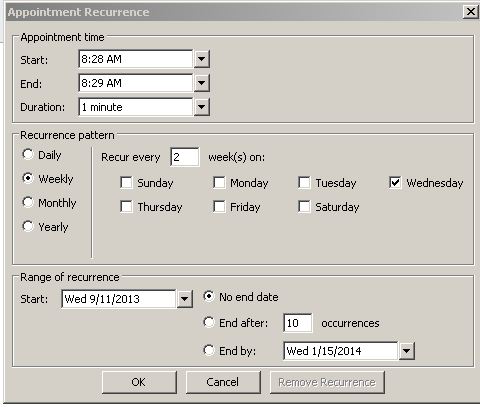
A one minute appointment every two weeks scheduled to not block a time when others may wish to schedule meetings with me. The body of the appointment has a link to the latest issue of Canada Gazette Part II. Happiness is not missing out on potentially important information.
An added benefit is the ability to invite a colleague to your appointment to make it a “meeting” – works great for short term assignments for vacation coverage!

Check Your Credit Report to Combat Identity Theft

All of us should check our credit report on an annual basis. Not only is this a good idea to cheto to make sure there are no mistakes on your credit record, it can also protect you against identity theft. If someone has stolen your identity, the transactions they have completed can tip you off that your identity has been compromised.
You can check your credit report once a year for free.
Get Organized!!

♫ Will remind, will remind, will remind me…♫
Lyrics, music and recorded by Röyksopp.

I admit that I have more than a typical fascination with technology. But this tip is about as low-tech as you can get. I have used this system for all the time that I have been in practice, when practising in firms as well as at the Law Society and I have found that it works exceedingly well.
In the image you can see a dry-eraseable 4 month calendar. By placing this calendar in a prominent location in your office and assigning someone with the task of writing in all closings, court dates, limitation dates and the like that are upcoming over the next 4 months, everyone in your department, firm or practice group can see..visually ..what is coming down the pike.
By the fact that it is a dry-erasable calendar, when one month is gone..swoosh…you erase it and put in the dates and deadlines for the 4th month in the future. (Jan is gone? Write in May’s deadlines). Everyone can see the commitments for everyone else (use different colours for each person) so in the event that someone is away, you can jump in and ensure that nothing falls between the cracks.
Vacations can be planned this way as well, to ensure that you have staff and lawyer coverage at all times.
This kind of visual reminder system is easy to maintain, it is easy to use and it doesn’t cost a lot. Great way to be reminded to complete your tasks!
-David J. Bilinsky, Vancouver, BC.
Think About the Reader
I have had the benefit of working on a writing project with others from my firm recently. One of the key things that I have learned from this is that writers, especially if the work is intended to convince others to act, must put themselves in the shoes of the reader.
The next time you are reviewing a research memo, opinion letter, brief, or argument (or even an email), try to review your work as if you were a member of the intended audience.
This type of review is harder to practice than it sounds. It is especially hard to do when you have just finished the gathering stage of a research project. All of the information that you took in while you were researching makes it difficult to assume the mantle of the fresh eyed reader. It is also difficult to ‘be’ your audience if you don’t ‘know’ your audience.
This is one of those tips where I ask for comments … advice anyone?
Watch for New Ways to View Information
Hat Tip to David Whelan via a tweet that led me to LawAtlas:

LawAtlasSM is a gateway to key laws aimed at improving our health or access to health care. Visitors can use the Interactive Law Maps pages to generate maps and tables highlighting selected features of the law as it exists today or has changed over time.
Though the interactive law maps are only for the USA, the principle of looking a law in a visual way is worthy of a research tip.
Use PC Decrapifier to Remove Unwanted Software From a New or Old PC
Unfortunately, most new computers come preloaded with a tons of junk software you don’t really want or need. These can be trial versions of various programs, including widely used programs, toolbars, utilities, games and other programs you have never heard of (and will probably never use).
And if you have an older computer, odds are there are programs on it that you also don’t want, need or use.
Nice to have a chance to try some of these programs out on a newer computer, but in the long run you just don’t want these extra programs on your machine. Why? Your computer will take longer to boot-up and run more slowly. These programs will bug you with annoying pop-ups, they can use significant amounts of space on your hard drive and they may slow down your access to the internet. You want them off your machine ASAP.
You can manually remove the programs you don’t want, but there is an easier way. PC Decrapifier is an easy to use tool will help you remove all the crap you don’t want on your machine! It also does a great job of helping you disable unnecessary startup items that can slow down your computer when it boots up. A wizard takes you step-by-step through the process, giving you recommendations on what to remove. PC Decrapifier works with all versions of Windows 7, Windows XP and Vista and is free for personal use. A commercial version is very inexpensive.
You will likely see a noticeable performance improvement after running PC Decrapifier on an older computer.
A small word of caution: You need to be a bit careful about what you remove. PC Decrapifier will help you make some of the decisions. A Google search can help you with programs you don’t recognize or are unsure of. If in doubt, don’t delete a program or delete it only after you have created a Restore point so you can easily revert back to a previous configuration.
Download PC Decrapifier here.
Add a Bit of Complexity to Your Life
♫ Hey Jude, don’t make it bad
Take a sad song and make it better
Remember to let her under your skin
Then you’ll begin to make it better…♫
Lyrics and music by Lennon & McCartney.

This column was written shortly after attending a wine tasting session. One of the themes of that session was how adding different types of grapes to a wine increases the complexities and the structure of a wine and, done right, this blending makes the wine more enjoyable and interesting. During that session (I have to admit that part of my mind was still thinking that this column was due) it occurred to me that the same approach could be applied to life. If we take a moment and try different things, our life becomes more complex, enjoyable and interesting (and summer is a great time to try this).
Whether it is a wine-tasting class, visiting and exploring new places or for those so inclined, taking the leap and trying bungee jumping, our lives are far richer and more interesting when we push out our boundaries and try something outside of our comfort zone. Challenges are meant to be met, mountains are meant to be climbed, lakes and streams are meant to be paddled, distances are meant to be spanned and limitations are meant to be conquered. We meet new people, we discover things about ourselves, we develop new confidences and we help others do the same. Sharing new experiences, especially among friends and family, helps deepen bonds and increases our sense of community and furthermore, they work against the feelings of isolation, routine and ‘sameness’ that can occur when practising law.
Let the new experience get under your skin and touch your soul. Let them open your eyes and your emotions, thoughts and feelings and those around you as well. By adding a bit of complexity to our lives we can begin to make them better.
Cheat for Remembering Research Passwords
I don’t know about you, but I have a zillion (only a slight exaggeration) passwords. There have been some great tips on the technology side of this blog and at Slaw.ca for using password generators and technology assisted password management.
Today’s Tip: use the same userid and password formula for both Westlaw and Quicklaw. It is not your banking information [don’t use your banking password for anything else], you aren’t going to change it frequently, and if you do change one, change both. Keep it simple
As a side, I keep a private Outlook contact with my research and social media login and passwords – not the actual passwords but a reminder of the formula I used to create them. The contact is not labeled “passwords”, but it is available on my desktop and my connected to the office mobile devices for those moments when I have a brain blank.
Find Your Lost Android Phone With Android Device Manager
Most of us have lost a phone at some point, even if only temporarily at home (between the couch cushions or in another room). Always frustrating when that happens, especially if you are rushing out the door or have absolutely no clue where your phone is.
Finally (as of just yesterday) Android users now have what iPhone (Find My iPhone) and Blackberry users (Blackberry Protect) have had for years: an app that will help you find your lost phone, and wipe the data remotely if necessary.
If you lost your phone in the couch cushions or in another room in the house, Android Device Manager lets you ring your phone or device at maximum volume, even if it’s been silenced. And in the event that your phone or tablet is out of earshot (say, at the club you were at last night), you can locate it on a map in real time.
Android Device Manager can also help you keep your data from ending up in the wrong hands. If your phone can’t be recovered, or has been stolen, you can quickly and securely erase all of the data on your device.
This service is now available on devices running Android 2.2 or above. Go to www.android.com/devicemanager to get Android Device Manager.
Lawyers’ Summer Renovations

As coincidences go, it’s probably not such a big deal.
It turns out that both my PracticeTips partner, David Bilinsky, and I happen to be immersed in home reno projects of some note this August.
Convergence or not, I enjoy the coast to (almost) coast symmetry.
Now when it comes to home renovations, well, that’s often one of the things summer is for. Relaxing, catching a few rays, and spending every other waking moment addressing a cacophony of questions about materials, labour, colours, patterns, high-ends and low-ends, creative decisions, intra-home negotiations, extras, costings, and the occasional legal document or two, offering a brief respite within which we can happily pretend to have at least a small clue about the mysterious matrix into which we have parachuted ourselves.
Continuing within the theme of symmetry, I can’t help but note the many parallels between working on a home improvement project and a practice-improvement project.
Both start with identifying a space in your world that just isn’t performing or working well enough. You might live with it for a while, but eventually the gap between reality and your wish-list widens and the time for action approaches.
A careful period then follows of needs assessment, research, planning and not a little daydreaming about the better tomorrow that could lie ahead. There are meetings, consultations, proposals, number crunching, false turns and reality checks. But then, at some point, a plan emerges. An actual plan, requiring only one or two key decisions to quickly move from paper to action.
Your plan gets the go-ahead.
And suddenly, change is upon you. It could be a minor upgrade of one key area. Or a full-scale demolition, where the old must go to make way for the new. Or any of the in-betweens. The actual work begins and the predictable order gives way to controlled, intermittent chaos until you ultimately arrive at a new, better order again.
It should be noted that whatever the scale and scope of the change, however, anything less than precision and near-perfection in execution will fall short and must be revisited for touch-ups and fixes before the project end. There is much follow-through – and much follow-up.
And so the cycle goes. You address one concern. You see improvement and enjoy the benefits. But the change-bunnies keep gnawing at you, and before you know it… well, there’s that other project you’ve been thinking about for a while…
There is one key difference, though, between the mindsets we bring to the typical home reno project and our typical professional practice-improvement initiatives.
When it comes to home renovations, most of us lawyer-types know intuitively that we are way out of our leagues and we welcome and actively seek professional assistance. Consultants, designers, general contractors, skilled trades – they are our crutches and our best friends throughout the process (if you find the right ones, that is). We gladly step back and let them do their thing.
With our own practice-development initiatives, well, expert guidance…? Uh, not so much. Strange isn’t it. We probably get more advice when we paint and re-carpet our offices than when we take action to improve our services or leverage our practices’ low-hanging opportunities.
Maybe that’s something worth thinking about. Before implementing changes or new initiatives in our law firms, perhaps we should consider getting an expert or two involved. Whether they be our accountants, human resources professionals, marketing professionals, IT specialists, or even other lawyers, they may really have something to offer.
Building for the future, at home and office. Always a good thing.
And today’s practice tip is therefore a simple one.
If you build it, get expert advice.
– Garry J. Wise, Toronto


