







All Our Tips
Multi-Tasking or Multi-Interrupting?

I’m going to check email for an hour until, “Oh, I have to take that call from the client. We’ve been playing phone tag. Hello?”, while I’m signing a cheque and your cell phone rings from that other client you said you would call back when you got out of the car. Back to email until I forgot to message that person back on my Facebook account about giving a quote.
Ah, the beauty of multi-tasking, says the first-born Aries!
It’s the thing that makes us all feel busy and useful and then we end our day accomplishing, nothing. Or, nothing we wanted to.
That is when I learned started to switch (no pun intended) my brain from a multi-tasking mindset to a multi-interrupting one. Multi-tasking is a myth. It cannot be done successfully if you want to complete anything.
Interruptions are generally detrimental when you are focused on one project and then you’re interrupted by something completed unrelated. You have to shift your focus, your resources and “warm up” to the new topic. It takes much longer than you think and then you have to “warm up” to the original task.
Studies show that it takes an average of 23 minutes and 15 seconds to get back to the original task! Okay, so what if I lose about 23 minutes every time I switch projects?
Unfortunately, the other major draw back is that it causes a significant amount more stress because you tend to work faster to try to compensate for the interruption, which fuels more stress. And then the stress of feeling like you’re not being able to keep up
Sound familiar? All too much for lawyers these days.
Some tips, which I’m trying to incorporate into my day:
1. Set a timer. I set a timer so that it keeps me focused for at least short bursts of time (maybe 20 minutes or one hour, depending on the type of “project”).
2. Do not disturb. Manage your interruptions by setting time aside to let people know that you are not to be interrupted. Stack all you interruptions together so you can deal with them in a block and then focus on some things.
3. Stop self-interruptions. Turn off your internet browser, notifications (audio and pop-ups) so that you can minimize your self-sabotage to productivity.
Did you read this whole post without looking at something else? Good start, if you did.
-Elizabeth Mah

Get Your Pronouns Right

It’s astonishing how many people have trouble with personal pronouns.
Perhaps like Lorelei Lee in Gentlemen Prefer Blondes, they think it’s somehow inelegant to say me – so the heroine of that classic book says ‘A girl like I’. But (between you and me) that’s wrong: it should be ‘A girl like me’, of course.
Others, faced with the awful choice between I and me, opt for what they think is the safer ground of myself. This is less wrong (if that’s possible), but not ideal – and it leads to weird constructions like ‘Mohammed and myself went to the meeting’. Myself is best used reflexively (I asked myself) or for emphasis (I did it myself).
To refresh, I, you, he, she, we and they are subjects; me, you, him, her, us and them are objects.
Example: She did that to me not Her did that to I.
So, how to get it right every time? Five simple rules:
1. After a preposition
After at, between, from, in, of, on etc., the pronoun will always be an object (me, him, her, us, them NOT I, she, him, we, they) [you is easy – it’s both a subject and an object, so you’ll never get that one wrong].
So between you and me, it’s ‘a girl like me’.
2. Take out the extra person
When in doubt, take out the extra person.
If you think it might be ‘She invited Jacques and I to the meeting’, remove Jacques from the picture and you’re left with ‘She invited I to the meeting’, which obviously can’t be right.
3. Add missing words
Is it ‘she is older than him’?
No. What you’re saying is ‘she is older than he is‘, so it’s actually ‘older than he’ (although in colloquial speech, him would be just about acceptable).
4. Subject is always ‘I’ (not ‘me’)
The subject of a sentence can never be me, him, her etc.
People routinely say ‘Mary and her went to the meeting’, but it’s wrong, wrong, wrong. Rule 2 will help you here too (‘her’ didn’t go, did she?).
5. ‘To be’ takes ‘I’ (technically)
If you’re a purist, the verb to be should always take I (subjective completion) not me (object).
This may sound a bit archaic in conversation, however, and your humble scribe won’t wince if you say ‘Hi, it’s me’. On the other hand, ‘It is I’ or ‘This is she’ can have a satisfyingly forbidding effect on cold callers who ask to speak to you by name.
To recapitulate:
- Preposition + me
- Take out the extra person
- Add the extra words
- Subject is always I not me
- To be takes I (except when it sounds fussy)
Technology at Examination for Discovery
I have operated my practice as a paperless one since I opened shop in November 2011. I was not a techie (nor am I). I did not have a background in science or computers other than what I needed to get through university. I much preferred reading things on paper than a screen (there are a few physiological and psychological reasons why many of us do). I printed out all my reference material when I could do so on someone else’s dime.
Organizing digital documents and prepping them for disclosure is straightforward, with commonly-accepted practices. The ISO-standardized portable document format (aka “PDF”) has become the de-facto standard. It has come to replace many of the analog equivalents of the old three-ring binder, but with more powerful tools for searching, reproduction, and ease of reference. Today, many lawyers are comfortable sharing documents as PDFs in the place of printing, binding, and couriering documents around town or across the province.
Despite its lack of security, many counsel email documents. Indeed, despite the security measures put in place by their law firms, many clients usurp those measures by using unsecure email services. Email has become the standard practice except where large volumes are involved, in which case flash drives and DVDs are sent around. I will save the security of email and couriering storage media, which are cultural ones in many respects, for another day.
What we do not have in BC (and I presume the rest of Canada) is an accepted practice for using digital documents in oral discoveries. Many stakeholders are discussing digital evidence in hearings, but I am unaware of similar discussions taking place for discovery practices. It seems, understandably, that those things are left to informal agreements between counsel.
Discoveries are far more common exercises and often more influential to the ultimate outcome of a case than a trial, but it remains that there is no accepted practice of using digital documents at discovery. I have been inconsistent myself – while I always bring my laptop and iPad, I also have, at times, printed and bound documents, especially when I want to mark exhibits put to the opposing party (of course, there is no current means of marking PDFs as exhibits although the technology exists). Of course, using digital documents in the absence of commonly-accepted practices.
The issue recently came to a head in a discovery in a comparatively document-intense wrongful dismissal matter. My client was being examined. I was taking notes on my laptop and, when opposing counsel would ask that a document be put to the witness, I would pull it up and slide my computer to the witness, much the same as I would do with a binder of documents. In one instance, opposing counsel asked to go off the record and began complaining (almost a diatribe, in fact) about how the use of PDFs was impeding his discovery and taking too much time. It became evident that this was highly frustrating to this lawyer, as the complaints evolved into a rather personal criticism of me in my clients’ presence.
Specifically, the issues raised were:
1. It was a waste of discovery time to pull up the documents – I was “trying to be paperless” with no corresponding benefit.
2. He could not see whether there were any annotations on the documents (I had previously advised him that I would be using PDFs and collapsing my annotations so the witness could not see them)
3. I was possibly feeding the witness evidence by pointing to things on the screen (I have a touch screen laptop and was flipping to the page opposing counsel to which counsel wanted to refer to save us all time).
It went on, but I will digress. It will suffice to say that the tone and nature of the comments were such that I doubt this experienced lawyer would have wanted them on the record. Nonetheless, this caused me to be introspective about an issue that I felt had no good solution at present.
Despite the expanding reliance on digital evidence in legal proceedings generally, reporting agencies are not seeing the same increasing use of digital documents at discovery. This might be for a few reasons. Reporting agencies typically follow the courts, given their role in providing services essential to the effective and just adjudication of cases. There is no accepted means of digitally marking exhibits. There is also no existing practice for displaying documents or allowing witnesses to read documents at discovery through digital media – whatever is there might not be suitable for every witness.
In that particular respect and also generally, we have to tackle cultural barriers to using digital evidence. Some people would say this is generational, but I think that the issue is really about reluctance to learn something new. Certainly, many of the leaders in legal technology were not raised in a digital age, but realized that adoption of new technology and adaptation are vital in a service-oriented industry that must conform to their clients’ practices (the ever-knowledgeable David Bilinsky was called to the bar before the PC came about, but that hasn’t slowed him, nor many others, down). Beyond that, the law is likely the fastest evolving profession in terms of substantive knowledge. Medicine, engineering, accounting, business, etc. do not see the same sea-changes occur overnight or the constant evolution of subject matter that the common law does. If we can continuously take on new substantive knowledge, which is not always easy, then why can’t we take on new technical knowledge?
There are many different solutions to these obstacles. I am sure an affective solution requires greater consultation, dialogue, and experimentation, but here is what I think we need to be able to make better use of digital documents at discovery:
1. User-friendly media to display and read digital documents: an iPad or other tablet is likely the most user-friendly media. Standard tablets are a touch too small for this. The 12.9” iPad Pro is conveniently about a half-inch larger in each dimension than a sheet of familiar A4 paper with the Apple “Pencil” allowing users to markup documents. (being half-Scottish, I think I will wait until my nearly-new iPad clunks out before making the upgrade, but we shall see).
2. A means of marking documents as exhibits by the reporter: the Electronic Transactions Act S.B.C. 2001, c. 10, allows this, but there are no reporters in BC doing so. Adobe Acrobat will create stamps equivalent to the ink-stamps we all know. While I am not sure if building a form into a stamp to make informational input faster currently exists as an option, it is certainly within the bounds of technical feasibility. For convenience, one could also hyperlink the reference to the exhibit in the transcript to the exhibit itself.
I have experimented both with my iPad Air and with my laptop as display media for my client, with one device being used for note-taking while the other is exclusively used by the client. There are pros and cons to both. The iPad has a smaller screen, but opposing counsel can (sort of) see where the client is at in the document and that there are not any annotations by counsel. Of course, the inverse is true when a laptop is used. One pro of a laptop is that I can let the client use the screen to read and I can use a Bluetooth mouse to pull up documents and jump to the right page without being on top of the client or passing the device around. This avoids the need for training or familiarization with the display app (e.g. GoodReader or PDF Expert) or how bookmarks work like tabs in a binder.
Of course, these technical solutions are only responsive to technical problems. The cultural obstacles remain.
I welcome any feedback from readers regarding their experience and ideas with digital evidence at discovery: [email protected]
- Michael McCubbin
*I am indebted to Christy Pratt, owner of Reportex Agencies in Vancouver, B.C. for her feedback and insight to supplement my own experience (there is no way that even the most seasoned trial lawyer in BC, which I am not, has as much oral discovery experience as Christy). Reportex is, in my view, one of the most forward thinking agencies (if not, the most) and her willingness to offer her insight is really part and parcel of the progressive culture her firm maintains.
Clarify the Question
Summer students have just started at my firm. One of the things that we emphasize in training is that if they don’t understand what they have been asked to do, they need to go back to the lawyer and clarify the question. While it may be embarrassing to have to go back and ask, it’s far better than discovering that they’ve researched the wrong thing.
This principle doesn’t just apply to students. Library staff get asked questions that need to be clarified or elaborated on. Sometimes the person asking the question knows so much about the area, they assume everyone else does. Sometimes the problem is that the question is phrased too generally, so the resources we come up with aren’t relevant or specific enough. Sometimes the question is being asked by a student based on a question they have been asked by a lawyer, and crucial elements have been lost in translation. And sometimes the reason that we don’t understand the question is because the person who is asking the question doesn’t either. In those situations the process of clarifying the question often ends up answering the original question.
How to Take a Free, Simple, and Great DIY Bio Photo
These days there’s no excuse for a bad social networking photo. A bad photo looks unprofessional and can diminish your chances with prospective clients. A good one can accentuate your personality. Your website bio, LinkedIn bio, and Facebook photo all communicate something about you to the public. Like it or not, we are judged partly by how we look. With a free app, a cell phone with a built-in camera, and some good technique, you can take a great bio photo. Here’s how.
- The App: http://www.photofeeler.com/
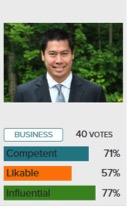
Upload your photo to Photofeeler and other users will give feedback about whether your photo makes you look competent, likeable, and influential. The rating in each category tells you what percentile your photo ranks in, so anything over 50% means you’re better than average. Photofeeler is free to use if you’re willing to rate others – you get credit for each review, and when you have enough credits, you can have your photo rated by 20 to 80 users. If you’d rather just get your ratings in a hurry, then you can pay about $10 (CDN) and buy a block of credits for 40 users to rate your photo.
Experiment with several different photos and use the one with the best rating.
- The Camera
Most cell phones take perfectly acceptable bio photos. You don’t need a high resolution camera because bio photos tend to be very small, often thumbnail-sized. What you do need is good lighting, good posture, and good technique.
Research shows that the background doesn’t affect how you are perceived. So this gives you freedom to get creative with a background. If you’re taking the photo outdoors, do so when the sun is near the horizon, typically in the first hour after sunrise and in the hour before sunset. If indoors, choose a spot opposite a window with a white wall behind you. You want to use natural diffused light, so avoid having the sun shining directly into the room.
Set your cell phone up at the level of your head, put it on a timer, and strike a pose. You’ll want to capture your head and shoulders, and perhaps down to your waist. Capturing your head alone is too intimate, and capturing below the waist is too casual.
- Strike a pose
Squinch. What’s that, you say? Squinching is a technique coined by professional photographer Peter Hurley (click the link to see how it’s done). Photofeeler’s research shows squinching can greatly improve a bio photo. It’s a subtle squint that makes everyone look better. Figure out how to do it in the mirror and suddenly you project more confidence.
Another tried and true technique is to stick out your forehead and angle it downward. This will make your face and jawline look better defined and slimmer.
If your body faces the camera this can look intimidating – it’s the same thing when someone stands with their shoulders squared to you. Try turning your body slightly away from the camera, while keeping your face looking directly into the camera.
Play around with different poses and use Photofeeler to figure out what your best photo is. In no time at all you’ll arrive at a great bio photo.
Ian Hu, Toronto
–Ice, –Ise, –Ize
Verb endings: a small but tricky point.
If you’re from the USA, the practice (noun) of law is practiced (verb) by lawyers. If you’re from the UK, the practice is practised. Here in Canada, we see both verb forms – but preferred usage (by me, anyway) is to go British.
So, is it admitted to practice or admitted to practise? Either is defensible: the first means admitted to the practice of law, the second permitted to engage in practising. Practice is better in this context, on the grounds the noun is what people probably have in mind (although maybe not in the States).
The practice/practise distinction has the advantage of being consistent with another verb that describes what we do: we provide legal advice, but we advise our clients on the law. (Distressingly, advise is cropping up as a noun, perhaps as a result of the vagaries of spellcheck. It’s just plain wrong.)
The Brits often use –ise for other verbs too, as readers of The Economist will know: realise, rationalise, amortise and the like. The advantage of this over –ize is that you don’t have to remember the small number of verbs that always take the –ise ending (including advertise, devise, surprise*).
But practice is divided even in the UK: the Oxford English Dictionary, the Oxford and Cambridge university presses and The Times all prefer –ize.
Whether you adopt –ise or –ize, do at least get the noun-verb distinction right with practice and practise, advice and advise.
Next tip: get your pronouns right
*Although readers of Jane Austen will know that the spelling of some of these words has changed over time: her characters are surprized not surprised.
7 Questions for Any Cloud-Based Player
I’ve been working in and through the “cloud” since before it was called the cloud. First and foremost, I learned how to credibly publish to the web. If we haven’t met – google “legaltypist”…
I set up my service based company, LegalTypist, Inc., to be able to securely work with any attorney who could dial a toll-free number; and I amassed others who were like me to do the day to day tasks and typing of the law firms I set up on “the System” <-original I know, but the more technical name makes people’s eyes glaze over!
I picked the tech of LegalTypist for very specific reasons – including the criteria I have for any cloud based service entrusted with my client’s data/information/files.
Here are the 7 Questions I ask, and you should too:
1. Where are your servers and my data located?
If the answer is not 100% in the US (or the country in which your practice is located), move along.
2. What kind of security measures are in place for my data?
From the physical servers to the connections to your accounts, all access points to your data should be secure. Every time you log in, you should see https (not http) at the beginning of the url. The “s” means that the connection between your device and the website is encrypted and secure. Other things to look for are display of certifications from companies like Thwate and Verisign <-which indicate that the site, and depending on the certification, the company, seriously “get” web-based security.
3. Are the servers geo-redundantly backed up to servers also located in the same country?
What is geo-redundancy? That’s when back up servers are outside the same power grid as the main servers in case of a wide-spread power outage. How could that affect you? Here’s how it adversely affected one cloud based player (who’s top brass had said “yes” to this question over pizza at LTNY months earlier, I might add): See How Far We’ve Come–The Importance of Redundancy in the Cloud
4. Who is on staff to fix the servers should they go down?
If the answer does not start with “We have x number of engineers on staff…” or “those servers are hosted in a remote location; where the only people who can physically access them have biometric permissions in place” … move along.
5. How do I retain local copies of my data?
If a cloud provider does not at least have in place a way to download your contact database into .csv format, that’s a huge warning. Keep in mind that all cloud services are programmed differently – and since cloud means the software too – there is generally no way to manipulate your data outside of that particular service provider’s paid monthly account. However, if you can get your data into .csv, you may be able to figure out a way (or pay someone) to populate it into a different program.
6. Can I work off line?
Is there a way to download a full, local copy of your data that you use until you get back on line and update the cloud data? The answer is probably not. Never hurts to find out for sure.
7. How long have you been in existence?
The longer the better. If you can get with sustained growth over time without huge investment in outside VC, that’s the best possible scenario. The last thing you want is to select a service, take the time to load all your data, then train everyone (including your staff and clients) on how to use it, only to have the company go belly up or not secure another round of funding.
Of course, the above list is not the ONLY things you should ask – however, the answers to these 7 questions should give you a good feel for how seriously the company takes your privacy and the duty of confidentiality you have to your clients.
Andrea Cannavina
Subscribe to Government & Court Press Releases
Press releases are a good source of free current awareness alerts and a legitimate resource for understanding the intent of new legislation. I’m sharing a few of my favourite sources for timely and helpful press releases today. I’m a BC law librarian so I use these three sources often. Please share your own favourite sources for press releases for your area of Canada in the comments!
Supreme Court of Canada – There are two places you can sign up for press releases from the SCC, but if you want the most timely updates, get this one*, not this one. I like these press releases because they give you a 2-4 day heads up on which applications for leave to appeal will be decided each Thursday and which appeals will come out each Friday.
BC Government – If you sign up for press releases for your area of interest and choose to get them “as soon as it’s published”, you’ll be the first to know when a relevant bill is introduced in the BC legislature. Not only is this a great real-time alert for legislative developments, but the press release often links to backgrounders and the full text of the bill. Also, the press release is the first place you’ll learn about the intent of a bill, since it will be available long before Hansard. Because the BC government press releases are so comprehensive and timely, they’re the perfect document to flip to a client when an important bill comes down.
Federal Department of Finance – The central fire hose of federal government press releases is overwhelming and often omits significant niche announcements. I recommend signing up for email delivery of individual Ministry press releases instead, such as for the Department of Finance. The option to receive press releases about new Notices of Ways and Means Motions will keep the tax lawyers among us happy, while the option to receive press releases on new public consultations is important for solicitors advising clients on lobbying opportunities.
—Bronwyn Guiton (@BronwynMaye)
* The SCC press release mailing list I prefer is often difficult to subscribe to from institutional internet connections. Make a note to subscribe at home on your personal internet connection instead
Artificial Malevolence
♫ Love was out to get me
That’s the way it seemed.
Disappointment haunted all my dreams…♫
Music and lyrics by Neil Diamond and recorded by The Monkees.

I have a confession to make. While I love technology, I am not quite sure the feelings are mutual. You see, technology has come to disappoint me so many times that I am questioning its intentions. In fact it causes me concern when thinking of the rise of artificial intelligence. You see, if technology at its current level of development can be so confounding, what lies in store when technology reaches some level of self-awareness? It could be that we would move from our present epoch of relatively benign technology and cross over to the world of self-aware machines, we move into the state of “Artificial Malevolence”.
Now I am aware that I am not the first to think of these things. In fact, being named Dave, the words of Hal in 2001: A Space Odyssey haunt me. Hal was supposed to be ‘foolproof and incapable of error.’ However, when asked to take action that would save Dave’s life, he states, devoid of emotion: “I’m sorry Dave – I can’t do that…”
In fact,Wikipedia states that:
“Siri”, Apple’s natural language voice control system for the iPhone 4S, features a reference to the film: it responds “I’m sorry I can’t do that” when asked to “open the pod bay doors”
Well what happens when you ask your favourite technology to open a file and (since it mostly hasn’t – yet – reached the point of communicating by voice), simply displays text stating: “file not found” or words to that effect. ARGH!! Renting of garments, gnashing of teeth, pulling of hair!
What is a mere mortal to do? Well my standard remedy when dealing with malevolent technology is to have a data backup. In fact, not just one, but rather..three.
If you put all your eggs in one electronic basket there is a consequential rule that you should watch that basket very, very carefully. Accordingly, making copies of your electronic data and ensuring that this data is stored in at least two locations, one on a hardened hard drive (such as the ioSafe line of hard drives that are designed to withstand fire, flood, temperatures, immersion etc. for extended periods of time) and the second being a cloud storage system is not only prudent but well advised. In fact I am now advising that you have a third backup. The third is a cloud-based backup that is not connected 24/7 to your network.
Many firms that the writer has spoken to have been hit with various variants of ransomware malware. These malevolent applications encrypt everything they can find on your network and demands a ransom to be paid – otherwise they disappear taking the decryption algorithm with it…leaving your data …useless.
In once case, fortunately, the firm’s cloud backup – which only backed up on a schedule and was not continually connected to the network – was left untouched by the malware and they were able restore their data without paying the ransom. This is perhaps one of the best arguments for backing your data up into a secure cloud backup that can remain isolated from a malware attack such as the ransomware nasties.
It is important that you have a multiple layer redundant backup system. Don’t depend on a sole backup system…if that backup fails … you are left totally vulnerable. It is important to test your backup system and ensure that it is operating properly so that you can restore your data as needed. I have seen situations where the sole backup system seemed to be functioning fine until the time came when it was needed – and then the realization hit that the backup was corrupted and useless. In one such case what had been backed up to Dropbox was recovered … all other data was lost.
The benefit of having a local hardened hard drive backup is that you can restore your data quickly in the event of a loss. Cloud backups…while wonderful for preserving your data in a safe location…will take considerable time to restore onto your network since you are limited by your download speeds. However, if your system is hit with a system-wide problem, such as ransomwear malware, a flood, fire or other disaster or a failure of your primary backup, you will be thanking your lucky stars for having a complete cloud backup no matter how long it takes to do the restore.
Believe me, I have had to restore data from the cloud after a system-wide failure (did I mention that technology seems to hate me?). A fast Internet connection can never be fast enough when time is money. But ultimately, having a cloud backup made the difference between sheer inconvenience and absolute disaster.
After all when technology is out to get you, you don’t want disappointment to haunt all your dreams.
Go Gender-Neutral
Strive for neutrality, or at least balance.
As Richard Wydick suggests in his excellent Plain English for Lawyers, ‘many readers, both women and men, will be distracted and perhaps offended if you use masculine terms to refer to people who are not necessarily male.’
Wydick also notes that it’s equally distracting to use ‘clumsy efforts to avoid masculine terms’, or to use only feminine terms to redress imbalance (and the latter has a sort of law-school ring to it, which may not be what you’re aiming for). And we can safely leave the androgynous new coinages xe and hir to graduate students in gender studies.
Ways to go gender-neutral:
- use both masculine and feminine: each client will have to consider his or her own circumstances
- omit the pronoun altogether: the client will need to make the decision (or a client) instead of the client will need to make his own decision
- use ‘you’ instead of ‘he’ or ‘she’: as a consumer, you’ll need to make your own choice rather than each consumer must decide for himself
- use ‘it’ instead of ‘he’ or ‘she’ (this may often work, if many of your clients are not natural persons): the banks’ customer will have to decide for itself not the bank’s customer will have to decide for himself or herself
- use the plural: bank customers will have to decide for themselves
- repeat the noun: a client will have to decide whether this is appropriate for that client’s particular circumstances rather than …for her circumstances
- alternate between masculine and feminine: this can look awkward and artificial, however, and you can mess up where a pronoun should actually be gendered, thereby giving someone an accidental sex change
- use the passive voice: not recommended, as it weakens the impact of your writing
- terminology: chair not chairman, representative not spokesman (although fisherfolk sounds silly, and fishers not much better – nor would I recommend referring to the four horsepersons of the Apocalypse)
Ways not to:
- he/she or his/her: ugly (don’t even get me started on (s)he)
- their or themselves: fine if your antecedent is plural (clients will need to assess their needs themselves) but NEVER if it’s singular (a client will need to assess their needs is wrong, wrong, wrong; say its needs or his or her needs)
Next tip: –ice, –ise, –ize


