







All Our Tips
Noun-Fatigue

Nouns can be used in ways that tire the reader. Here are some things to watch for.
Noun chains
Richard Wydick, author of the excellent Plain English for Lawyers (5th ed, 2005), observes that long chains of nouns used as adjectives don’t make for vigorous prose.
As Wydick puts it, ‘noun chains create noun chain reader strangulation problems’. (See GWWT 42 for the contrasting German approach, which is fine with noun-accumulation.)
Writers of headlines in a certain kind of newspaper love noun chains: ZIKA VIRUS HEALTH CRISIS WARNING – NAZI MYSTERY GOLD TRAIN DISCOVERY – DEATH CRASH POLICE OFFICER RELEASE – HOLLYWOOD STARLET DRUG SCANDAL SHOCKER.
So (perhaps oddly) do drafters of legislation and other bureaucrats: a glance at federal regulations beginning with A yields (among other gems) the Animals of the Sub-family Bovinae and their Products Importation Prohibition Regulations and the Alberta Sex Offender Information Registration Regulations.
This is OK in the interests of concision on the front page or in a legislative table, but in other kinds of writing the effect is deadening – or downright confusing. Example: business process outsourcing strategy.
Remove some nouns, insert some verbs, make a sentence not a verbal car-crash.
Noun phrases (aka nominalisations)
Here, noun combines with verb (and some other stuff), in order to make what could usually be a straightforward verb. Another way to describe it is with the awful noun nominalisation (making a noun out of something else, basically).
Examples (with their preferable, simple verb alternatives in parenthesis):
- make a recommendation (recommend)
- provide assistance to (help or assist)
- make a decision (decide)
- provide advice to (advise)
- this is to acknowledge receipt of (we received)
Etc., etc. – you get the drift. The problem with these constructions is that they make your sentences longer, flabbier, less direct. Surely you’d rather be concise, toned and vigorous (in your prose, at the very least)?
Weak verbs from nouns
Another tendency of dull legal prose is to use verbs that are derived from nouns (like nominalise).
Other examples: facilitate, operationalise, utilise. Why not the simpler (and more lively) help, launch and use?
Weak nouns from verbs
Please avoid the temptation to turn verbs into nouns, especially when there are perfectly serviceable nouns already. Examples (with their better, existing nouns): ask (request); spend (expenditure, cost), value-add (benefit, advantage).
Next up: miscellaneous little things that annoy me, part 3

O’Brien’s Internet

If there’s one thing I’ve learned in eight years as a law librarian, it’s that every lawyer loves O’Brien’s Encyclopedia of Forms. And as the purpose of such an encyclopedia is to save you work in creating documents, it follows that you must like O’Brien’s Internet even more, as it provides the entire O’Brien’s collection of first draft legal forms as Word documents.
Do you use O’Brien’s Internet? If not, you probably should. Here are a few pointers in using our province-wide subscription.
First, to access O’Brien’s Internet, you need to get to the Members Section. If you don’t know your username or password, please contact the library immediately to get that straightened out.
The way I see it, there are two ways into our O’Brien’s subscription. You can browse the Table of Contents – it’s the tab at the far left:
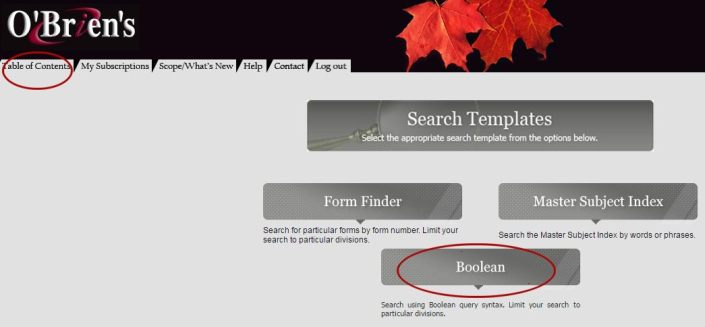
The Table of Contents is easy to use – just keep clicking on the little plus signs beside the most relevant headings, and eventually you’ll find lists of useful documents in the center pane.
Note that each of the main titles has both a TABLE OF CONTENTS and an INDEX – so if you don’t find what you are looking for browsing the contents, you might try looking for key terms in the A-Z indices.
In the screenshot above, you will also see three Search Templates. Our online subscription does not include the Master Subject Index. The Form Finder is useful when you know the number of the form you are looking for (possibly from looking at the print version).
But my preferred way of finding forms in O’Brien’s Internet is to use the “Boolean” search template, where you can find forms using search queries.
First, know your operators – the operators appear in a table just below the Boolean Search box. If you enter two or more terms with no operators between them, the search engine will look only for documents with both (or all) of your terms. You can also use “&” or the word “and.” The word “or” works as the OR operator, which searches for either of two or more synonymous terms, like “agriculture or farming” – but don’t use quote marks in your search unless you want to limit to an exact phrase, like “acceleration on default.” Use the asterisk (*) as your multiple character wildcard – for example, “arbitrat*” (without the quote marks) will call up documents including the words “arbitrate,” “arbitrator,” “arbitration,” etc. There are other operators, but those are the ones that I use most often.
Once you get your search results, you may want to refine your search or do some further browsing. Navigating O’Brien’s Internet is a lot easier if you learn how to use the row of buttons at the top of the central pane –

The first two buttons allow you to edit your search, or return from a document to your search results.
The fifth button from the left, the left-right arrows, allows you to “synchronize” your search results with the Table of Contents – this is very helpful if you find a useful document and want to see what other forms are around it in the encyclopedia’s contents. The “TOC” button beside it simply returns you to the Table of Contents afresh. Third from the right is a button that shows you the “path” to the current document, or the hierarchy of headings in the encyclopedia it falls under. The final two buttons on the right-hand side are for printing and saving, but my preference is to pull up the documents in Word, and use the printing and saving features there.
The Law Society’s subscription to O’Brien’s Internet covers the following divisions of O’Brien’s Encyclopedia:
- Division I – Commercial and General
- Division II – Corporations
- Division III – Leases
- Division V – Wills and Trusts
- Division VII – Labour Relations and Employment
- Division IX – Municipal Corporations
- Division X – Computers and Information Technology
If you are creating legal forms in any of those topic areas, you would do well to make friends with O’Brien’s Internet. For further information or research assistance, contact the library.
[This tip by Ken Fox originally appeared on the Law Society of Saskatchewan Library’s Legal Sourcery Blog]
The Conflict of Laws – What Are the Sources?
Conflict of laws, also known as private international law, is a topic concerning the rules governing what happens when two or more legal systems clash in a private dispute. Pitel & Rafferty’s text on Conflict of Laws identifies three key questions: (1) whether a court has jurisdiction, (2) what law the court will apply, and (3) whether a judgment from another jurisdiction will be enforced. Unlike public international law, conflict of laws is not the same everywhere, but is particular to each jurisdiction.
As such, some people have asked about developing a Saskatchewan-specific resource for conflict of laws. While most of the issues discussed the textbooks are internationally-based, there are some areas, such as estates law and family property law, where inter-provincial jurisdictional issues become critical. So a Saskatchewan-based resource might be a good idea – we’ll look into it!
Nationally, the most often-cited text is Castel & Walker’s Canadian Conflict of Laws. The current (6th) edition is a two-volume looseleaf published by LexisNexis, which is available at our libraries in Regina and Saskatoon. For a more concise text, try the aforementioned Pitel and Rafferty, a volume in Irwin’s Essentials of Canadian Law series, which are available to Saskatchewan lawyers online through the Members Section of our website. Also available through the Members Section, and our shelves, is the Canadian Encyclopedic Digest volume on Conflict of Laws, which is cross-referenced to related case law in the Canadian Abridgment.
Internationally, the library maintains the current edition of the classic Dicey Morris and Collins book on The Conflict of Laws, published by Sweet & Maxwell in London. At a glance, I wasn’t sure how relevant this text is to Canadian legal disputes (unless they involve the British jurisdiction specifically), but it has been cited by Canadian courts over 400 times in CanLii, including in recent decisions by the Saskatchewan Court of Appeal and Supreme Court of Canada, so apparently it still carries some authority.
If you have any questions about the above, or have any recommendations about sources we should acquire or develop, please add your comments below, or otherwise contact us.
[This tip by Ken Fox originally appeared on the Law Society of Saskatchewan Library’s Legal Sourcery Blog]
Helpful (But Unreliable) Software Tools
Oh, Microsoft, Apple and your ilk! You think you’re being helpful when you release new tools and updates, but you generally wreak more havoc than you bring clarity and certainty.
Herewith some views on some various writing ‘solutions’ (to use the lingo of Silicon Valley).
Auto-correct
I am a terrible typist, so in some ways a feature that automatically corrects obvious typos is a blessing.
But also a curse. The auto-correct feature that you get with the standard Microsoft products was not devised by lawyers, nor is it set up to work in a Canadian setting. It can also defy common sense and good English.
Microsoft Word thinks that tortious (relating to a civil wrong) must be tortuous (twisty), dislikes honour, offence and the like, assumes I mean paragraph © not paragraph (c), and insists I want 5th when I actually want 5th (the superscript is incorrect in legal citations, by the bye).
You can reset the language from US English to Canadian (or Caribbean, or Australian, or UK…) English, but that’s a bit fiddly to do – and what dictionaries are they relying on? If the word ‘Oxford’ isn’t in the title, it’s not a proper dictionary, to my mind.
The auto-correct feature that comes with Apple’s version of Microsoft is even more aggressive. And texting is worse: no wonder there is a website dedicated to frustrating (and funny) iPhone auto-correct failures.
Auto-fill
How many times have you sent an e-mail to the wrong person because some other name was automatically pulled out of your contacts or your list of previous recipients?
Often this isn’t really an issue (although your mother may wonder why you’re asking her to join the gang for drinks on Friday night), but if you’re a lawyer it can be very scary indeed.
Many a privileged e-mail has wound up with the wrong party as a result of the auto-fill feature, and that is clearly A Bad Thing.
Spell-check
Same comments as for auto-correct. No, I don’t mean cheese when I type cheque …
In a legal document, you’ll end up with lots of wavy lines under technical terms or regional spellings which Word just doesn’t recognise. And your humble scribe hasn’t managed to figure out how to add a (correct) spelling to spell-check’s dictionary.
Use this feature with caution – it’s never a substitute for printing off a hard copy and doing some proper proofreading.
Microsoft Word Proofing
This is a bit buried. Go to the Review tab in the top toolbar in Microsoft Word, then Review > Language > Language Preferences > Proofing.
You’ll get a menu that allows you to select your auto-correct options (you can turn off the automatic correction of (c) to ©, for example).
You can also run a check of grammatical and stylistic problems or errors, including misused words, run-on sentences, sentence fragments, clichés, colloquialisms, gender-specific language, passive constructions, unclear phrasing and overly long sentences.
Another option is to get readability statistics – and I bet you most lawyers will get high scores for the number of passive constructions (which isn’t good).
A lot of subjectivity there, but at least you can accept or reject the suggested changes. It’s doubtful that the software is attuned to legal terminology, but it may help you avoid some obvious problems.
WordRake
This one isn’t free, but it may also be helpful. WordRake says it ‘tightens, tones, and clarifies your writing’ (like calisthenics for prose?), aiming for both ‘clarity and brevity’. By clicking ‘the “rake” button … the in-line editor ripple[s] through your document, suggesting edits to remove clutter and improve unclear phrasing, just like a live editor.’
Sounds great! In a recent demo with a real lawyer’s document, WordRake picked up a lot of boring, passive constructions and suggested more concise alternatives to verbose phrasing. But it failed to pick up the (ghastly) facilitative and didn’t always handle idioms well. It won’t catch grammar and spelling errors.
Like all the other tools, helpful as far as it goes, but unreliable.
Next time: noun-fatigue
Giving Feedback? Changing One Small Word Can Make All the Difference

Have you ever noticed how irritating it can be when someone points out our errors?
At home we might hear: “You forgot to sweep the floor again.”
At work you may be told: “You missed citing the leading authority on this issue.”
Ugh.
It’s never pleasant to be called out on our mistakes. And if the message triggers a stress response, the hormones released inhibit our ability to reflect and reason for a time.
One key to working effectively in teams, with an assistant, or delegating tasks is to learn to provide feedback in a way that supports the individual’s learning and growth. Mastering how to give feedback effectively is a valuable skill.
William Ury, author of The Power of a Positive No, writes:
“A natural human tendency is to point a finger at the person: ‘The product was delayed because your team took so long to get organized and because you made too many changes.’ Such you-statements, however, naturally make the other feel defensive and reactive.
A more neutral and effective way to get the same information across is to replace you with the. Here’s an example: ‘The product got delayed as a result of the many changes that were made.’ The-statements avoid conflating the person with the behavior. The-statements are a simple yes to the facts. No blame, no judgment, just the straight facts.” (Positive No, p. 105)
This month notice the difference when instead of focusing the feedback on the person, you zero in on the facts.
Here’s an example:
- You-statement: “The negotiation stalled because you took two weeks to respond to the emails and phone messages and then you changed your mind about the outcome you were after.”
- The-statement of facts: “The negotiation stalled because of delays in responses and the change in the desired outcome.”
In a case where a legal assistant has made an error on a document:
- You-statement: “You missed updating the dollar value on this settlement letter.”
- The-statement of facts: “The settlement letter does not have the updated dollar value.”
This small shift from you to the can make a big impact.
This week, watch for opportunities to exchange you with the-statements and notice the impact this has on the effectiveness of your communication.
_____
This post originally appeared in the Lawyer With A Life Blog.
Federal Legislation at a Glance
Today’s SLAW tip is short and sweet. If you’d like to see an overview of the current status of federal bills, the Parliament of Canada website has a handy table: http://www.parl.gc.ca/LegisInfo/LAAG.aspx.
Is Your Law Firm Experiencing Growing Pains?
The growing pains experienced at law firms don’t usually get self-diagnosed as such.
Instead, they tend to be described in terms of the series of symptoms that happen to be manifesting, often at the same time.
Some examples:
- Without a parallel increase in billings, the lawyers, the staff and the law clerks, all appear to be more frenzied than normal.
- Individuals that used to work well together are, not infrequently, encountering ‘broken telephone’.
- A, not insignificant, percentage of work is being done by the wrong level or position.
- Tasks that used to be streamlined are starting to fall through the cracks.
- People are no longer feeling connected to the firm vision.
- Politics are, on occasion, becoming a distraction.
- Motivation is dropping.
It matters that, at the root, these complaints are all signs of growing pains.
A correct diagnosis would provide you with the opportunity to generate insight about appropriate solutions, rather than applying a series of band aids which could actually make things worse.
To illustrate the point, if you’re not viewing growing pains as a systemic issue, you might be concerned about the performance of specific individuals and begin appropriate measures to address that. If, instead, the problem was treated at the root level, with process improvements, structure adjustments and formal job descriptions, everyone would be part of the solution.
A very different approach.
So, for today’s tip, if you start to notice some (or many) of these issues all starting to present themselves at the same time, rather than problem solving one-by-one, give some consideration to what’s really happening.
Are these isolated issues? Or are they growing pains driven by larger systemic problems?
That conversation alone could be the driver of a completely different course of action… with potentially much better results.
—
For reading related to growing pains, see these past articles on Slaw and SlawTips:
Also, see the following articles by Sandra Bekhor at Toronto Marketing Blog:
- Set your people up to succeed – Every last one of them
- Proper delegation builds partnerships – practice management tips
- Dance your way to leadership!
Phrases We Love to Misuse
The proof is in the pudding
This kind of makes sense, perhaps if you grew up in a culture where it is common to put a coin or other prize in a festive dessert (like the English at Christmas or the French on the jour des Rois).
But that isn’t the origin of the phrase. In its full, correct form, it’s the proof of the pudding is in the eating.
In other words, you don’t know what the thing is going to taste like until you actually sample it. Also applied metaphorically to any situation or thing that needs to be tested before you can say it worked.
For all intensive purposes
A friend suggested I include this, but I didn’t think people actually said it – until I heard it recently at a meeting. Cringe.
A malapropism for for all intents and purposes, of course.
This begs the question
Often used by someone who wants to say, ‘This raises another issue …’ – but it’s not quite what the phrase means.
To trot out some Latin (never to be used again), the original expression is petitio principii, a rhetorical term for a statement containing circular reasoning.
That is, a statement that offers, as proof of its truth, another statement that itself requires proof: for example, ‘God is great because He is the Supreme Being.’
Sooner than later
This is now frequently heard (thank you, Drake). While it does make some sense, it lacks the elegance and completeness of thought of the original phrasing: sooner rather than later.
Is confusion with sooner or later at work?
I could care less
We’ve had this one before: see ‘Accentuating the negative‘.
Pedants and other word nerds love to criticise I could care less, when it’s used to express lack of interest in something.
If you think about it, it actually means you do care about whatever it is, because it would be possible to care to a lesser degree. You should say you couldn’t care less if you don’t care at all.
The devil is in the details
Misused if you take the view that it’s a later variant of the original God is in the details.
They both mean the same thing: you cannot fully understand or appreciate something unless you look at the inner workings, the fine print, the subtleties. In the one version, those details will send you to perdition if overlooked; in the other, they are sublime.
Often attributed to the architect Ludwig Mies van der Rohe (1886-1969), but probably older.
Out of pocket
I didn’t realise people misused this until I went to a meeting at an accounting firm (where management-consulting-speak is much in evidence).
The person at the meeting used it to mean ‘unavailable, out of the office, out of the picture, inaccessible’. What it actually means is to have disbursed money from one’s actual or metaphorical pocket: I am out of pocket by about 20 bucks because I paid for everyone’s coffee.
Hell hath no fury
Completed by most with like a woman scorned, but this is a misquotation. The original (from William Congreve’s Mourning Bride (1697)):
Heav’n has no Rage like Love to Hatred turn’d,
Nor Hell a Fury like a Woman scorn’d.
But that brings us to a more important point. The ‘scorned woman’ business is more than a bit sexist, and most of the other phrases in today’s list (with the possible exception of I couldn’t care less) are decidedly shopworn.
You’d be better to avoid hackneyed expressions and tired old proverbs, in favour of wording that is direct and original.
Next week: helpful (but unreliable) software tools
Articling Students and Young Lawyers: Get a Mentor
I was not hired back after articling. After months of searching (soul and otherwise) I was ultimately offered two jobs at the same time. One was located in a trendy area in Toronto for the “young and eligible”. The other was in a small city outside of Toronto, as foreign to me as another country. I had no idea how to choose firms, other than that accepting the Toronto offer would let me stay in my hometown, as, after all, I was young and eligible, and pay me more (at least initially). So I sent a quick thank-you email to the lawyers that I used as references, saying that I was going to choose the Toronto job. Within minutes I received a reply, subject line: “DON’T TAKE THE TORONTO JOB”. And the replies kept coming, advising me to take the other offer.
Ultimately I followed my mentors’ advice, a move which I have been thankful for ever since. It helped launch my career, find a spouse and make a family, and establish a life in a town that I have come to call home. Sure, if I had ignored my mentors, I would probably have ended up just fine. But with the knowledge that I have come to gain in the years since, I know that given the same options I would make the same decision again.
Mentors have valuable knowledge that can help you as an articling student or a young lawyer. They have the benefit of wisdom accumulated over years of trials and tribulations – dealing with difficult clients, managing the ups and downs of practice, navigating a career – and on top of all that, they know you and can give you advice in light of your character. Offering more than just book knowledge, a good mentor may know you better than you know yourself.
Find a mentor in the senior lawyers you work with, in your colleagues, or with formal networks, by joining your local bar association or a section of the Ontario Bar Association. The Law Society of Upper Canada’s Coach and Advisor Network can connect you with a mentor for a specific purpose. The Advocates Society can help you develop skills. And various diversity associations such as the Federation of Asian Canadian Lawyers and the Canadian Association of Black Lawyers can help you network and connect with like-minded lawyers. Also check out practicePRO’s manging a mentoring relationship booklet.
Subscribe to HeinOnline’s Blog!
HeinOnline is a popular full-text journal database available in the Law Society Library’s Members’ Section. Your firm’s library may also have a subscription.
Did you know that HeinOnline has an excellent blog? Here are some recent research tips from their blog:
- Five Things You Can Do in Less Than 15 Seconds in HeinOnline
- Primary Sources, Secondary Sources and Beyond
- Comprehensive Search Results in HeinOnline Just Got Better
- Index to Foreign Legal Periodicals: Did You Know…?
- HeinOnline: Where Books Rule
We encourage you to consider subscribing to HeinOnline’s blog!
[This tip by Alan Kilpatrick originally appeared on the Law Society of Saskatchewan Library’s Legal Sourcery Blog]


