All Our Tips
Real Time Research

Today’s Tip: seeing is believing.
If you have an interest in a particular area of law, for example human rights, you should be aware of what is happening at the Supreme Court of Canada in regards to your topic.
Today, the SCC is hearing a case from the Saskatchewan Court of Appeal called Saskatchewan Human Rights Commission v. William Whatcott. The SCC Case information page (link location) leads to a summary, the docket, the Factums and the live (or archived) webcast.
Webcasts for SCC hearings can be viewed directly in your Internet Explorer browser using the plugin. If you visit the webcast site without the plugin, you will be prompted for an install. Silverlight works with Intel base Mac operating systems

The Google Doodles Archive

Over the years, Google doodles (adaptations of the standard Google logo) on the Google homepage have generated surprise and interest for people visiting the Google site to do a search. Doodles celebrate events, holidays, anniversaries, and the lives of famous people.
The concept of the doodle was born in 1998 when Google founders Larry and Sergey played with the corporate logo to indicate their attendance at the Burning Man festival in the Nevada desert. A stick figure drawing was placed behind the 2nd “o” in the word, Google and the revised logo was intended as a comical message to Google users that the founders were “out of office.” While the first doodle was relatively simple, the idea of decorating the company logo to celebrate notable events generated a fair bit of interest among Google users.
A year later in 2000, Larry and Sergey asked current webmaster Dennis Hwang, an intern at the time, to produce a doodle for Bastille Day. Pleased with the result, Dennis was then appointed Google’s chief doodler and doodles became a regular occurrence on the Google homepage. (Wish I took art back in high school!)
The doodle team has created over 300 doodles for Google.com in the United States and over 700 have been designed internationally. You can see an archive of Google doodles here.
See this page for more history on the Google doodle.
Plan for Success

It has often been said, “Failing to plan is planning to fail.”
At its essence, planning is not only knowing where you want to go but being prepared for obstacles that may be thrown into your path. The Boy Scouts’ motto is: “Be Prepared” and we couldn’t say it any better.
Before your office ever opens, take time to prepare your business plan. Decide how your practice looks on paper. What and where is your target market? How will you reach out to these clients? Most lawyers when they open their new practice assume that they have to take in whatever comes in the door.
Michael Porter’s work at Harvard Business School would indicate that it is better instead to focus on a niche practice – which generally has higher margins and lower number of overall clients.
If you are not (yet) in a position to launch a niche practice, at least decide to grow into one and actively take a few steps every day to take you – bit by bit – towards your goal. Furthermore, by planning to move your practice to a niche practice, you can apply the other skills to assist you in organizing how you approach the business-side of your practice towards a stated objective.
There are many examples of success at planning and having a vision. Perhaps the most timely as this column is being written is that of Steve Jobs and Apple Corp. The New York Times stated:
Mr. Jobs was neither a hardware engineer nor a software programmer, nor did he think of himself as a manager. He considered himself a technology leader, choosing the best people possible, encouraging and prodding them, and making the final call on product design.
I am sure Steve didn’t have the final vision of any product in his mind at the beginning – like most projects, I would assume Steve’s vision was refined over time as they progressed and tried and learned. The New York Times continued:
“Toy Story,” for example, took four years to make while Pixar struggled, yet Mr. Jobs never let up on his colleagues. “‘You need a lot more than vision — you need a stubbornness, tenacity, belief and patience to stay the course,” said Edwin Catmull, a computer scientist and a co-founder of Pixar. “In Steve’s case, he pushes right to the edge, to try to make the next big step forward.”
That combination of vision, leadership and motivating drive is what will keep you moving towards your desired practice niche.
There are, of course, other details to attend to! For example, how will you finance your practice – not only from a start-up perspective but also from an operating cash flow perspective?
You need to do a budget and outline your projected setup and operating costs and income required to not only stay solvent but to meet your own income requirements. Most importantly you need to know how many billable hours you must work every day to generate the cash flow required to keep you afloat. Surveys such as the (now disappeared Lexis-Nexis Law Firm Economic Survey) have noted the average 105 day ‘lag’ between rendering an invoice and receiving payment – this delay in payment can and does cause cash flow difficulties for new and established firms alike. Knowing this lag allows you to plan your cash flow to pay bills that have a 30 day payment window while waiting for payment from your clients.
Planning extends to technology and office systems. Your network and information technology should support not only the production of excellent legal work but also the record-keeping and financial systems in the firm. A good integrated legal and trust accounting system will help you start out right, preferably if it is matched with an experienced bookkeeper – who can not only maintain your financial systems but provide valuable feedback on your financial health.
Lastly when you do get a new client – start out right by planning for success on the file. This means planning for not only a legal success for the client but also a financial success to you for handling the file well. You should outline the expectations that you have for the client in meeting the financial terms for doing the work – and incorporate those expectations in a written retainer agreement (signed by the client) together with an up-front retainer (“Ernest Money”).
Make it clear that continuing the legal work is dependent on the client upholding their financial side of the file. Anticipate how you will (legally and ethically) end the retainer if the client cannot keep up their side of the file and put those terms in your retainer agreement.
Follow the Class
One of the great things about Twitter is that you can follow along with what is happening at a continuing education seminar that you are not attending.
Ted Tjaden and I are presenting, along with other great speakers, for the Legal Education Society of Alberta on .
For today’s tip, I have been tweeting tips, as have others, at #LESAonline
Google’s Amazing New “Search by Image” Functionality
“Search by Image” is an amazing new search functionality that Google now has. And to be clear, this isn’t the same as Google’s image search (i.e., searching for an image using a string of text).
Search by Image lets you find other occurrences of an image on the web, as well as all sorts of other content from the web that’s related to a specific image. For example, search using a picture of your favourite band and you will see search results that might include similar images, webpages about the band, and even sites that included the same pictures.
I used it yesterday to confirm suspicions that a website referenced by an apparent fraudster was for a non-existent firm. A search using images of the lawyers who supposedly worked at the firm showed me that the photos were stock images that actually appeared on other sites on the web.
How to search by image
Search by Image is compatible with Chrome, Firefox 3.0+, Internet Explorer 8+ and Safari 5.0+. There are four ways to search by image:
- Drag and drop: Drag and drop an image from the web or your computer into the search box on images.google.com
- Upload an image: On images.google.com, click the camera icon, then select “Upload an image.” Select the image you want to use to start your search.
- Copy and paste the URL for an image: Use this if you have an image on the web you’re curious about. Right-click the image to copy the URL. On images.google.com, click the camera icon, and “Paste image URL”.
- Right-click an image on the web: To search by image even faster, download the Chrome or Firefox extension. With the extension installed, simply right-click an image on the web to search Google with that image
.
Search by Image is optimized to work well for content that is reasonably well described on the web. For this reason, you’ll likely get more relevant results for famous landmarks or paintings than you will for your personal images.
How it works
Google uses computer vision techniques to match your image to other images in the Google Images index and additional image collections. From those matches, it generates “best guess” text description of your image, as well as finding other images that have the same content as your search image.
The results page
When you search by image, your results will look different than your normal Images or Web results page. The biggest difference is that your results can include non-image results like webpages that seem relevant to the image that you searched for. The elements of your results page will change depending on your search and on the information that’s most relevant to that search.
Remember to try Search by Image next time you want to find more about a picture or painting.
Lead…More So Now Than Ever Before…
Napoleon Bonaparte said: “A leader is a dealer in hope.” Now – more so perhaps than ever before in living memory – with the spectre of dark economic days lying ahead – you need to be a leader of your firm.
Of course, you are the person in charge of your future. But more importantly, your staff and your clients will be looking for you to take the lead and demonstrate that you have planned where you are going. They will be looking to you to be the light that shows them the right path to take in these confusing times.
Your clients will be coming to you for much the same reasons. They are also going through difficult times and they are looking to you for trust, assurance and vision.
Trust in your staff to achieve the goals that you set out for them – but be the one who knows what the game plan is. Bring people into the solution. Set daily, weekly and annual goals for yourself and hold yourself accountable for your actions (or inaction, as the case may be).
Draw people into your vision and keep describing where everyone is headed. Most importantly, hold yourself to a higher standard than you hold anyone else. The staff will recognize this and appreciate it.
Take a few moments of time and read some great inspirational books that deal with professionalism and leadership, such as David Maister’s True Professionalism:
The problem, clearly, is not in figuring out what to do. Rather, the problem is to find the strength and courage to do what we know to be right.
Leadership is a learned art – read, watch others and learn from their example. Mostly though, set an example – this is needed more so now than ever before.
Leveraging Google Advanced Search
Editor’s note: This tip was provided by Ted Tjaden, National Director, Knowledge Management at McMillan, Slaw contributor, and . Thanks Ted!
Although many law librarians “complain” of the tendency for law students to go straight online before thinking about the issues and consulting print and online secondary resources, I remain surprised by the number of smart law students who when they go online have never used
Google Advanced Search has a number of advantages over a simple Google search:
- Search within a a site or domain: limit your search to a particular domain or URL (e.g., “un.org”)
- Show 100 results per page
- Where your keywords show up: easily limit your keywords to the “title” of a document (providing a much more focused search)
- File type: limit your results to a particular document format (e.g., PDF or Word)
- Date or region restrictions
The screenshot below shows a Google Advanced search limited to the United Nations website where the words “canada” and “treaty” appear in the title of the document showing 100 results per page.
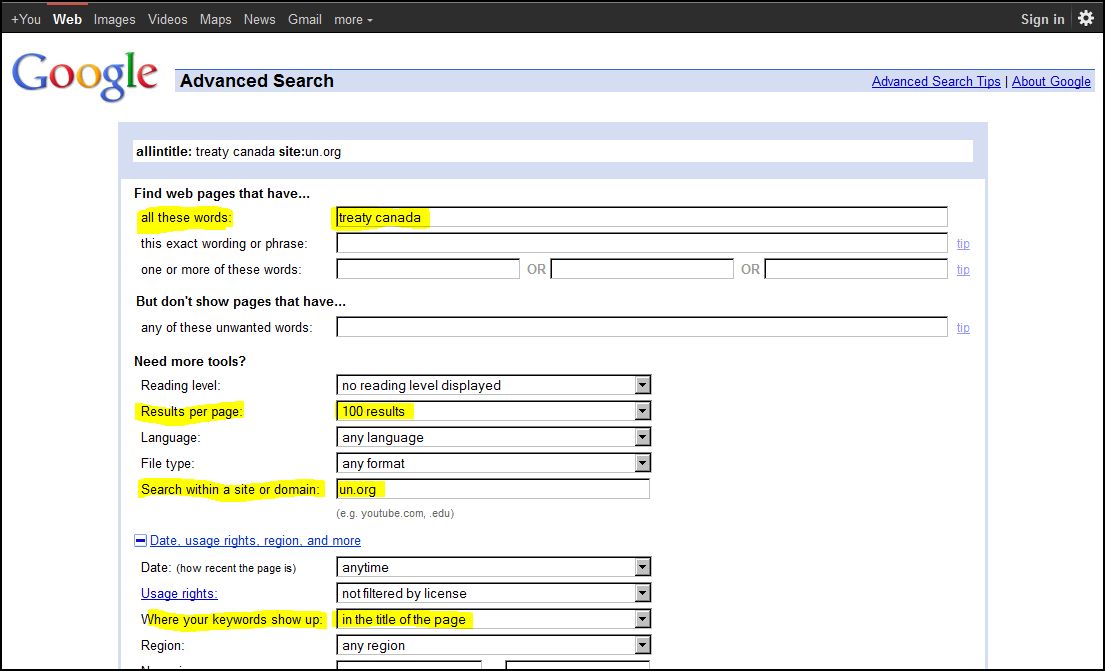
Click on image to enlarge
Running a search on the United Nations website on “canada” and “treaty” gets results, but different results. In many situations, I find it easier to review and navigate the Google Advanced Search results compared to the actual site’s internal search engine results.
Realize, however, that some websites make block Google from crawling their entire website.
Send a Text Message to a Mobile Phone via Email
There are times when a text message gets better attention than an email. And then there are times when you’re not able to text from you phone — for example because you’re at your desk and your phone is… elsewhere. In such cases, you can use your email program to fashion the 160-character message and ship it off to your recipient’s phone.
You only have to know which service your recipient uses (because each service has its own text-as-email address), which is likely to be the case if you’re sending the message to a friend or an office-mate who has a company phone.
In Canada the details are these:
Rogers Wireless: [10-digit phone number]@pcs.rogers.com
Fido: [10-digit phone number]@fido.ca
Telus: [10-digit phone number]@msg.telus.com
Bell Mobility: [10-digit phone number]@txt.bell.ca
Kudo Mobile: [10-digit phone number]@msg.koodomobile.com
MTS: [10-digit phone number]@text.mtsmobility.com
President’s Choice: [10-digit phone number]@txt.bell.ca
Sasktel: [10-digit phone number]@sms.sasktel.com
Solo: [10-digit phone number]@txt.bell.ca
Virgin: [10-digit phone number]@vmobile.ca
And in the US this is what you need to know:
AT&T: [10-digit phone number]@txt.att.net
Qwest: [10-digit phone number]@qwestmp.com
T-Mobile: [10-digit phone number]@tmomail.net
Verizon: [10-digit phone number]@vtext.com
Sprint: [10-digit phone number]@messaging.sprintpcs.com or [10-digit phone number]@pm.sprint.com
Virgin Mobile: [10-digit phone number]@vmobl.com
Nextel: [10-digit phone number]@messaging.nextel.com
Alltel: [10-digit phone number]@message.alltel.com
Metro PCS: [10-digit phone number]@mymetropcs.com
Powertel: [10-digit phone number]@ptel.com
Suncom: [10-digit phone number]@tms.suncom.com
U.S. Cellular: [10-digit phone number]@email.uscc.net
Cingular: [10-digit phone number]@cingularme.com
Remember that you’re limited to 160 characters, so don’t clutter things up with your signature or disclaimer.
Guard Your Castle to Keep Client Confidences Safe
As more and more law firms have moved to mobile computing via laptops, tablets and smartphones, there has been a tendency to forget about security for the computer infrastructure, usually back at the office, which supports all this mobile access to information.
But as this tip is being written, there has been a rash of thefts of servers from law offices in Portland, Oregon. The thieves seem to be looking for information, and may possibly know where to find what they’re looking for, since the only thing taken in the robberies is the servers – not the desktop computers used by the staff.
As a part of your obligation to keep client information confidential, take a careful look at the set-up of your computer network. Make sure that servers are kept in a locked room, that the location of this room is not obvious to clients or causal visitors, and that keys to the server room are locked away in another office rather than left in the door or in a drawer nearby.
Make sure that the server has a strong password and, if it is reasonably new, you might also consider encrypting all your data, however, this will reduce the speed with which documents open and can be saved.
While you are not ethically required to protect confidential information against any and every potential attempt to steal it, the more physical barriers you can erect between a thief and your servers, the better off you and your clients will be.
You don’t need to make it completely impossible for someone to steal a server, you just need to keep them busy long enough for the police to arrive.
Search in Google Plus
Google+ is now open to anyone so I thought it would be appropriate to share a tip for legal research on this social media tool.
First – a caution: the only thing that Google+ will tell you about a topic is who cares about it. Sometimes that is important to identify when looking at a legal research issue.
How do you search Google+? This is one of the new features announced yesterday
Search in Google+
You’ve been asking for it, and we’ve been busy building it, so today we’re bringing Google’s search expertise to Google+. Just type what you’re looking for into the Google+ search box, and we’ll return relevant people and posts, as well as popular content from around the web.
Join Google+ to get access to the search box. There is always a catch 🙂